
For gamers seeking a 1440p gaming monitor capable of high frame rates, the options can be overwhelming. The ASUS ROG XG27AQNGV stands out as the best overall choice, offering a perfect blend of high refresh rate and fast response times. The LG 27GR83Q-B is a strong contender for those prioritizing color accuracy and premium features, while the ASUS TUF Gaming VG27AQ3A provides an excellent balance between performance and affordability. The main tradeoffs in this category involve balancing refresh rate, response time, panel quality, and additional features like G-SYNC or FreeSync. Continue reading for a detailed breakdown of the top models to help you make an informed decision.

Get VR and gaming gear delivered free — and shop member deals
- Fast, free delivery on millions of items
- Access to Prime Big Deal Days deals on October 6–7
- Prime Video, Amazon Music and more included
Key Takeaways
- High refresh rates (240Hz-360Hz) remain essential for maximizing high FPS gaming performance at 1440p.
- G-SYNC and FreeSync compatibility are key for smooth gameplay, but choosing between them depends on your GPU brand.
- Panel technology (IPS vs. TN) impacts color accuracy and response times; IPS panels dominate for vibrant visuals but can have slightly higher latency.
- Extra features like HDMI 2.1, VESA HDR, and adjustable stands add value but often increase price.
- Price varies widely; balancing budget with desired performance features is critical for optimal value.
| ASUS ROG XG27AQNGV 27-Inch 1440p 360Hz G-SYNC Pulsar Gaming Monitor |  | Best Overall for High-FPS 1440p Gaming | Size: 27 inches | Resolution: 2560 x 1440 | Refresh Rate: 360Hz | VIEW ON AMAZON | See Our Full Breakdown |
| LG 27GR83Q-B 27-Inch Ultragear QHD Gaming Monitor |  | Best for Versatile High-FPS Gaming with HDR | Size: 27 inches | Resolution: 2560 x 1440 | Refresh Rate: 240Hz | VIEW ON AMAZON | See Our Full Breakdown |
| ASUS TUF Gaming VG27AQ3A 27-Inch QHD 1440p 180Hz G-SYNC Gaming Monitor |  | Best for Vibrant Colors and Moderate High FPS | Size: 27 inches | Resolution: 2560 x 1440 | Refresh Rate: 180Hz | VIEW ON AMAZON | See Our Full Breakdown |
| LG 27G640A-B 27-inch Ultragear QHD IPS Gaming Monitor, 300Hz, 1ms, NVIDIA G-Sync, AMD FreeSync Premium, VESA DisplayHDR 400, HDMI 2.1, USB Type-C, Adjustable Stand |  | Best for Ultra-High Refresh and Versatile Connectivity | Size: 27 inches | Resolution: 2560 x 1440 | Refresh Rate: 300Hz | VIEW ON AMAZON | See Our Full Breakdown |
| Acer Nitro 27-inch QHD IPS Gaming Monitor KG271U X2bmiipx |  | Best for Fast Response and Color Accuracy at a Moderate Price | Size: 27 inches | Resolution: 2560 x 1440 | Refresh Rate: 210Hz | VIEW ON AMAZON | See Our Full Breakdown |
| KTC 27 Inch Curved Gaming Monitor, 1440P QHD, 144Hz, HDR 400 |  | Best for Immersive Gaming and Color Accuracy | Size: 27 inches | Resolution: 2560×1440 (QHD) | Refresh Rate: 144Hz | VIEW ON AMAZON | See Our Full Breakdown |
| Samsung 27″ Odyssey G5 (G51F) Series QHD Gaming Monitor |  | Best for Responsive Gameplay with HDR Support | Screen Size: 27 inches | Resolution: QHD (2560 x 1440) | Refresh Rate: 180Hz | VIEW ON AMAZON | See Our Full Breakdown |
| Acer Nitro 27-inch QHD IPS Gaming Monitor XV272U | 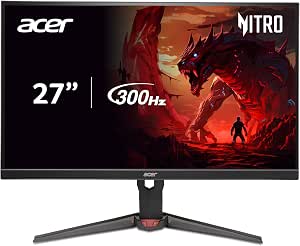 | Best for Color Accuracy and Fast Response | Size: 27 inches | Resolution: 2560×1440 (QHD) | Refresh Rate: 300Hz | VIEW ON AMAZON | See Our Full Breakdown |
| 27 Inch Curved Gaming Monitor with 280Hz Refresh Rate and WQHD Resolution |  | Best for Esports and FPS with High Refresh Rate | Size: 27 inches | Resolution: WQHD 2560×1440 | Refresh Rate: 280Hz | VIEW ON AMAZON | See Our Full Breakdown |
| LG 27GR83Q-B 27-inch Ultragear QHD Gaming Monitor, 240Hz, 1ms, HDR400, G-Sync, FreeSync Premium, HDMI 2.1, DisplayPort, Tilt/Height/Pivot Stand |  | Best for Versatile High-Performance Gaming | Size: 27 inches | Resolution: 2560×1440 (QHD) | Refresh Rate: 240Hz | VIEW ON AMAZON | See Our Full Breakdown |
| AOC 27-Inch Gaming Monitor QHD 240Hz IPS G-SYNC |  | Best Overall for Competitive High-FPS Gaming | Display Size: 27 inches | Resolution: 2560×1440 (QHD) | Refresh Rate: 240Hz | VIEW ON AMAZON | See Our Full Breakdown |
| ASUS TUF Gaming VG27AQL5A 27-Inch QHD 1440p 210Hz G-SYNC Gaming Monitor |  | Best Value for High-FPS Gaming with Ergonomics | Display Size: 27 inches | Resolution: 2560 x 1440 (QHD) | Refresh Rate: 210Hz (OC) | VIEW ON AMAZON | See Our Full Breakdown |
| ASUS TUF Gaming VG27AQM5A 27-Inch 1440p 300Hz G-SYNC Gaming Monitor |  | Best for High-Performance Gaming and Content Creation | Display Size: 27 inches | Resolution: 2560×1440 (QHD) | Refresh Rate: 300Hz | VIEW ON AMAZON | See Our Full Breakdown |
| Hikers 27 Inch Curved Gaming Monitor 280Hz 240Hz 1ms 2K |  | Best for Immersive, Fast-Paced Esports Gaming | Size: 27 inches | Resolution: 2560×1440 (WQHD) | Refresh Rate: 280Hz | VIEW ON AMAZON | See Our Full Breakdown |
| 1440p gaming monitor for high fp | Resolution | Refresh Rate | Response Time | Size |
|---|---|---|---|---|
| ASUS ROG XG27AQNGV 27-Inch 144 | 2560 x 1440 | 360Hz | 1ms | 27 inches |
| LG 27GR83Q-B 27-Inch Ultragear | 2560 x 1440 | 240Hz | 1ms | 27 inches |
| ASUS TUF Gaming VG27AQ3A 27-In | 2560 x 1440 | 180Hz | 1ms | 27 inches |
| LG 27G640A-B 27-inch Ultragear | 2560 x 1440 | 300Hz | 1ms | 27 inches |
| Acer Nitro 27-inch QHD IPS Gam | 2560 x 1440 | 210Hz | 0.5ms GTG | 27 inches |
| KTC 27 Inch Curved Gaming Moni | 2560×1440 (QHD) | 144Hz | — | 27 inches |
| Samsung 27" Odyssey G5 | QHD (2560 x 1440) | 180Hz | 1ms | — |
| Acer Nitro 27-inch QHD IPS Gam | 2560×1440 (QHD) | 300Hz | 0.5ms | 27 inches |
| 27 Inch Curved Gaming Monitor | WQHD 2560×1440 | 280Hz | 1ms MPRT | 27 inches |
| LG 27GR83Q-B 27-inch Ultragear | 2560×1440 (QHD) | 240Hz | 1ms | 27 inches |
| AOC 27-Inch Gaming Monitor QHD | 2560×1440 (QHD) | 240Hz | 0.3ms MPRT | — |
| ASUS TUF Gaming VG27AQL5A 27-I | 2560 x 1440 (QHD) | 210Hz (OC) | 0.3ms (GTG) | — |
| ASUS TUF Gaming VG27AQM5A 27-I | 2560×1440 (QHD) | 300Hz | 0.3ms (GTG) | — |
| Hikers 27 Inch Curved Gaming M | 2560×1440 (WQHD) | 280Hz | 1ms | 27 inches |
More Details on Our Top Picks
ASUS ROG XG27AQNGV 27-Inch 1440p 360Hz G-SYNC Pulsar Gaming Monitor
This monitor stands out for its combination of an ultra-high 360Hz refresh rate and a 1ms response time, making it ideal for competitive gamers seeking maximum smoothness. Its G-SYNC Pulsar technology further enhances motion clarity, especially compared to the LG 27GR83Q-B, which offers a slightly lower 240Hz. The inclusion of ambient lighting reduces eye strain during long sessions. However, the premium price and complex setup might deter casual users. This pick is best for serious gamers who prioritize the highest frame rates and smoothest gameplay, willing to invest in advanced features.
Pros:- Exceptional 360Hz refresh rate ensures ultra-smooth gameplay
- 1ms response time minimizes ghosting and motion blur
- G-SYNC Pulsar technology boosts motion clarity
Cons:- High price point may be prohibitive for some users
- Complex features require time to set up and optimize
Best for: High-level competitive gamers who want the absolute fastest refresh rates and advanced synchronization tech
Not ideal for: Casual players or those on a tight budget, as its premium cost and complex features may be overkill
- Size:27 inches
- Resolution:2560 x 1440
- Refresh Rate:360Hz
- Response Time:1ms
- Technology:IPS, G-SYNC Pulsar, ELMB SYNC
- HDR:Yes
Our verdict“This monitor is perfect for competitive gamers demanding the highest frame rates and smoothest visuals without concern for price.”
LG 27GR83Q-B 27-Inch Ultragear QHD Gaming Monitor
This 27-inch LG UltraGear model offers a solid 240Hz refresh rate with a 1ms response time, serving as a versatile option for gamers who also care about visual quality. Its support for DisplayHDR 400 and DCI-P3 95% color coverage makes it a step above basic models like the Acer Nitro KG271U in terms of color richness, but it falls short of the 360Hz benchmark set by the ASUS XG27AQNGV. The adjustable stand adds ergonomic flexibility, though it lacks built-in speakers. This monitor suits gamers seeking high refresh rates combined with good color fidelity and HDR support, but it isn’t the best choice for those prioritizing ultra-high frame rates.
Pros:- Supports both NVIDIA G-SYNC and AMD FreeSync for tear-free gaming
- VESA DisplayHDR 400 enhances visual depth and color
- Adjustable stand improves ergonomic comfort
Cons:- Lacks the ultra-high 360Hz refresh rate for competitive gaming
- No built-in speakers or extensive connectivity details provided
Best for: Gamers who want a balanced mix of high FPS and vibrant visuals, especially for immersive gaming and multimedia
Not ideal for: Players who need the absolute highest refresh rate for competitive edge, as 240Hz may be limiting compared to 360Hz options
- Size:27 inches
- Resolution:2560 x 1440
- Refresh Rate:240Hz
- Response Time:1ms
- Color Coverage:DCI-P3 95%
- HDR:DisplayHDR 400
Our verdict“Ideal for gamers who want a versatile monitor with strong visual features and smooth gameplay, without needing the highest refresh rate available.”
ASUS TUF Gaming VG27AQ3A 27-Inch QHD 1440p 180Hz G-SYNC Gaming Monitor
This 27-inch monitor emphasizes color vibrancy with a 130% sRGB gamut and HDR-10 support, suited for gamers who value rich visuals alongside decent high refresh rates. Compared to the LG 27GR83Q-B, which offers broader color coverage, the VG27AQ3A is more affordable but trades some color depth for a lower 180Hz refresh rate. Its low motion blur technology helps maintain visual clarity even at fast speeds, but its 180Hz might not satisfy high-level competitive players chasing 240Hz or more. This monitor works well for gamers who prioritize color fidelity and smooth gameplay without the need for ultra-high refresh rates.
Pros:- Vibrant colors with 130% sRGB coverage for immersive visuals
- Low motion blur technology keeps visuals sharp during fast action
- G-SYNC compatible and FreeSync support for tear-free gaming
Cons:- Limited to 180Hz, less competitive than 240Hz or 360Hz models
- HDR performance details are not extensively specified
Best for: Casual to mid-tier gamers who want vibrant visuals and reliable performance at a reasonable price
Not ideal for: Hardcore esports players seeking the highest possible refresh rates above 180Hz
- Size:27 inches
- Resolution:2560 x 1440
- Refresh Rate:180Hz
- Response Time:1ms
- Color Gamut:130% sRGB
- HDR:HDR-10
Our verdict“A strong choice for gamers who want vivid visuals and smooth gameplay at a more accessible refresh rate.”
LG 27G640A-B 27-inch Ultragear QHD IPS Gaming Monitor, 300Hz, 1ms, NVIDIA G-Sync, AMD FreeSync Premium, VESA DisplayHDR 400, HDMI 2.1, USB Type-C, Adjustable Stand
This monitor pushes the boundaries with a 300Hz refresh rate and 1ms response time, surpassing many competitors like the ASUS VG27AQ3A. Its comprehensive connectivity options, including HDMI 2.1 and USB-C, make it highly adaptable for various gaming setups. The inclusion of G-SYNC and FreeSync Premium ensures tear-free performance across different GPUs. However, achieving the full 300Hz refresh rate requires a graphics card supporting HDMI 2.1 or DisplayPort 1.4, which may increase overall system costs. This model is best suited for gamers who demand the highest refresh rates and flexible connectivity for a future-proof setup.
Pros:- Outstanding 300Hz refresh rate offers ultra-smooth gameplay
- Fast 1ms GtG response time minimizes ghosting
- Multiple connectivity options including HDMI 2.1 and USB-C
Cons:- Full 300Hz performance depends on high-end graphics hardware
- Potentially higher cost due to advanced features
Best for: Enthusiasts and competitive gamers with high-end systems seeking maximum refresh rates and versatile ports
Not ideal for: Budget-conscious gamers or those with older hardware lacking HDMI 2.1 or DisplayPort 1.4 support
- Size:27 inches
- Resolution:2560 x 1440
- Refresh Rate:300Hz
- Response Time:1ms
- HDR:VESA DisplayHDR 400
- Connectivity:HDMI 2.1, USB Type-C
Our verdict“Perfect for high-end gamers who want the fastest refresh rates and maximum flexibility in connection options.”
Acer Nitro 27-inch QHD IPS Gaming Monitor KG271U X2bmiipx
This 27-inch model offers a balance of performance with a 210Hz refresh rate and 0.5ms response time, making it suitable for fast-paced gaming. Its DCI-P3 90% color gamut and HDR10 support provide vibrant visuals, though it doesn’t reach the broad color coverage of the LG 27GR83Q-B. Compared to the ASUS TUF VG27AQ3A, which emphasizes color fidelity, the Acer KG271U leans more toward responsiveness. Its VESA mount and ergonomic tilt add versatility, but the limited maximum refresh rate when connected via HDMI can restrict full performance. This monitor is a solid choice for gamers who want quick response times and decent color accuracy without the top-tier prices.
Pros:- Fast 0.5ms response time reduces ghosting
- High 210Hz refresh rate for smooth gameplay
- VESA mount supports flexible positioning
Cons:- Limited to 144Hz when using HDMI, reducing maximum performance
- No built-in USB ports or speakers of notable quality
Best for: Budget-conscious gamers needing fast response times and good color for competitive or casual gaming
Not ideal for: Players seeking the highest possible refresh rate or advanced HDR features, as 210Hz may be limiting
- Size:27 inches
- Resolution:2560 x 1440
- Refresh Rate:210Hz
- Response Time:0.5ms GTG
- Color Gamut:DCI-P3 90%
- HDR:HDR10
Our verdict“A reliable all-rounder for gamers who value quick responses and vibrant visuals at a more affordable price point.”
KTC 27 Inch Curved Gaming Monitor, 1440P QHD, 144Hz, HDR 400
The KTC 27-inch curved monitor stands out for its immersive 1500R curvature, which enhances focus during gaming sessions and reduces eye strain compared to flat screens like the Acer XV272U. Its vibrant color reproduction, with 129% sRGB and 110% DCI-P3, makes it ideal for gamers who also value visual fidelity in creative work. The 144Hz refresh rate coupled with Adaptive-Sync provides smooth gameplay, though HDR 400 performance can be inconsistent depending on content, unlike the more refined HDR support on the Samsung Odyssey G5. Its ergonomic stand offers tilt adjustments, but the limited size might not satisfy users wanting a larger display for multitasking. Overall, this monitor suits gamers seeking an immersive experience with accurate colors and comfort, but less so for those needing higher HDR performance or larger screens.
Pros:- Immersive 1500R curvature enhances focus and reduces eye strain
- Vivid and accurate colors suitable for gaming and photo editing
- 144Hz refresh rate and Adaptive-Sync enable smooth gameplay
Cons:- Limited to 27 inches, which may feel small for some users
- HDR 400 performance is content-dependent and not highly impactful
Best for: Gamers who prioritize immersion and color accuracy in a 27-inch curved display
Not ideal for: Professional content creators or users needing larger screens for multitasking
- Size:27 inches
- Resolution:2560×1440 (QHD)
- Refresh Rate:144Hz
- Curvature:1500R
- Color Gamut:129% sRGB, 110% DCI-P3
- HDR:HDR 400
Our verdict“This monitor is ideal for gamers seeking an immersive curved display with vibrant colors and good refresh rates, but not for those needing larger screens or high-end HDR.”
Samsung 27″ Odyssey G5 (G51F) Series QHD Gaming Monitor
The Samsung Odyssey G5 offers a high 180Hz refresh rate and 1ms response time, making it a top choice for fast-paced FPS gaming, especially compared to the 144Hz KTC. Its HDR10 support adds depth and contrast, though it’s not as color-rich as the Acer XV272U’s IPS panel, which excels in accuracy. The ergonomic stand with tilt, pivot, and height adjustments ensures comfort during long gaming sessions, but its bulky design may be unsuitable for small desks or minimalist setups. This monitor is well-suited for gamers who prioritize responsiveness and HDR enhancements over color grading or professional use, though it sacrifices some aesthetic finesse and size flexibility.
Pros:- High 180Hz refresh rate with 1ms response time for responsive gameplay
- Supports HDR10 for enhanced visual depth
- Adjustable stand for ergonomic comfort
Cons:- Design may be bulky and less suited for small spaces
- Limited to gaming use, not ideal for professional work
Best for: Competitive gamers seeking high responsiveness and ergonomic comfort in a 27-inch display
Not ideal for: Creative professionals or users who prefer ultra-wide color accuracy over response times
- Screen Size:27 inches
- Resolution:QHD (2560 x 1440)
- Refresh Rate:180Hz
- Response Time:1ms
- HDR:HDR10
- Stand Adjustments:Tilt, Pivot, Height
Our verdict“This monitor is perfect for competitive gamers who need fast response times and adjustable comfort but isn’t tailored for creative or multitasking needs.”
Acer Nitro 27-inch QHD IPS Gaming Monitor XV272U
The Acer Nitro XV272U excels with its 300Hz refresh rate and 0.5ms response time, surpassing many in the field and making it ideal for high-FPS gaming compared to the 144Hz options like the KTC or Samsung G5. Its IPS panel ensures color accuracy with 99% sRGB coverage, suitable for creative work or professional tasks. However, this high-end performance comes at a premium price, potentially limiting access for casual gamers. Its requirement for a powerful GPU to fully utilize the 300Hz refresh rate might be a hurdle for some, and its size is standard at 27 inches, which might not satisfy those looking for larger displays. This monitor balances speed, color, and response, making it a strong choice for competitive players with demanding hardware setups.
Pros:- Extremely high 300Hz refresh rate for ultra-smooth gameplay
- Fast 0.5ms response time reduces motion blur
- Excellent color accuracy with 99% sRGB coverage
Cons:- Higher price point may be prohibitive for casual users
- Requires a powerful GPU to reach full performance potential
Best for: Gamers and professionals needing ultra-fast response with color accuracy in a 27-inch IPS panel
Not ideal for: Budget-conscious users or those preferring larger screens for multitasking
- Size:27 inches
- Resolution:2560×1440 (QHD)
- Refresh Rate:300Hz
- Response Time:0.5ms
- Color Coverage:99% sRGB
- Panel Type:IPS
Our verdict“This monitor is a top pick for speed-focused gamers who also value precise color reproduction, despite its higher cost and hardware demands.”
27 Inch Curved Gaming Monitor with 280Hz Refresh Rate and WQHD Resolution
This curved 27-inch monitor with 280Hz refresh rate and WQHD resolution delivers incredibly smooth visuals ideal for competitive FPS gaming, outperforming the standard 144Hz models like the KTC or Samsung G5 in responsiveness. Its VA panel offers a contrast ratio of 5000:1, providing deep blacks and vibrant colors, though it may not match the color accuracy of IPS screens like the Acer XV272U. The inclusion of multiple game modes, AI enhancements, and professional connectivity options makes it versatile, but the lack of built-in speakers and limited ergonomic adjustments could be drawbacks for some users. This monitor makes the most sense for gamers seeking maximum refresh rate and contrast, especially in fast-paced games, at the expense of some color fidelity and convenience features.
Pros:- 280Hz refresh rate ensures ultra-smooth gameplay
- High contrast VA panel with deep blacks and vibrant colors
- Multiple gaming modes and AI features enhance competitive play
Cons:- Lacks built-in speakers and extensive ergonomic adjustability
- Color accuracy limited compared to IPS panels
Best for: FPS players and esports competitors needing ultra-high refresh rates and immersive visuals
Not ideal for: Content creators or users desiring precise color accuracy and extensive ergonomic options
- Size:27 inches
- Resolution:WQHD 2560×1440
- Refresh Rate:280Hz
- Response Time:1ms MPRT
- Contrast Ratio:5000:1
- Panel Type:VA
Our verdict“This monitor is tailored for competitive FPS gamers who prioritize refresh rate and contrast over color neutrality or extensive ergonomics.”
LG 27GR83Q-B 27-inch Ultragear QHD Gaming Monitor, 240Hz, 1ms, HDR400, G-Sync, FreeSync Premium, HDMI 2.1, DisplayPort, Tilt/Height/Pivot Stand
The LG 27GR83Q-B combines a 240Hz refresh rate with G-Sync and FreeSync Premium, creating a flexible platform for gamers who want smooth, tear-free gameplay across different hardware. Its HDR400 support adds visual depth, though it doesn’t match the high dynamic range of premium HDR monitors like the Samsung Odyssey G5. The stand’s tilt, height, and pivot adjustments bolster comfort during marathon gaming sessions, setting it apart from less adjustable models. While its feature set is rich, the menu system can be complex, and the price reflects its premium nature, making it less accessible for casual users. This monitor is best suited for gamers seeking a versatile, feature-rich display with strong adaptive sync support and ergonomic flexibility.
Pros:- Supports G-Sync and FreeSync Premium for tear-free gaming
- Adjustable stand enhances ergonomic comfort
- Vibrant colors with HDR400 support
Cons:- Premium price point may be a barrier for some
- HDR performance limited to DisplayHDR 400
Best for: Enthusiast gamers who value adaptive sync technologies and ergonomic flexibility in a 27-inch display
Not ideal for: Budget-conscious buyers or those mainly interested in creative work without extensive gaming features
- Size:27 inches
- Resolution:2560×1440 (QHD)
- Refresh Rate:240Hz
- Response Time:1ms
- HDR:DisplayHDR 400
- Additional Features:G-SYNC Compatible, AMD FreeSync Premium
Our verdict“This monitor suits gamers who want a versatile display with adaptive sync, good ergonomics, and HDR support, despite its higher price and HDR limitations.”
AOC 27-Inch Gaming Monitor QHD 240Hz IPS G-SYNC
The AOC 27-Inch Gaming Monitor stands out for its combination of a 240Hz refresh rate and a rapid 0.3ms response time, making it ideal for fast-paced, competitive gaming. Its IPS panel delivers vibrant colors and wide viewing angles, which are often lacking in high-refresh-rate monitors with VA panels. Compared to the Hikers 27 Inch Curved Gaming Monitor, it offers a more traditional flat display, but with a slightly lower maximum refresh rate. The limited HDMI 2.0 ports are a drawback for those with multiple consoles or devices, but the ergonomic tilt adjustment enhances comfort during extended gaming sessions. This monitor excels for gamers prioritizing smooth visuals and color accuracy but may feel restrictive for users needing extensive connectivity options or a curved display.
Pros:- High 240Hz refresh rate ensures ultra-smooth gameplay
- 0.3ms MPRT response time minimizes motion blur
- Vibrant IPS panel with wide viewing angles
- Supports Adaptive-Sync for tear-free gaming
Cons:- Limited to HDMI 2.0 ports, restricting compatibility with newer devices
- Design is minimalistic, which may not appeal to all users
Best for: Serious competitive gamers who need high refresh rates and quick response times for sharp, tear-free gameplay
Not ideal for: Casual gamers or content creators who want wider connectivity options or a curved screen for immersive experiences
- Display Size:27 inches
- Resolution:2560×1440 (QHD)
- Refresh Rate:240Hz
- Response Time:0.3ms MPRT
- Panel Type:IPS
- Connectivity:1x DisplayPort 1.4, 2x HDMI 2.0, audio out
Our verdict“This monitor is perfect for competitive gamers who prioritize speed and color clarity over extensive connectivity or curved design.”
ASUS TUF Gaming VG27AQL5A 27-Inch QHD 1440p 210Hz G-SYNC Gaming Monitor
The ASUS TUF Gaming VG27AQL5A offers a strong balance of high refresh rate, fast response time, and ergonomic features at a competitive price point. Its 210Hz overclocked refresh rate and 0.3ms GTG response time support smooth, tear-free gaming, comparable to the AOC 27-Inch Gaming Monitor, but with the added benefit of height adjustment for prolonged comfort. While it lacks advanced color accuracy details, its fast IPS panel and motion blur reduction make it suitable for competitive titles. However, the overclocked refresh rate can vary between units, and it misses some premium extras like built-in speakers. This monitor is a solid choice for gamers seeking performance and comfort without paying premium prices, though it’s less ideal for those needing extensive color work or multiple display setups.
Pros:- High 210Hz overclocked refresh rate for smooth gameplay
- Fast 0.3ms GTG response time reduces motion blur
- Ergonomic height adjustment for prolonged comfort
- Fast IPS panel with good viewing angles
Cons:- OC refresh rate may not be consistent across units
- Limited color accuracy information provided
- Lacks premium features like built-in speakers or USB-C
Best for: Budget-conscious gamers who want a high-refresh-rate monitor with ergonomic adjustments
Not ideal for: Content creators or professional color graders who require precise color accuracy and extensive connectivity
- Display Size:27 inches
- Resolution:2560 x 1440 (QHD)
- Refresh Rate:210Hz (OC)
- Response Time:0.3ms (GTG)
- Technology:Fast IPS, ELMB Sync, FreeSync Premium
- Adjustments:Height adjustment
Our verdict“This monitor provides excellent gaming performance combined with ergonomic flexibility for budget-focused players.”
ASUS TUF Gaming VG27AQM5A 27-Inch 1440p 300Hz G-SYNC Gaming Monitor
The ASUS TUF VG27AQM5A pushes the high-refresh frontier with a 300Hz refresh rate and a 0.3ms GTG response time, making it an outstanding choice for professional-level gaming. Its wide 95% DCI-P3 color gamut and additional features like Shadow Boost and DisplayWidget Center support vibrant visuals and nuanced gameplay. When compared to the AOC 27-Inch Gaming Monitor, it offers a notably higher refresh rate and richer color coverage, although it is more tailored towards gamers who also do content creation or enjoy vivid visuals. The built-in speakers are basic, and the monitor’s focus on gaming and creative work limits its suitability for professional photo editing. This model is best suited for gamers who want competitive speed combined with vibrant, accurate visuals, but those seeking a purely professional monitor with color calibration should look elsewhere.
Pros:- Exceptional 300Hz refresh rate for ultra-smooth action
- Wide 95% DCI-P3 color coverage enhances visual vibrancy
- Fast 0.3ms response time minimizes motion blur
- Includes advanced gaming features like Shadow Boost
Cons:- Limited professional photo editing capability
- Built-in speakers are not high quality
- Focuses mainly on gaming and creative visuals, less on professional calibration
Best for: Gamers who demand high refresh rates and rich color for gaming and creative tasks
Not ideal for: Professional photographers or users requiring calibrated color or extensive connectivity options
- Display Size:27 inches
- Resolution:2560×1440 (QHD)
- Refresh Rate:300Hz
- Response Time:0.3ms (GTG)
- Color Gamut:95% DCI-P3
- Features:G-SYNC, Shadow Boost, DisplayWidget Center
Our verdict“This monitor is tailored for gamers who want top-tier speed and color richness for both gaming and content creation.”
Hikers 27 Inch Curved Gaming Monitor 280Hz 240Hz 1ms 2K
The Hikers 27 Inch Curved Gaming Monitor combines a 280Hz refresh rate with a 1ms response time, delivering extremely fluid visuals with an immersive curved design. The VA panel offers a contrast ratio of 5000:1, producing deep blacks that benefit fast-paced gaming, especially in darker scenes. Compared with flat monitors like the AOC 27-Inch Gaming Monitor, its curved screen enhances immersion, making it a compelling option for esports and fast reflex-based titles. Its support for HDMI 2.1 and G-Sync ensures compatibility with the latest gaming hardware, while features like HDR10 and wide color gamut add vibrancy. However, the absence of built-in speakers and limited tilt adjustment might be drawbacks for some users. This monitor excels for players who prioritize extreme refresh rates and immersive visuals, but it’s less suitable for users needing extensive ergonomic adjustments or professional color work.
Pros:- Extremely high 280Hz refresh rate for ultra-smooth motion
- 1ms response time reduces motion blur
- Curved design enhances immersion in gameplay
- Supports HDMI 2.1 and G-Sync for broad compatibility
Cons:- No built-in speakers, requiring external audio solutions
- Limited tilt adjustment options
- Requires HDMI 2.1 cable for best performance
Best for: Players seeking ultra-smooth, immersive gameplay with high contrast and fast response times
Not ideal for: Content creators or users who prefer flat displays with extensive adjustability or built-in audio
- Size:27 inches
- Resolution:2560×1440 (WQHD)
- Refresh Rate:280Hz
- Response Time:1ms
- Panel Type:VA
- Contrast Ratio:5000:1
Our verdict“This monitor is ideal for competitive gamers who value ultra-high refresh rates and an immersive curved display for fast-paced titles.”

How We Picked
These monitors were evaluated based on key performance factors critical for high FPS gaming at 1440p. Priority was given to refresh rates of at least 144Hz, with many models exceeding 240Hz for ultra-smooth visuals. Response time and G-SYNC/FreeSync support were essential for reducing motion blur and tearing, especially in fast-paced games. Build quality, ergonomic adjustability, and additional features like HDR and connectivity options were also considered to ensure versatility and durability. The ranking reflects a balance of performance, value, and feature set, aiming to recommend options suitable for different types of gamers—from competitive players to casual enthusiasts.| 1440p gaming monitor for high fp | HDR |
|---|---|
| ASUS ROG XG27AQNGV 27-Inch 144 | Yes |
| LG 27GR83Q-B 27-Inch Ultragear | DisplayHDR 400 |
| ASUS TUF Gaming VG27AQ3A 27-In | HDR-10 |
| LG 27G640A-B 27-inch Ultragear | VESA DisplayHDR 400 |
| Acer Nitro 27-inch QHD IPS Gam | HDR10 |
| KTC 27 Inch Curved Gaming Moni | HDR 400 |
| Samsung 27" Odyssey G5 | HDR10 |
| Acer Nitro 27-inch QHD IPS Gam | — |
| 27 Inch Curved Gaming Monitor | — |
| LG 27GR83Q-B 27-inch Ultragear | DisplayHDR 400 |
| AOC 27-Inch Gaming Monitor QHD | — |
| ASUS TUF Gaming VG27AQL5A 27-I | — |
| ASUS TUF Gaming VG27AQM5A 27-I | — |
| Hikers 27 Inch Curved Gaming M | — |
Factors to Consider When Choosing 1440p Gaming Monitor For High Fps
Choosing the right 1440p monitor for high FPS gaming involves more than just looking at refresh rates. Understanding how panel type, adaptive sync technology, and connectivity options influence your gaming experience can help you make a more informed decision. It’s also important to consider your gaming environment, console compatibility, and future upgrade plans. The following sections highlight key factors to keep in mind when selecting a monitor that matches your performance expectations and budget.Refresh Rate and Response Time
For high FPS gaming, a refresh rate of 240Hz or higher is generally preferred, as it provides smoother motion and reduces motion blur. Response time, ideally 1ms to 3ms, complements this by minimizing ghosting and input lag. These specs are crucial for fast-paced competitive gaming, where every millisecond counts. However, higher refresh rates often come with a higher price, so balancing your budget against your performance needs is essential.
Panel Technology and Color Accuracy
IPS panels are favored for their vibrant colors and wider viewing angles, making them suitable for immersive gaming and multimedia use. TN panels, while typically offering slightly faster response times, tend to have inferior color reproduction. For gamers who want both speed and visual quality, IPS options like those in this roundup are usually the best choice. Keep in mind that IPS panels can sometimes have higher input lag, so check for models optimized for gaming.
Adaptive Sync Support: G-SYNC vs. FreeSync
Adaptive sync technology reduces screen tearing and stuttering by synchronizing the monitor’s refresh rate with the GPU output. G-SYNC is designed for NVIDIA GPUs, while FreeSync works best with AMD cards. Many monitors now support both, offering greater flexibility. Consider your GPU brand and whether you prioritize compatibility or specific features like variable overdrive for better motion clarity.
Connectivity and Ergonomics
Look for HDMI 2.1 and DisplayPort 1.4 or higher to future-proof your setup and support the highest refresh rates at 1440p. USB-C or USB hubs add convenience for connecting peripherals. Ergonomic features such as height adjustability, tilt, and swivel are vital for comfort during long gaming sessions. Some monitors also include built-in speakers or VESA compatibility for mounting flexibility, which can enhance your overall experience.
Additional Features and Price Considerations
Features like VESA HDR, wide color gamut, and built-in USB hubs add value but also increase cost. Higher-end models tend to include better build quality, more comprehensive calibration options, and gaming-specific extras like customizable RGB lighting. Budget options often compromise on some of these features, so define what matters most—performance or extra bells and whistles—and choose accordingly to avoid overspending on features you won’t use.
Frequently Asked Questions
Is a 144Hz monitor enough for high FPS gaming?
Yes, a 144Hz monitor is generally sufficient for high FPS gaming, especially if your GPU can consistently deliver frame rates above this threshold. However, for competitive gaming or fast-paced titles, higher refresh rates like 240Hz or 360Hz offer visibly smoother gameplay, giving you an edge in reaction times. Keep in mind that your GPU must also be capable of pushing high frame rates to fully benefit from these higher refresh rates.
Should I prioritize G-SYNC or FreeSync support?
The choice depends mainly on your GPU: NVIDIA users benefit most from G-SYNC support, while AMD cards pair better with FreeSync. Many monitors now support both, providing flexibility if you switch GPUs later. Compatibility ensures tear-free gameplay at high fps, but check for any potential latency differences or feature limitations that might influence your decision based on your gaming style.
Is an IPS panel better than TN for gaming?
For high FPS gaming at 1440p, IPS panels are generally preferred because they combine fast response times with superior color accuracy and wider viewing angles. While TN panels can be slightly faster, they often sacrifice color quality and viewing comfort. Many modern IPS monitors now offer response times close to TN panels, making them the better overall choice for most gamers who want speed and visual fidelity.
Do I need HDR support for competitive gaming?
HDR support enhances visual quality, making games look more vibrant and detailed, but it is less critical for competitive gaming where speed and response times matter more. In fact, many HDR implementations can introduce latency or reduce frame rates slightly. If your focus is on competitive play, prioritize refresh rate and response time over HDR; however, HDR can improve immersion in single-player or casual gaming sessions.
How much should I budget for a high-quality 1440p high FPS monitor?
Expect to spend between $400 and $800 for a well-rounded model with high refresh rates, fast response times, and good build quality. Premium monitors with advanced features like VESA HDR, USB-C, and extensive ergonomic adjustments can push prices above $1,000. Balance your desired features with your budget, but investing in a quality monitor can significantly improve your overall gaming experience and longevity.
Conclusion
For competitive gamers prioritizing ultra-smooth gameplay, the ASUS ROG XG27AQNGV offers the best overall performance thanks to its 360Hz refresh rate and G-SYNC support. Budget-conscious players should consider the ASUS TUF Gaming VG27AQ3A, which delivers excellent speed at a more accessible price. For those seeking a more premium experience with vibrant visuals, the LG 27GR83Q-B stands out with its color accuracy and high-end features. Beginners or casual gamers can start with models like the Acer Nitro KG271U for reliable performance without overspending. Ultimately, your choice depends on your gaming style, GPU compatibility, and desired feature set—pick accordingly to maximize your high FPS experience at 1440p.Halloween Picks
halloween
As an affiliate, we earn on qualifying purchases.