The best gaming controller overall in this roundup is the ASUS ROG Raikiri II, a strong fit for players who want wireless flexibility across Xbox and PC. The GameSir G7 SE is a more straightforward wired choice, while the Razer Wolverine V3 Pro 8K targets competitive PC play with a high polling rate. The main tradeoffs are wireless freedom versus wired consistency, broad platform support versus console-specific features, and premium customization versus simpler controls. Stick technology, button layout, and compatibility can matter more than extra lighting or onboard displays. Read on for how all 15 picks compare and which one best matches your setup.

Get VR and gaming gear delivered free — and shop member deals
- Fast, free delivery on millions of items
- Access to Prime Big Deal Days deals on October 6–7
- Prime Video, Amazon Music and more included
Key Takeaways
- The lineup splits by connection and platform: Xbox-focused wired models such as the GameSir G7 SE favor direct setup, while wireless options like the ASUS ROG Raikiri II offer more freedom but require closer compatibility checks.
- Hall Effect sticks appear across several price-positioned models: they are not exclusive to premium controllers, so buyers can find drift-resistant stick technology without choosing a feature-heavy flagship.
- Competitive features are concentrated in a few picks: the Razer Wolverine V3 Pro 8K and Flydigi Vader 5 Pro emphasize low-latency control, while everyday cross-device play is better served by simpler wireless options.
- Premium customization is not the same as universal value: the Xbox Elite Series 2 and DualSense Edge suit players who will use their extra controls and profiles, but can be excessive for casual play.
- Multiplatform claims need a device-by-device check: Bluetooth or wireless support does not guarantee identical features on every system, particularly for console-specific functions and audio.
| Razer Wolverine V3 Pro 8K PC Wireless Gaming Controller |  | Best for Competitive PC Play | Compatibility: Windows PC | Connectivity: 2.4 GHz wireless; wired | Polling rate: 8000 Hz | VIEW LATEST PRICE | See Our Full Breakdown |
| EasySMX X15 Wireless PC & Steam Gaming Controller, Hall Effect, Black | 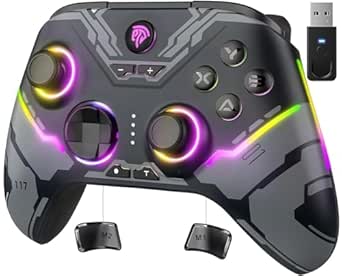 | Best Value for Multi-Platform Play | Compatible platforms: Windows PC, Steam, Nintendo Switch, Android, iOS | Connectivity: 2.4G wireless, Bluetooth, USB | Joystick type: Hall effect | VIEW LATEST PRICE | See Our Full Breakdown |
| ManbaOne Interactive Screen Wireless Gaming Controller for PC, Switch, iOS, Android, Hall Effect Stick & Trigger, RGB Lighting, Remappable Buttons, 1800mAh Battery with Charging Dock |  | Best for On-Controller Customization | Supported platforms: Switch, Switch 2, iOS, Android, Windows PC | Connection modes: Wired, Bluetooth, wireless dongle | Display: 2-inch interactive screen | VIEW LATEST PRICE | See Our Full Breakdown |
| GameSir G7 Pro Wired Controller for Xbox Series X|S, Xbox One, PC & Android | 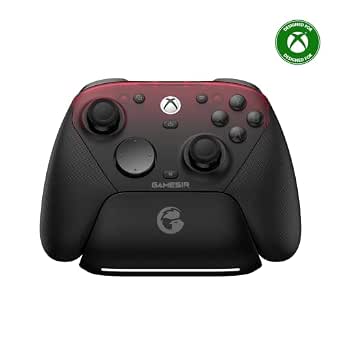 | Best for Xbox and PC Versatility | Compatible devices: Xbox Series X|S, Xbox One, PC, Android | Connectivity: Wired for Xbox, 2.4G wireless, Bluetooth for Android | Polling rate: 1000 Hz | VIEW LATEST PRICE | See Our Full Breakdown |
| Xbox Wireless Gaming Controller Elite Series 2 Black | 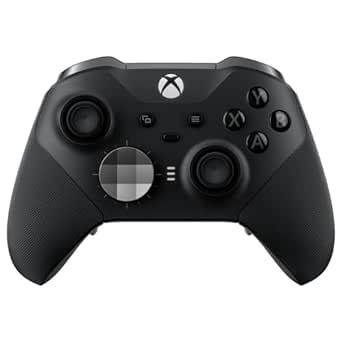 | Best Premium Customizable Controller | Compatibility: Xbox Series X|S, Xbox One, Windows PC, mobile devices | Connectivity: Xbox Wireless, Bluetooth, USB-C | Battery life: Up to 40 hours | VIEW LATEST PRICE | See Our Full Breakdown |
| GameSir G7 Pro 8K PC Wireless Gaming Controller with Hall Effect Triggers and Programmable Buttons |  | Best for Competitive PC Play | Compatibility: Android, Nintendo Switch, Nintendo Switch 2, Windows | Connectivity: Wired and 2.4GHz wireless | Polling rate: 8000Hz | VIEW LATEST PRICE | See Our Full Breakdown |
| GameSir Nova Lite 2 Wireless PC Controller with Hall Effect Sticks |  | Best for Cross-Platform Flexibility | Compatibility: Android, Nintendo Switch, Nintendo Switch 2, PC | Connectivity: Wired, Bluetooth, wireless dongle | Controller type: Gamepad | VIEW LATEST PRICE | See Our Full Breakdown |
| PlayStation DualSense Edge Wireless Controller | 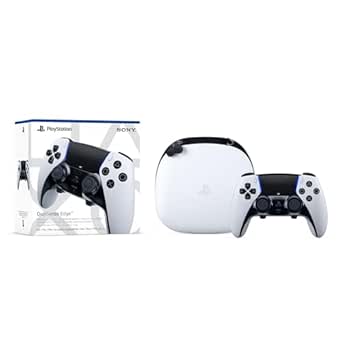 | Best for PS5 Customization | Compatibility: PlayStation 5 | Connectivity: Wireless | Controller type: Gamepad | VIEW LATEST PRICE | See Our Full Breakdown |
| FLYDIGI VADER 5S Wired Controller for Xbox Series X|S, Xbox One, Windows |  | Best Wired Xbox Pick | Compatibility: Windows, Xbox One, Xbox Series S, Xbox Series X | Connection: Wired | Controller type: Wired controller | VIEW LATEST PRICE | See Our Full Breakdown |
| EasySMX X05Pro Wireless Gaming Controller for PC, Switch, Android, iOS | 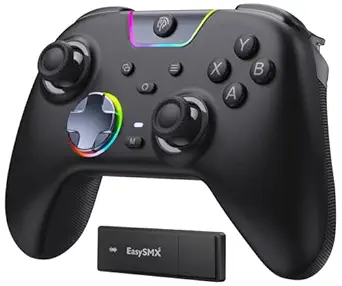 | Best for Quiet Multi-Device Play | Compatibility: Windows PC, Switch, Android, iOS | Connectivity: USB-C, 2.4G wireless, Bluetooth | Polling rate: 1000Hz wired and 2.4G; 125Hz Bluetooth | VIEW LATEST PRICE | See Our Full Breakdown |
| GameSir G7 SE Wired Controller for Xbox Series X|S, Xbox One & Windows 10/11 (White) |  | Best Wired Xbox Value | Compatible devices: PC, Windows, Xbox One, Xbox Series X | Connectivity: Wired | Joysticks and triggers: Hall effect | VIEW LATEST PRICE | See Our Full Breakdown |
| ASUS ROG Raikiri II Xbox Wireless Gaming Controller for PC and Xbox Series X|S |  | Best Premium Multi-Connection Pick | Compatible devices: Xbox, PC, ROG Xbox Ally | Connectivity: USB-C, Bluetooth, 2.4GHz RF | Polling rate: 1000Hz | VIEW LATEST PRICE | See Our Full Breakdown |
| AceGamer Aurora II Wireless Bluetooth Controller for PC, Android, Switch, iOS, Steam Deck | 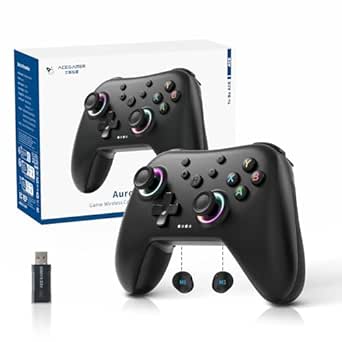 | Best for Broad Mobile and Handheld Compatibility | Compatible devices: PC, Android, Switch, iOS, Steam Deck | Connectivity: Bluetooth, 2.4G wireless | Joysticks: Hall effect with RGB | VIEW LATEST PRICE | See Our Full Breakdown |
| Razer Wolverine V3 Pro Wireless Gaming Controller |  | Best for Competitive Xbox and PC Play | Compatibility: Xbox Series X|S, Xbox One, Windows PC | Connectivity: HyperSpeed 2.4GHz wireless, USB Type-C wired | Remappable controls: 6 remappable buttons, 4 mouse-click back buttons, 2 claw-grip bumpers | VIEW LATEST PRICE | See Our Full Breakdown |
| Flydigi Vader 5 Pro PC Controller with Low Latency and FORCEFLEX Joysticks |  | Best for PC Control Customization | Compatible devices: PC, Nintendo Switch, Android, TV, laptops | Connectivity: Wired, wireless, Bluetooth | Latency: 3ms wired, 4ms wireless | VIEW LATEST PRICE | See Our Full Breakdown |
| gaming controller | Connectivity | Compatibility |
|---|---|---|
| Razer Wolverine V3 Pro 8K PC W | 2.4 GHz wireless; wired | Windows PC |
| EasySMX X15 Wireless PC & Stea | 2.4G wireless, Bluetooth, USB | — |
| ManbaOne Interactive Screen Wi | — | — |
| GameSir G7 Pro Wired Controlle | Wired for Xbox, 2.4G wireless, Bluetooth for Android | — |
| Xbox Wireless Gaming Controlle | Xbox Wireless, Bluetooth, USB-C | Xbox Series X|S, Xbox One, Windows PC, mobile devices |
| GameSir G7 Pro 8K PC Wireless | Wired and 2.4GHz wireless | Android, Nintendo Switch, Nintendo Switch 2, Windows |
| GameSir Nova Lite 2 Wireless P | Wired, Bluetooth, wireless dongle | Android, Nintendo Switch, Nintendo Switch 2, PC |
| PlayStation DualSense Edge Wir | Wireless | PlayStation 5 |
| FLYDIGI VADER 5S Wired Control | — | Windows, Xbox One, Xbox Series S, Xbox Series X |
| EasySMX X05Pro Wireless Gaming | USB-C, 2.4G wireless, Bluetooth | Windows PC, Switch, Android, iOS |
| GameSir G7 SE Wired Controller | Wired | — |
| ASUS ROG Raikiri II Xbox Wirel | USB-C, Bluetooth, 2.4GHz RF | — |
| AceGamer Aurora II Wireless Bl | Bluetooth, 2.4G wireless | — |
| Razer Wolverine V3 Pro Wireles | HyperSpeed 2.4GHz wireless, USB Type-C wired | Xbox Series X|S, Xbox One, Windows PC |
| Flydigi Vader 5 Pro PC Control | Wired, wireless, Bluetooth | — |
More Details on Our Top Picks
Razer Wolverine V3 Pro 8K PC Wireless Gaming Controller
I’d put the Razer Wolverine V3 Pro 8K at the top for Windows players who prioritize fast input and extensive control mapping. Its 8000 Hz polling rate works in both wired and wireless modes, while TMR sticks with swappable caps let players tailor stick feel and aiming. Four mouse-click back buttons and two additional remappable buttons give it more tactical flexibility than the Xbox Elite Series 2, whose appeal leans more toward interchangeable parts and long battery life.
The tradeoff is a narrow platform focus: this controller is Windows PC only, unlike the cross-platform EasySMX X15. Wireless play also requires a USB dongle, so it is less convenient for someone who wants to switch between consoles or connect without an extra receiver. I’d choose it for PC competition, not as an all-purpose living-room controller.
Pros:- 8000 Hz polling rate available in wired and wireless modes
- TMR thumbsticks have swappable caps for customized feel
- Four mouse-click back buttons plus two additional remappable buttons
- Includes a carrying case and 2 m braided cable
Cons:- Compatible only with Windows PCs
- Wireless use requires a USB dongle
- Its competitive-focused controls may be more than casual players need
Best for: Windows PC players who want high polling, swappable sticks, and multiple remappable controls for competitive games
Not ideal for: Console or mobile players, and buyers who want wireless connectivity without a separate USB dongle
- Compatibility:Windows PC
- Connectivity:2.4 GHz wireless; wired
- Polling rate:8000 Hz
- Thumbsticks:TMR with swappable caps
- Remappable controls:6
- Power:Battery powered
- Weight:0.58 kg
- Included accessories:Carrying case; 2 m braided cable
Our verdict“Choose the Wolverine V3 Pro 8K if your priority is responsive, highly configurable Windows PC play and you do not need console compatibility.”
EasySMX X15 Wireless PC & Steam Gaming Controller, Hall Effect, Black
The EasySMX X15 is the flexible pick for players who want one controller for PC, Switch, and mobile devices without centering their setup on a single platform. Its Hall effect joysticks avoid the wear-related stick drift associated with conventional stick sensors, and its 2.4G, Bluetooth, and USB options make it easier to move between supported devices than the Windows-only Razer Wolverine V3 Pro 8K. Programmable back buttons add useful shortcuts without making the controller as feature-dense as the screen-equipped ManbaOne.
That breadth comes with limits: the X15 has no gyro sensor or built-in microphone, and compatibility should be checked for the specific device and game. Its listed battery life is up to 20 hours with RGB options, so players wanting the longer stated runtime of the Xbox Elite Series 2 may prefer that model. This is a practical multi-device choice, not a specialist competitive controller.
Pros:- Compatible with several PC, console, and mobile platforms
- Hall effect joysticks resist stick drift from sensor wear
- Supports 2.4G wireless, Bluetooth, and USB connections
- Programmable back buttons and up to 20 hours of stated playtime
Cons:- No built-in gyro sensor or microphone
- Compatibility depends on the specific device and supported connection
- Up to 20 hours of stated playtime is shorter than the Elite Series 2’s stated maximum
Best for: Players switching among Windows PC, Steam, Switch, Android, and iOS who want Hall effect sticks and several connection options
Not ideal for: Players who need motion controls, a built-in microphone, or a controller tailored specifically for competitive PC play
- Compatible platforms:Windows PC, Steam, Nintendo Switch, Android, iOS
- Connectivity:2.4G wireless, Bluetooth, USB
- Joystick type:Hall effect
- Programmable controls:Back buttons
- Battery life:Up to 20 hours
- Button quantity:14
- Color:Black
- Warranty:12 months
Our verdict“Pick the X15 if you want a flexible controller for several supported platforms and can do without gyro controls and a built-in microphone.”
ManbaOne Interactive Screen Wireless Gaming Controller for PC, Switch, iOS, Android, Hall Effect Stick & Trigger, RGB Lighting, Remappable Buttons, 1800mAh Battery with Charging Dock
The ManbaOne stands apart by putting settings on its own 2-inch interactive screen, which lets players customize controls without relying on separate software. Hall effect sticks and linear Hall effect triggers cover both aiming and trigger input, while remappable buttons and macro support offer more configuration than the simpler EasySMX X15. It also spans Switch, Switch 2, PC, iOS, and Android, making it a compelling option for players with several devices.
This breadth asks for patience. The controller weighs 630 g, and its listed Bluetooth mode is not recommended for stable gameplay; setup can also be more involved than on the plug-and-play GameSir G7 Pro. It does not support Xbox or PlayStation consoles. I’d favor it when screen-based adjustments and broad compatibility matter more than a lightweight design or straightforward setup.
Pros:- 2-inch screen enables on-controller customization without additional software
- Hall effect joysticks and linear Hall effect triggers
- Remappable buttons and macro support
- Includes a charging station and supports wired, Bluetooth, and dongle connections
Cons:- Not compatible with Xbox or PlayStation consoles
- Bluetooth is not recommended for stable gameplay
- At 630 g, it is heavier than the EasySMX X15
Best for: Multi-platform players who want to adjust controller settings directly on the device and use Hall effect sticks and triggers
Not ideal for: Xbox or PlayStation owners, buyers seeking a lightweight controller, or players who rely on stable Bluetooth gameplay
- Supported platforms:Switch, Switch 2, iOS, Android, Windows PC
- Connection modes:Wired, Bluetooth, wireless dongle
- Display:2-inch interactive screen
- Joystick type:Hall effect
- Trigger type:Linear Hall effect
- Battery capacity:1800 mAh
- Weight:630 g
- Included charging accessory:Charging station
Our verdict“Choose the ManbaOne if you want screen-based customization across supported platforms and can accept its weight and setup demands.”
GameSir G7 Pro Wired Controller for Xbox Series X|S, Xbox One, PC & Android
The GameSir G7 Pro is the most natural fit here for players who want an Xbox-compatible controller that can also serve a PC and Android setup. It combines Hall effect analog triggers, TMR sticks, customizable buttons, and a 1000 Hz polling rate, giving it a stronger feature set for responsive play than the broad but less specialized EasySMX X15. Tri-mode connectivity adds practical range: wired for Xbox, 2.4G wireless, and Bluetooth for Android.
That flexibility is not identical across every platform. Wireless modes require setup, and the gyro is PC-only, so Android and Xbox buyers should not expect every feature everywhere. Compared with the Windows-exclusive Razer Wolverine V3 Pro 8K, the G7 Pro serves more devices but has a lower listed polling rate. I’d choose it for mixed Xbox and PC use, rather than for players seeking the highest polling figure in this group.
Pros:- Supports Xbox, PC, and Android with tri-mode connectivity
- Hall effect analog triggers and TMR sticks
- 1000 Hz polling rate and customizable buttons
- Built-in 1200 mAh battery and included charging station
Cons:- Wireless modes require setup
- Gyroscope functionality is PC-only
- Its polling rate is lower than the Razer Wolverine V3 Pro 8K’s 8000 Hz
Best for: Xbox Series X|S or Xbox One owners who also play on PC or Android and want Hall effect controls across supported connections
Not ideal for: Players who need every feature, including gyro, on every platform or want a controller focused solely on maximum polling rate
- Compatible devices:Xbox Series X|S, Xbox One, PC, Android
- Connectivity:Wired for Xbox, 2.4G wireless, Bluetooth for Android
- Polling rate:1000 Hz
- Sticks:TMR
- Triggers:Hall effect analog
- Battery:1200 mAh built-in
- Weight:272 g
- Warranty:1 year
Our verdict“Choose the G7 Pro if you want one customizable controller for Xbox, PC, and Android and can work around platform-specific feature limits.”
Xbox Wireless Gaming Controller Elite Series 2 Black
The Xbox Elite Series 2 is the premium customization choice for players who want to reshape the controller around their preferred games. Adjustable-tension thumbsticks, interchangeable components, four paddles, and profile switching give it a different emphasis from the Razer Wolverine V3 Pro 8K: the Razer focuses on a high polling rate and mouse-click back buttons, while the Elite offers a broad kit for changing feel and layout. Its stated up to 40-hour battery life also suits long sessions without frequent charging.
Its flexibility means more setup and more parts to manage. The customization features can feel involved, and some functions depend on compatible devices and software. Compared with the more platform-flexible ManbaOne, the Elite is a better fit for Xbox-centered play with PC and mobile support, not Switch use. I’d choose it for players who will actually use the interchangeable components and profiles.
Pros:- Adjustable-tension thumbsticks and interchangeable components
- Includes four paddles, six thumbsticks, and two D-pads
- Up to 40 hours of stated battery life
- Supports Xbox Wireless, Bluetooth, and USB-C
Cons:- Customization setup can be involved
- Full feature access depends on compatible devices and software
- Its interchangeable parts may be unnecessary for players who prefer a simple layout
Best for: Xbox players who also game on Windows PC or mobile and want interchangeable parts, adjustable sticks, paddles, and saved profiles
Not ideal for: Buyers who want a simple plug-and-play pad, need Nintendo Switch support, or would not use its customization options
- Compatibility:Xbox Series X|S, Xbox One, Windows PC, mobile devices
- Connectivity:Xbox Wireless, Bluetooth, USB-C
- Battery life:Up to 40 hours
- Thumbsticks:Adjustable tension; 6 included
- Paddles:4 included
- D-pads:2 included
- Included accessories:Carrying case, charging dock, USB-C cable
- Profile support:Profile switching
Our verdict“Choose the Elite Series 2 if you want a highly adjustable Xbox-centered controller and will make use of its paddles, components, and profiles.”
GameSir G7 Pro 8K PC Wireless Gaming Controller with Hall Effect Triggers and Programmable Buttons
The GameSir G7 Pro 8K is the specialist pick here for PC players who value fast input and extensive control tuning. Its 8000Hz polling rate, Hall Effect TMR sticks, and four programmable macro buttons favor quick responses and personalized layouts; the included dock also makes recharging easier between sessions. Compared with the GameSir Nova Lite 2, this model puts more emphasis on competitive features and a charging setup, while the Nova Lite 2 is the simpler cross-device choice. That extra control comes with a steeper software setup, and the listed compatibility is narrower than the Nova Lite 2’s. I’d choose it for Windows-focused play, not as a universal controller for a mixed-device household.
Pros:- 8000Hz polling rate is designed for highly responsive PC input.
- Hall Effect TMR sticks offer precise control with reduced drift concerns.
- Four programmable macro buttons support personalized competitive layouts.
- Charging dock provides a convenient place to recharge between sessions.
Cons:- Software customization may take time to configure.
- Its advanced feature set may be more than casual players need.
- Compatibility is less broadly specified than the Nova Lite 2’s.
Best for: Windows PC players who want high polling, programmable controls, Hall Effect sticks, and a charging dock.
Not ideal for: Players who need broad compatibility across platforms or want to avoid software setup and advanced customization.
- Compatibility:Android, Nintendo Switch, Nintendo Switch 2, Windows
- Connectivity:Wired and 2.4GHz wireless
- Polling rate:8000Hz
- Controls:16 buttons; 4 programmable macro buttons
- Sticks:Hall Effect TMR
- Additional features:Hall Effect triggers, gyroscope, vibration motors, 3.5mm headset jack
- Power:Rechargeable battery; charging dock included
- Color:Royal2
Our verdict“Choose the G7 Pro 8K if responsive Windows play and extensive control tuning matter more than simple setup or wide platform coverage.”
GameSir Nova Lite 2 Wireless PC Controller with Hall Effect Sticks
The GameSir Nova Lite 2 suits players who move between PC, Switch, and mobile devices and want one controller for those setups. Bluetooth, a wireless dongle, and wired connectivity give it more connection options than the FLYDIGI VADER 5S, which is wired and focused on Xbox and Windows. Hall Effect sticks and remappable buttons add useful control features without pushing this model as far into competitive specialization as the GameSir G7 Pro 8K. The tradeoff is that full customization requires an app, and the provided details don’t specify battery life, so I can’t judge how often it needs charging. It’s a flexible everyday pick, but not the clearest choice for players who want detailed endurance information or a plug-and-play setup.
Pros:- Works with PC, Nintendo Switch, Android, and Nintendo Switch 2.
- Wired, Bluetooth, and wireless dongle connections support varied setups.
- Hall Effect sticks are designed for smooth input and reduced drift.
- Remappable buttons and firmware customization allow control adjustments.
Cons:- Full customization requires a mobile or PC app.
- Battery-life information is not provided.
- Its feature set is less focused on high polling and competitive extras than the GameSir G7 Pro 8K.
Best for: Players who alternate between PC, Nintendo Switch, and Android devices and want wired and wireless connection options.
Not ideal for: Buyers who need stated battery-life figures or want to avoid app-based customization.
- Compatibility:Android, Nintendo Switch, Nintendo Switch 2, PC
- Connectivity:Wired, Bluetooth, wireless dongle
- Controller type:Gamepad
- Controls:16 buttons; remappable buttons
- Sticks:Hall Effect joysticks
- Additional features:Trigger locks, vibration, firmware customization
- Power:Battery powered; battery life not specified
- Dimensions:6.1 x 4.09 x 2.24 inches
- Weight:0.24 kg
Our verdict“Pick the Nova Lite 2 if you want a flexible controller for PC, Switch, and mobile, and are comfortable configuring it through an app.”
PlayStation DualSense Edge Wireless Controller
For PS5 owners who want to tailor a controller to different games, the DualSense Edge offers the most platform-focused customization in this group. Swappable stick modules, mappable back buttons, adjustable trigger lengths, and saved control profiles let players change their setup without moving to a PC-oriented model such as the GameSir G7 Pro 8K. It also retains the DualSense’s haptic feedback and adaptive triggers, linking custom controls with PS5-specific immersion. The tradeoffs are its PS5-only compatibility and a more involved feature set that can feel excessive for casual play. Replacement stick modules are sold separately, so the swappable design does not remove the cost or effort of maintaining it. I’d choose it for focused PS5 use, not as a single controller for multiple platforms.
Pros:- Customizable profiles and mappable back buttons adapt controls to different games.
- Swappable stick modules provide a replacement path if a module wears out.
- Adjustable trigger lengths suit different play styles.
- Haptic feedback and adaptive triggers preserve PS5-specific features.
Cons:- Compatible only with PlayStation 5 according to the listed specifications.
- Replacement stick modules require a separate purchase.
- The customization options may be more involved than casual players need.
Best for: PS5 players who want adjustable triggers, back buttons, control profiles, and the option to replace stick modules.
Not ideal for: Multi-platform players, casual users who prefer simple controls, or buyers who don’t want separately purchased replacement modules.
- Compatibility:PlayStation 5
- Connectivity:Wireless
- Controller type:Gamepad
- Controls:Mappable back buttons; adjustable trigger lengths
- Stick system:Swappable stick modules
- Additional features:Haptic feedback, adaptive triggers, customizable profiles
- Power:Battery powered
- Color:White
Our verdict“Choose the DualSense Edge if you play primarily on PS5 and will make use of its adjustable controls and swappable sticks.”
FLYDIGI VADER 5S Wired Controller for Xbox Series X|S, Xbox One, Windows
The FLYDIGI VADER 5S is a strong fit for Xbox and Windows players who prefer a wired connection and want more control over stick tension. Hall Effect sticks, adjustable triggers, profile switching, and remappable buttons make it more configurable than the EasySMX X05Pro, while the EasySMX offers wireless connections and broader mobile compatibility. The VADER 5S’s cable keeps the setup straightforward and avoids relying on a wireless link, but it restricts movement and requires a nearby connection point. Its many adjustment options may also take time to set up, so this is not the most effortless pick for casual players. I’d rank it above general-purpose options for a fixed Xbox or PC setup, but below wireless alternatives for couch flexibility.
Pros:- Hall Effect sticks are designed for precise input with reduced drift concerns.
- Adjustable stick tension and triggers let players tune the controls.
- Profile switching and remappable buttons support different games.
- Compatible with Xbox One, Xbox Series X|S, and Windows.
Cons:- Wired connection limits movement compared with wireless options such as the EasySMX X05Pro.
- Customization may be complicated for casual players.
- Compatibility does not include the mobile platforms supported by some alternatives.
Best for: Xbox Series X|S, Xbox One, and Windows players who want adjustable stick tension and a wired setup.
Not ideal for: Players who need wireless freedom, mobile-device compatibility, or a controller that requires little configuration.
- Compatibility:Windows, Xbox One, Xbox Series S, Xbox Series X
- Connection:Wired
- Controller type:Wired controller
- Controls:17 buttons; remappable buttons
- Sticks:Hall Effect sticks with customizable tension
- Additional features:Adjustable triggers, vibration, profile switching, headphone jack
- Weight:450 g
Our verdict“Choose the VADER 5S for a fixed Xbox or Windows setup where wired play and adjustable controls matter more than wireless freedom.”
EasySMX X05Pro Wireless Gaming Controller for PC, Switch, Android, iOS
The EasySMX X05Pro makes sense for players who want one wireless controller for several devices and prefer quieter button presses. Its silent operation distinguishes it from the more competition-focused GameSir G7 Pro 8K, while Hall Effect sticks, adjustable triggers, and programmable buttons still provide meaningful control options. Connection flexibility is another advantage: it supports USB-C, 2.4G wireless, and Bluetooth, with the listed polling rate varying by connection. That difference matters for players choosing a low-latency link rather than Bluetooth convenience. The X05Pro covers PC, Switch, Android, and iOS, but not Xbox or PlayStation consoles. Its programmable controls may also require configuration, so I’d favor it for quiet multi-device use over a dedicated console setup.
Pros:- Compatible with Windows PC, Switch, Android, and iOS.
- Silent buttons suit late-night play or shared spaces.
- Hall Effect joysticks and adjustable triggers provide useful control options.
- USB-C, 2.4G wireless, and Bluetooth support different setups.
Cons:- Not compatible with Xbox or PlayStation consoles.
- Polling rate varies by connection, with Bluetooth listed at 125Hz.
- Programmable buttons may take time to configure.
Best for: Players who switch among PC, Switch, Android, and iOS and want quiet buttons with wireless connection choices.
Not ideal for: Xbox or PlayStation owners seeking a compatible controller, and buyers who want to avoid configuring programmable buttons.
- Compatibility:Windows PC, Switch, Android, iOS
- Connectivity:USB-C, 2.4G wireless, Bluetooth
- Polling rate:1000Hz wired and 2.4G; 125Hz Bluetooth
- Battery:1000mAh rechargeable
- Sticks:Hall Effect joysticks
- Additional features:Adjustable triggers, programmable buttons, silent operation
Our verdict“Choose the X05Pro if quiet operation and multi-device compatibility matter more than console support or uniform polling across connections.”
GameSir G7 SE Wired Controller for Xbox Series X|S, Xbox One & Windows 10/11 (White)
The GameSir G7 SE is a straightforward choice for Xbox and Windows players who want Hall effect control without adding wireless setup or charging to their routine. Its Hall effect joysticks and triggers are designed for precise input and reduced wear concerns, while customizable rear buttons give players extra controls without requiring a more feature-heavy setup. A 3.5mm headset jack and textured ergonomic grip make it well suited to long sessions at a desk or couch.
Compared with the wireless ASUS ROG Raikiri II, the G7 SE gives up roaming freedom and extras such as a charging stand, but keeps the connection simple: plug in and play. That cable is also its main limitation, and this model is focused on Xbox and Windows rather than broad mobile or Switch use. I’d pick it for dependable wired play, not for a tidy cable-free setup.
Pros:- Hall effect joysticks and triggers support precise control and are designed to reduce wear-related drift concerns.
- Customizable rear buttons add convenient inputs for games that benefit from quick access.
- Wired plug-and-play connection avoids battery charging and wireless pairing.
- Textured ergonomic grip and 3.5mm audio jack suit extended sessions with a headset.
Cons:- The cable restricts movement compared with the wireless ASUS ROG Raikiri II and AceGamer Aurora II.
- Listed compatibility centers on Xbox and Windows, limiting its usefulness as a multi-platform controller.
Best for: Xbox Series X|S, Xbox One, and Windows players who prefer a plug-and-play wired connection, want Hall effect controls, and use a wired headset.
Not ideal for: Players who want wireless freedom, play mainly on Switch or mobile devices, or need a controller that works across a wider range of platforms.
- Compatible devices:PC, Windows, Xbox One, Xbox Series X
- Connectivity:Wired
- Joysticks and triggers:Hall effect
- Audio:3.5mm audio jack
- Additional controls:Customizable back buttons
- Power source:Corded electric
- Weight:420 g
- Dimensions:8.27 x 4.53 x 2.56 inches
Our verdict“Choose the GameSir G7 SE for capable, uncomplicated wired Xbox or PC play; skip it if wireless mobility matters more than a direct connection.”
ASUS ROG Raikiri II Xbox Wireless Gaming Controller for PC and Xbox Series X|S
The ASUS ROG Raikiri II suits players who move between Xbox, PC, and ROG Xbox Ally and want one controller to cover those setups. Its tri-mode connectivity—USB-C, Bluetooth, and 2.4GHz RF—offers more flexibility than the wired GameSir G7 SE, while a stated 1000Hz polling rate and anti-drift joysticks target fast, controlled input. Programmable rear buttons and dual-mode triggers let players tailor controls to different games rather than settling for a basic layout.
The included charging stand and protective case make this a more complete travel-and-desk package than the AceGamer Aurora II, and the battery is rated for up to 30 hours. That versatility brings a more involved feature set, and the product data flags its bulk as a possible fit issue. It makes the most sense for players who will use its connection options and accessories; for a simple wired Xbox pad, the G7 SE is the more direct pick.
Pros:- USB-C, Bluetooth, and 2.4GHz RF support several ways to connect across compatible devices.
- 1000Hz polling and anti-drift joysticks are aimed at responsive, consistent input.
- Programmable rear buttons and dual-mode triggers allow control adjustments for different games.
- Includes a charging stand, protective case, and detachable joystick caps.
Cons:- The listed weight and product description suggest a bulkier feel than simpler options such as the GameSir G7 SE.
- Its extra modes and controls may be unnecessary for players with a single-console setup.
Best for: Players who regularly switch between Xbox Series X|S, PC, and ROG Xbox Ally and want wireless options, rear controls, and included storage and charging accessories.
Not ideal for: Players seeking a lightweight, uncomplicated controller or those who only need a wired Xbox pad and would not use multiple connection modes.
- Compatible devices:Xbox, PC, ROG Xbox Ally
- Connectivity:USB-C, Bluetooth, 2.4GHz RF
- Polling rate:1000Hz
- Joysticks:Anti-drift
- Controls:Programmable rear buttons and dual-mode triggers
- Battery life:Up to 30 hours
- Included accessories:Protective case, charging stand, detachable joystick caps
- Weight:9.6 ounces
Our verdict“Pick the Raikiri II if you want one accessory-rich controller for Xbox, PC, and ROG Xbox Ally; choose the G7 SE for simpler wired play.”
AceGamer Aurora II Wireless Bluetooth Controller for PC, Android, Switch, iOS, Steam Deck
The AceGamer Aurora II is the flexible pick for players who want one wireless gamepad for a mix of PC, Switch, phone, and handheld gaming. Its Hall effect joysticks and customizable back keys bring useful control options to a multi-device design, while Bluetooth and 2.4G wireless offer alternatives when one connection method is inconvenient. That platform range sets it apart from the Xbox-focused GameSir G7 SE and ASUS ROG Raikiri II.
The 1000mAh battery and power-saving mode support portable use, but compatibility does not extend to Xbox systems—a significant limit for players with an Xbox console. The 2.4G setup also calls for specific button presses, so pairing may take more attention than the G7 SE’s wired plug-and-play approach. I’d choose this for a varied PC, Switch, or mobile setup, not as a single controller for every console.
Pros:- Supports PC, Android, Switch, iOS, and Steam Deck, making it a flexible option for mixed-device play.
- Hall effect joysticks provide precise input and are designed to limit stick-drift concerns.
- Bluetooth and 2.4G wireless offer more than one connection method.
- Customizable back keys and a 1000mAh battery suit portable, personalized play.
Cons:- Not compatible with Xbox systems, unlike the GameSir G7 SE and ASUS ROG Raikiri II.
- The 2.4G connection requires specific button presses, which can make setup less immediate.
- The product data does not specify battery runtime, so capacity alone does not indicate time between charges.
Best for: Players who split their gaming between PC, Nintendo Switch, Android or iOS devices, and Steam Deck and want wireless connectivity with rear controls.
Not ideal for: Xbox owners looking for a controller for their console, or anyone who wants the simplest possible setup without wireless pairing steps.
- Compatible devices:PC, Android, Switch, iOS, Steam Deck
- Connectivity:Bluetooth, 2.4G wireless
- Joysticks:Hall effect with RGB
- Back controls:Customizable back keys
- Battery capacity:1000mAh
- Power features:Power-saving mode
- Button quantity:12
- Color:Midnight Black
Our verdict“Choose the Aurora II for wireless gaming across PC, Switch, and mobile devices, but skip it if Xbox compatibility is part of your setup.”
Razer Wolverine V3 Pro Wireless Gaming Controller
The Razer Wolverine V3 Pro is built for players who want fast access to extra controls, not just a standard wireless layout. Its four mouse-click back buttons, six remappable buttons, and claw-grip bumpers give competitive players more inputs close at hand. Hall effect thumbsticks and adjustable-travel Pro HyperTriggers add fine control, while HyperSpeed wireless supports cable-free play. In wired PC Tournament Mode, the listed polling rate reaches 1000Hz.
Compared with the more approachable GameSir G7 SE, the Wolverine offers far more customization and wireless freedom, but its extensive controls can be overkill for casual play. Some performance features are PC-only, so Xbox players do not get the full listed feature set. The carrying case, long cable, and replaceable stick caps add practical value for players who travel to sessions, but this remains a specialized choice for people ready to configure it.
Pros:- Four mouse-click back buttons, six remappable buttons, and two claw-grip bumpers provide extensive extra inputs.
- Hall effect thumbsticks and adjustable-travel triggers support precise control.
- HyperSpeed 2.4GHz wireless and USB-C wired connectivity provide different setup options.
- Includes a carrying case, 10 ft USB-C cable, and two replaceable thumbstick caps.
Cons:- Its many extra controls may take time to configure and can be unnecessary for casual gaming.
- The 1000Hz Tournament Mode is listed for wired PC use, not as a feature available across all platforms.
- Compatibility is limited to Xbox and Windows PC, unlike the cross-platform AceGamer Aurora II.
Best for: Competitive Xbox Series X|S, Xbox One, and Windows PC players who want multiple remappable controls, adjustable triggers, and both wireless and wired play.
Not ideal for: Casual players who prefer a familiar, uncluttered layout, or Xbox players who expect every listed PC Tournament Mode feature to work on console.
- Compatibility:Xbox Series X|S, Xbox One, Windows PC
- Connectivity:HyperSpeed 2.4GHz wireless, USB Type-C wired
- Remappable controls:6 remappable buttons, 4 mouse-click back buttons, 2 claw-grip bumpers
- Thumbsticks:Hall effect precision thumbsticks
- Triggers:Pro HyperTriggers with adjustable travel
- Action buttons:Razer Mecha-Tactile
- Polling rate:1000Hz in wired PC Tournament Mode
- Included accessories:Carrying case, 10 ft USB Type-C cable, 2 replaceable thumbstick caps
Our verdict“Choose the Wolverine V3 Pro if competitive play and extensive remapping justify its complexity; casual players may prefer the simpler GameSir G7 SE.”
Flydigi Vader 5 Pro PC Controller with Low Latency and FORCEFLEX Joysticks
The Flydigi Vader 5 Pro makes the most sense for PC players who like adjusting a controller to suit different genres. Adjustable FORCEFLEX joysticks, customizable buttons, profiles, motion sensing, and rumble give it a broader control toolkit than the simpler GameSir G7 SE. It also supports wired, wireless, and Bluetooth connections, so it can fit more than one setup. The listed low-latency figures—3ms wired and 4ms wireless—are aimed at players who value quick response.
Its compatible-device list includes PC, Switch, Android, TVs, and laptops, but excludes Xbox and PlayStation, so console households should check that limitation before choosing it. Full customization requires software, which may be more effort than players want, and the charging dock is sold separately. Compared with the AceGamer Aurora II, the Vader 5 Pro places more emphasis on adjustment and button options, rather than broad iOS support.
Pros:- Wired, wireless, and Bluetooth connectivity support different gaming setups.
- Adjustable FORCEFLEX joysticks let players tailor stick feel and control.
- Customizable buttons and profiles can adapt the layout to different genres.
- Motion sensing and rumble add control and feedback options.
Cons:- Not compatible with Xbox or PlayStation, unlike the Xbox-ready GameSir G7 SE and Razer Wolverine V3 Pro.
- Full customization requires software that may add setup complexity.
- The charging dock is sold separately.
Best for: PC players who want adjustable joystick feel, multiple connection choices, and configurable controls for different game genres, with Switch or Android compatibility as a bonus.
Not ideal for: Xbox or PlayStation players, and anyone who wants full customization without installing or learning software.
- Compatible devices:PC, Nintendo Switch, Android, TV, laptops
- Connectivity:Wired, wireless, Bluetooth
- Latency:3ms wired, 4ms wireless
- Joystick system:Adjustable FORCEFLEX joysticks
- Buttons:20
- Additional features:Motion sensing, rumble, customizable buttons and profiles
- Battery capacity:1000mAh
- Dimensions:6.06 x 4 x 2.56 inches
Our verdict“Pick the Vader 5 Pro for adjustable, customizable PC controls across several connection types, but not if you need Xbox or PlayStation support.”
How We Picked
I ranked these best gaming controllers by how well their design serves a clear buyer need: platform fit, connection type, control options, stick and trigger technology, comfort potential, and setup complexity. I gave more weight to reliable compatibility and useful controls than to decorative features. A controller with broad device support can be a stronger pick for a mixed-device household, while a console-specific model may be the better choice when it offers the controls and audio features that system owners rely on.
The order reflects overall usefulness, not a single performance metric. Premium models rank well when their customization or competitive features have a clear audience, but those extras do not automatically beat a simpler controller. Wired options earn credit for direct, low-fuss connections; wireless models earn credit for flexibility, with compatibility and charging demands counted as tradeoffs. Since the list spans different platforms and feature sets, buyers should confirm system support and connection requirements for their exact setup before choosing.
Factors to Consider When Choosing Best Gaming Controllers
Before choosing from this roundup, match the controller to the system and the way you play. A long feature list can distract from basic questions about connection, layout, and whether the controls will be useful in your games.
Match the controller to your platform first
Start with the exact device you plan to use, not a broad label such as “wireless” or “multiplatform.” PC support is common across this list, but Xbox and PlayStation consoles have different compatibility requirements, and mobile or Switch support can depend on connection mode. Check whether the controller connects directly, needs a cable or adapter, and supports the features you expect on that platform. A model that pairs with a phone may not provide the same button mapping or audio functions on a console. For shared households, write down every device before buying and verify each one against the manufacturer’s compatibility details. This prevents paying for flexibility that does not extend to your actual setup.
Choose wired or wireless based on your routine
Wired controllers remove battery management and can be a simple choice for a desk setup, but cable length and routing affect comfort. Wireless models give you room to play away from the screen and work better when the controller moves between devices, though they add charging and pairing steps. Do not assume every wireless controller uses the same connection method or offers the same performance on each platform. If you play competitive games, compare the controller’s supported connection modes and latency-related features rather than treating “wireless” as a complete specification. If you mostly play from a couch, freedom from a cable may matter more than advanced tuning. The right choice follows where and how you play, not a general preference for one connection type.
Treat Hall Effect sticks as one factor, not a guarantee
Hall Effect sticks use magnetic sensing rather than the traditional contact-based approach, which can reduce a common source of stick wear. That feature is useful, but it does not tell you everything about stick feel, dead zones, calibration, or the controller’s overall build. A buyer who values long-term stick reliability should also check whether sensitivity settings are adjustable and whether the controller’s software supports the desired platform. Do not pay extra for a specification you will not notice in your games, and do not assume it makes every other part of the controller more durable. Comfort, layout, and support still shape day-to-day use. Compare the full control experience, not just the stick technology.
Pay for customization only when you will use it
Extra rear buttons, remapping, trigger adjustments, profiles, and onboard controls can help players tailor a controller to different games. They also add setup choices and may take time to configure. Before choosing a feature-rich premium model, name the controls you would remap and the games where those changes would help. If your preferred games use a standard layout and you rarely change settings, a simpler controller may be easier to live with. Conversely, frequent players who switch between genres may benefit from profiles that preserve different control layouts. The best upgrade is the one that solves a repeat problem rather than adding options for their own sake.
Compare fit and layout before chasing extra features
Button placement, grip shape, trigger reach, and controller size can matter more over a long session than lighting or a screen. Players with smaller hands may find a large, heavy controller tiring, while others may prefer a fuller grip and separated rear controls. Product specifications rarely capture how a layout feels in your hands, so use return policies and clear manufacturer dimensions as practical checks when possible. Also look at whether the layout matches your main platform; switching between Xbox-style and PlayStation-style stick arrangements can take adjustment. A compact or simpler model may be the better daily choice even when a larger premium option has more features. Prioritize the controls you touch constantly over extras you may rarely use.
Frequently Asked Questions
Which controller should I choose if I play on both Xbox and PC?
Start by deciding whether Xbox console use or PC flexibility matters more, then verify that the specific model supports both systems in the way you intend to connect. The ASUS ROG Raikiri II is the roundup’s strongest fit for buyers seeking wireless Xbox and PC use, while the GameSir G7 SE is a simpler wired alternative for Xbox and Windows. A controller’s PC compatibility does not automatically mean every console feature works the same way. Check connection requirements, audio support, and any software-dependent functions before buying. If you move between systems often, ease of switching can matter as much as the feature list.
Is a wired controller a better choice for competitive gaming?
A wired connection can simplify play by avoiding battery concerns and wireless pairing, which makes it a practical choice for a fixed desk setup. It is not the only route to responsive control: some wireless models in this roundup focus on low-latency play and competitive features. Compare the connection modes supported on your platform rather than assuming every wired controller is automatically faster or every wireless one introduces a problem. Cable reach and desk layout also affect whether wired play is convenient. Choose based on your system, play location, and the controller’s actual performance features.
Do Hall Effect sticks make a controller worth buying?
Hall Effect sticks can appeal to players concerned about stick wear, but the technology alone does not determine whether a controller is a good fit. Several models here include Hall Effect sticks, so buyers can compare grip, platform support, controls, and connection style without treating the feature as a premium-only benefit. Stick response and adjustment options also matter, especially if you play games that depend on precise aiming. Look at the full controller rather than paying extra for one specification in isolation. If your current controller’s sticks are not a problem, layout and comfort may be a more useful upgrade.
Should I pay more for a controller with remappable buttons and profiles?
Extra controls are most useful when you have a clear plan for them, such as moving frequent actions off the face buttons or keeping separate layouts for different game types. The Elite Series 2, DualSense Edge, and several competitive-focused options cater to players who value customization, but those features add setup decisions. For straightforward play, a simpler model can be easier to pick up and use without configuration. Consider whether you will actually save profiles or change assignments regularly. If not, put your budget toward platform compatibility, a comfortable shape, or a connection style that suits your setup.
Can one controller handle PC, phone, and Nintendo Switch play?
Some controllers in this roundup are designed for several device types, but broad compatibility does not guarantee the same connection method or feature set everywhere. Check the exact support list for your PC, phone operating system, and Switch, then confirm whether pairing uses Bluetooth, a cable, or an adapter. Buttons and menus may behave differently between platforms, and console-specific functions may not carry over. If you plan to switch devices often, also check how easily the controller changes connections and whether it remembers pairings. A narrower model with confirmed support for your main system can be a safer choice than a longer compatibility list that does not match your needs.
Conclusion
For most buyers seeking one capable controller across Xbox and PC, I would start with the ASUS ROG Raikiri II as the best overall pick in this lineup. For a straightforward value choice, the GameSir G7 SE suits Xbox and Windows players who prefer wired play and Hall Effect sticks. Beginners who want a simpler route into PC and multi-device gaming should compare the GameSir Nova Lite 2 and EasySMX X05Pro, checking platform support before choosing. For premium customization, consider the Xbox Elite Series 2 or PlayStation DualSense Edge according to your console; for competitive PC control, look at the Razer Wolverine V3 Pro 8K or Flydigi Vader 5 Pro. The best choice is the one that fits your main platform and play style without making you pay for controls you will not use.
Halloween Picks
halloween
As an affiliate, we earn on qualifying purchases.