
TL;DR

Play games on Amazon Luna for your next adventure, included with Prime
- A rotating selection of games, no download needed
- Play on TV, laptop or phone
- Fast, free delivery for your gear, too
The classic build vs buy debate for AI workstations has shifted. Today, it’s about balancing cost, speed to deployment, support, and control. Prebuilt systems often match or beat DIY on price and reliability, especially during component shortages, while custom builds excel in fine-tuning and niche needs.
Forget what you used to know. Building your own AI workstation was always cheaper, right? Not anymore. The 2026 landscape shifts the game—component shortages, rising prices, and the rise of prebuilt systems that come tested, optimized, and ready to run. This isn’t just a price debate anymore. It’s about speed, support, control, and workload fit. Whether you’re deep into research, training large models, or just exploring AI on a budget, understanding the new rules changes everything.
In this guide, you’ll see how the heat of the market has reshaped the build-vs-buy choice. We’ll explore real scenarios, compare costs, and give you practical tips to help you make the smartest move for your AI ambitions.
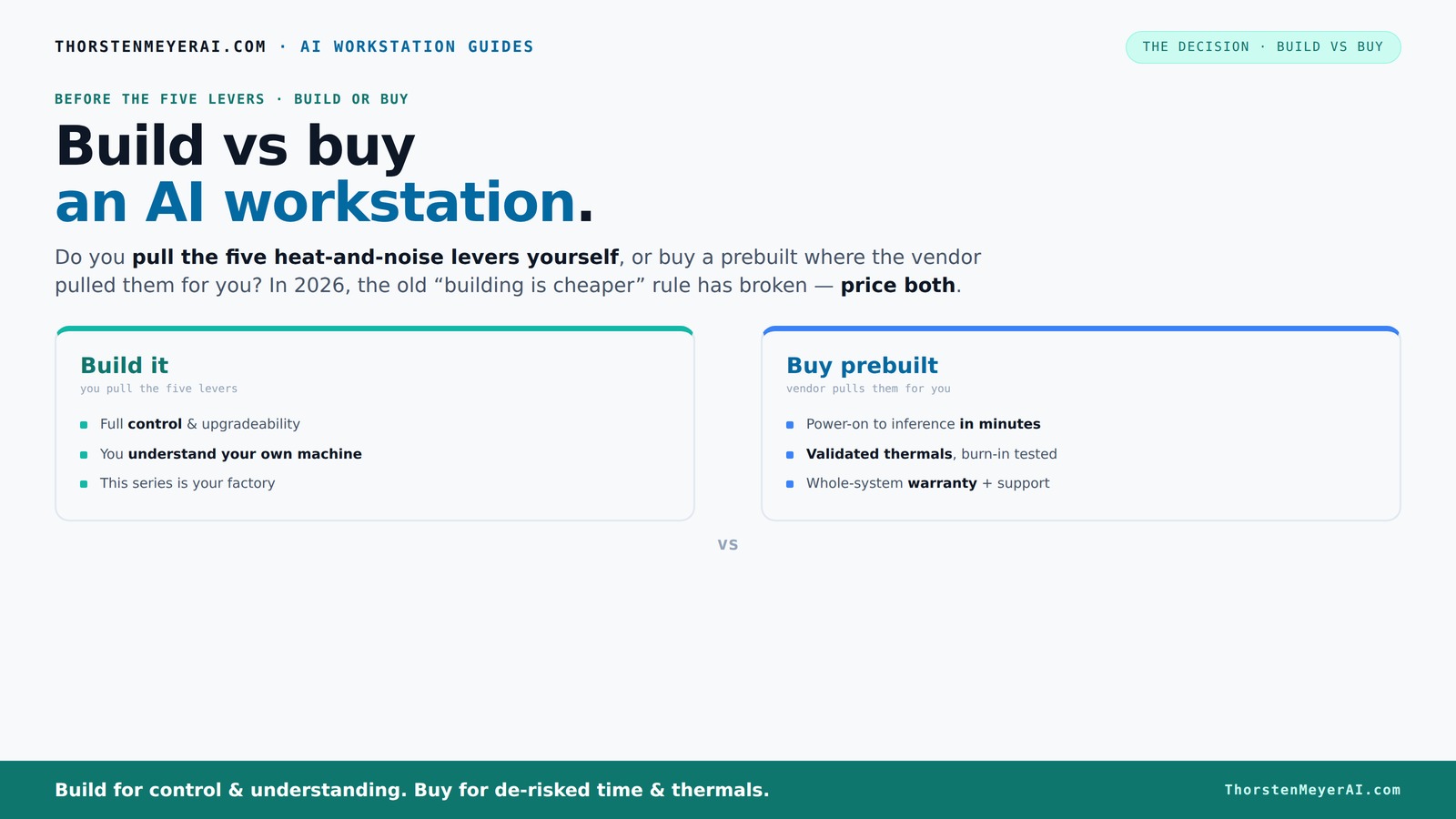
Build vs buy
an AI workstation.
The real question behind this whole series: do you pull the five heat-and-noise levers yourself, or buy a prebuilt where the vendor pulled them for you? And in 2026, the old “building is cheaper” rule has broken. Match your situation in Part 3.
Key Takeaways
- Component shortages have made prebuilt AI workstations often cheaper or comparable in price to DIY builds.
- Prebuilts offer validated thermals, faster deployment, and support—crucial for production environments.
- Building gives you control over every component, but requires thermal expertise and time investment.
- Emerging AI hardware bundles and software optimizations make prebuilt systems more attractive than ever.
- Your choice depends on workload, control needs, budget, and how quickly you need results.
As an affiliate, we earn on qualifying purchases.
Why Building Your Own AI Workstation Is No Longer Always Cheaper
Building your own system used to be the clear winner on price. Build vs Buy a Prebuilt AI Workstation Today, shortages and bulk buying have changed that. A DIY build that cost $1,000 in 2024 is now pushing $1,250 or more, especially for high-end parts like GPUs and DDR5 RAM. But more than just raw costs matter here. The implications of these price hikes mean that DIY might require more time, effort, and troubleshooting, which can offset the initial savings. Additionally, supply chain chaos causes delays and unpredictability—what was once a straightforward cost saving now might translate into longer wait times and higher prices due to scarcity.
Conversely, top-tier prebuilt manufacturers have already bought components in bulk, allowing them to offer systems at competitive prices despite market turmoil. They often include warranties, tested thermals, and optimized configurations, which can reduce the total cost of ownership when factoring in support and downtime. This shift emphasizes that cost isn't just about sticker price but also about reliability, time-to-deploy, and ongoing support—especially critical in professional or research environments where delays can be costly. Learn more about build vs buy options for AI workstations.
The tradeoff is clear: DIY offers customization and potential cost savings if you’re willing to invest time and expertise, but prebuilt systems provide peace of mind, faster deployment, and often better value during volatile times. The choice hinges on your priorities: control versus convenience, cost versus reliability, and immediate needs versus long-term flexibility.
As an affiliate, we earn on qualifying purchases.
Who Pulls the Levers? The Real Heat and Noise Battle
Heat and noise are critical factors in high-performance AI workstations because they directly impact system stability and user comfort. For insights on optimizing your setup, see build vs buy a prebuilt AI workstation. Building your own system gives you the opportunity to fine-tune thermal management—undervolting GPUs, selecting quieter coolers, and optimizing airflow paths. Check out build vs buy a prebuilt AI workstation for more details. These choices can significantly reduce noise and improve thermal performance, enabling your system to sustain high workloads longer without throttling. However, this requires a certain level of expertise, time, and ongoing maintenance—it's a tradeoff between control and effort.
Prebuilt systems from vendors like Lambda or BIZON are designed with these concerns in mind. They incorporate advanced thermal engineering, such as custom water cooling, high-quality fans, and noise-dampening materials. These systems undergo rigorous stress testing—often 24–48 hours—to validate thermal and acoustic performance before shipping. For instance, BIZON claims their systems achieve "up to 30% lower noise and temperature" compared to standard configurations, which can be crucial in shared environments or noise-sensitive settings.
Choosing between DIY and prebuilt in this context depends on your willingness to tinker and your environment. If you want a system that runs quietly and stays cool under sustained loads, prebuilt vendors often provide engineered solutions that save you the hassle of trial-and-error. Conversely, if you enjoy customizing and fine-tuning every thermal aspect, DIY offers the flexibility but at the cost of time and expertise. The core tradeoff is control versus convenience—your choice will impact not just performance but also your day-to-day comfort and system longevity.
As an affiliate, we earn on qualifying purchases.
When Buying Prebuilt Makes Sense (And When It Doesn’t)
If your priority is rapid deployment, reliable performance, and minimal fuss, prebuilt systems are often the better choice. See build vs buy a prebuilt AI workstation for options. They come fully assembled, with the operating system, CUDA, and AI frameworks preinstalled and tested, allowing you to start working immediately. This can be a game-changer for busy research teams or startups that cannot afford delays due to assembly or troubleshooting. Additionally, the support and warranty services provided by reputable vendors ensure that hardware failures or thermal issues are resolved quickly, reducing downtime and safeguarding your investment.
For example, vendors like Puget Systems perform extensive testing—running each system under load for 24–48 hours before shipping—to ensure stability and thermal efficiency. This rigorous quality control is especially important for multi-GPU setups or systems with complex cooling solutions, where compatibility and reliability are critical. The convenience of plug-and-play setups minimizes technical hurdles, allowing you to focus on your research or development.
However, if your needs are niche—such as custom cooling solutions, specific component choices, or budget constraints—DIY still holds significant appeal. Building your own system offers unparalleled control over every part, from selecting a specific GPU model to designing airflow tailored to your workspace. This approach can be more cost-effective if you already possess the expertise and time, and it enables you to customize for particular workloads or thermal preferences not available in prebuilt options. The key is weighing the value of immediate reliability and support against the flexibility and potential savings of a tailored build.
As an affiliate, we earn on qualifying purchases.
Component Choices That Make or Break AI Performance
For AI workloads, the devil is in the details. GPU VRAM, PCIe lanes, cooling solutions, and power delivery are critical factors that influence performance, stability, and longevity. For guidance on component selection, visit coderfacts.com. Choosing the right components isn’t just about raw specs; it’s about understanding how they interact under sustained loads. For example, insufficient VRAM can bottleneck large models, while inadequate PCIe lanes can throttle data transfer, causing performance drops. Similarly, cooling solutions determine thermal stability—overheating can cause throttling or hardware failure, especially during long training sessions.
Here’s a quick comparison of key components:
| Component | Build | Prebuilt |
|---|---|---|
| GPU | Choice depends on budget and workload; DIY allows selecting the latest or most cost-effective model | Pre-selected, tested models optimized for compatibility and performance |
| VRAM | Pick based on dataset size, model complexity, and future scalability—more VRAM enables larger models and datasets | Configured for typical AI tasks with sufficient, but not excessive, VRAM |
| Cooling | DIY allows custom cooling solutions—airflow, water cooling—tailored to thermal and acoustic preferences | Factory-tuned, optimized cooling designed for balanced performance and noise levels |
| Power Supply | Must match GPU and CPU load; DIY offers flexibility in wattage and efficiency choices | Pre-validated wattage, quality, and cable management to ensure stability |
Choosing components carefully ensures that your system maintains thermal stability, minimizes noise, and sustains peak performance during intensive training or inference tasks. The tradeoff involves balancing cost, customization, and risk—knowing that a well-chosen component set can significantly impact your workload's efficiency and lifespan.
The Emerging Trends That Tilt the Scale
Industry trends are increasingly favoring prebuilt systems, thanks to AI-ready hardware bundles and software optimizations. Vendors now offer preconfigured systems with ISV-optimized hardware and software stacks, reducing setup time and improving performance. These tailored configurations often feature plug-and-play AI stacks, enabling faster deployment of models and workflows. According to Dell, these integrated solutions help reduce lag and power consumption, which is crucial in production environments where efficiency and uptime matter.
Simultaneously, the quality gap between custom-built and prebuilt systems is narrowing. Reputable builders now deliver well-engineered, aesthetically pleasing systems with polished cable management, thermal solutions, and thorough compatibility checks—making DIY less of a gamble. Furthermore, the economics of cloud versus local AI hardware influence this decision: for some, investing in local, high-performance systems can be more cost-effective over time if they have consistent workloads and infrastructure in place. This trend suggests that prebuilt systems will continue to evolve, integrating more AI-specific features and easing deployment challenges, making them increasingly attractive for both enterprise and individual users.
The Real-World Decision Framework: Build or Buy?
Ask yourself: how much control do you need over hardware customization? How quickly do you need to deploy? What’s your support budget and tolerance for troubleshooting? If your priority is immediate deployment, reliable thermal performance, and comprehensive support, prebuilt systems are often the smarter choice. They reduce setup time, minimize compatibility issues, and come with warranties that cover hardware failures, ensuring your project stays on track. This is especially valuable in time-sensitive research or commercial applications where delays can be costly.
On the other hand, if you require specific hardware configurations—such as custom cooling, niche components, or a tightly controlled budget—building your own system offers unparalleled flexibility. It allows you to select exactly the parts you want, optimize for particular workloads, and potentially reduce costs if you have the expertise. The decision hinges on your project's scope, your technical skill, and how much time you can dedicate to assembly and testing. Evaluating these factors against current market prices and component availability will help you make an informed choice that aligns with your workload demands and strategic goals.
Frequently Asked Questions
Is a prebuilt AI workstation more expensive than building one?
It depends. Recent shortages and bulk buying have narrowed or even reversed the cost gap. Sometimes, prebuilts offer better value when factoring in time, support, and thermal engineering, especially during component scarcity [3][6].When does buying prebuilt make more sense than DIY?
Prebuilts shine when you need quick setup, validated thermals, warranty support, and minimal fuss. They are ideal for teams or individuals who prioritize reliability and fast deployment over component-level customization [2][3].What components matter most for AI workloads: GPU, VRAM, RAM, CPU, SSD, or cooling?
GPU VRAM and cooling are critical. Adequate PCIe lanes and power delivery also matter to prevent bottlenecks. Your choice depends on workload specifics—large models need more VRAM, while cooling impacts sustained performance [3][4].How much performance do I lose by not building my own workstation?
Performance differences are often minimal if you choose well-tested, high-quality prebuilt components. However, DIY allows for more niche tuning and component choices, which can benefit specific workloads or thermal goals [3][4].Is warranty/support worth the premium for AI workstations?
Absolutely. For mission-critical tasks, support and warranty reduce downtime and provide peace of mind—especially during long training runs or multi-GPU setups [3][6].Conclusion
Deciding whether to build or buy your AI workstation isn’t just about price anymore. It’s about what matters most—speed, support, control, or customization. Today, a well-chosen prebuilt can deliver exactly what you need without the hassle of assembly or tuning.
Imagine plugging in a system, launching your models, and diving straight into AI work. That’s the power of the right choice today. Will you tune every detail yourself, or trust a proven builder to do it for you? The best decision depends on your project’s pace and your control appetite.
Fall Picks
fall essentials
As an affiliate, we earn on qualifying purchases.