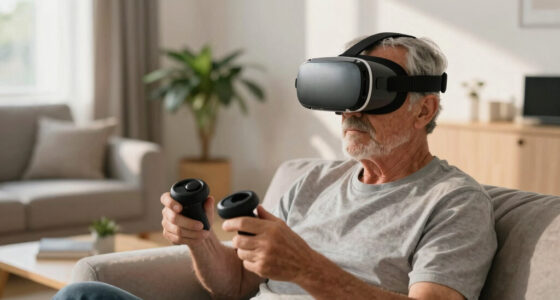
Your hands sweat during VR because your body reacts to the immersive experience, especially if it feels intense or unfamiliar. Poor sensor calibration, uncomfortable controller fit, or environmental heat can also cause stress and sweating. To reduce this, make sure your sensors are well-calibrated, use comfortable grips, stay in a cool room, and take regular breaks. Keep going to discover more tips on staying comfortable during your VR sessions.
Key Takeaways
- Hand sweating often results from stress and heightened arousal during immersive VR experiences.
- Proper sensor calibration and stable setup improve tracking accuracy, reducing user frustration and stress.
- Ensuring a comfortable environment, including room temperature and ventilation, helps prevent excessive sweating.
- Using ergonomic controllers, grips, or sweat-absorbing gloves minimizes unconscious grip tightening.
- Taking regular breaks, staying hydrated, and managing session duration decrease physical tension and sweating.

If you’ve ever experienced sweaty palms while using a VR headset, you’re not alone. This common issue often surprises newcomers and seasoned users alike. One of the main reasons for hand sweating in VR is that the technology can trigger a natural stress response, especially if your body perceives the experience as intense or unfamiliar. To improve your experience, paying attention to sensor calibration can make a significant difference. Properly calibrated sensors ensure that the VR system accurately tracks your hand movements, reducing frustrations that can lead to anxiety and sweat. When sensors are out of sync, your brain might interpret the situation as more challenging or stressful than it actually is, which can cause your palms to sweat more. Regularly calibrating your device helps create a smoother, more responsive experience, leading to better user comfort and less hand sweating over time.
Proper sensor calibration reduces stress and hand sweating in VR for a smoother, more comfortable experience.
Beyond sensor calibration, many users overlook the importance of user comfort in reducing hand sweating. The physical fit of your VR controllers and the environment you use them in play essential roles. If your controllers are too tight or too loose, your grip may tighten unconsciously, increasing sweat production. Choose controllers that fit well in your hands and consider using grips or gloves designed to absorb sweat. Additionally, maintaining a comfortable room temperature can help, as heat and humidity contribute to sweating. Ventilating your play area or using fans can keep you cool and prevent excessive sweating, making the experience more enjoyable and less frustrating. Proper setup can also make a difference, as an ergonomic environment helps reduce physical tension.
Another way to improve user comfort is to take regular breaks during extended VR sessions. When you’re immersed for too long, your body can become tense or fatigued, which can trigger sweat production. Short breaks allow your body to relax, reset sensor calibration if needed, and help you stay focused without tension building up. Staying hydrated is equally important, as dehydration can make sweating worse and leave you feeling uncomfortable.
Finally, consider the ergonomic design of your VR setup. Ensuring that your play area is organized, your controllers are within reach, and your seating or standing position is natural can reduce physical strain. When you’re physically comfortable, your body’s stress response diminishes, leading to less hand sweating. In the end, addressing sensor calibration issues and prioritizing user comfort are key steps toward a more pleasant VR experience—one where sweaty palms don’t hold you back from fully enjoying virtual worlds.

AMZDM Controller Grip for Meta Quest 3S Oculus Quest 3 VR Accessories Grips Cover for VR Touch Controllers Straps Silicone Covers Protector with Non-Slip Thumbstick Covers 1Pair Black
- Controller Protection: Secure and protect Oculus Quest 3/3S
- Enhanced Comfort & Control: Ergonomic design with non-slip surface
- Adjustable Knuckle Straps: Vegan leather straps for a secure fit
As an affiliate, we earn on qualifying purchases.
As an affiliate, we earn on qualifying purchases.
Frequently Asked Questions
Can VR Hand Sweating Cause Long-Term Skin Issues?
Yes, VR hand sweating can cause long-term skin issues if you don’t take precautions. Excess moisture can lead to skin irritation and increase the infection risk, especially if you don’t clean your VR controllers regularly. To protect your skin, dry your hands often, clean your equipment, and take breaks. These steps help prevent irritation and keep your skin healthy during extended VR sessions.
Are There Specific VR Headsets That Reduce Hand Sweating?
Imagine a gentle breeze cooling your palms as you immerse yourself in VR. Some headsets with advanced glove technology and haptic feedback, like Oculus Quest or Valve Index, are designed to reduce hand sweating. These models often feature better airflow and materials that wick moisture, keeping your hands dry. While no headset completely eliminates sweating, choosing ones with improved glove tech can make your experience more comfortable and immersive.
Does Hand Sweating Vary With Different Types of VR Content?
Yes, hand sweating varies with different VR content. When you engage with intense, fast-paced games, your hand temperature rises, and you tend to grip controllers more tightly, increasing sweat. Conversely, calmer experiences keep your hands cooler and lessen grip intensity. You can notice more sweating during high-adrenaline moments, so adjusting your grip or taking breaks can help manage comfort and reduce hand sweating during varied VR content.
Can Diet or Hydration Affect VR Hand Sweating?
Did you ever notice how a quick snack or a glass of water can unexpectedly help with VR hand sweating? Your diet impact and hydration effects play a role—you might sweat less when you’re well-hydrated or eating foods that stabilize your body’s temperature. Staying hydrated keeps your skin cool and reduces sweating, while proper nutrition can help manage your body’s response. So, keep water handy and choose balanced meals before VR sessions.
Are There Wearable Devices to Monitor Hand Moisture During VR?
Yes, wearable devices with sensor technology exist for moisture monitoring during VR. These devices track your hand moisture levels in real-time, helping you identify when sweating occurs. By providing immediate feedback, they allow you to adjust your environment or techniques to stay comfortable. Many of these sensors are compact, accurate, and designed specifically for VR use, making it easier to manage hand sweating and improve your overall experience.

ONISSI Pro Gaming Gloves for Sweaty Hands, Sim Racing Gloves for Gamer Grip
- Perfect Fit Sizing Guide: Ensure the right size for all gamers
- Universal Compatibility: Suitable for Xbox, PlayStation, PC, and simulators
- Enhanced Anti-Slip Grip: Improves control during intense gameplay
As an affiliate, we earn on qualifying purchases.
As an affiliate, we earn on qualifying purchases.
Conclusion
Now that you know why your VR hands sweat like a torrential downpour, you’re practically prepared for a thunderstorm in your palms! Just imagine, with these simple tips, you could transform your sweaty hands into the coolest, driest hands in the virtual universe. Say goodbye to slip-ups, and hello to smooth, sweat-free adventures. Get ready to conquer VR worlds with hands so dry, they’ll make deserts jealous! The virtual domain has never been so comfortably cool.
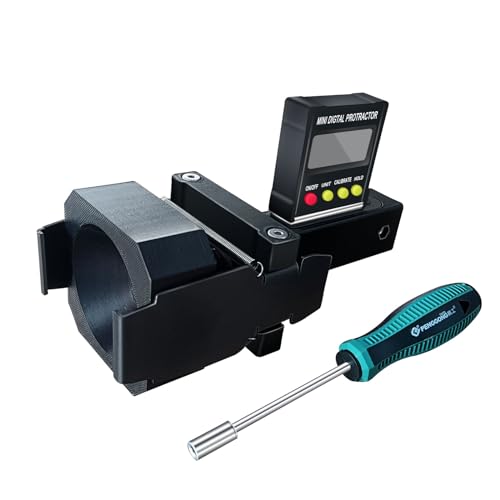
Dynamic ACC Positioning Tool For Eyeball Unit, ADAS Calibration Tool
- Power Source: Requires 2 AAA batteries (not included)
- Compatibility: For eyeball unit only, not planar
- Function: Supports dynamic ACC calibration only
As an affiliate, we earn on qualifying purchases.
As an affiliate, we earn on qualifying purchases.
AMZDM Controller Grip for Meta Quest 3S Oculus Quest 3 VR Accessories Grips Cover for VR Touch Controllers Straps Silicone Covers Protector with Non-Slip Thumbstick Covers 1Pair Black
- Controller Protection: Secure and protect Oculus Quest 3/3S
- Enhanced Comfort & Control: Ergonomic design with non-slip surface
- Adjustable Knuckle Straps: Vegan leather straps for a secure fit
As an affiliate, we earn on qualifying purchases.
As an affiliate, we earn on qualifying purchases.