
When choosing a GPU for VR productivity, performance and reliability are critical. The best options deliver smooth, lag-free experiences essential for professional workflows, creative design, or detailed simulations. The ASUS Prime Radeon RX 9070 XT stands out as the top overall pick thanks to its high VRAM and robust gaming capabilities, while the PNY NVIDIA Quadro RTX 4000 offers professional-grade ray tracing and stability for demanding tasks. However, tradeoffs include higher costs for premium features or increased power consumption in some models. Continue reading to explore the full lineup and find the best fit for your VR needs.

Get VR and gaming gear delivered free — and shop member deals
- Fast, free delivery on millions of items
- Access to Prime Big Deal Days deals on October 6–7
- Prime Video, Amazon Music and more included
Key Takeaways
- High VRAM (16GB or more) is essential for heavy VR workloads and future-proofing.
- Professional cards like the Quadro series excel in stability and software support but cost significantly more.
- Gaming GPUs such as the RTX 5080 deliver exceptional performance but may have features unnecessary for non-gaming VR tasks.
- Power consumption and size vary widely; compact or lower-power models suit smaller or energy-conscious setups.
- Value often comes from balancing price with essential features—more expensive isn’t always better for VR productivity.
| ASUS Prime Radeon RX 9070 XT 16GB GDDR6 OC Edition Gaming Graphics Card |  | Best Overall for High-Performance VR Productivity | GPU Model: Radeon RX 9070 XT | Memory: 16GB GDDR6 | Design: 2.5-slot | VIEW ON AMAZON | See Our Full Breakdown |
| ASUS Dual GeForce RTX 3050 6GB GDDR6 OC Edition Gaming Graphics Card | 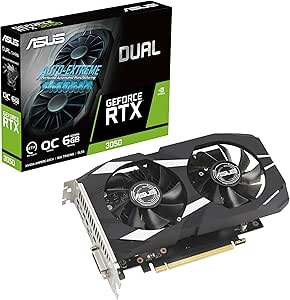 | Best Value for Entry-Level VR Productivity | GPU: GeForce RTX 3050 | Memory: 6GB GDDR6 | Boost Clock: 1500 MHz (OC Mode) | VIEW ON AMAZON | See Our Full Breakdown |
| PNY NVIDIA Quadro RTX 4000 – Ray Tracing GPU |  | Best for Professional VR and Rendering Tasks | GPU Architecture: Turing | RT Cores: 36 | Memory: Ultra-fast graphics memory | VIEW ON AMAZON | See Our Full Breakdown |
| PNY NVIDIA RTX A2000 12GB |  | Best Compact Professional GPU for VR Workloads | CUDA Cores: 3328 | TFLOPS: 7.99 | Memory: 12GB | VIEW ON AMAZON | See Our Full Breakdown |
| GIGABYTE Radeon RX 9070 XT Gaming OC 16G Graphics Card |  | Best for Premium VR Performance with Advanced Cooling | GPU Model: Radeon RX 9070 XT | Memory: 16GB GDDR6 | Interface: PCIe 5.0 | VIEW ON AMAZON | See Our Full Breakdown |
| GIGABYTE GeForce RTX 5080 Gaming OC 16G Graphics Card |  | Best Overall for High-End VR Productivity | Graphics Coprocessor: NVIDIA GeForce RTX 5080 | RAM: 16 GB | GPU Clock Speed: 2.73 gigahertz | VIEW ON AMAZON | See Our Full Breakdown |
| ASRock Intel Arc Pro B60 24GB Graphics Card, Workstation GPU, PCIe 5.0, 4x DisplayPort 2.1, Blower |  | Best for Professional Workstation VR and Multi-Monitor Setups | Memory: 24GB GDDR6 | Memory Bus: 192-bit | Architecture: Intel Xe2-HPG | VIEW ON AMAZON | See Our Full Breakdown |
| EVGA GeForce GTX TITAN X 12GB Gaming Graphics Card (Renewed) |  | Best for Budget-Conscious VR Enthusiasts | Graphics Coprocessor: NVIDIA GeForce GTX Titan | RAM: 12 GB | GPU Clock Speed: 2 GHz | VIEW ON AMAZON | See Our Full Breakdown |
| ASRock Radeon RX 9060 XT Challenger 16GB OC Graphics Card |  | Best for 1440p Gaming and Mid-Range VR Work | GPU Architecture: RDNA 4 | Memory: 16GB GDDR6 | Boost Clock: 3290 MHz | VIEW ON AMAZON | See Our Full Breakdown |
| PNY NVIDIA Quadro P5000 16 GB VR Ready Graphics Card |  | Best for Professional VR and Creative Workstations | GPU Architecture: Pascal | Memory: 16 GB | VR Ready: Yes | VIEW ON AMAZON | See Our Full Breakdown |
| gpu for vr productivity | Memory |
|---|---|
| ASUS Prime Radeon RX 9070 XT 1 | 16GB GDDR6 |
| ASUS Dual GeForce RTX 3050 6GB | 6GB GDDR6 |
| PNY NVIDIA Quadro RTX 4000 | Ultra-fast graphics memory |
| PNY NVIDIA RTX A2000 12GB | 12GB |
| GIGABYTE Radeon RX 9070 XT Gam | 16GB GDDR6 |
| GIGABYTE GeForce RTX 5080 Gami | — |
| ASRock Intel Arc Pro B60 24GB | 24GB GDDR6 |
| EVGA GeForce GTX TITAN X 12GB | — |
| ASRock Radeon RX 9060 XT Chall | 16GB GDDR6 |
| PNY NVIDIA Quadro P5000 16 GB | 16 GB |
More Details on Our Top Picks
ASUS Prime Radeon RX 9070 XT 16GB GDDR6 OC Edition Gaming Graphics Card
This model stands out for combining high clock speeds up to 3030 MHz with advanced cooling features like axial-tech fans and phase-change thermal pads, making it ideal for demanding VR workloads. Compared to the GIGABYTE Radeon RX 9070 XT Gaming OC, it offers comparable memory and thermal management but often operates more quietly thanks to its dual BIOS and 0dB technology. The main tradeoff is its large 2.5-slot design, which may not fit smaller cases, and its high power draw could require a robust power supply. For those seeking top-tier VR performance and quiet operation, this card delivers exceptional speed and cooling efficiency.
Pros:- Exceptional cooling with axial-tech fans and phase-change thermal pads
- Very high clock speeds for smooth VR rendering
- Quiet operation with dual BIOS and 0dB technology
Cons:- Large 2.5-slot design limits compatibility in smaller cases
- High power consumption may require a more capable PSU
Best for: High-end VR content creators or gamers who need peak performance in a spacious PC case
Not ideal for: Users with small or compact builds, due to its large size and high power requirements
- GPU Model:Radeon RX 9070 XT
- Memory:16GB GDDR6
- Design:2.5-slot
- Cooling:Axial-tech fans, phase-change thermal pad
- Clock Speeds:up to 3030 MHz (Boost, OC mode)
- Features:Dual BIOS, 0dB technology
Our verdict“This card is perfect for enthusiasts prioritizing maximum VR performance in a spacious, well-powered system.”
ASUS Dual GeForce RTX 3050 6GB GDDR6 OC Edition Gaming Graphics Card
This card leverages NVIDIA’s Ampere architecture to provide enhanced ray-tracing and AI capabilities at an accessible price point, making it suitable for those new to VR or with moderate performance needs. It features dual axial-tech fans for effective cooling, similar to the NVIDIA Quadro RTX 4000, but with a focus on gaming rather than professional rendering. Its 6GB VRAM limits its suitability for very demanding VR applications, especially compared to higher-end options like the GIGABYTE RX 9070 XT. Yet, it offers a balanced mix of performance and affordability for casual VR workflows. Ideal for budget-conscious users seeking decent VR performance without high-end specs.
Pros:- Enhanced ray-tracing and AI features from Ampere architecture
- Effective dual-fan cooling system
- Durable stainless steel bracket and dust resistance
Cons:- Limited to 6GB VRAM, not suitable for heavy VR workloads
- Requires a small chassis for optimal fit
Best for: Casual VR users or entry-level content creators with limited budgets
Not ideal for: Power users or professionals requiring large VRAM or professional-grade rendering
- GPU:GeForce RTX 3050
- Memory:6GB GDDR6
- Boost Clock:1500 MHz (OC Mode)
- Design:2-slot
- Fan Design:Axial-tech
- Durability:Stainless steel bracket, IP5X Dust Resistance
Our verdict“This card works well for newcomers or casual VR users who want reliable performance at a lower price.”
PNY NVIDIA Quadro RTX 4000 – Ray Tracing GPU
This professional-grade card excels in real-time ray tracing, offering 36 RT cores and high-performance graphics memory, making it a strong choice for immersive VR experiences that demand photorealistic rendering. Its Turing architecture is optimized for demanding professional workflows rather than gaming, unlike the gaming-focused options like the ASUS RX 9070 XT. The Quadro RTX 4000’s primary tradeoff is its high cost and system requirements, which make it less suitable for casual or budget-conscious users. This is ideal for professionals needing precise, high-quality VR visuals and complex rendering capabilities.
Pros:- Real-time ray tracing for photorealistic VR visuals
- Fast performance suited for immersive VR applications
- Supports high-quality rendering workflows
Cons:- Expensive compared to consumer-oriented options
- Requires compatible system and sufficient power supply
Best for: VR content creators and professionals working on high-fidelity rendering projects
Not ideal for: Casual gamers or users with limited budgets, due to its professional focus and cost
- GPU Architecture:Turing
- RT Cores:36
- Memory:Ultra-fast graphics memory
- Technology:NVIDIA RTX
Our verdict“This GPU is tailored for professionals demanding precision and high-quality VR rendering, not casual use.”
PNY NVIDIA RTX A2000 12GB
The RTX A2000 12GB brings a high CUDA core count and efficient design into a low-profile form factor, making it suitable for compact professional workstations focused on VR tasks. With 3328 CUDA cores and 7.99 TFLOPS, it offers considerable computational power, comparable to higher-end cards like the Quadro RTX 4000 but in a smaller package. The main limitation is the lack of detailed specs and limited consumer-oriented features, which might make it less appealing for gaming or casual VR users. This GPU makes sense for professionals needing reliable, space-saving VR performance in a constrained system.
Pros:- High CUDA core count for demanding VR and professional workflows
- Compact low-profile design fits small builds
- Power-efficient with a maximum of 70W consumption
Cons:- Limited detailed specs and user feedback
- No mention of price or detailed performance metrics
Best for: Professionals building small or low-profile workstations requiring VR capabilities
Not ideal for: Enthusiasts or gamers who need large VRAM or extensive gaming features
- CUDA Cores:3328
- TFLOPS:7.99
- Memory:12GB
- Power Consumption:70W
- Form Factor:Low-profile, dual-slot
Our verdict“This card is excellent for space-constrained professional setups needing solid VR performance.”
GIGABYTE Radeon RX 9070 XT Gaming OC 16G Graphics Card
Compared with the ASUS RX 9070 XT, this GIGABYTE model emphasizes PCIe 5.0 support and features RGB lighting, appealing to users who want cutting-edge data transfer speeds and aesthetic customization. Its WINDFORCE cooling system ensures thermal stability during long VR sessions, but the high-performance nature may lead to increased power needs and a higher price point. The limited information on price and availability makes it harder to judge value, yet its robust features make it suitable for high-end VR setups. This pick is best for enthusiasts seeking a blend of performance, cooling, and style.
Pros:- 16GB GDDR6 memory supports demanding VR content
- Supports PCIe 5.0 for faster data transfer
- Advanced cooling with WINDFORCE technology
Cons:- Potentially high power consumption
- Limited info on price and availability
Best for: VR enthusiasts and gamers who want top-tier hardware with advanced cooling and aesthetics
Not ideal for: Budget-conscious users or those with smaller or less powerful PSUs
- GPU Model:Radeon RX 9070 XT
- Memory:16GB GDDR6
- Interface:PCIe 5.0
- Cooling System:WINDFORCE
- Lighting:RGB
Our verdict“This card is ideal for users seeking high performance, advanced cooling, and customizable features in a premium package.”
GIGABYTE GeForce RTX 5080 Gaming OC 16G Graphics Card
The GIGABYTE GeForce RTX 5080 Gaming OC stands out as the top choice for demanding VR workflows thanks to its latest RTX architecture and 16GB GDDR7 memory, which ensure smooth rendering of complex scenes. Compared with the PNY NVIDIA Quadro P5000, it offers significantly better real-time performance in VR, but this comes with a higher price tag and increased power needs. Its large cooling solution maintains thermal stability during extended sessions. However, its size and cost may be prohibitive for smaller or budget-conscious setups. This makes it ideal for professionals who prioritize raw graphics power and have the space and budget to support it.Pros:- Latest NVIDIA RTX architecture delivers fast, smooth VR experiences
- Large 16GB GDDR7 memory handles complex projects efficiently
- Effective cooling with 3 fans prevents thermal throttling
- Supports ultra-high resolutions up to 7680×4320
Cons:- High cost makes it less accessible for casual users
- Large size requires a spacious PC case and adequate airflow
- Potentially high power consumption demands a strong power supply
Best for: High-end VR creators and enthusiasts with spacious cases and a flexible budget
Not ideal for: Casual VR users or those with limited case space and tighter budgets
- Graphics Coprocessor:NVIDIA GeForce RTX 5080
- RAM:16 GB
- GPU Clock Speed:2.73 gigahertz
- Video Output Interface:DisplayPort, HDMI
- Graphics RAM Type:GDDR7
- Maximum Resolution:7680×4320 pixels
- Interface:PCI-Express x16
- Number of Fans:3
Our verdict“This GPU is best suited for professionals or serious enthusiasts demanding top-tier VR performance and willing to invest accordingly.”
ASRock Intel Arc Pro B60 24GB Graphics Card, Workstation GPU, PCIe 5.0, 4x DisplayPort 2.1, Blower
The ASRock Intel Arc Pro B60 offers a substantial 24GB of GDDR6 memory and PCIe 5.0 support, making it a strong contender for multi-monitor VR workflows and AI tasks. Compared with the PNY NVIDIA Quadro P5000, it provides newer PCIe standards and more display outputs, but its blower-style cooling can be less effective under sustained high loads. Its silent operation at low loads makes it appealing for quiet office environments. However, its professional focus and potential size constraints mean it may be overkill for casual VR gaming. This GPU is well-suited for professionals working on complex 3D projects or AI tasks with multiple high-res displays.Pros:- Massive 24GB GDDR6 memory handles large datasets and AI workloads
- Supports PCIe 5.0 for maximum bandwidth and faster data transfer
- Four DisplayPort 2.1 outputs enable extensive multi-monitor setups
- Silent operation at low loads
Cons:- Blower cooling may be less effective for sustained high performance
- Requires a compatible case with sufficient clearance
- Higher power requirements may need a robust PSU
Best for: VR developers and 3D professionals needing multi-monitor and AI integration
Not ideal for: Casual gamers or users with small cases lacking sufficient clearance
- Memory:24GB GDDR6
- Memory Bus:192-bit
- Architecture:Intel Xe2-HPG
- Core Count:20 Xe cores
- Outputs:4x DisplayPort 2.1
- Power:Single 8-pin, 200W TDP
Our verdict“This card is tailored for professionals managing large VR projects and multi-monitor AI workflows, where stability and memory capacity outweigh size and cost.”
EVGA GeForce GTX TITAN X 12GB Gaming Graphics Card (Renewed)
The EVGA GTX TITAN X 12GB provides a solid foundation for VR productivity at a more accessible price point, with 12GB of GDDR5 memory and a 2 GHz GPU clock. Compared to the GIGABYTE RTX 5080, it lacks the latest architecture and ray-tracing features but remains capable of handling VR applications and 4K content. Its refurbished status offers good value, though warranty length and reliability should be confirmed. Its moderate size makes it compatible with most cases, but it’s not as future-proof or power-efficient as newer models. This card fits well for users starting with VR content creation who want decent performance without the premium cost.Pros:- 12GB GDDR5 memory supports demanding VR applications
- VR ready and capable of 4K gaming
- Refurbished with warranty, offering good value
Cons:- Older architecture means less efficiency and features
- Limited warranty compared to new models
- No included accessories or advanced cooling options
Best for: Entry-level VR creators and gamers upgrading from older hardware
Not ideal for: Power users or those planning complex VR workflows requiring high-end features
- Graphics Coprocessor:NVIDIA GeForce GTX Titan
- RAM:12 GB
- GPU Clock Speed:2 GHz
- Video Output Interface:DisplayPort
- Graphics RAM Type:GDDR5
- Maximum Resolution:4096×2160
Our verdict“This GPU is suited for budget-conscious users seeking reliable VR performance with room to grow.”
ASRock Radeon RX 9060 XT Challenger 16GB OC Graphics Card
The ASRock Radeon RX 9060 XT Challenger offers a compelling mix of performance and value, with a boost clock up to 3290 MHz and 16GB GDDR6 memory. Compared to the GIGABYTE RTX 5080, it’s more affordable while still supporting high-quality VR rendering at 1440p and even 4K in some scenarios. Its dual silent fans help maintain quiet operation, but its size and 550W power requirement could be limiting for smaller builds. This makes it an attractive choice for mid-range VR users who want solid performance without the premium price of top-tier cards.Pros:- High boost clock ensures smooth performance in VR and games
- 16GB GDDR6 memory supports modern VR applications
- Supports DisplayPort 2.1 and HDMI 2.1 for high-res output
- Silent dual fan cooling system
Cons:- Requires a 550W power supply, which may be high for some builds
- Size may limit compatibility with smaller cases
- More suited to gaming and mid-range tasks than professional workflows
Best for: Mid-range VR users focused on 1440p and occasional 4K content
Not ideal for: High-end VR professionals needing ultra-high resolution or maximum future-proofing
- GPU Architecture:RDNA 4
- Memory:16GB GDDR6
- Boost Clock:3290 MHz
- Display Outputs:DisplayPort 2.1a, HDMI 2.1b
- Dimensions:249 mm x 132 mm x 41 mm
- Power Connector:1 x 8-pin
Our verdict“This card strikes a balance between performance and affordability for serious VR gamers and creators at 1440p and entry-level 4K.”
PNY NVIDIA Quadro P5000 16 GB VR Ready Graphics Card
The NVIDIA Quadro P5000 excels in demanding professional VR and rendering environments thanks to its 16GB VRAM and Pascal architecture, supporting multi-projection and extensive encoding features. Compared with the GIGABYTE RTX 5080, it offers stability and certified drivers for professional software, but falls short in raw gaming performance and lacks features like ray tracing. Its weight and power requirements mean it needs a robust setup, making it less suitable for casual users. This GPU is perfect for those who prioritize stability, accuracy, and extensive professional features over gaming bells and whistles.Pros:- Massive 16GB VRAM ideal for complex scenes and multi-projection
- Supports VR and professional rendering workflows
- Certified drivers ensure compatibility with enterprise software
Cons:- High cost limits accessibility for hobbyists
- Heavy and power-hungry, requiring a strong system
- Designed primarily for professional use, not gaming
Best for: VR content creators and engineers working with complex simulations and multi-system setups
Not ideal for: Casual gamers or users seeking cutting-edge gaming visuals
- GPU Architecture:Pascal
- Memory:16 GB
- VR Ready:Yes
- Supported Systems:Windows 10, Linux
- Features:Multi-Projection, Mosaics, 16K Texture
- Interface:PCI-Express x16
Our verdict“This GPU is best suited for professionals who need maximum stability, VR accuracy, and extensive computational features rather than gaming performance.”

How We Picked
Products were evaluated based on performance benchmarks relevant to VR workloads, including frame rates, latency, and stability. Build quality, thermal management, and noise levels also influenced rankings, as these factors impact long-term usability. We prioritized models offering high VRAM and strong driver support for professional and creative applications. Cost-effectiveness was considered, but only in relation to performance gains, ensuring that higher-priced options justify their premium through tangible benefits for VR productivity. The ranking reflects a blend of raw power, reliability, and value tailored specifically for VR workflows.Factors to Consider When Choosing Gpu For Vr Productivity
Choosing the right GPU for VR productivity involves more than just raw power. Several key factors can influence your experience and the value you get. Understanding these considerations helps you avoid common pitfalls like underpowered cards or overly expensive models that don’t match your needs. Keep in mind that the best GPU balances performance, compatibility, and cost, especially when used for demanding VR applications or professional work.Performance and VRAM
For VR productivity, performance is paramount. Look for a GPU with at least 12GB of VRAM, as this helps handle large, complex scenes without lag. Higher VRAM improves stability and future-proofing, especially in professional or design environments. Don’t be tempted to sacrifice VRAM for a slightly faster card if you plan to run intensive VR applications long-term, as bottlenecks can significantly hamper productivity.
Professional vs. Gaming GPUs
Professional GPUs like the NVIDIA Quadro series prioritize stability, optimized drivers, and software support, making them ideal for CAD, 3D modeling, and other precision tasks. Gaming GPUs, such as the RTX series, often offer higher raw performance at a better price but may lack some professional-grade features. The choice hinges on your primary use: if stability and software certifications matter, investing in a workstation GPU makes sense; otherwise, gaming cards can deliver excellent VR performance for less.
Power Consumption and Size
Higher-end GPUs can draw significant power and occupy large spaces inside your PC. If your setup has limited power capacity or space constraints, consider models with lower TDP or smaller form factors. Efficient cooling solutions are also vital to prevent thermal throttling, which can hinder VR performance. Budgeting for a quality power supply and adequate case airflow helps maintain a smooth VR experience.
Compatibility and Connectivity
Ensure your GPU supports the latest display standards like HDMI 2.1 or DisplayPort 2.1, which are crucial for high-resolution VR headsets. Check that your PC’s motherboard and power supply are compatible with the GPU’s requirements. Also, verify that the GPU has enough outputs for your VR setup, especially if you plan to run multi-monitor configurations alongside VR. Compatibility issues can cause frustrating delays or suboptimal performance.
Cost vs. Value
While top-tier GPUs deliver impressive performance, they often come with high price tags. Balance your budget against your specific needs—if you’re a professional, investing more can be justified; for casual or light VR tasks, mid-range models may suffice. Beware of overpaying for features you won’t use, but don’t cut corners on essentials that could limit your workflow or cause stability issues. Focus on the performance-to-price ratio for the best long-term investment.
Frequently Asked Questions
Is a professional GPU necessary for VR productivity?
Not necessarily. While professional GPUs like the Quadro series provide enhanced stability, driver support, and certifications for design and engineering software, many gaming GPUs can handle VR tasks effectively, especially in less demanding workflows. Your choice depends on your specific applications; if you use software that benefits from professional driver support, investing in a workstation GPU makes sense. For general VR work and gaming, high-end gaming cards often deliver excellent performance at a lower cost.
How much VRAM do I need for serious VR productivity?
For demanding VR tasks such as rendering, large scene editing, or professional simulations, a GPU with at least 12GB of VRAM is recommended. This ensures smoother performance and greater stability with complex models and textures. For lighter use or casual VR, 8GB may suffice, but opting for more VRAM provides a buffer that helps future-proof your setup. Keep in mind that VRAM is a limiting factor in managing large datasets within VR environments.
Should I prioritize performance or stability in my GPU?
Both matter, but the priority depends on your use case. For professional work involving precise modeling, CAD, or detailed rendering, stability and driver support take precedence, making a workstation GPU a better choice. If gaming or general VR entertainment is your focus, raw performance with gaming GPUs can provide the best experience. Balancing these factors depends on whether your workflows are mission-critical or more recreational.
Are the latest GPUs worth the extra cost for VR?
Latest GPUs often bring improvements in processing power, VRAM, and connectivity, which can enhance VR experiences, especially at high resolutions or frame rates. However, the cost-to-benefit ratio varies—if your current setup already meets your performance needs, upgrading might offer diminishing returns. For new builds or significant upgrades, investing in recent models ensures compatibility with upcoming VR headsets and software, making the higher price justifiable.
Can I use a mid-range GPU for professional VR tasks?
Yes, mid-range GPUs can handle many VR productivity tasks effectively, especially if they offer sufficient VRAM and good driver support. They often provide a good balance between cost and performance, suitable for hobbyists, students, or small studios. However, for highly detailed projects or large datasets, mid-range cards may struggle with rendering times or stability, so evaluating your specific workload is important before choosing a budget option.
Conclusion
For most professional users and serious VR enthusiasts, the ASUS Prime Radeon RX 9070 XT offers the best overall balance of power, stability, and future-proofing. Those seeking the best value should consider mid-range options like the ASUS Dual GeForce RTX 3050, which provides solid performance without breaking the bank. For professionals requiring guaranteed stability and driver support, the PNY NVIDIA Quadro RTX 4000 stands out despite its higher cost. Beginners or casual users might start with more affordable gaming cards, while power users should look toward premium models like the RTX 5080 for ultimate performance and longevity.
As an affiliate, we earn on qualifying purchases.Fall Picks
fall essentials