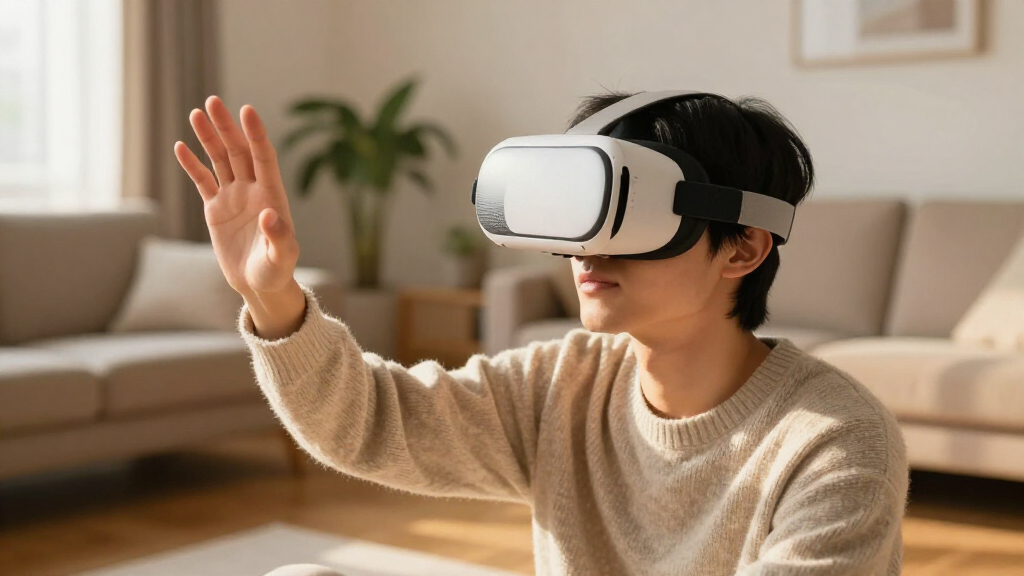
For most buyers, the Meta Quest 3 is the best standalone VR headset here, pairing a strong game library with color passthrough and mixed reality features. The Quest 3S offers a more accessible entry point, while HTC’s Vive XR Elite and Focus Vision suit buyers who want broader PC VR or enterprise-oriented options. The main tradeoffs are display clarity, comfort, age and condition, and whether you need PC connectivity or a headset that works on its own. Older Quest 2 and Oculus Go models may appeal for limited budgets or simple viewing, but their capabilities and software support differ sharply from newer headsets. Read on for how each option compares and which one fits your priorities.

Play games on Amazon Luna for your next adventure, included with Prime
- A rotating selection of games, no download needed
- Play on TV, laptop or phone
- Fast, free delivery for your gear, too
Complete the kit



Key Takeaways
- Quest 3 leads the general-purpose picks because it combines standalone gaming with color passthrough and mixed reality; the Quest 3S keeps similar platform access but uses a less capable display and lens design.
- Quest 3S is the entry point for current Meta VR, while renewed Quest 2 units are older alternatives with less headroom and more uncertainty around condition.
- HTC’s headsets serve different priorities: Vive XR Elite emphasizes a compact convertible design, while Focus Vision adds mixed reality and PC VR options in a more headset-like form.
- Product condition matters as much as the model name. Renewed Quest 2 and Quest 3S listings can vary in wear, included accessories, and remaining useful life.
- Oculus Go and Vive Focus Plus are legacy choices with narrower use cases; buyers seeking current game support should favor newer Quest or Vive models.
| Meta Quest 3 512GB VR Headset with Gorilla Tag Bundle |  | Best Overall | Storage: 512GB | Processor: Snapdragon XR2 Gen 2 | Memory: 8GB RAM | VIEW LATEST PRICE | See Our Full Breakdown |
| Meta Quest Pro | 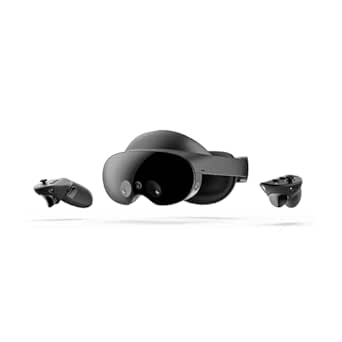 | Best Premium | Storage: 256GB | Memory: 12GB RAM | Sensors: 10 VR/MR sensors | VIEW LATEST PRICE | See Our Full Breakdown |
| Meta Quest 3S 128GB VR Headset (Renewed Premium) |  | Best Value | Storage: 128GB | Memory: 8GB RAM | Processor: Snapdragon XR2 Gen 2 | VIEW LATEST PRICE | See Our Full Breakdown |
| Oculus Go Standalone Virtual Reality Headset, 64GB |  | Best Budget Media Viewer | Storage: 64GB | Platform: Qualcomm Snapdragon 821 | Audio: Built-in spatial audio drivers; 3.5mm jack | VIEW LATEST PRICE | See Our Full Breakdown |
| Meta Quest 2 256 GB All-in-One VR Headset (Renewed) |  | Best Big-Library Budget Pick | Storage: 256GB | Display: LCD, 1832 × 1920 pixels per eye | Refresh rate: 90Hz | VIEW LATEST PRICE | See Our Full Breakdown |
| Meta Quest 3S 128GB VR Headset with Gorilla Tag Bundle |  | Best for Families and Younger Players | Storage: 128GB | Processor: Snapdragon XR2 Gen 2 | Memory: 8GB RAM | VIEW LATEST PRICE | See Our Full Breakdown |
| HTC Vive Focus Plus 6DOF VR Headset Bundle |  | Best Legacy Pick for Enterprise Simulations | Brand: HTC | Model: Vive Focus Plus | Type: Standalone VR headset | VIEW LATEST PRICE | See Our Full Breakdown |
| HTC Vive XR Elite Mixed Reality and PC VR Headset with Deluxe Pack and Controllers |  | Best Convertible Hybrid Design | Combined resolution: 3840 × 1920 | Field of view: Up to 110° | Refresh rate: 90 Hz | VIEW LATEST PRICE | See Our Full Breakdown |
| Meta Quest 2 All-in-One VR Headset, 128 GB |  | Best Budget Entry Point | Storage: 128 GB | Audio: 3D positional audio | Controls: Hand tracking and controllers | VIEW LATEST PRICE | See Our Full Breakdown |
| HTC Vive Focus Vision Mixed Reality and PC VR Headset with Controllers |  | Best Premium Standalone for Enthusiasts | Resolution: 2448 × 2448 per eye (5K total) | Field of view: Up to 120° | Refresh rate: 90 Hz | VIEW LATEST PRICE | See Our Full Breakdown |
| HTC VIVE Focus Vision XR Headset Wired Bundle |  | Best for PC VR and Standalone Flexibility | Display resolution: 2448 × 2448 pixels per eye | Field of view: Up to 120° | Refresh rate: 90 Hz | VIEW LATEST PRICE | See Our Full Breakdown |
| standalone VR headset | Storage | Connectivity | Memory |
|---|---|---|---|
| Meta Quest 3 512GB VR Headset | 512GB | Wireless standalone | 8GB RAM |
| Meta Quest Pro | 256GB | — | 12GB RAM |
| Meta Quest 3S 128GB VR Headset | 128GB | — | 8GB RAM |
| Oculus Go Standalone Virtual R | 64GB | Standalone; no PC or phone required | — |
| Meta Quest 2 256 GB All-in-One | 256GB | Bluetooth | — |
| Meta Quest 3S 128GB VR Headset | 128GB | Wireless | 8GB RAM |
| HTC Vive Focus Plus 6DOF VR He | — | — | — |
| HTC Vive XR Elite Mixed Realit | — | Wireless or USB PC streaming | — |
| Meta Quest 2 All-in-One VR Hea | 128 GB | Wireless | — |
| HTC Vive Focus Vision Mixed Re | — | — | 12 GB RAM |
| HTC VIVE Focus Vision XR Heads | — | DisplayPort PC VR streaming and Wi-Fi streaming | 12 GB RAM |
More Details on Our Top Picks
Meta Quest 3 512GB VR Headset with Gorilla Tag Bundle
The Meta Quest 3 512GB sets the benchmark in this lineup because it pairs the same Snapdragon XR2 Gen 2 chip found in the cheaper Quest 3S with a sharper 4K+ display and double the storage. That extra headroom matters if you install large games and apps rather than juggling deletions, which is a real frustration on 128GB models. Compared with the Meta Quest Pro, it delivers the same full-color mixed reality passthrough at a far more accessible positioning, though it lacks the Pro’s self-tracking controllers and facial expression capture. The Gorilla Tag bundle adds exclusive items and 2,000 Shiny Rocks, making it a smart pick for younger players. The main compromise is battery life — just over two hours — so longer sessions need a power bank or a break.
Pros:- Same Snapdragon XR2 Gen 2 performance as pricier mixed reality headsets
- 4K+ Infinite Display is sharper than the Quest 3S and Quest 2 panels
- 512GB of storage removes the need to manage game libraries
- Full-color passthrough makes mixed reality games playable in any room
Cons:- Battery life tops out at just over two hours
- Controllers lack the self-tracking and advanced haptics of the Quest Pro
Best for: Players who want the sharpest standalone experience with room to grow, especially Gorilla Tag fans who will use the bundled currency
Not ideal for: Marathon session players who can’t tolerate recharging after roughly two hours
- Storage:512GB
- Processor:Snapdragon XR2 Gen 2
- Memory:8GB RAM
- Display:4K+ Infinite Display
- Battery life:2+ hours
- Passthrough:Full-color mixed reality via two RGB cameras
- Connectivity:Wireless standalone
- Bundle:Gorilla Tag items and 2,000 Shiny Rocks
Our verdict“This pick makes the most sense for buyers who want the best balance of display quality, power, and storage without stepping up to premium pricing.”
Meta Quest Pro
The Meta Quest Pro earns its premium slot through hardware the others simply don’t have: self-tracking Touch Pro controllers that read individual finger movements, pancake lenses with local dimming and quantum dot technology, and avatar cameras that mirror your facial expressions. Where the Meta Quest 3 is the better pure gaming value, the Pro is built for social VR and virtual meetings, where expressive avatars and a counter-balanced fit for extended wear change the experience. Its 12GB of RAM and 10 VR/MR sensors give it headroom the Quest 2 and Oculus Go can’t approach. The tradeoffs are real, though: 256GB of storage is half what the Quest 3 512GB offers, a Meta account is mandatory, and Meta doesn’t publish battery life or weight figures here — a gap buyers should question before committing.
Pros:- Self-tracking controllers capture detailed finger actions with advanced haptics
- Pancake lenses with local dimming and quantum dots deliver superior image depth
- Facial expression tracking makes social VR feel genuinely personal
- Counter-balanced ergonomics suit all-day wear
Cons:- 256GB storage is half the Quest 3’s capacity at a premium position
- No published battery life or weight figures
- Requires a Meta account
Best for: Professionals and social VR enthusiasts who need expressive avatars, finger-tracked controllers, and comfort for long virtual meetings
Not ideal for: Budget-conscious gamers who would get 90% of the fun from a Quest 3 or 3S for considerably less
- Storage:256GB
- Memory:12GB RAM
- Sensors:10 VR/MR sensors
- Controllers:Touch Pro Controllers with self-tracking cameras and haptics
- Display features:Pancake lenses, local dimming, quantum dot technology
- Passthrough:Full-color mixed reality
- Audio:Spatial audio
- Account requirement:Meta account required
Our verdict“This model is better suited to serious social and workplace VR users than gamers chasing raw value.”
Meta Quest 3S 128GB VR Headset (Renewed Premium)
For most buyers, the Meta Quest 3S is the smartest spending decision in this roundup. It runs the same Snapdragon XR2 Gen 2 processor and 8GB of RAM as the full Quest 3, so games load and play nearly identically — the compromise is an LCD panel at 2064 × 2208 instead of the Quest 3’s 4K+ display, and 128GB instead of 512GB of storage. Compared with the Meta Quest 2, it’s a clear generational step up thanks to color passthrough and the newer chip. The renewed premium condition with the Amazon Renewed Guarantee softens the risk, but it’s still not a new unit. Hand tracking and Touch controllers both come standard, and up to three hours of battery life actually beats the Quest 3’s runtime.
Pros:- Same Snapdragon XR2 Gen 2 chip and 8GB RAM as the pricier Quest 3
- Up to 3 hours of battery life beats the Quest 3’s runtime
- Color passthrough and hand tracking included at an entry position
- Renewed Guarantee provides recourse if the unit falls short
Cons:- LCD display and lower resolution than the Quest 3’s 4K+ panel
- Renewed condition rather than factory new
Best for: First-time or budget-focused buyers who want current-generation performance and don’t need maximum storage or the sharpest panel
Not ideal for: Players with large game libraries — 128GB fills up fast and there’s no cheaper storage tier below it
- Storage:128GB
- Memory:8GB RAM
- Processor:Snapdragon XR2 Gen 2
- Display:LCD, 2064 × 2208 pixels, 90Hz
- Field of view:96 degrees
- Battery life:Up to 3 hours
- Tracking:Hand tracking and Touch controllers
- Condition:Renewed Premium with Amazon Renewed Guarantee
Our verdict“This option stands out for anyone who wants modern standalone VR performance while spending as little as possible.”
Oculus Go Standalone Virtual Reality Headset, 64GB
The Oculus Go occupies a different niche than everything else here: it’s a lightweight media and social viewer, not a gaming machine. Its single included controller handles pointing and clicking, which is fine for movies, virtual events, and casual apps but a world away from the 6DOF motion control of the Meta Quest 2 or Quest 3S. The Snapdragon 821 platform and 64GB of storage place it firmly in legacy territory, and its app ecosystem has been sunset — new content is scarce. What it still does well is simple: no PC, phone, or wires, built-in spatial audio, and a glasses spacer that makes it genuinely comfortable for glasses wearers watching long films. Buyers wanting modern games should skip straight to the Quest 3S; buyers wanting a cheap big-screen viewer may still find it useful.
Pros:- Fully standalone with no PC or phone required
- Built-in spatial audio plus a 3.5mm jack for private listening
- Glasses spacer included for comfortable viewing with frames
- Lightweight and portable for travel use
Cons:- Legacy platform with a sunset app store and limited new content
- 3DOF controller and dated hardware can’t match Quest-era gaming
Best for: Casual users who mainly want an inexpensive, glasses-friendly headset for movies and virtual events
Not ideal for: Gamers — the aging Snapdragon 821, single controller, and discontinued app ecosystem can’t run modern titles
- Storage:64GB
- Platform:Qualcomm Snapdragon 821
- Audio:Built-in spatial audio drivers; 3.5mm jack
- Connectivity:Standalone; no PC or phone required
- Controller:Single included controller
- Glasses compatibility:Spacer included for most frames
Our verdict“This pick makes the most sense only as a basic media viewer; anyone wanting current games should choose the Quest 3S instead.”
Meta Quest 2 256 GB All-in-One VR Headset (Renewed)
The renewed Meta Quest 2 256GB splits the difference between the Oculus Go and the Quest 3S: it’s a genuine modern gaming headset with 6DOF motion controllers, but on the previous hardware generation. Its 1832 × 1920 per-eye LCD at 90Hz still holds up for most games, though it trails the Quest 3S’s panel, and the older chip means less headroom for demanding titles. The standout argument here is 256GB of storage — double the Quest 3S 128GB — which matters if you hoard games rather than chase the sharpest visuals. The bundled silicone grip covers and adjustable knuckle straps are a small but welcome comfort upgrade over stock. As a renewed unit it carries inherent risk, and some compatible experiences still require a PC, so confirm your use case before buying.
Pros:- 256GB of storage doubles the base Quest 3S capacity
- Full 6DOF tracking with motion controllers for proper VR gaming
- 90Hz refresh rate keeps motion smooth in fast games
- Included grip covers and knuckle straps improve controller comfort
Cons:- Previous-generation display and processor trail the Quest 3S
- Renewed condition rather than new
- Some compatible uses still require a connected PC
Best for: Storage-hungry gamers who want a large library on-device at the lowest possible spend
Not ideal for: Buyers who prioritize image quality or longevity — the Quest 3S offers a newer chip and better display for a modest step up
- Storage:256GB
- Display:LCD, 1832 × 1920 pixels per eye
- Refresh rate:90Hz
- Field of view:90 degrees
- Connectivity:Bluetooth
- Sensors:Accelerometer, gyroscope, proximity sensor, magnetometer
- Condition:Renewed
Our verdict“This model is better suited to library-building gamers on a budget than anyone who needs the latest display technology.”
Meta Quest 3S 128GB VR Headset with Gorilla Tag Bundle
Compared with the aging Meta Quest 2, the 3S represents a real generational step: the Snapdragon XR2 Gen 2 chip and dual RGB color cameras deliver full-color passthrough mixed reality that the older headset simply can’t match. This option stands out for households where Gorilla Tag is already a daily obsession — the bundled in-game items and 2,000 shiny rocks save real money for players who would buy them anyway. Setup is genuinely easy, with no PC or console involved, which makes it the pick makes-the-most-sense-for pick for kids and VR newcomers. The tradeoffs are real, though: battery life sits at just over two hours, so longer sessions mean a charging break, and the fresnel lenses and lower resolution panels don’t match the full Quest 3’s clarity. The Horizon+ trial also auto-renews if you don’t cancel.
Pros:- Snapdragon XR2 Gen 2 processor with 8GB RAM handles modern VR and mixed reality well
- Full-color passthrough enables genuine mixed reality experiences
- Gorilla Tag bundle includes exclusive items and 2,000 shiny rocks
- Completely wireless setup with no PC or console required
Cons:- Battery life is limited to just over two hours per charge
- Fresnel lenses and lower display clarity than the full Quest 3
- Meta Horizon+ trial auto-renews unless cancelled
Best for: Families with kids who play Gorilla Tag and want modern mixed reality without PC setup
Not ideal for: Enthusiasts wanting the sharpest visuals — the Quest 3’s lenses and resolution outclass the 3S
- Storage:128GB
- Processor:Snapdragon XR2 Gen 2
- Memory:8GB RAM
- Battery life:More than 2 hours
- Cameras:Dual RGB color cameras
- Connectivity:Wireless
- Bundle:Gorilla Tag items and 2,000 shiny rocks
Our verdict“The smartest entry point for Gorilla Tag-loving families who want modern mixed reality at the ground floor.”
HTC Vive Focus Plus 6DOF VR Headset Bundle
When it launched, the Vive Focus Plus was the first standalone headset to bring proper 6DOF tracking with controllers to a self-contained package, and it still does the basics competently. Compared with newer options like the Meta Quest 3S, though, its age shows: no color passthrough, a heavier all-in-one headband design, and an app ecosystem geared toward HTC’s enterprise and Viveport ecosystem rather than mainstream gaming. This model is better suited to businesses running training simulations or kiosk deployments that already standardized on HTC hardware and software — the complete bundle (controllers, charger, cable, face cushion) makes fleet management simpler. For anyone buying a first headset in the current market, the value equation has moved on, and the Focus Vision or a Quest will serve better.
Pros:- True 6DOF inside-out tracking with no external sensors
- Complete bundle includes controllers, charger, and USB-C cable
- Fully standalone operation without a PC
- Built for durability in multi-user and professional settings
Cons:- Aging hardware with no color passthrough or mixed reality features
- Smaller, enterprise-oriented content library compared with Quest’s store
Best for: Businesses and training programs already invested in the Vive ecosystem
Not ideal for: First-time buyers — modern headsets offer better displays, mixed reality, and larger game libraries
- Brand:HTC
- Model:Vive Focus Plus
- Type:Standalone VR headset
- Tracking:6DOF
- Color:Almond white
- Included accessories:Controllers, face cushion, QC 3.0 charger, USB Type-C cable
Our verdict“A legacy standalone that earns its place only for HTC-locked enterprise deployments, not for modern consumers.”
HTC Vive XR Elite Mixed Reality and PC VR Headset with Deluxe Pack and Controllers
The Vive XR Elite takes a different philosophy than the Quest 3S: instead of pure standalone simplicity, it’s a convertible system that works wirelessly on its own, in mixed reality with color passthrough, or tethered to a gaming PC. Its standout trick is stepless IPD and diopter adjustment — glasses wearers can dial in focus without inserting their frames, something no Quest model offers. The Deluxe Pack adds four fit accessories, and the swappable battery means downtime is optional if you buy spares. Compared with the Focus Vision, it’s lighter and more travel-friendly, but it gives up that headset’s 5K panels, eye tracking, and DisplayPort streaming. The two-hour battery ceiling mirrors the Quest 3S, and hand-tracking support varies by title, so check compatibility before relying on it.
Pros:- Convertible design covers standalone VR, mixed reality, and PC VR
- Stepless IPD and diopter adjustments eliminate the need for glasses
- Swappable, replaceable battery extends sessions indefinitely with spares
- Deluxe Pack includes four fit and comfort accessories
Cons:- Battery maxes out at 2 hours of continuous use
- USB streaming cable for reliable PC VR is sold separately
- Hand-tracking functionality varies by title
Best for: Glasses wearers and hybrid users who want one headset for standalone, mixed reality, and PC VR
Not ideal for: Buyers who mainly want maximum visual fidelity — the Focus Vision’s resolution and tracking surpass it
- Combined resolution:3840 × 1920
- Field of view:Up to 110°
- Refresh rate:90 Hz
- Tracking:Four wide FOV cameras; no base stations required
- Battery:Swappable, up to 2 hours
- Adjustments:Stepless IPD and diopter
- Connectivity:Wireless or USB PC streaming
Our verdict“The most flexible fit-and-form pick for spectacle-wearing users who move between standalone and PC VR.”
Meta Quest 2 All-in-One VR Headset, 128 GB
Two generations old it may be, but the Quest 2 remains the cheapest legitimate door into quality standalone VR. Compared with the Quest 3S, you lose the color passthrough and the faster XR2 Gen 2 chip — mixed reality on the Quest 2 is grainy black-and-white at best — yet the 500+ title library, 3D positional audio, and hand tracking all carry over, and most games still run well on its older processor. This pick makes the most sense for casual first-time buyers or gift-givers who want the lowest barrier to entry without touching the used market. The tradeoffs: visuals are noticeably softer than every other current headset here, 128GB fills fast with modern game sizes, and Meta’s own age guidance flags that some content skews mature. If budget stretches further, the 3S is worth the upgrade.
Pros:- Lowest-cost entry into the Quest ecosystem with no PC or console needed
- Access to a library of over 500 games and experiences
- Hand tracking and 3D positional audio included
- Wireless design with built-in battery and easy setup
Cons:- Grainy black-and-white passthrough and older processor versus the Quest 3S
- 128GB storage fills quickly with modern VR game sizes
- Some content is suitable only for a more mature audience
Best for: Budget-conscious first-time buyers wanting proven standalone VR at the lowest cost
Not ideal for: Players who care about visual sharpness or mixed reality — both are meaningfully behind the Quest 3S
- Storage:128 GB
- Audio:3D positional audio
- Controls:Hand tracking and controllers
- Connectivity:Wireless
- Power:Built-in battery
- Age guidance:Accounts for ages 10+
Our verdict“The cheapest dependable way into standalone VR — buy it only if the Quest 3S stretch isn’t possible.”
HTC Vive Focus Vision Mixed Reality and PC VR Headset with Controllers
This is the specs king of the lineup. The Focus Vision pairs 5K resolution (2448 × 2448 per eye) with a 120° field of view — visibly sharper and wider than both the Quest 3S and the Vive XR Elite — and it backs that up with built-in eye and hand tracking, optional body trackers, and DisplayPort streaming for uncompressed PC VR that no wireless Quest can match. The hot-swappable main battery with a reserve front cell means you never power down mid-session, and MicroSD expansion up to 2TB solves the storage anxiety that plagues the 128GB Quest models. The magnesium alloy frame feels like a professional tool. The catch: PC VR streaming requires a wired Ethernet connection from PC to router, and full-body tracking demands separately sold trackers, so the true cost climbs.
Pros:- 5K resolution with 120° field of view exceeds every other headset in this lineup
- DisplayPort streaming delivers uncompressed PC VR quality
- Hot-swappable battery with reserve front cell eliminates downtime
- MicroSD expansion up to 2TB and 12GB of RAM for headroom
Cons:- PC VR streaming requires wired Ethernet from PC to router
- Body tracking and some features need separately sold accessories
- Heavier professional-grade hardware may be overkill for casual players
Best for: Enthusiasts and sim racers who want maximum visual fidelity in both standalone and PC VR
Not ideal for: Casual gamers on simple home networks — the Ethernet-to-router requirement adds friction most won’t expect
- Resolution:2448 × 2448 per eye (5K total)
- Field of view:Up to 120°
- Refresh rate:90 Hz
- Memory:12 GB RAM
- Expandable storage:Up to 2 TB via MicroSD
- Tracking:Eye and hand tracking; supports body trackers
- Battery:Hot-swappable main battery with reserve front battery
- Frame:Magnesium alloy
Our verdict“The enthusiast’s standalone — unmatched fidelity and expandability if your network and budget can keep up.”
HTC VIVE Focus Vision XR Headset Wired Bundle
The VIVE Focus Vision suits buyers who want one headset for standalone mixed reality and a wired PC VR setup. Its DisplayPort connection gives it a more direct PC option than the Meta Quest 3, which relies on wireless or USB streaming, while its 2448 × 2448-pixel-per-eye display and up-to-120° field of view support a broad, detailed view. Built-in eye and hand tracking add interaction options without extra sensors. The hot-swappable battery, backed by a reserve front battery, can help extend sessions without waiting for a full recharge. The tradeoff is setup: PC streaming may call for a direct Ethernet connection to the router, and face or body tracking depends on compatible accessories. Choose it for connection flexibility and expansion; skip it if you want a simpler, self-contained headset.
Pros:- Supports standalone mixed reality and DisplayPort PC VR
- 2448 × 2448-pixel-per-eye resolution and up-to-120° field of view
- Built-in eye and hand tracking
- Hot-swappable main battery with a reserve front battery
Cons:- PC VR streaming setup may require a direct Ethernet connection to the Wi-Fi router
- Some face and body tracking features require compatible accessories
Best for: PC VR players who also want standalone mixed reality, eye and hand tracking, and the option to extend sessions with a swappable battery
Not ideal for: Buyers seeking a straightforward wireless headset with minimal setup, or those who expect face and body tracking without purchasing compatible accessories
- Display resolution:2448 × 2448 pixels per eye
- Field of view:Up to 120°
- Refresh rate:90 Hz
- Memory:12 GB RAM
- Tracking:Built-in eye and hand tracking; supports face and body trackers
- Audio:Open-back dual-driver speakers, noise- and echo-cancelling microphones, and 3.5 mm audio jack
- Storage expansion:Up to 2 TB via MicroSD card
- Connectivity:DisplayPort PC VR streaming and Wi-Fi streaming
- Battery:Hot-swappable main battery with reserve front battery
Our verdict“Choose the VIVE Focus Vision if you want standalone use plus a direct DisplayPort route to PC VR and value tracking and battery flexibility.”

How We Picked
I ranked these standalone VR headsets by how well they meet the needs of someone who wants useful VR without requiring a PC for basic operation. I weighed display and tracking capabilities, access to software, comfort and setup, mixed reality features, and the flexibility to connect to a PC where relevant. I also considered the practical limits of older and renewed models, since product age and condition can affect how useful a headset is after purchase.
The Quest 3 ranks first for its balance of current standalone gaming and mixed reality; Quest 3S follows as a simpler way into the same broad ecosystem. HTC’s newer Vive models rank for buyers who value PC options, convertible form factors, or specialized use, though they are less straightforward recommendations for general gaming. Older Quest models, Oculus Go, and Vive Focus Plus place lower because of dated capabilities, narrower software fit, or renewed condition uncertainty. Bundle contents do not change a headset’s core hardware ranking.
| standalone VR headset | Connectivity |
|---|---|
| Meta Quest 3 512GB VR Headset | Wireless standalone |
| Meta Quest Pro | — |
| Meta Quest 3S 128GB VR Headset | — |
| Oculus Go Standalone Virtual R | Standalone; no PC or phone required |
| Meta Quest 2 256 GB All-in-One | Bluetooth |
| Meta Quest 3S 128GB VR Headset | Wireless |
| HTC Vive Focus Plus 6DOF VR He | — |
| HTC Vive XR Elite Mixed Realit | Wireless or USB PC streaming |
| Meta Quest 2 All-in-One VR Hea | Wireless |
| HTC Vive Focus Vision Mixed Re | — |
| HTC VIVE Focus Vision XR Heads | DisplayPort PC VR streaming and Wi-Fi streaming |
Factors to Consider When Choosing Standalone VR Headsets
Choosing a standalone headset is about matching the device to how you will use it, not chasing the longest feature list. I would settle a few practical questions before comparing model names: what you plan to play, whether you need PC VR, and how much uncertainty you can accept from a renewed or older device.
Choose a software ecosystem before a headset
A headset can have capable hardware and still be a poor fit if the games or apps you want are unavailable on its platform. Check specific titles and required accessories before buying, especially for older headsets whose libraries may be limited or whose services have changed over time. A standalone headset is easiest to use when the content you want runs directly on it. PC connectivity can widen the library, but it adds setup and may require a capable computer. Avoid assuming that all VR games work across Meta and HTC devices. Start with the software you expect to use most, then shortlist compatible headsets.
Treat display and lenses as comfort features
Resolution figures alone do not tell you how readable menus or distant details will feel. Lens design and the ability to find a clear viewing position can matter during long sessions, especially for glasses wearers. Before choosing a lower-cost model, check its adjustment options and whether it supports your vision needs. A sharper view may be more valuable for text-heavy apps, while fast-paced games may put greater emphasis on tracking and responsiveness. Try to distinguish display limits from fit problems: a headset that sits poorly can make an otherwise clear image feel tiring. Comfort can shape how often you actually use the device.
Decide whether PC VR is a real requirement
PC connectivity is useful if you already own a gaming computer and want access to PC VR experiences, but it does not make a headset a better standalone device by itself. Wired play can constrain movement, while wireless streaming depends on a capable network and may need extra setup. Buyers without a suitable PC should judge the headset by its onboard library and performance. If PC VR is only a vague future possibility, avoid paying for features you may never use. Check which connection methods a model supports and whether cables or adapters are included. That detail can change the actual setup effort.
Compare total setup, not just the headset
Controllers, charging, storage, fit accessories, and room setup all affect the experience after unboxing. A bundle may include a game or extra hardware, but it does not necessarily include every accessory you will want. Consider where you will play: room-scale games need clear space, while seated viewing can work in a smaller area. Check whether the headset tracks movement on its own and what calibration the apps require. Storage needs depend on the size of installed games and whether you are comfortable removing and reinstalling them. A simple setup often matters more to beginners than a long feature list.
Assess renewed and older models carefully
Renewed listings can make an older generation tempting, but condition, battery health, included parts, and return terms deserve close attention. Confirm that controllers and chargers are included and that the headset is not locked to another account. Older devices may have fewer current apps or limited support, so check compatibility for the exact use you have in mind. A lower purchase cost does not help if replacement accessories are hard to find. For a first headset, current models usually offer a clearer path to software and support. Choose an older option only when its limits match your intended use.
Frequently Asked Questions
Can I use a standalone VR headset without owning a gaming PC?
Yes. Standalone headsets run compatible apps and games on the headset itself, so a PC is not required for basic VR use. A gaming computer only becomes relevant if you want PC VR titles or certain streaming features. Those modes can require extra setup and may use a cable or a strong Wi-Fi network. Check the specific games you want before treating PC connectivity as a deciding feature.
Is the Quest 3S a better buy than a renewed Quest 2?
For someone choosing a first current Meta headset, the Quest 3S is generally the more forward-looking option in this lineup. The renewed Quest 2 may still suit a buyer whose needs are modest and who verifies the device condition, accessories, and app compatibility. Renewed products can vary, so inspect the seller’s return terms and what is included. Compare the headset’s lens and display experience as well as its model age. Choose based on the apps you plan to use and how long you want the device to remain useful.
Do HTC’s Vive headsets work as standalone devices?
Some Vive models support standalone use, while their PC VR capabilities add another way to access content. The exact experience depends on the model and the app, so verify that the titles you want can run directly on the headset. PC modes require a compatible computer and may add connection or setup steps. This flexibility is most useful for buyers who already know they want both use cases. If you only want uncomplicated standalone gaming, compare the available onboard software first.
Should I choose a mixed reality headset if I mainly want VR games?
Not automatically. Mixed reality passthrough can be useful for seeing your surroundings and using apps that place digital content in your room, but it may not improve the VR games you play most. Consider whether those features support a regular part of your routine or are simply appealing on a spec sheet. For game-focused use, prioritize the headset’s library, tracking, fit, and display. A headset with mixed reality makes more sense when you expect to use those apps beyond occasional experimentation.
Is Oculus Go still suitable as a first VR headset?
Oculus Go is a legacy option best limited to simple viewing or apps that you have confirmed still work with it. Its capabilities differ from modern six-degree-of-freedom headsets, which track movement through a room and support a broader style of interaction. That difference can make current games and active VR experiences a poor fit. Check software access and the condition of any used unit before buying. For a general first headset, a newer model in this roundup is a more versatile starting point.
Conclusion
For most people, I recommend the Meta Quest 3 as the best overall because it balances standalone gaming and mixed reality. Choose the Quest 3S for best value and beginners who want access to the current Meta ecosystem with a simpler hardware package. The Vive XR Elite is the premium pick for buyers who value its convertible design and PC VR flexibility, while the Focus Vision is better suited to people specifically seeking its mixed reality and PC options. Renewed Quest 2 models fit buyers comfortable checking condition and accepting older hardware; Oculus Go and Vive Focus Plus make sense only for narrow legacy needs. Match the headset to your intended apps and setup, and the right choice becomes much clearer.
Fall Picks
fall essentials
As an affiliate, we earn on qualifying purchases.