For smooth VR experiences, a fast and reliable Wi-Fi connection is essential. The best PCIe Wi-Fi cards for VR combine high throughput, low latency, and strong signal stability to keep your virtual worlds seamless. The TP-Link WiFi 6 AX3000 (Archer TX55E) stands out for its excellent speed and broad compatibility, making it the top overall pick. Meanwhile, the GIGABYTE WiFi 6E GC-WBAX210 offers tri-band support for future-proofing, and the TP-Link WiFi 7 BE9300 pushes the boundaries with cutting-edge Wi-Fi 7 technology. The main tradeoffs revolve around compatibility, speed, and price—factors that can influence your choice depending on your setup and budget. Continue reading for a detailed breakdown of each option and which one fits your VR needs best.
Key Takeaways
- The top picks emphasize high speed and low latency to support VR’s demanding real-time data transfer needs.
- Tri-band and Wi-Fi 6E/7 options provide better future-proofing and less network congestion, especially in multi-device homes.
- Compatibility with Windows versions, motherboard slots, and Bluetooth support varies, making product choice dependent on existing hardware.
- Price often correlates with advanced features; premium options offer cutting-edge tech but may be overkill for casual VR users.
- Build quality and antenna design significantly impact signal stability, especially in larger rooms or setups with multiple obstacles.


More Details on Our Top Picks
TP-Link WiFi 6 PCIe WiFi Card for Desktop PC AX1800 (Archer TX20E), Bluetooth 5.2, WPA3, 802.11ax Dual Band Wireless Adapter with MU-MIMO, Ultra-Low Latency, Supports Windows 11, 10 (64bit) Only
The TP-Link Archer TX20E offers a solid upgrade to WiFi 6 at an accessible price point, providing faster speeds and better reliability than older standards. Its sleek, low-profile design and easy installation make it suitable for most desktop setups, especially for those who want to improve their wireless experience without breaking the bank. Compared with GIGABYTE WiFi 6E GC-WBAX210, it lacks tri-band support and the 6 GHz spectrum, but it compensates with affordability and straightforward compatibility with Windows 10/11. The MU-MIMO and OFDMA technologies deliver reduced lag and stable connections for VR gaming and streaming, although its maximum throughput (AX1800) is lower than premium options like WiFi 6E. Setup via TP-Link’s intuitive utility simplifies configuration, and its dual antennas enhance coverage—ideal for users in multi-room environments. However, the included antennas are not adjustable for fine-tuning signal, and the card does not support older Windows versions, limiting flexibility. Overall, this pick makes the most sense for budget-conscious gamers or streamers seeking reliable WiFi 6 performance without the high price tag.
Pros:- Affordable price point for WiFi 6 upgrade
- Dual high-gain antennas improve coverage
- Easy plug-and-play installation with TP-Link utility
Cons:- Maximum throughput limited to AX1800, lower than WiFi 6E options
- Non-adjustable antennas reduce fine-tuning options
- No support for Windows versions prior to Windows 10
Best for: Budget-conscious gamers and streamers who want reliable WiFi 6 for VR and high-bandwidth tasks on Windows 10/11.
Not ideal for: Users needing tri-band WiFi 6E or compatibility with older Windows versions, as this card is limited to Windows 10 and 11 and lacks 6 GHz support.
- Wireless Standard:802.11ax (WiFi 6)
- Max Speed:1800 Mbps
- Antenna:2 high-gain detachable antennas
- Security:WPA3
- Compatibility:Windows 10/11
- Form Factor:PCIe x1
Bottom line: This is an excellent choice for users seeking a cost-effective, reliable WiFi 6 upgrade for VR and streaming on Windows 10/11.
GIGABYTE WiFi 6E GC-WBAX210 (2×2 802.11ax/ Tri-Band WiFi/Bluetooth 5.2/ PCIe Expansion Card)
The GIGABYTE GC-WBAX210 stands out for its tri-band support, unlocking the full potential of WiFi 6E with access to the 6 GHz spectrum. Its built-in Intel AX210 chipset ensures maximum speed (up to 2400 Mbps on 6 GHz) and ultra-low latencies, making it ideal for VR, 4K streaming, and demanding online gaming. Compared with TP-Link TX20E, it offers broader spectrum options but comes at a higher price and slightly more complex installation process. The dedicated 6 GHz band minimizes interference, providing congestion-free channels and smoother VR experiences. Its support for MU-MIMO and OFDMA enhances multi-device performance, although its size and complexity might be less suited for small or pre-built desktops. The included dual antennas are adjustable for optimal reception, and the card supports Windows 10/11, ensuring broad compatibility. The main tradeoff is the higher cost and the need for a compatible WiFi 6E router to utilize full features. This is best for users who want future-proof, multi-band VR-ready WiFi with maximum speed and minimal latency.
Pros:- Supports tri-band WiFi 6E for maximum spectrum access
- Ultra-low latency and high speeds up to 2400 Mbps on 6 GHz
- Dedicated 6 GHz spectrum reduces interference
Cons:- Higher price compared to dual-band WiFi cards
- Requires a WiFi 6E-compatible router to realize full benefits
- Larger size may not fit all desktop builds
Best for: Enthusiasts and professionals wanting tri-band WiFi 6E for VR, streaming, and low-latency gaming with maximum bandwidth.
Not ideal for: Budget-conscious users or those with older routers, as tri-band WiFi 6E requires compatible hardware and incurs higher costs.
- Wireless Standard:802.11ax (WiFi 6E)
- Max Speed:2400 Mbps (6 GHz)
- Antenna:Dual adjustable antennas
- Bluetooth:5.2
- Compatibility:Windows 10/11
- Form Factor:PCIe
Bottom line: Ideal for users seeking future-proof, tri-band WiFi 6E connectivity for VR and streaming demanding the highest bandwidth and lowest latency.
TP-Link WiFi 7 BE9300 PCIe WiFi Card for Desktop PC(Archer TBE550E), Tri-Band Wireless Adapter, Bluetooth 5.4, Multicolor Status LED, Supports AMD/Intel Motherboard, Not Compatible with Windows 10
The TP-Link Archer TBE550E introduces WiFi 7 with speeds up to 5760 Mbps on the 6 GHz band, making it a prime candidate for the most demanding VR setups, streaming, and gaming. Its tri-band support, including the 6 GHz spectrum, offers congestion-free channels and future-proof performance. Compared with WiFi 6E cards like GIGABYTE GC-WBAX210, it pushes the envelope further with higher maximum speeds and enhanced technologies like 4096-QAM and 320 MHz channels, providing a significant boost in throughput and reliability. The card’s Bluetooth 5.4 ensures faster peripheral pairing, while its multicolor LED adds to aesthetic customization. Designed for AMD and Intel motherboards, it’s optimized for high-performance desktops but is not compatible with Windows 10, limiting its immediate upgrade path for some users. The main tradeoff is the premium price and the need for a WiFi 7 router to unlock full capabilities. This makes it best for gamers and VR enthusiasts aiming to future-proof their setup with the latest WiFi standard.
Pros:- Supports WiFi 7 with speeds up to 5760 Mbps
- Tri-band support for maximum spectrum access
- Enhanced Bluetooth 5.4 for faster device pairing
Cons:- Premium cost relative to WiFi 6E cards
- Requires WiFi 7 router and Windows 11 for full benefits
- Not compatible with Windows 10
Best for: Power users and early adopters wanting the latest WiFi 7 technology for VR, streaming, and ultra-low latency gaming on Windows 11.
Not ideal for: Users with older systems or non-Windows 11 setups, as the card is not compatible with Windows 10 and requires a WiFi 7 router for full features.
- Wireless Standard:WiFi 7 (802.11be)
- Max Speed:5760 Mbps
- Antenna:Tri-band antennas
- Bluetooth:5.4
- Compatibility:Windows 11
- Form Factor:PCIe
Bottom line: Best suited for users seeking the newest WiFi 7 standard to maximize VR bandwidth and minimize latency, with future-proofing in mind.
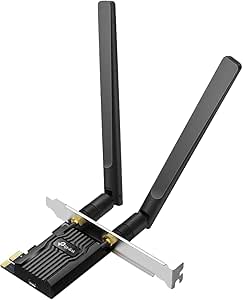
TP-Link WiFi 6 PCIe WiFi Card for Desktop PC AX3000 (Archer TX55E), Bluetooth 5.2, WPA3, 802.11ax Dual Band Wireless Adapter with MU-MIMO, Ultra-Low Latency, Supports Windows 11, 10 (64bit) Only
The TP-Link Archer TX55E earns its spot as the best overall choice for a WiFi 6 PCIe card tailored for VR, thanks to its combination of high speed, low latency, and robust security features. It delivers speeds up to 2.4 Gbps on dual bands, making it suitable for demanding VR applications, streaming, and online gaming. The inclusion of MU-MIMO and OFDMA technologies ensures reduced lag and stable multi-device performance, surpassing older WiFi standards like the Archer TX20E. Its high-gain antennas extend range, which is essential for VR setups spanning multiple rooms or requiring reliable long-distance connections. The WPA3 security protocol adds a layer of protection for your network. Compared to WiFi 6E or WiFi 7 cards, it offers excellent performance at a more accessible price point, albeit without the extra spectrum of WiFi 6E or the blazing speeds of WiFi 7. The setup process is straightforward, and the hardware is compatible with Windows 10/11. The main tradeoff is slightly lower maximum throughput than premium options, but it strikes a superb balance for most VR users.
Pros:- High speeds up to 2.4 Gbps for VR and streaming
- MU-MIMO and OFDMA technology reduce lag
- High-gain antennas improve range and stability
Cons:- Limited to WiFi 6, lacking tri-band or WiFi 7 support
- No support for older Windows versions below Windows 10
- Maximum throughput lower than WiFi 6E or WiFi 7 options
Best for: VR gamers and streamers seeking a reliable, high-speed WiFi 6 upgrade on Windows 10/11 with solid security and range.
Not ideal for: Users requiring tri-band or WiFi 7 support, or those on earlier Windows versions, as this card is limited to WiFi 6 and Windows 10/11.
- Wireless Standard:802.11ax (WiFi 6)
- Max Speed:2402 Mbps
- Antenna:High-gain dual antennas
- Security:WPA3
- Compatibility:Windows 10/11
- Form Factor:PCIe x1
Bottom line: This WiFi 6 card offers a balanced mix of speed, range, and security, perfect for VR users on Windows 10/11 seeking dependable performance.
TP-Link WiFi 6E Intel AX210 PCIe WiFi Card for Desktop PC (Archer TXE73E), Up to 5.4 Gbps Tri-Band Wireless Card | 6 GHz | Low-Latency | Bluetooth 5.3 | Low-Profile Single Antenna | OFDMA, MU-MIMO
This Wi-Fi 6E card stands out for offering the highest potential speeds and interference-free 6 GHz band, making it ideal for demanding VR experiences that require stable, ultra-fast connections. Compared to the TP-Link Archer T5E, which provides reliable dual-band Wi-Fi and Bluetooth 5.0, the TXE73E’s tri-band capability offers significantly lower latency and higher throughput, particularly when paired with a compatible tri-band router. The single high-gain antenna and magnetized base allow flexible positioning, maximizing signal stability. However, the full benefits depend on a tri-band router and Windows 11, which could be a drawback for users with older setups or budget constraints. The advanced security with WPA3 and Bluetooth 5.3 also provide future-proofing for secure VR streaming and device pairing. This pick makes the most sense for high-end VR users who want the best possible wireless performance and are prepared to invest in compatible hardware.
Pros:- Tri-band speeds up to 5.4 Gbps for maximum throughput
- Interference-free 6 GHz band reduces latency and congestion
- Bluetooth 5.3 for reliable device pairing and lower latency
- Low-profile design with adjustable antenna placement
Cons:- Requires Windows 11 for full Wi-Fi 6E features, limiting compatibility with older systems
- Higher cost compared to dual-band options like the TP-Link Archer T5E
- Dependent on supporting tri-band routers to realize maximum speeds
Best for: Power users and enthusiasts building high-performance VR setups with the latest hardware and network infrastructure.
Not ideal for: Casual gamers or users with older motherboards and routers that lack tri-band support, as they won’t experience the full speed benefits.
- Wireless Speed:up to 5.4 Gbps
- Bands:Tri-band (6 GHz, 5 GHz, 2.4 GHz)
- Bluetooth Version:5.3
- Antenna:Low-profile single high-gain antenna
- Security:WPA3
- Compatibility:Windows 11/10
Bottom line: This card is best suited for serious VR users seeking future-proof, ultra-fast wireless connectivity and willing to invest in compatible hardware.
TP-Link AC1200 PCIe WiFi Card for Desktop PC (Archer T5E) – Bluetooth 5.0, Dual Band Wireless Network Card (2.4Ghz and 5Ghz) for Gaming and Streaming, 2 High Gain Antennas, Supports Windows 10/11
This PCIe Wi-Fi card delivers reliable dual-band performance up to 1200 Mbps, making it a solid choice for VR users who prioritize stability without needing the latest Wi-Fi 6E features. Compared with the TP-Link AX210, which offers tri-band speeds and Bluetooth 5.3, the T5E’s dual-band setup is simpler and more affordable but may introduce higher latency and less bandwidth at peak loads. Its two external high-gain antennas improve range and signal stability, essential for smooth VR streaming. The inclusion of WPA3 security enhances online safety, while the straightforward PCIe installation makes it accessible for most users. However, it lacks the ultra-low latency of newer models and doesn’t support the 6 GHz band, which could become a limitation as VR content demands increase. This pick is ideal for VR gamers seeking a reliable, budget-friendly connection that still supports streaming and gaming needs.
Pros:- Reliable dual-band speeds up to 1200 Mbps
- Two high-gain antennas for better range and stability
- Supports WPA3 security for safer online activity
- Easy to install with included brackets
Cons:- Limited to dual-band Wi-Fi; no 6 GHz support
- Bluetooth 5.0 offers slightly higher latency compared to 5.3
- Less future-proof as VR content and networks evolve toward Wi-Fi 6E and beyond
Best for: Budget-conscious VR gamers or streamers who want dependable dual-band Wi-Fi with Bluetooth 5.0 support.
Not ideal for: High-end VR setups or power users aiming for the lowest possible latency and future-proof wireless tech, as it lacks Wi-Fi 6E and tri-band capabilities.
- Wireless Speed:up to 1200 Mbps
- Bands:Dual-band (2.4 GHz and 5 GHz)
- Bluetooth Version:5.0
- Antennas:2 high-gain external antennas
- Security:WPA3
- Compatibility:Windows 10/11
Bottom line: This card is a practical choice for VR users seeking dependable performance and security at a budget-friendly price, but it won’t deliver the lowest latency or highest speeds of newer models.
How We Picked
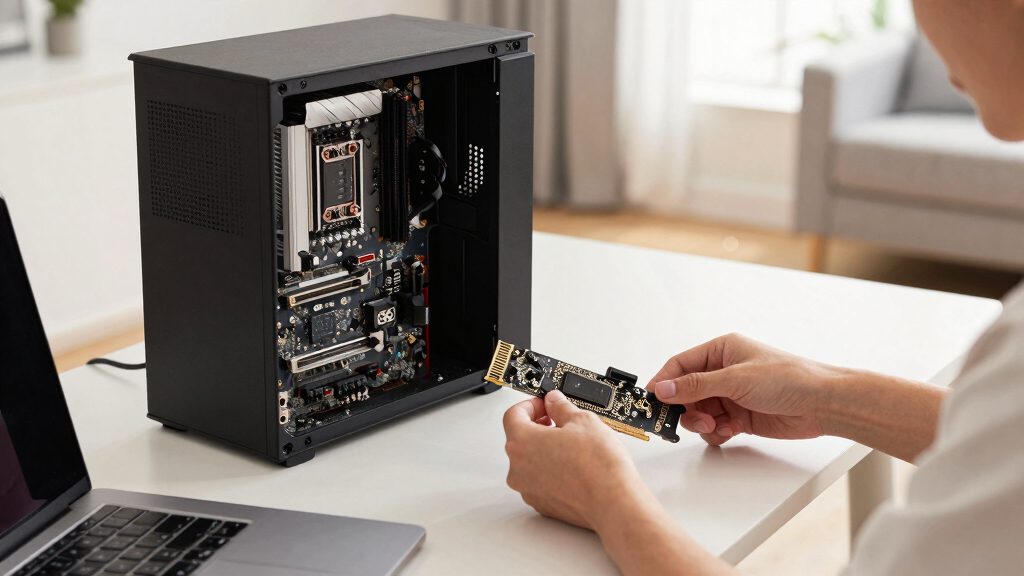
I evaluated these PCIe Wi-Fi cards based on their performance metrics, compatibility, build quality, and feature set. Priority was given to models that deliver high throughput with low latency, as these are critical for VR’s real-time data transfer. I also considered ease of installation, support for the latest Wi-Fi standards, and Bluetooth integration, which can enhance VR accessory connectivity. The ranking reflects a balance between cutting-edge technology and practical usability, ensuring each option suits different user needs—from gamers to tech enthusiasts. Cost was also a factor, with an emphasis on value for performance and future-proofing features.Factors to Consider When Choosing Best PCIe Wi-Fi Cards For VR
Choosing the best PCIe Wi-Fi card for VR involves considering several technical and practical factors. Beyond raw speed, it’s important to assess compatibility, latency, and how future-proof the card is. To get the most out of your VR setup, you should evaluate your current hardware, network environment, and specific VR requirements. This guide covers key factors to help you make a well-informed decision and avoid common pitfalls like overpaying for features you don’t need or selecting incompatible hardware.Speed and Bandwidth
For VR, high data transfer rates are vital to prevent lag and stuttering. Look for Wi-Fi cards supporting at least Wi-Fi 6 or Wi-Fi 6E standards, which provide faster speeds and better congestion management. Tri-band options, which include 2.4GHz, 5GHz, and 6GHz frequencies, can significantly reduce interference and improve stability. However, higher speeds often come at a premium, so weigh your actual VR bandwidth needs against your budget to avoid overspending.
Latency and Stability
Low latency is essential for a smooth VR experience, especially in fast-paced games or applications. Features like MU-MIMO and OFDMA help minimize lag by optimizing data streams. Antenna design and placement also influence signal stability—consider models with multiple antennas or external options for better coverage. Remember, a stable connection reduces the risk of motion sickness and improves overall immersion, making this a critical factor in your choice.
Compatibility and Future-Proofing
Ensure the card is compatible with your motherboard’s slot and your PC’s operating system. If you plan to upgrade or expand your network, opting for Wi-Fi 6E or Wi-Fi 7 models can offer longer-term benefits. Bluetooth support is a bonus for connecting VR accessories like controllers or headphones without additional adapters. Avoid models with outdated standards or limited OS support, as these can limit your VR experience and hardware flexibility.
Price and Value
Premium features like Wi-Fi 7 or tri-band support often come with a higher price tag. Evaluate whether these features translate into real-world benefits for your VR use case. For casual or budget-conscious users, mid-range Wi-Fi 6 options often provide excellent performance without breaking the bank. Remember, investing in a reliable, high-quality card can prevent frustrating connectivity issues during critical VR sessions.
Build Quality and Antennas
Good build quality and effective antenna design influence signal strength and range. External antennas or multiple antenna arrays typically provide better coverage, especially in larger or obstructed rooms. Consider cards with adjustable antennas for optimal positioning. Poorly built cards or those with weak antennas can lead to unstable connections, negatively impacting your VR immersion.





![How I Saw The Solar Eclipse 2026 - [MSFS2024]](https://vrgearguide.com/wp-content/uploads/2026/08/how-i-saw-the-solar-eclipse-2026-msfs2024-featured-260x140.jpg)