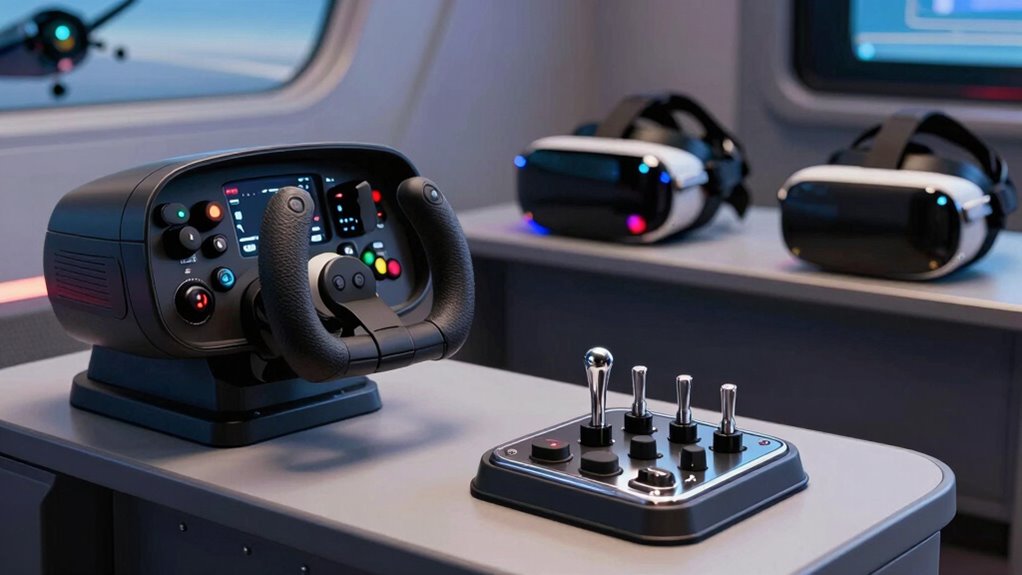
For serious VR flight sim enthusiasts, choosing the right controls can dramatically improve immersion and realism. The best overall pick is the Logitech G PRO Flight Yoke System, offering a smooth, realistic feel with durable build quality. The Thrustmaster T-Flight Hotas X stands out as a budget-friendly option that still delivers solid performance, while the Logitech G X56 H.O.T.A.S provides advanced customization for experienced sim pilots. Readers often face tradeoffs between precision, complexity, and price in this category, making it important to weigh what aspects matter most for their setup. Keep reading for a detailed breakdown of the top options and what to consider when upgrading your VR flight controls.

Get VR and gaming gear delivered free — and shop member deals
- Fast, free delivery on millions of items
- Access to Prime Big Deal Days deals on October 6–7
- Prime Video, Amazon Music and more included
Key Takeaways
- The top picks balance realism, build quality, and ease of use, with the Yoke System excelling in immersion and the Hotas X offering affordability.
- More advanced controllers like the X56 provide extensive customization but can be overwhelming for new users.
- Compatibility with VR headsets and flight sim software is critical; not all controls work seamlessly with every setup.
- Price varies widely, so consider whether you prioritize features or value, as premium options tend to offer more durability and precision.
- Cable management and mounting options are often overlooked but essential for a clutter-free, comfortable VR experience.
| Thrustmaster Sol-R1 Hall-Effect Space Combat Flight Sim Joystick – PC | 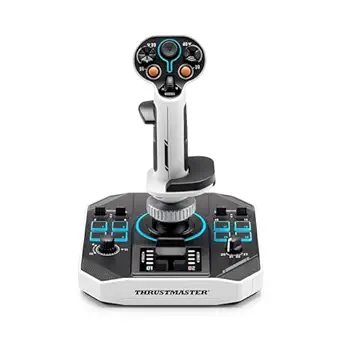 | Best Overall for Precision and Customization | Number of programmable actions: 44 | Buttons: 21 on the flight stick, including 2 triggers, 2 hat switches, 1 ministick, 1 thumbwheel | Technology: Hall-Effect AccuRate Technology | VIEW ON AMAZON | See Our Full Breakdown |
| Logitech G Pro Flight Rudder Pedals |  | Best for Realistic Pedal Control and Customization | Platform Compatibility: Windows 7, 8, 8.1, 10 | Dimensions: 31x41x17 cm | Weight: 2.3 kg | VIEW ON AMAZON | See Our Full Breakdown |
| Logitech G Pro Flight Yoke System + Pro Flight Rudder Pedals Bundle |  | Best for Complete Flight Simulation Experience | Self-centering rudder pedals: Yes | Number of programmable controls: 54 | Footrest adjustability: Yes | VIEW ON AMAZON | See Our Full Breakdown |
| Logitech G Saitek X52 Pro Flight Control System – Black/Silver |  | Best for Versatile and User-Friendly Controls | System requirements: Windows 10, 8.1, 7; 2 USB 2.0 ports | Handle adjustment: 5 positions | Grip: Soft-touch, contoured | VIEW ON AMAZON | See Our Full Breakdown |
| Logitech G X56 H.O.T.A.S Throttle and Joystick Flight Simulator Game Controller |  | Best for Advanced Customization and Realism in VR | Control Surface Options: All control surfaces required for flight | Programmable Controls: 189 | Lighting: RGB backlighting | VIEW ON AMAZON | See Our Full Breakdown |
| Thrustmaster T-Flight Hotas One MSFS 2024 Collector Edition – Xbox & PC |  | Best Overall for Versatile Flight Experience | Axes: 5 | Buttons: 14 | Compatibility: Xbox Series X|S, PC | VIEW ON AMAZON | See Our Full Breakdown |
| Thrustmaster T16000M FCS – Precision Combat Flight Sim Joystick for PC |  | Best for Precision and Customization | Sensor Technology: H.E.A.R.T magnetic sensors | Number of Buttons: 16 | Hat Switch: 8-way | VIEW ON AMAZON | See Our Full Breakdown |
| Logitech G X56 H.O.T.A.S Throttle and Joystick Flight Simulator Game Controller + Pro Flight Rudder Pedals Bundle |  | Best for Immersive, Full-Range Control in VR | Control Surfaces: All control surface options | Mini Analog Stick: Yes | RGB Backlighting: Yes | VIEW ON AMAZON | See Our Full Breakdown |
| Thrustmaster T-Flight Hotas X USB Flight Sim Stick & Throttle – PC | 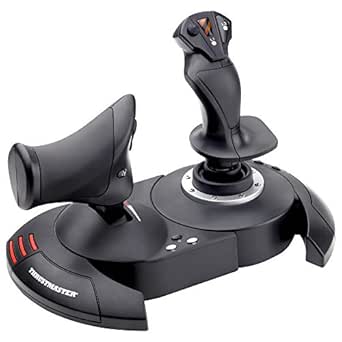 | Best for Entry-Level PC Flight Sim Enthusiasts | Connectivity: USB | Platform: PC | Number of Buttons: 12 | VIEW ON AMAZON | See Our Full Breakdown |
| Logitech G PRO Flight Yoke System Professional Simulation |  | Best for Realistic Yoke Control and Pilot Simulation | Modes: 3 | Programmable Controls: 75 | Controls: 54 | VIEW ON AMAZON | See Our Full Breakdown |
More Details on Our Top Picks
Thrustmaster Sol-R1 Hall-Effect Space Combat Flight Sim Joystick – PC
The Thrustmaster Sol-R1 stands out for its exceptional Hall-effect technology, delivering incredibly smooth and precise control that surpasses traditional potentiometer-based joysticks like the Logitech G X56. Its 44 programmable actions and ambidextrous, ergonomic design make it highly adaptable for long space combat sessions. However, the setup can be complex for newcomers, and its premium price might put it out of reach for casual users. Compared to other high-end controllers, this joystick offers unmatched accuracy but sacrifices some ease of use and broad compatibility outside PC flight sims.
Pros:- Exceptional Hall-effect technology for ultra-smooth, accurate control
- Numerous programmable buttons for tailored gameplay
- Ambidextrous, ergonomic design enhances comfort during extended use
Cons:- Setup process can be overwhelming for beginners
- High price may deter casual or budget-conscious users
Best for: Dedicated space combat enthusiasts seeking maximum control and customization in VR environments.
Not ideal for: Casual gamers or newcomers who prefer plug-and-play simplicity over advanced features.
- Number of programmable actions:44
- Buttons:21 on the flight stick, including 2 triggers, 2 hat switches, 1 ministick, 1 thumbwheel
- Technology:Hall-Effect AccuRate Technology
- Design:Ambidextrous, backlit, sci-fi inspired
- Additional features:Detachable grip, central throttle, sturdy stability supports
Our verdict“This joystick is ideal for serious pilots wanting top-tier precision and customization in VR flight sims.”
Logitech G Pro Flight Rudder Pedals
The Logitech G Pro Flight Rudder Pedals excel in delivering authentic pedal feedback with a self-centering mechanism and adjustable tension, making them a step above basic rudders. Their differential toe brakes mimic real aircraft controls, adding to the realism. While they are compatible with various Windows versions, they require an internet connection for software updates, and they lack wireless options, limiting mobility. Compared with the Logitech G X56, these pedals focus solely on pedal accuracy and feel, making them perfect for VR pilots who prioritize pedal realism but may feel limited without additional flight controls.
Pros:- Self-centering mechanism for authentic feel
- Adjustable tension for personalized pedal response
- Differential toe brakes for precise control
Cons:- Requires internet connection for software updates
- Limited to PC use without wireless options
Best for: VR flight sim pilots seeking highly realistic and customizable pedal responses.
Not ideal for: Casual players or those with limited desk space, as the pedals are sizable and require setup space.
- Platform Compatibility:Windows 7, 8, 8.1, 10
- Dimensions:31x41x17 cm
- Weight:2.3 kg
- Rudder Axis:9-bit
- Toe Brake Axis:7-bit
- Connectivity:USB 2.0
Our verdict“These pedals are perfect for VR pilots demanding realistic pedal feedback and customization, with some setup considerations.”
Logitech G Pro Flight Yoke System + Pro Flight Rudder Pedals Bundle
The Logitech G Pro Flight Yoke System paired with the rudder pedals creates a comprehensive control setup, offering a realistic pilot experience. The 54 programmable controls on the yoke and the adjustable footrests on the pedals make this bundle versatile for both newcomers and seasoned pilots. Compared to the Thrustmaster Sol-R1, this bundle emphasizes a more traditional, airline-style cockpit feel, but it requires more space and a more complex setup. Its extensive customization options are ideal for users who want a full-flight experience, though some may find the system bulky or expensive.
Pros:- Realistic yoke and rudder pedal controls
- Many programmable controls for tailored flying experience
- Adjustable footrests for comfort
Cons:- Requires significant space for setup
- Can be costly for casual players
Best for: Aviators seeking a full cockpit feel with extensive control customization in VR flight sims.
Not ideal for: Limited space or users preferring simpler, less expensive setups with fewer controls.
- Self-centering rudder pedals:Yes
- Number of programmable controls:54
- Footrest adjustability:Yes
- Toe brakes:Differential
- Button controls:14
- Mode switch positions:3
Our verdict“This bundle suits VR pilots who want immersive, full-flight controls and don’t mind a larger setup.”
Logitech G Saitek X52 Pro Flight Control System – Black/Silver
The Logitech G Saitek X52 Pro offers a balance of customization and ease of use, with features like an LCD multi-function display and a progressive throttle with detents. Its soft-touch, contoured grip makes extended sessions comfortable, and the illuminated buttons improve visibility in VR environments. Compared with the more complex Thrustmaster Sol-R1, the X52 Pro is simpler to set up and program, but it may lack the same level of precision for advanced users. Its design suits those who want reliable, customizable controls without overwhelming complexity.
Pros:- Customizable controls with programmable software
- Illuminated buttons and LCD display for better usability
- Ergonomic, soft-touch grip for comfort
Cons:- Requires multiple USB ports and software setup
- Limited compatibility beyond Windows systems
Best for: Intermediate VR pilots who want a versatile, easy-to-configure flight system with good ergonomics.
Not ideal for: Hardcore flight simmers seeking top-tier precision or extensive programmable actions.
- System requirements:Windows 10, 8.1, 7; 2 USB 2.0 ports
- Handle adjustment:5 positions
- Grip:Soft-touch, contoured
- Illumination:Yes
- Display:LCD multi-function
Our verdict“This system fits VR pilots desiring a user-friendly, customizable setup without the complexity of high-end options.”
Logitech G X56 H.O.T.A.S Throttle and Joystick Flight Simulator Game Controller
The Logitech G X56 H.O.T.A.S offers an extensive array of control surfaces, with 189 programmable options and RGB lighting, making it highly adaptable for complex VR flight scenarios. Its dual throttles and hall-effect sensors provide precise, customizable control, ideal for those who want detailed flight simulation capabilities. Compared to the simpler Thrustmaster T-Flight Hotas X, the X56 is geared toward experienced pilots who need maximum control and visual flair, but it comes with a steep learning curve and requires multiple USB ports. For VR enthusiasts seeking high configurability, this system delivers, albeit with significant setup effort.
Pros:- High number of programmable controls for customization
- Hall-effect sensors for consistent, precise control surfaces
- RGB lighting adds aesthetic appeal
Cons:- Requires multiple USB ports and complex setup
- Premium price and steep learning curve
Best for: Advanced VR pilots who demand extensive control options and high precision for immersive flight experiences.
Not ideal for: Beginners or casual players who prefer straightforward controls and minimal setup.
- Control Surface Options:All control surfaces required for flight
- Programmable Controls:189
- Lighting:RGB backlighting
- Sensors:Hall-effect sensors for aileron and elevator axes
- Spring Options:4 spring options for stick force adjustment
- Throttle:Twin throttles with friction adjuster and throttle lock
Our verdict“This controller is suited for highly experienced VR pilots prioritizing maximum customization and realism, accepting setup complexity.”
Thrustmaster T-Flight Hotas One MSFS 2024 Collector Edition – Xbox & PC
This collector’s edition stands out for its official licensing and modular design, making it a top choice for those who want a comprehensive setup compatible with Xbox and PC. Unlike the Logitech G PRO Flight Yoke System, which offers more realistic yoke controls, this Hotas provides a broader range of controls with a detachable throttle and dual rudder system, though it requires additional pedals for full rudder control. Its high-precision 10-bit controls deliver smooth, accurate responses, ideal for serious flight simmers. Compared with the Thrustmaster T16000M, it offers more modularity but at a potentially higher price and complexity. This makes it perfect for dedicated enthusiasts who want a flexible, immersive experience but are comfortable with the setup process.Pros:- Officially licensed for MSFS 2024, ensuring compatibility
- Detachable throttle and modular design for customization
- High-precision 10-bit controls for accuracy
- Dual rudder system for realistic maneuvering
Cons:- Requires additional pedals for complete rudder control
- May be complex for complete beginners
Best for: Flight sim enthusiasts seeking a versatile, full-featured setup compatible with multiple platforms
Not ideal for: Beginners or casual players who prefer plug-and-play simplicity without additional pedal investment
- Axes:5
- Buttons:14
- Compatibility:Xbox Series X|S, PC
- Precision:10-bit
- Detachable Throttle:Yes
- Rudder Control:Dual rudder system
Our verdict“This pick is best suited for dedicated flight simmers who want flexibility and realism in their setup.”
Thrustmaster T16000M FCS – Precision Combat Flight Sim Joystick for PC
The T16000M FCS excels in delivering drift-free, magnetic sensor-based accuracy, making it ideal for users who prioritize precise control, especially over the Logitech G X56 H.O.T.A.S bundle, which offers more comprehensive control options. Its ambidextrous ergonomic design and 16 programmable buttons enable tailored setups, but the reliance on software for full customization might intimidate beginners. The inclusion of a twist rudder axis adds to its realism, though it’s primarily limited to PC compatibility, unlike the Xbox-compatible Thrustmaster T-Flight Hotas. This joystick works well for enthusiasts who want detailed control without overwhelming complexity, but less so for those seeking an all-in-one VR flight bundle.Pros:- Drift-free magnetic sensors for accuracy
- Fully ambidextrous ergonomic design
- Numerous programmable buttons and axes
- Includes software for personalized profiles
Cons:- Requires software setup for full customization
- May be complex for beginners
Best for: PC users seeking high-precision, customizable joystick controls for flight simulation
Not ideal for: Newcomers to flight sims who prefer ready-to-go solutions or console players
- Sensor Technology:H.E.A.R.T magnetic sensors
- Number of Buttons:16
- Hat Switch:8-way
- Axes:4 (including twist rudder)
- Compatibility:PC
- Software:T.A.R.G.E.T profile customization
Our verdict“This joystick is best for experienced flight sim players who want detailed, customizable control on PC.”
Logitech G X56 H.O.T.A.S Throttle and Joystick Flight Simulator Game Controller + Pro Flight Rudder Pedals Bundle
This bundle offers a complete, immersive control solution with customizable surfaces, RGB lighting, and dedicated rudder pedals, making it ideal for serious VR flight enthusiasts. Compared to the Thrustmaster T-Flight Hotas One, which emphasizes modularity and versatility, the X56 bundle provides a more integrated experience with dedicated pedals and extensive control surfaces, though its complex setup can be overwhelming for newcomers. Its RGB backlighting adds aesthetic value and functional clarity, especially in VR where visual cues matter. The bundle’s comprehensive controls make it suitable for users wanting a highly realistic cockpit environment, but the premium price and complexity can be a barrier for casual users or beginners.Pros:- Highly customizable control surfaces
- Includes self-centering, adjustable rudder pedals
- RGB backlighting for enhanced usability in VR
- Designed for comprehensive aircraft control
Cons:- Complex setup process
- Premium price point
- Overwhelming for users new to flight controls
Best for: Experienced VR flight simmers who want a highly customizable, immersive cockpit setup
Not ideal for: Beginners or casual players who prefer straightforward, low-cost controllers
- Control Surfaces:All control surface options
- Mini Analog Stick:Yes
- RGB Backlighting:Yes
- Rudder Pedals:Self-centering, adjustable tension
- Compatibility:VR ready
Our verdict“This bundle makes the most sense for dedicated VR flight sim enthusiasts seeking maximum realism and control customization.”
Thrustmaster T-Flight Hotas X USB Flight Sim Stick & Throttle – PC
The T-Flight Hotas X offers an ergonomic and fully programmable setup at an accessible price point, making it ideal for newcomers to VR flight sims who want a reliable, comfortable control system. Its adjustable resistance and dual rudder control provide a decent level of realism, though it lacks some of the precision and modular features seen in higher-end models like the Thrustmaster T-Flight Hotas One. Its plug-and-play design with preset profiles simplifies setup for casual users but may require calibration for optimal performance. Compared with the Logitech G PRO Flight Yoke, which offers more realism, this Hotas X is better suited for those just starting out or with limited budgets.Pros:- Ergonomic design for long gaming sessions
- Fully programmable controls
- Detachable throttle for flexible setup
- Plug and play with preset profiles
Cons:- Limited to PC compatibility
- May need calibration for best performance
Best for: PC newcomers seeking a straightforward, comfortable flight control setup for VR
Not ideal for: Advanced users or those wanting a full cockpit experience with extensive customization
- Connectivity:USB
- Platform:PC
- Number of Buttons:12
- Number of axes:5
- Detachable Throttle:Yes
- Rudder Control:Dual (handle rotation or tilting lever)
Our verdict“This controller is ideal for beginners who want a reliable, adjustable Hotas setup for VR flights without complexity.”
Logitech G PRO Flight Yoke System Professional Simulation
The G PRO Flight Yoke System delivers a highly realistic yoke experience, complete with 75 programmable controls and sturdy mounting clamps, making it ideal for pilots who want authentic feel in VR. Its extensive control options surpass the simpler joystick setups like Thrustmaster T16000M, providing more detailed aircraft handling. However, it requires optional software for full functionality, and its complexity might be intimidating for casual players or those with limited desktop space. While it excels in realism, its compatibility is somewhat limited to Windows and certain flight sims, making it less versatile for casual VR users. This system suits those aiming for a true pilot-like experience in their virtual cockpit.Pros:- Realistic, adjustable yoke controls
- High number of programmable controls
- Sturdy mounting clamps for secure setup
- Compatible with major flight software
Cons:- Requires software download for full features
- May be complex for casual users
- Limited compatibility with older OS
Best for: Pilots and serious flight sim enthusiasts wanting a realistic yoke experience in VR
Not ideal for: Casual gamers or users with limited space who prefer simpler controllers
- Modes:3
- Programmable Controls:75
- Controls:54
- Connectivity:USB
- Compatible Software:Microsoft Flight Simulator, FSX, X-Plane 10, Prepar3D
- Mounting:2 desk clamps
Our verdict“This yoke system is best for dedicated VR flight pilots seeking authentic, customizable control with extensive features.”

How We Picked
Our evaluation focused on performance, build quality, ease of integration with VR, and versatility across different flight sims. We prioritized controllers that deliver realistic feedback and precision, essential for immersive VR flying. Durability and comfort were also key factors, especially for long sessions, while value played a role in balancing features against price. We compared user reviews, expert opinions, and technical specifications to create a ranking that helps both beginners and seasoned sim pilots find the best fit for their needs.
Factors to Consider When Choosing Pro Flight Sim Controls For Vr
Choosing the right pro flight sim controls for VR involves several important considerations. Beyond raw features, understanding how each factor impacts your experience can prevent costly mistakes and ensure your setup is both immersive and comfortable. Here are key points to keep in mind when selecting your ideal controller.Compatibility with VR and Flight Sim Software
Not all controllers work seamlessly with every VR headset or flight simulation platform. Before buying, verify compatibility to avoid frustration and ensure your hardware integrates smoothly. Look for controllers explicitly designed or tested for VR use, especially if you’re running popular sims like Microsoft Flight Simulator or X-Plane. Some controllers offer native VR support, which can significantly enhance immersion and responsiveness.
Realism and Feedback
For VR flight sims, tactile feedback and realistic controls are vital for immersion. Thrustmaster HOTAS systems and yoke setups generally provide better flight experience than simpler gamepads or basic joysticks. Consider whether you want force feedback, which simulates physical resistance, or a more straightforward design. The tradeoff often involves complexity and cost, but the right feedback can make or break your virtual flying experience.
Build Quality and Durability
VR flight controls are often used intensively, making durability a key factor. Cheaper plastic models may wear out or break faster, especially with frequent use. Look for metal components, high-quality switches, and sturdy mounting options to ensure your control system withstands long-term use. Well-built controls also tend to feel more realistic, adding to the overall immersion.
Customization and Expandability
Advanced pilots often prefer controls that can be customized or expanded with additional modules, such as extra switches or throttles. This flexibility helps tailor the setup to specific aircraft and flying styles. However, more complex systems tend to have steeper learning curves and higher costs, so consider whether you need extensive customization or a simpler plug-and-play option.
Price and Value
Prices for pro flight controls vary widely, from budget-friendly models to high-end systems costing thousands. Define your budget upfront and weigh features against cost. Sometimes, investing in a slightly more expensive, durable setup pays off in the long run through better performance and longevity. Conversely, beginners or casual users might prioritize affordability and ease of setup to avoid overwhelming complexity.
Frequently Asked Questions
Will these controls work with my VR headset and software?
Most modern pro flight sim controls are designed with compatibility in mind, but it’s essential to double-check before purchasing. Compatibility depends on both the hardware interfaces and the flight sim software you use. Many controllers explicitly list VR support or compatibility with specific platforms like Oculus or HTC Vive. Reading user reviews and manufacturer specifications can help confirm whether a particular control will integrate smoothly with your setup.
Are high-end controls worth the extra cost?
Higher-priced controls often deliver more realistic feedback, better durability, and extensive customization options, which can significantly enhance VR immersion. If you fly frequently or are aiming for a highly realistic experience, investing in premium controls pays off through improved performance and longevity. However, for casual use or beginners, more affordable models can still provide satisfying results without breaking the bank.
Can I upgrade my existing controls for VR use?
Many controllers can be upgraded or supplemented with additional modules like pedals or throttle quadrants to improve realism. However, compatibility and integration depend on the specific hardware and software. Upgrading can be cost-effective if your current setup supports it, but sometimes replacing a lower-quality product with a dedicated VR-compatible control yields better results and simplifies your experience.
What features should I prioritize for VR flight sim controls?
Prioritize controls that offer precise feedback, seamless compatibility with VR headsets, and comfort during extended use. Features like force feedback, adjustable tension, and a realistic feel significantly boost immersion. Also, consider how easily you can mount or position controls within your VR space to maintain comfort and accessibility during gameplay.
Is it better to choose a yoke or HOTAS system for VR flight sims?
The choice depends on your flight preferences. Yokes tend to offer a more authentic experience for commercial aircraft and general aviation, while HOTAS systems excel in combat or military-style flying. Both can be adapted for VR, but HOTAS systems often provide more throttle and switch options for combat simulations. Think about the aircraft types you prefer and your comfort with each setup when making a decision.
Conclusion
For those seeking the best overall experience with VR flight sims, the Logitech G PRO Flight Yoke System offers excellent realism and build quality. Budget-conscious pilots will find the Thrustmaster T-Flight Hotas X provides solid performance at an accessible price. If you prioritize customization and advanced features, the Logitech G X56 H.O.T.A.S is worth considering, despite its steeper learning curve. Beginners should opt for simpler, more straightforward controllers, while experienced pilots may prefer high-end, modular setups. Ultimately, selecting the right controls depends on your flying style and budget—match your choice to your specific VR flight sim goals for the best results.
Halloween Picks
halloween
As an affiliate, we earn on qualifying purchases.