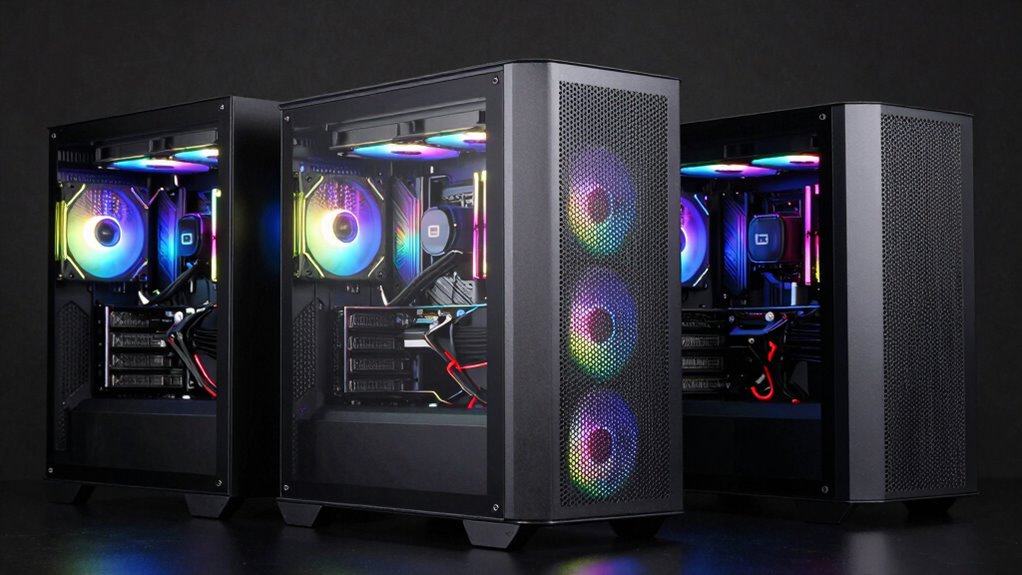

Building a VR-ready PC demands excellent airflow to keep high-performance components cool during extended sessions. Among the top contenders, the Montech Air 903 Max stands out for its exceptional ventilation and cooling capacity, ideal for demanding hardware. The CORSAIR 3500X RS offers a sleek, stylish design with ample airflow support, but may require additional fans for optimal cooling. Meanwhile, the MUSETEX K2 combines a panoramic look with a massive fan setup, perfect for enthusiasts who want show-stopping aesthetics and maximum cooling potential. These options highlight the tradeoffs between size, design, and cooling performance, helping you choose based on space, style, and thermal needs.

Get VR and gaming gear delivered free — and shop member deals
- Fast, free delivery on millions of items
- Access to Prime Big Deal Days deals on October 6–7
- Prime Video, Amazon Music and more included
Key Takeaways
- High airflow cases like Montech Air 903 Max excel at cooling demanding VR hardware but can be bulky.
- Aesthetic features such as tempered glass panels may limit internal space or airflow efficiency.
- Pre-installed fans vary; more fans generally mean better cooling but add to cost and noise.
- Support for large radiators and high-end GPUs is crucial for VR builds with overclocked components.
- Size and design choices influence ease of building versus cooling performance.
| Montech Air 903 Max High Airflow E-ATX PC Case, 4x140mm PWM Fans, Black |  | Best Overall for Maximum Airflow | Form Factor: E-ATX | Color: Black | Fans Included: 4x140mm PWM Fans | VIEW ON AMAZON | See Our Full Breakdown |
| CORSAIR 3500X RS ARGB Panoramic Mid-Tower PC Case – Black |  | Best for Aesthetic and Versatility | Number of pre-installed fans: 3 | Supports motherboard form-factors: Mini-ITX to E-ATX | Cooling capacity: Up to 10x 120mm fans | VIEW ON AMAZON | See Our Full Breakdown |
| MUSETEX ATX PC Case with 7 PWM ARGB Fans, Full-View Dual Tempered Glass, Mid Tower, Black (K2) |  | Best for Show-Stopping Aesthetics and Cooling | Number of Fans: 7 pre-installed, expandable to 10 | Fan Size: 120*120*25mm | Fan Speed: 600-1300 RPM | VIEW ON AMAZON | See Our Full Breakdown |
| CORSAIR 4000D RS ARGB Frame Modular Mid-Tower ATX PC Case |  | Best for Customizability and Clean Design | Form Factor: Mid-Tower ATX | Color: Black | Pre-installed Fans: 3 ARGB PWM Fans | VIEW ON AMAZON | See Our Full Breakdown |
| Montech XR Panoramic High Airflow ATX PC Case, 3 ARGB PWM Fans, Black |  | Best for High Airflow and Practical Design | Design: Panoramic high airflow | Color: Black | Fans: 3 ARGB PWM fans (max 1500 RPM) | VIEW ON AMAZON | See Our Full Breakdown |
| pc case for airflow in vr build | Color |
|---|---|
| Montech Air 903 Max High Airfl | Black |
| CORSAIR 3500X RS ARGB Panorami | Black |
| MUSETEX ATX PC Case with 7 PWM | — |
| CORSAIR 4000D RS ARGB Frame Mo | Black |
| Montech XR Panoramic High Airf | Black |
More Details on Our Top Picks
Montech Air 903 Max High Airflow E-ATX PC Case, 4x140mm PWM Fans, Black
The Montech Air 903 Max is designed specifically for high airflow, featuring a mesh front panel that promotes optimal ventilation. Its inclusion of four 140mm PWM fans provides robust cooling right out of the box, making it ideal for demanding VR builds with high-end GPUs and overclocked CPUs. Compared with other cases, it offers superior airflow and radiator support—up to 360mm at the front and top—yet its bulkiness might be a drawback for smaller desks. Its straightforward design and easy-to-clean mesh panel make maintenance simple, but the limited color options may not suit users wanting more aesthetic flexibility.
Pros:- Excellent airflow with high ventilation rate
- Includes RGB PWM fans with multiple lighting effects
- Supports large radiators and high-end CPU coolers
- Easy to dismantle mesh front panel for cleaning
Cons:- May be bulky for small desk spaces
- Limited color options (only black)
Best for: High-performance VR builds that prioritize cooling and airflow efficiency
Not ideal for: Users with limited space or those seeking a more subdued or minimalist aesthetic
- Form Factor:E-ATX
- Color:Black
- Fans Included:4x140mm PWM Fans
- Ventilation Rate:51%
- Supports Radiators:360mm at front and top
- Maximum GPU Length:400mm
- Maximum CPU Cooler Height:180mm
Our verdict“This case is the top choice for those who need maximum airflow and cooling capacity, accepting its size tradeoff.”
CORSAIR 3500X RS ARGB Panoramic Mid-Tower PC Case – Black
The CORSAIR 3500X RS ARGB combines a sleek panoramic glass design with solid airflow support. Its three pre-installed ARGB fans offer both aesthetics and cooling performance, but for VR builds that generate significant heat, additional fans may be necessary to prevent thermal bottlenecks, especially if overclocking. The case supports a wide range of motherboard sizes, from Mini-ITX to E-ATX, and features removable tempered glass panels for easy access. However, the glass panels add weight and may limit internal space, making cable management slightly more challenging. It’s ideal for users who want style and flexibility but are willing to add extra cooling components.
Pros:- Elegant panoramic glass design showcases hardware
- Supports extensive cooling with up to 10 fans
- Removable tempered glass panels for easy maintenance
Cons:- Only includes 3 pre-installed fans, additional fans may be needed
- Component compatibility not included in the package
- May be larger and heavier due to glass panels
Best for: VR builders seeking a stylish case with decent airflow and upgrade potential
Not ideal for: Those who need maximum airflow without additional fan investment or space constraints
- Number of pre-installed fans:3
- Supports motherboard form-factors:Mini-ITX to E-ATX
- Cooling capacity:Up to 10x 120mm fans
- Material:Tempered glass
- Color:Black
Our verdict“A stylish, flexible case suitable for those who prioritize aesthetics and moderate airflow, with room for upgrades.”
MUSETEX ATX PC Case with 7 PWM ARGB Fans, Full-View Dual Tempered Glass, Mid Tower, Black (K2)
The MUSETEX K2 makes a bold statement with its dual tempered glass panels and seven pre-installed PWM ARGB fans, delivering both style and cooling. Its internal layout supports high-end hardware, including GPUs up to 400mm, and radiator support up to 360mm at the top. The fan speed ranges from 600 to 1300 RPM, providing ample airflow for VR setups, though the noise level is moderate at 20.8dB(A). Its large size offers extensive space for components, but this can be a drawback for those with limited room or seeking a more compact build. This case is best for enthusiasts who want maximum visual impact paired with high airflow performance.
Pros:- Elegant dual tempered glass showcase
- Includes 7 customizable PWM ARGB fans
- Supports high-end components and radiator options
- Expandable fan support up to 10 fans
Cons:- Does not come with motherboard, GPU, PSU, or radiator
- Requires motherboard software for lighting
- Large size may not suit compact builds
Best for: VR enthusiasts who want a visually stunning case with excellent cooling capacity
Not ideal for: Small space setups or budget-conscious builders due to its size and potential extra cooling needs
- Number of Fans:7 pre-installed, expandable to 10
- Fan Size:120*120*25mm
- Fan Speed:600-1300 RPM
- Max Airflow:24.72 CFM
- GPU Length Support:up to 400mm
- Motherboard Compatibility:ATX
Our verdict“An eye-catching case with superb airflow potential, perfect for users who prioritize aesthetics alongside thermal performance.”
CORSAIR 4000D RS ARGB Frame Modular Mid-Tower ATX PC Case
The CORSAIR 4000D RS ARGB offers a modular approach to airflow, with flexible mounting options and high compatibility for VR components. Its pre-installed ARGB fans and the InfiniRail™ mounting system allow precise placement of fans and radiators, boosting cooling efficiency. While this case caters well to those who want a tailored setup, its complexity can pose challenges for first-time builders. The premium price reflects its build quality and customization potential, making it suited for users willing to invest in a versatile, high-airflow chassis that can adapt to evolving VR hardware needs.
Pros:- Highly customizable with modular design
- Excellent airflow with pre-installed ARGB fans
- Supports various motherboard and fan configurations
Cons:- Complex setup for first-time builders
- Premium price may be high for budget-conscious users
Best for: Experienced builders seeking a highly customizable, airflow-focused case
Not ideal for: Beginners or those with tight budgets due to its complexity and cost
- Form Factor:Mid-Tower ATX
- Color:Black
- Pre-installed Fans:3 ARGB PWM Fans
- Fan Mounting System:InfiniRail™
- Included Accessories:USB ports, ARGB control
Our verdict“A premium, flexible case best suited for advanced users who want tailored airflow and aesthetic options.”
Montech XR Panoramic High Airflow ATX PC Case, 3 ARGB PWM Fans, Black
The Montech XR emphasizes practicality and cooling, with three pre-installed ARGB PWM fans supporting up to nine fans total. Its panoramic design provides a broad view of internal components, ideal for showcasing VR hardware. It supports a 360mm radiator at the top, large GPUs, and comprehensive filters for maintaining dust-free operation. However, its size might limit internal space for some configurations, and the maximum fan RPM of 1500 may not satisfy users seeking extreme cooling performance. This case is a solid choice for those demanding high airflow with a focus on easy maintenance and good aesthetics.
Pros:- Excellent airflow with support for up to 9 fans
- Includes 3 ARGB PWM fans for vibrant lighting
- Supports large radiators and high-end GPUs
- Filters for easy cleaning
Cons:- Compact size may restrict internal space
- Maximum RPM of 1500 may be insufficient for extreme cooling
Best for: VR builds requiring strong airflow, large radiators, and dust filtration
Not ideal for: Users who prefer smaller cases or require ultra-high RPM cooling for overclocking
- Design:Panoramic high airflow
- Color:Black
- Fans:3 ARGB PWM fans (max 1500 RPM)
- Radiator Support:Up to 360mm at the top
- GPU Support:Supports high-end GPUs like the 40 series
- Fan Support:Supports up to 9 fans
Our verdict“A well-rounded airflow-focused case with enough space and filtration, suitable for demanding VR hardware setups.”

How We Picked
Our selection process focused on cases that prioritize airflow with large ventilation areas, multiple fan mounting options, and support for high-performance hardware typical in VR setups. We compared features like fan support, radiator compatibility, internal space, and build quality, emphasizing those that facilitate optimal thermal management. Cost, ease of installation, and aesthetic appeal also influenced rankings, ensuring options suited for different user priorities—from compact spaces to showpiece builds.
Factors to Consider When Choosing Pc Case For Airflow In Vr Builds
Choosing the right case for an airflow-focused VR build involves balancing cooling performance, size, aesthetics, and expandability. The key is to prioritize cases that support multiple large fans, radiator compatibility, and have good internal airflow pathways. Consider your space constraints, whether you prefer a sleek design or a more open, ventilated chassis, and how much customization you want over the cooling setup.
Airflow and Cooling Capacity
Look for cases with high ventilation rates, mesh panels, and support for multiple large fans (140mm or 120mm). Cases like the Montech Air 903 Max excel here, providing pre-installed high-CFM fans and radiator support, which are essential for maintaining low temperatures during VR sessions. Keep in mind, more fans and larger radiators improve cooling but can add noise and size.
Size and Compatibility
VR builds often require larger cases to accommodate high-end GPUs, multiple fans, and radiators. E-ATX and full-tower options like the Montech Air 903 Max or MUSETEX K2 offer more space at the expense of desk footprint. Smaller mid-tower cases can be more manageable but may limit expansion and airflow options.
Design and Aesthetics
While high airflow is critical, aesthetic features like tempered glass panels and ARGB lighting add visual appeal. Cases like the CORSAIR 3500X RS and MUSETEX K2 blend style with functionality, but keep in mind that glass panels can restrict internal airflow slightly and increase weight. Decide whether visual impact or maximum airflow takes priority.
Expandability and Customization
If you plan to upgrade or overclock, choose cases supporting multiple fans, radiators, and versatile mounting options. Modular cases like the CORSAIR 4000D RS offer flexibility, but setup complexity and cost should be considered. For straightforward builds, simpler cases may suffice.
Frequently Asked Questions
How important is airflow in VR builds?
Airflow is vital in VR builds because high-performance components generate significant heat, especially during extended VR sessions. Proper airflow helps maintain stable temperatures, preventing thermal throttling and ensuring consistent VR experiences. A case with good ventilation pathways and support for multiple fans will help keep hardware cool and prolong its lifespan.
Can I upgrade the fans in these cases later?
Most cases reviewed support additional or larger fans, allowing for future upgrades. It’s advisable to check fan mounting points and clearance before purchasing extra fans. Upgrading fans can enhance airflow and cooling capacity, which is beneficial for overclocked hardware or high-temperature environments.
Is a mesh front panel better for airflow than a tempered glass panel?
Yes, mesh panels typically provide better airflow because they allow more air to pass through with less restriction. Tempered glass panels, while visually appealing, can impede airflow slightly, especially if the case design limits fan placement or airflow pathways. For maximum cooling efficiency, mesh panels are generally preferred in high airflow VR builds.
How many fans should I plan to install in my case?
For VR builds, I recommend supporting at least 4-6 fans for optimal airflow, especially if you’re using high-end GPUs or overclocking. Cases like the Montech Air 903 Max come with four fans, but adding extra fans or radiators can further improve cooling. Balance the number of fans with noise levels and internal space to avoid clutter.
Are larger cases more difficult to build in?
While larger cases provide more room for components and better airflow, they can be more challenging to manage due to increased weight and complexity. Cable management can also be trickier in bigger cases. However, they often make installing large GPUs, radiators, and multiple fans easier, which is advantageous for high-performance VR setups.
Conclusion
For users prioritizing maximum airflow and cooling performance, the Montech Air 903 Max remains the top pick, especially if size isn’t an issue. Those seeking a balance between aesthetics and airflow might prefer the CORSAIR 3500X RS, which offers style and upgrade potential. Enthusiasts looking for a show-stopping visual setup with extensive cooling capacity should consider the MUSETEX K2. Meanwhile, the CORSAIR 4000D RS is best for builders who want a customizable, high-airflow case with flexibility for future upgrades. Your choice depends on your space, budget, and cooling needs—each case excels in different ways for VR builds in 2026.
Halloween Picks
halloween
As an affiliate, we earn on qualifying purchases.