The best gaming equipment depends on what holds your setup back: comfort, sound, communication, or control. My best overall pick is the SteelSeries Arctis Nova Pro Omni for players prioritizing a versatile wireless headset, while the Logitech G PRO X2 SUPERSTRIKE suits mouse-focused play and the FIFINE AmpliGame AM8PROT offers a flexible microphone path. Across this lineup, the main tradeoffs are specialized performance versus all-purpose usefulness, wireless convenience versus wired options, and ergonomic features versus desk space. The list also includes chairs, a racing wheel, and a mouse pad, so the strongest choice depends on the upgrade you will use most. Continue reading for the full breakdown and guidance by setup and playing style.

Play games on Amazon Luna for your next adventure, included with Prime
- A rotating selection of games, no download needed
- Play on TV, laptop or phone
- Fast, free delivery for your gear, too
Complete the kit


Key Takeaways
- The lineup spans different jobs: headsets, microphones, chairs, a racing wheel, a mouse, and a desk mat are not interchangeable upgrades; prioritize the part of your setup that limits play or comfort.
- The SteelSeries Arctis Nova Pro Omni leads for headset versatility: the Razer BlackShark V3 Pro is the more specialized alternative for players who value active noise cancellation, while Turtle Beach’s Stealth 600 is a simpler wireless option.
- Microphone choice depends on how much control you want: the FIFINE AM8PROT offers USB/XLR flexibility, the KS5 bundle adds a mixer, and the TONOR TC310+ packages a condenser mic with a boom arm and RGB.
- Both chairs include footrests and lumbar support: the VITESSE and GTPLAYER models share a comfort-focused approach, so room fit, appearance, and personal fit matter more than treating either as a universal ergonomic solution.
- Specialized gear pays off only for the right use: the Logitech G29 targets racing games, while the BladeHawks extended mat favors broad mouse movement; neither replaces a general-purpose headset or input device.
| VITESSE Gaming Chair with Footrest and Lumbar Support, Gray |  | Best for Relaxed Long Sessions | Brand: VITESSE | Color: Gray | Upholstery: PU leather | VIEW LATEST PRICE | See Our Full Breakdown |
| TONOR TC310+ USB Gaming Condenser Microphone Kit with Boom Arm and RGB Lighting | 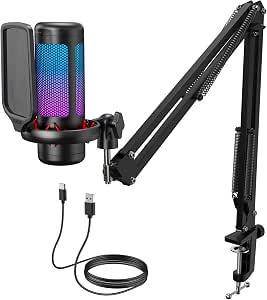 | Best Starter Streaming Microphone | Brand and model: TONOR TC310+ | Connectivity: USB-A | Polar pattern: Unidirectional | VIEW LATEST PRICE | See Our Full Breakdown |
| SteelSeries Arctis Nova Pro Omni Wireless Gaming Headset, White | 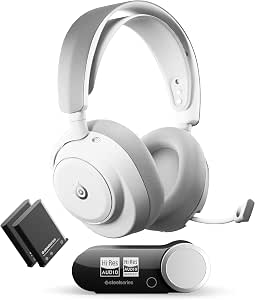 | Best Premium Multi-System Headset | Brand and model: SteelSeries Arctis Nova Pro Omni, model 61722 | Color: White | Connectivity: 2.4 GHz wireless, Bluetooth 5.3 LE, USB, line-in | VIEW LATEST PRICE | See Our Full Breakdown |
| FIFINE AmpliGame KS5 XLR/USB Gaming Microphone and Mixer Bundle |  | Best for Hands-On Audio Control | Connectivity: XLR/USB | Audio channels: 4 | Audio inputs: XLR, USB | VIEW LATEST PRICE | See Our Full Breakdown |
| Turtle Beach Stealth 600 Wireless Multiplatform Gaming Headset |  | Best for Long Battery Life | Connectivity: 2.4 GHz wireless and Bluetooth 5.2 | Battery life: Up to 80 hours | Drivers: 50 mm Nanoclear | VIEW LATEST PRICE | See Our Full Breakdown |
| Turtle Beach Stealth 600 Wireless Multiplatform Gaming Headset |  | Best Battery Life | Compatibility: PlayStation 5, PlayStation 4, PC, Steam Deck, and mobile devices | Wireless connectivity: 2.4 GHz wireless and Bluetooth 5.2 | Battery life: Up to 80 hours with quick charge | VIEW LATEST PRICE | See Our Full Breakdown |
| BladeHawks RGB Extended Gaming Mouse Pad, 31.5 × 12 in, Black | 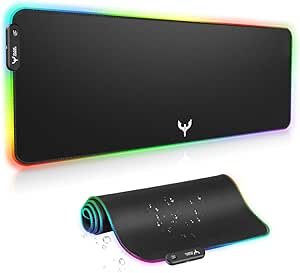 | Best Extended RGB Mouse Pad | Dimensions: 31.5 × 12 in (800 × 300 mm) | Thickness: 4 mm | Weight: 0.1 kg | VIEW LATEST PRICE | See Our Full Breakdown |
| GTPLAYER Gaming Chair with Footrest and Lumbar Support, Pearl White |  | Best for Reclining Breaks | Model: GT800A | Color: Pearl White | Material: Faux leather | VIEW LATEST PRICE | See Our Full Breakdown |
| FIFINE AmpliGame AM8PROT USB/XLR Dynamic Gaming Microphone Kit |  | Best for a Growing Streaming Setup | Connectivity: USB, XLR | Microphone type: Dynamic | Polar pattern: Unidirectional (cardioid) | VIEW LATEST PRICE | See Our Full Breakdown |
| Razer BlackShark V3 Pro Wireless Gaming Headset with ANC, White |  | Best Premium Noise-Cancelling Headset | Driver size: 50 mm | Microphone: Detachable HyperClear Full Band 12 mm | Wireless latency: As low as 10 ms | VIEW LATEST PRICE | See Our Full Breakdown |
| Logitech G29 Racing Wheel and Pedals for PS5, PS4, and PC | 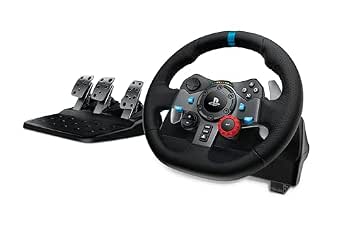 | Best for Sim-Racing | Compatible devices: PlayStation 5, PlayStation 4, PC, Mac | Rotation: 900 degrees | Force feedback: Dual-motor | VIEW LATEST PRICE | See Our Full Breakdown |
| Logitech G PRO X2 SUPERSTRIKE Wireless Gaming Mouse, Black and White |  | Best for Competitive Wireless Play | Connectivity: LIGHTSPEED wireless, USB | Sensor: HERO 2 | Maximum sensitivity: 26,000 DPI listed in specifications; description also states up to 44,000 DPI | VIEW LATEST PRICE | See Our Full Breakdown |
| gaming equipment | Connectivity |
|---|---|
| VITESSE Gaming Chair with Foot | — |
| TONOR TC310+ USB Gaming Conden | USB-A |
| SteelSeries Arctis Nova Pro Om | 2.4 GHz wireless, Bluetooth 5.3 LE, USB, line-in |
| FIFINE AmpliGame KS5 XLR/USB G | XLR/USB |
| Turtle Beach Stealth 600 Wirel | 2.4 GHz wireless and Bluetooth 5.2 |
| Turtle Beach Stealth 600 Wirel | — |
| BladeHawks RGB Extended Gaming | — |
| GTPLAYER Gaming Chair with Foo | — |
| FIFINE AmpliGame AM8PROT USB/X | USB, XLR |
| Razer BlackShark V3 Pro Wirele | 2.4 GHz wireless, Bluetooth 5.3, USB, 3.5 mm |
| Logitech G29 Racing Wheel and | — |
| Logitech G PRO X2 SUPERSTRIKE | LIGHTSPEED wireless, USB |
More Details on Our Top Picks
VITESSE Gaming Chair with Footrest and Lumbar Support, Gray
The VITESSE earns its place as the comfort-focused chair in this lineup: its adjustable lumbar curve, thick cushion, and included footrest give players more ways to settle in than a basic gaming seat. The 400-pound recommended maximum and metal frame also set it apart from equipment focused on audio or desk control, such as the TONOR TC310+ microphone kit. Its wipe-clean PU leather is practical for everyday gaming, though it may feel less breathable than fabric during long, warm sessions. I would choose this chair for reclining breaks and adjustable back support, not for a compact setup: its high-back design and roughly 25.6-inch depth need room. Assembly is required, and the product details do not explain the massage feature mentioned in the title.
Pros:- Adjustable lumbar curve and thick cushion support varied sitting positions.
- Included footrest makes it easier to recline between matches.
- PU leather upholstery can be wiped clean.
- SGS-verified Class 4 gas lift and a 400-pound recommended maximum weight.
Cons:- High-back frame and 25.59-inch depth may crowd smaller setups.
- PU leather may feel warm during extended sessions.
- Assembly is required, and massage functionality is not detailed in the provided product information.
Best for: Players seeking an adjustable high-back chair with a footrest and a higher stated weight capacity for a dedicated gaming space.
Not ideal for: Gamers with limited floor space, those who prefer breathable fabric upholstery, or buyers who need clearly specified massage functionality.
- Brand:VITESSE
- Color:Gray
- Upholstery:PU leather
- Maximum weight recommendation:400 pounds
- Dimensions (D × W × H):25.59 × 20.28 × 47.44 inches
- Back style:High back
- Usage:Indoor
Our verdict“Choose the VITESSE if you want a reclining-friendly gaming chair with adjustable lumbar support and have room for its full-size frame.”
TONOR TC310+ USB Gaming Condenser Microphone Kit with Boom Arm and RGB Lighting
The TONOR TC310+ is the straightforward pick for a gamer who wants a desk-mounted microphone kit without piecing together separate accessories. Its boom arm, pop filter, shock mount, and plug-and-play USB connection make setup simpler than the FIFINE AmpliGame KS5, which adds a mixer and supports XLR for a more involved audio setup. Tap-to-mute and adjustable gain are useful during live chat, while the unidirectional pickup pattern is aimed at voices in front of the mic rather than sound from every direction. RGB modes add a customizable desk accent, but do not change recording quality. The tradeoff is limited upgrade flexibility compared with an XLR-based setup, and the included clamp only fits desks up to 2.36 inches thick.
Pros:- Boom arm, pop filter, and shock mount are included in the kit.
- Tap-to-mute and adjustable gain provide convenient voice controls.
- Plug-and-play USB connection works with computers and PS4/PS5.
- Four RGB modes include brightness control.
Cons:- USB-only connectivity offers less audio-chain flexibility than the FIFINE AmpliGame KS5’s XLR/USB design.
- Desk clamp fits surfaces no thicker than 2.36 inches.
- Requires an available USB 2.0 or 3.0 port.
Best for: New streamers and multiplayer gamers who want a USB microphone with an included boom arm, pop filter, and quick mute control.
Not ideal for: Creators planning an XLR-based audio chain or gamers whose desk is thicker than 2.36 inches at the clamp point.
- Brand and model:TONOR TC310+
- Connectivity:USB-A
- Polar pattern:Unidirectional
- Audio sensitivity:10 dB
- Signal-to-noise ratio:78 dB
- Compatible devices:Desktop computer, laptop, Mac OS, PS4, PS5
- Desk clamp capacity:Fits desks up to 2.36 inches thick
- Included components:Microphone, pop filter, boom arm stand, shock mount, USB cable, manual
Our verdict“Pick the TONOR TC310+ for an easy USB streaming setup with a full set of mounting accessories, not for an expandable XLR system.”
SteelSeries Arctis Nova Pro Omni Wireless Gaming Headset, White
The Arctis Nova Pro Omni is the most feature-rich headset here for players who move between several systems or want game audio alongside other sources. Its USB connections support up to three systems, while 2.4 GHz and Bluetooth 5.3 broaden how it can connect; that flexibility goes beyond the simpler wireless-and-Bluetooth setup of the Turtle Beach Stealth 600. Hybrid active noise cancellation and a noise-reducing microphone suit noisy rooms and voice chat, and two hot-swappable batteries reduce downtime. The advertised up to 60 hours depends on both batteries, so it is not a single-charge figure. This is a more involved choice than a straightforward headset: some controls and features rely on the transmitter, app, or PC software, which may be unnecessary overhead for players who want simple plug-and-play use.
Pros:- Supports 2.4 GHz wireless, Bluetooth 5.3, USB, and line-in connections.
- Can connect up to three systems over USB and mix multiple audio sources.
- Hybrid active noise cancellation includes Transparency Mode.
- Two hot-swappable batteries provide up to 60 hours of combined runtime.
Cons:- The up-to-60-hour runtime relies on using both included batteries.
- Some features and controls require the app, PC software, or wireless transmitter.
- Its multi-system feature set may be more involved than needed for a single-console setup.
Best for: Multi-platform players and streamers who want to connect several systems, mix audio sources, and swap batteries during long sessions.
Not ideal for: Gamers who want simple controls, a single-system setup, or a headset whose full feature set does not depend on companion software or a transmitter.
- Brand and model:SteelSeries Arctis Nova Pro Omni, model 61722
- Color:White
- Connectivity:2.4 GHz wireless, Bluetooth 5.3 LE, USB, line-in
- Audio certification:Hi-Res Audio
- Driver frequency range:10 Hz–40 kHz
- Noise cancellation:Hybrid active noise cancellation with Transparency Mode
- Battery runtime:Up to 60 hours with two hot-swappable batteries
- Compatibility:PC, Mac, PlayStation, Xbox, Switch, Steam Deck, ROG Ally, and mobile devices
- Warranty:1 year
Our verdict“Choose the Arctis Nova Pro Omni if you need premium audio routing across several gaming systems and are comfortable managing its extra controls.”
FIFINE AmpliGame KS5 XLR/USB Gaming Microphone and Mixer Bundle
The FIFINE AmpliGame KS5 suits gamers who want physical control over their voice and headphone audio rather than just a microphone on an arm. Its included four-channel mixer provides mute controls, headphone monitoring, and a volume fader, giving it more desk-side control than the USB-focused TONOR TC310+. The dynamic microphone also offers both USB and XLR connectivity, so it can fit a simpler computer setup or a more developed audio chain. That flexibility has a clear catch: the microphone’s mute, gain, monitoring, and headphone controls work over USB only. Players using XLR give up those onboard controls, so the bundle makes the most sense when its USB features suit the intended setup. Its 1.48 kg item weight also calls for a stable desk and room for the mixer.
Pros:- Bundles a dynamic microphone with a four-channel mixer.
- Supports both USB and XLR connectivity.
- Mixer includes mute controls, headphone monitoring, and a volume fader.
- Five RGB lighting effects offer desk setup customization.
Cons:- Microphone controls are unavailable when using the XLR connection.
- Mixer adds desk space and setup complexity compared with the TONOR TC310+ USB kit.
- The 1.48 kg bundle may need a stable, uncluttered surface.
Best for: Streamers and gamers who want a bundled dynamic microphone, hands-on mixer controls, and the option to use USB or XLR.
Not ideal for: Buyers who plan to use XLR while relying on the microphone’s onboard mute, gain, monitoring, or headphone controls.
- Connectivity:XLR/USB
- Audio channels:4
- Audio inputs:XLR, USB
- Compatible devices:Gaming console, headphone, laptop, personal computer, speaker
- Item weight:1.48 kg
- RGB lighting effects:5
- Microphone type:Dynamic
Our verdict“Choose the KS5 if you want a microphone-and-mixer bundle with physical audio controls and can work around the XLR control limitation.”
Turtle Beach Stealth 600 Wireless Multiplatform Gaming Headset
The Turtle Beach Stealth 600 is the practical wireless pick for players who value long stretches between charges and easy switching between gaming and Bluetooth audio. Its QuickSwitch button makes changing connections more direct than juggling separate pairing steps, and its up to 80-hour battery life exceeds the combined runtime listed for the SteelSeries Arctis Nova Pro Omni. That endurance and simpler connection approach make it a better fit for everyday multiplatform use than SteelSeries’ more elaborate system for connecting and mixing several sources. The Stealth 600 still offers useful tuning through the Swarm II app, including a 10-band EQ, but it does not list active noise cancellation or the Nova Pro Omni’s hot-swappable batteries. Glasses-friendly memory foam cushions address a comfort concern for some players, though fit remains personal.
Pros:- 2.4 GHz wireless and Bluetooth 5.2 connections include a QuickSwitch button.
- Up to 80 hours of battery life with quick charging.
- Swarm II app offers a 10-band EQ and mappable controls.
- Memory foam cushions include glasses-friendly technology.
Cons:- Does not list active noise cancellation, unlike the SteelSeries Arctis Nova Pro Omni.
- Its feature set is less suited to players who need multi-system USB audio mixing.
- Sound customization and control mapping rely on the Swarm II app.
Best for: Multiplatform gamers who want long battery life, quick switching between wireless and Bluetooth, and app-based sound customization.
Not ideal for: Players who need active noise cancellation, several USB-connected systems, or replaceable hot-swappable batteries for uninterrupted sessions.
- Connectivity:2.4 GHz wireless and Bluetooth 5.2
- Battery life:Up to 80 hours
- Drivers:50 mm Nanoclear
- Audio:Waves 3D Audio
- Microphone:Flip-to-mute with AI-based noise reduction
- Customization:Swarm II app with 10-band EQ, mappable wheel, and mode button
- Comfort:Memory foam cushions with glasses-friendly technology
- Design:Lay-flat, adjustable
Our verdict“Pick the Stealth 600 for convenient wireless switching and extended battery life, but choose the Arctis Nova Pro Omni for active noise cancellation and more elaborate multi-system audio.”
Turtle Beach Stealth 600 Wireless Multiplatform Gaming Headset
The Turtle Beach Stealth 600 suits players who want one headset for console, PC, and mobile without frequent charging. Its up to 80-hour battery life exceeds the Razer BlackShark V3 Pro’s stated 70 hours, while 2.4 GHz wireless keeps game audio responsive and Bluetooth adds a convenient route to compatible mobile devices. QuickSwitch makes moving between those wireless connections easier than managing separate headsets.
The flip-to-mute mic, glasses-friendly memory foam cushions, and adjustable lay-flat design make it a practical everyday pick. Built-in EQ modes work for straightforward setup, though advanced tuning depends on the Swarm II app. Unlike the BlackShark V3 Pro, this headset does not list active noise cancellation or wired USB and 3.5 mm connections, so it is less suited to buyers seeking maximum connection flexibility or help blocking surrounding noise.
Pros:- Up to 80 hours of battery life with quick charge
- QuickSwitch supports switching between 2.4 GHz wireless and Bluetooth
- Glasses-friendly memory foam cushions and flip-to-mute microphone
- Built-in EQ modes with additional 10-band tuning in the Swarm II app
Cons:- Advanced EQ customization requires the Swarm II app
- Does not list active noise cancellation
- The listed connection options omit USB and 3.5 mm wired audio
Best for: Multi-platform players who want long battery life, quick switching between 2.4 GHz and Bluetooth, and glasses-friendly cushions.
Not ideal for: Players who need active noise cancellation, wired USB or 3.5 mm connections, or app-free access to advanced EQ controls.
- Compatibility:PlayStation 5, PlayStation 4, PC, Steam Deck, and mobile devices
- Wireless connectivity:2.4 GHz wireless and Bluetooth 5.2
- Battery life:Up to 80 hours with quick charge
- Drivers:50 mm Nanoclear
- Microphone:Unidirectional flip-to-mute with AI noise reduction
- Audio customization:Built-in EQ modes; Swarm II app with 10-band audio and microphone EQ
- Design:Adjustable lay-flat design with glasses-friendly memory foam cushions
Our verdict“Choose the Stealth 600 if battery life and easy wireless switching matter more than the BlackShark V3 Pro’s noise cancellation and wired connections.”
BladeHawks RGB Extended Gaming Mouse Pad, 31.5 × 12 in, Black
The BladeHawks extended mouse pad is the lineup’s pick for players who want their keyboard and mouse on one continuous surface. At 31.5 × 12 inches, it gives low-sensitivity mouse users room to sweep without running off the edge, while the rubber base helps keep the pad in place. Compared with the GTPLAYER chair, this is a small, desk-focused upgrade rather than a major furniture addition, but it also asks much less of the room.
Its 14 lighting modes and power-off memory add a customizable look, and the waterproof cloth surface is designed to handle spills. The tradeoff is that lighting needs a USB connection, and the full-size mat still takes up considerable desk area. Buyers who prefer a clean, unlit setup can skip the lighting; those with compact desks should measure before choosing it.
Pros:- Extended surface fits a keyboard and mouse together
- Fourteen static and dynamic lighting modes with power-off memory
- Natural rubber base helps limit movement during play
- Waterproof surface offers some protection against spills
Cons:- Lighting requires a USB connection
- The 31.5 × 12-inch footprint may not fit smaller desks
- Adds lighting rather than gaming performance features
Best for: PC players with a roomy desk who want a shared keyboard-and-mouse surface and customizable RGB lighting.
Not ideal for: Players with compact desks or anyone who wants a cable-free, unlit mouse surface.
- Dimensions:31.5 × 12 in (800 × 300 mm)
- Thickness:4 mm
- Weight:0.1 kg
- Surface material:Cloth
- Base material:Natural rubber
- Lighting modes:14 (7 static and 7 dynamic)
- Power:USB
- Features:Non-slip, waterproof, power-off memory
- Warranty:1 year
Our verdict“Pick the BladeHawks if your desk has room for a large shared surface and you want RGB; skip it if space or a simple setup takes priority.”
GTPLAYER Gaming Chair with Footrest and Lumbar Support, Pearl White
The GTPLAYER GT800A is the chair pick for players who want a footrest and included support cushions alongside a gaming seat. Its retractable footrest, headrest, and lumbar pillow make it better suited to leaning back between matches than the BladeHawks mouse pad, which improves desk coverage but offers no seating support. A metal frame and legs provide a sturdy structural basis, and the faux leather surfaces can be wiped clean.
This is a practical option for a gaming room that also serves as a home office, with height adjustment and 360-degree swivel for everyday desk use. Its main tradeoffs are the assembly required and the faux leather upholstery, which may not suit buyers who prefer fabric. The supplied details also do not give seat dimensions or a weight capacity, so buyers with specific fit or support needs should seek those measurements before choosing it.
Pros:- Retractable footrest, headrest, and lumbar pillow are included
- Metal frame and legs
- Height adjustment and 360-degree swivel suit desk use
- Faux leather surfaces can be wiped clean
Cons:- Assembly is required
- Faux leather may not suit buyers who prefer fabric upholstery
- The supplied specifications do not state seat dimensions or weight capacity
Best for: Players setting up a home gaming or office desk who want an adjustable chair with a footrest and included lumbar and head support.
Not ideal for: Buyers who prefer breathable fabric, want to avoid assembly, or need confirmed seat dimensions and weight capacity before purchase.
- Model:GT800A
- Color:Pearl White
- Material:Faux leather
- Frame:Metal
- Fill material:Foam
- Features:Height adjustable, 360° swivel, footrest, headrest, lumbar pillow
- Recommended use:Office, gaming
- Warranty support:Free replacement or refund within 30 days; free replacement or repair within 1 year
Our verdict“Choose the GTPLAYER if a footrest and included support cushions matter more than fabric upholstery or a no-assembly setup.”
FIFINE AmpliGame AM8PROT USB/XLR Dynamic Gaming Microphone Kit
The FIFINE AmpliGame AM8PROT is the microphone pick for players who want to start with USB and retain the option to move to an XLR setup. USB provides plug-and-play use, plus tap-to-mute, real-time monitoring, mix and volume controls, while the included boom arm and windscreen make it a more ready-to-place kit than a microphone sold without mounting hardware. Compared with the TONOR TC310+ condenser kit in the roundup, this model uses a dynamic mic and also lists XLR connectivity, giving it a different upgrade path.
The cardioid pickup pattern focuses capture toward the speaker, and the 48 kHz/24-bit specification suits voice recording and streaming. The tradeoff is that RGB and the mix controls are USB-only; the product details also do not specify an XLR cable or audio interface. Buyers planning to record over XLR should account for that additional equipment rather than assuming the kit is complete for that connection.
Pros:- USB plug-and-play and XLR connectivity support different setup stages
- Boom arm and windscreen are included
- USB mode provides tap-to-mute, monitoring, and mix controls
- Cardioid dynamic microphone with 48 kHz/24-bit audio resolution
Cons:- RGB lighting and mix controls are available only over USB
- The supplied details do not specify an XLR cable or audio interface
- XLR use requires compatible external equipment
Best for: Streamers and gamers who want a USB-ready microphone now, with the option to build an XLR-based setup later.
Not ideal for: Buyers who need a complete XLR recording chain in the box or who want RGB and mix controls while connected through XLR.
- Connectivity:USB, XLR
- Microphone type:Dynamic
- Polar pattern:Unidirectional (cardioid)
- Audio resolution:48 kHz/24-bit
- Frequency response:20 Hz–20 kHz
- Maximum SPL:115 dB
- Channels:1
- Boom arm extension:Up to 30 in
- Compatible devices:Laptop, PC, PS4, PS5
Our verdict“Choose the AM8PROT if you want a USB microphone kit with a defined XLR upgrade path, but not if you need XLR accessories included.”
Razer BlackShark V3 Pro Wireless Gaming Headset with ANC, White
The Razer BlackShark V3 Pro is the headset choice for players who want noise reduction and several ways to connect. Its hybrid active noise cancellation sets it apart from the Turtle Beach Stealth 600, which instead emphasizes longer stated battery life and QuickSwitch between wireless connections. Razer lists low-latency 2.4 GHz audio, Bluetooth 5.3, USB, and 3.5 mm connectivity, so this model can suit gaming setups that move between wireless play and wired devices.
The detachable microphone gives the headset a cleaner profile when it is not needed, and up to 70 hours of battery life supports extended use, though it falls short of the Stealth 600’s stated 80 hours. THX Spatial Audio with 7.1.4 surround is limited to Windows systems, so console players should not buy it for that feature alone. At approximately 367 g, it may also feel like a substantial headset for buyers who prioritize low weight.
Pros:- Hybrid active noise cancellation
- 2.4 GHz wireless, Bluetooth 5.3, USB, and 3.5 mm connections
- Low-latency wireless audio specified as low as 10 ms
- Up to 70 hours of battery life and a detachable microphone
Cons:- THX Spatial Audio support is specified for Windows systems
- At approximately 367 g, it may not suit buyers seeking a lightweight headset
- Its stated battery life is shorter than the Turtle Beach Stealth 600’s
Best for: Players who want active noise cancellation, multiple wired and wireless connections, and primarily game on Windows or across several devices.
Not ideal for: Buyers who prioritize the longest listed battery life, a permanently attached mic, low weight, or THX Spatial Audio on consoles.
- Driver size:50 mm
- Microphone:Detachable HyperClear Full Band 12 mm
- Wireless latency:As low as 10 ms
- Connectivity:2.4 GHz wireless, Bluetooth 5.3, USB, 3.5 mm
- Battery life:Up to 70 hours
- Weight:Approximately 367 g
- Spatial audio:THX Spatial Audio with 7.1.4 surround; supported on Windows systems
- Frequency response:12 Hz–28 kHz
- Warranty:2 years
Our verdict“Choose the BlackShark V3 Pro for noise cancellation and connection flexibility, but pick the Stealth 600 if longer stated battery life is your priority.”
Logitech G29 Racing Wheel and Pedals for PS5, PS4, and PC
The Logitech G29 is the dedicated driving pick in this gaming-equipment lineup: its dual-motor force feedback and 900-degree rotation let compatible games convey steering resistance and changing road conditions, while the pressure-sensitive brake gives pedal input more nuance than a basic controller. The leather-covered wheel, metal paddle shifters, and on-wheel controls make it feel purpose-built for longer racing sessions. Compared with the Logitech G PRO X2 SUPERSTRIKE, which prioritizes low-latency mouse control and customization for PC play, the G29 is a larger, fixed-use setup aimed at racing games. That specialization is its main tradeoff: it takes desk or rig space, connects by cable, and its optional six-speed shifter is sold separately. I’d choose it for racers who want physical steering and pedals, not an all-purpose gaming peripheral.
Pros:- Dual-motor force feedback adds steering resistance and road feedback in compatible games.
- 900-degree rotation supports broad steering input for racing.
- Pressure-sensitive brake and adjustable pedal faces allow a more tailored pedal position.
- Leather-covered wheel and stainless steel paddle shifters provide a substantial driving-focused control layout.
Cons:- The wheel and pedal set needs dedicated space and is less convenient to put away than a controller.
- Corded power and connection limit placement flexibility.
- The optional six-speed shifter is sold separately.
Best for: PlayStation 5, PlayStation 4, or PC players who mainly play compatible racing games and have space to mount a wheel and pedals.
Not ideal for: Players who want a compact, wireless peripheral for a mix of game genres, or buyers who expect a six-speed shifter in the box.
- Compatible devices:PlayStation 5, PlayStation 4, PC, Mac
- Rotation:900 degrees
- Force feedback:Dual-motor
- Pedals:Pressure-sensitive nonlinear brake; adjustable pedal faces
- Wheel cover:Hand-stitched leather
- Paddle shifters:Stainless steel
- Buttons:16
- Dimensions:17.75 x 13.25 x 12.5 inches (D x W x H)
Our verdict“Choose the G29 if racing games are a regular part of your play and you want wheel-and-pedal control; skip it if you need a small, multipurpose gaming accessory.”
Logitech G PRO X2 SUPERSTRIKE Wireless Gaming Mouse, Black and White
The G PRO X2 SUPERSTRIKE is the most specialized choice here for players who want to tune mouse clicks as well as tracking: customizable actuation, rapid trigger settings, and click haptics give competitive PC and Mac players more control over button response than the racing-focused G29 can offer. Its 61-gram build, HERO 2 sensor, LIGHTSPEED connection, and polling of up to 8 kHz are aimed at fast, precise input; the G29 instead serves players seeking physical steering and pedals. This mouse is a better fit for esports-style play than a broad, plug-and-play peripheral, though its right-handed shape narrows its audience. Advanced settings require Logitech G HUB, and the listed battery life varies between 60 hours in the specifications and 60–90 hours in the description. I’d favor it for players who will use the tuning options, not those seeking a simple mouse.
Pros:- Customizable actuation, rapid trigger settings, and haptic feedback let players tailor click response.
- LIGHTSPEED wireless connectivity and polling of up to 8 kHz target responsive input.
- At 61 g, the mouse is lightweight for quick repositioning.
- HERO 2 sensor and large UHMWPE gliding feet support tracking and movement.
Cons:- Some advanced features depend on Logitech G HUB software.
- The right-handed design excludes left-handed users.
- POWERPLAY wireless charging is a separate purchase, and stated battery life varies between 60 and 60–90 hours.
Best for: Right-handed PC or Mac players who compete in fast-paced games and want adjustable click response, wireless connectivity, and a lightweight mouse.
Not ideal for: Left-handed players, console-only gamers, or buyers who prefer simple settings without companion software and do not need advanced click customization.
- Connectivity:LIGHTSPEED wireless, USB
- Sensor:HERO 2
- Maximum sensitivity:26,000 DPI listed in specifications; description also states up to 44,000 DPI
- Polling rate:Up to 8 kHz
- Battery life:60 hours in specifications; 60–90 hours in description
- Weight:61 g
- Buttons:5
- Compatibility:PC and Mac
- Battery:1 included AA battery
Our verdict“Pick the G PRO X2 SUPERSTRIKE if you’re a right-handed PC or Mac competitor who will use its click tuning; choose a simpler mouse if you don’t need those controls.”

How We Picked
I compared the 12 products by the job each one does in a gaming setup: sustained comfort, audio and communication, control, or support for a specific play style. Within each category, I weighed practical usability, connection options, included accessories, build and adjustment features, and how much setup space or configuration the product asks of its owner. A feature counted most when it could change an everyday gaming decision, not simply because it appeared on a specification list.
The ranking favors products with a clear role and useful flexibility, then distinguishes specialist picks from more straightforward upgrades. That is why the SteelSeries headset and FIFINE AM8PROT stand out for broader utility, while the racing wheel earns a place for a narrower but clear audience. The two Turtle Beach entries are the same model, so I treat them as one distinct option rather than presenting a duplicate as a separate recommendation. Without a defined audience or verified comparative test data, this ordering is an editorial fit-based guide, not a claim that one product wins every performance measure.
Factors to Consider When Choosing Best Gaming Equipment
Gaming equipment works best as a coordinated setup, not a pile of upgrades. I would start with the problem you notice most during a typical session, then check compatibility, space, and how much adjustment the gear needs. These broader checks can prevent a feature-rich purchase from becoming an awkward fit.
Start With the Bottleneck in Your Setup
Identify what interrupts play most often before choosing a category. Discomfort points toward seating, unclear team chat toward a microphone or headset, and limited control in racing games toward a wheel and pedals. A flashy upgrade can feel underwhelming if the real issue is elsewhere, such as poor room acoustics or an unsuitable desk layout. Write down the problem you want to solve and the situations where it appears. Then compare products by whether their features address that problem directly. This approach also helps avoid buying two devices that solve the same issue while leaving a more pressing need untouched.
Check Platform and Connection Compatibility
Compatibility can depend on the exact console, computer, connection type, and intended use. A product described as multiplatform may still have different features or setup steps across systems, so verify support for your own hardware before ordering. USB and XLR microphones offer different routes: USB can simplify a basic setup, while XLR typically calls for compatible audio equipment and more configuration. Wireless headsets also deserve a connection check, especially if you plan to switch between console and PC. For a racing wheel, confirm that the wheel, pedals, and games match your platform. Treat compatibility as a first-pass filter rather than assuming a broad product label covers every feature.
Match Comfort Features to Your Body and Room
A chair’s footrest and lumbar support describe features, not a guarantee of a good fit. Seat dimensions, desk height, arm position, and how long you sit can affect comfort more than an accessory list. Measure the available floor space too: a reclined chair with a footrest needs room behind and in front. Try to distinguish adjustability from true ergonomic support, since a cushion or footrest may not suit every posture. If possible, check the chair’s dimensions against your own measurements and your desk before deciding. Buyers with limited space may get more value from improving their existing chair setup than adding a bulky model.
Choose Audio Gear Around Your Environment
Headset features matter differently in a quiet bedroom, a shared home, and a noisy room. Active noise cancellation may help reduce steady outside noise, but it does not solve every sound issue or replace a comfortable fit. A headset microphone can keep a desk tidy, while a separate mic may offer more placement control and a more deliberate streaming setup. Condenser microphones can pick up room sound, so a noisy or echoing space may call for careful placement and acoustic improvements. Before paying for extra audio features, decide whether your priority is hearing game detail, clear chat, reducing outside noise, or recording. The answer often points to a more suitable setup than choosing by feature count alone.
Budget for the Whole Setup, Not One Box
Some gear needs supporting items or space to work well. An XLR microphone may call for an interface or mixer, and a boom arm needs a suitable desk edge and room for movement. A racing wheel needs a stable mounting surface and enough space to use the pedals safely. Extended mouse pads also occupy more desk area than compact mats, which can matter around a keyboard, monitor stand, or controller. Make a short list of any required accessories and setup changes before choosing a device. Paying more for a feature-rich product makes sense when you will use those features regularly; otherwise, a simpler option can leave room for an upgrade you need more.
Prioritize Features You Will Use Often
Specialist equipment can improve a particular activity while adding little to other games. A racing wheel is a distinct choice for driving titles, and a large mouse pad is useful when broad mouse movement fits your play style and desk. By contrast, everyday audio gear can serve more sessions, though the right fit still depends on how you play. Think about the games and tasks that make up most of your week rather than an occasional use case. Also consider whether you prefer plug-and-play simplicity or enjoy adjusting settings and connections. The best match is the one whose advantages show up in your routine, not just on its feature list.
Frequently Asked Questions
Which upgrade should I buy first if I am building a gaming setup from scratch?
I would begin with the item tied to the most hours of use and the clearest problem: a headset for private audio and chat, a microphone for communication or streaming, or a chair if sitting comfort is limiting sessions. You do not need to buy every category at once. Check that the first device works with your platform and leaves room in your budget for any required accessories. A specialty item such as the Logitech G29 makes more sense after you know racing games are a regular part of your play. Building around actual use helps prevent expensive gear from sitting unused.
Should I choose a wireless headset or a wired microphone for gaming chat?
These solve different needs, so the choice depends on whether you want one headset-based setup or more control over voice capture. A wireless headset keeps listening and chat gear in one device and reduces cable clutter, while a standalone microphone can be positioned independently and may suit recording or streaming workflows. A USB mic can be simpler to connect, whereas XLR options may require additional audio equipment. Room noise and desk space can affect mic performance and placement. Choose based on your usual activities and the amount of setup you are willing to manage.
Is a gaming chair with a footrest a good choice for long sessions?
A footrest can provide a place to support your legs when reclining, but it does not by itself make a chair suitable for extended use. Seat depth, back support, arm position, and fit with your desk all affect comfort. Check dimensions and measure your space, including the area needed when the chair reclines. The VITESSE and GTPLAYER options in this roundup both include footrests and lumbar support, but those shared features do not mean they fit every body or posture equally well. If possible, compare measurements and adjustment range with the chair you already find comfortable.
Do I need an XLR microphone bundle, or is USB enough?
USB is often the more direct route if you want a microphone connected to a computer or compatible setup with minimal extra equipment. XLR offers another connection path and can suit people who want to build a more adjustable audio chain, but it may require a mixer or interface. The FIFINE AM8PROT provides USB/XLR flexibility, while the KS5 bundle includes a mixer; that added gear is useful only if it fits your recording or control needs. Consider your platform, desk space, and willingness to configure audio before selecting a bundle. For straightforward voice chat, extra routing options may not add much practical value.
Will an extended mouse pad or racing wheel improve every kind of game?
No: both are focused upgrades rather than universal improvements. An extended pad can give mouse players a broad movement area, but it takes up desk space and will not help much if you mostly use a controller. A racing wheel and pedals can make driving games more hands-on, yet they need a stable place to mount and may see little use outside racing. Think about which games you play most and whether you can keep the equipment set up or store it conveniently. If those conditions do not fit your routine, a more general headset or microphone may benefit more sessions.
Conclusion
For an all-around audio upgrade, I would start with the SteelSeries Arctis Nova Pro Omni; it is the best overall choice here for buyers seeking a versatile wireless headset. The Turtle Beach Stealth 600 is the best value-oriented route for shoppers who want a more straightforward wireless headset, while the Razer BlackShark V3 Pro is my premium pick for players who specifically want ANC. For beginners building a voice setup, the TONOR TC310+ packages a condenser mic with a boom arm; choose the FIFINE AM8PROT instead if USB/XLR flexibility matters more. For specific needs, racing fans should look at the Logitech G29, mouse players with ample desk space at the BladeHawks extended pad, and comfort-focused buyers at the VITESSE or GTPLAYER chair. The right choice is the one that solves your most frequent setup problem and fits your space and platform.
Columbus Day / Indigenous Peoples' Day Picks
long weekend sales
As an affiliate, we earn on qualifying purchases.