This checklist is for people setting up a VR fitness routine who want gear that supports comfortable movement and helps keep their headset and play area ready for regular workouts. It includes both small accessories and practical considerations for choosing products that fit your setup.

Play games on Amazon Luna for your next adventure, included with Prime
- A rotating selection of games, no download needed
- Play on TV, laptop or phone
- Fast, free delivery for your gear, too
The sections follow the gear list: wristbands, head strap, face cover, neck fan, workout mat, and lens cleaning kit. Some slots have a named pick; others are advice only. The listed names are the only product details available, so check each item’s full description before deciding it suits your needs.
Use the look-for lists to compare fit, materials, compatibility, and intended use. Check headset model names and dimensions against your own equipment, and consider whether an accessory could interfere with movement, comfort, or safe use during exercise.
Weighted Wristbands
Wristbands add an option for people who want resistance as part of a VR workout routine. Since this slot has no specific product pick, focus on how a band feels during the movements you actually plan to do. A secure fit matters: a loose band can shift as you move, while a tight one can feel uncomfortable over a longer session.
A common mistake is choosing added weight by appearance or assuming that more resistance is automatically a better fit. Check the listed weight, closure, and size range, then consider whether both bands can be worn comfortably and evenly. Make sure the material sits well against your skin and that the fastening does not create pressure when your arms bend or swing. If you wear a watch or other wrist accessory, check that the combination does not crowd the same area.
Try the fit with a few gentle movements before using wristbands in a full session. Keep your headset controllers easy to grip and operate, and avoid bands that interfere with tracking or your range of motion. Prioritize comfortable fit and controlled movement over adding resistance.
What to look for:
- A secure closure that stays in place during arm movement
- Listed weight per band and total pair weight
- A size range that fits your wrists comfortably
- Materials and care instructions suited to regular use
- A shape that leaves room for controller straps and a comfortable grip
Sweatproof Head Strap
The named pick is “VR Head Strap with 10,000 mAh Battery for Meta Quest 3S, Quest 3, and ”. Its title names Meta Quest 3S and Quest 3, but ends with an incomplete compatibility phrase. Confirm the complete listing and verify that your exact headset model is supported before buying. The title alone does not establish that the strap is sweatproof.
Head straps affect how a headset sits while you move, so check the adjustment method and how the strap distributes contact around your head. A common mistake is assuming that a battery-equipped strap will fit every headset or remain comfortable during exercise. Confirm how the battery attaches, whether it changes the balance of the headset, and how the unit is charged and used according to the product listing. Make sure its placement will not obstruct the headset’s adjustment or your range of motion.
For workouts, look for clear guidance on cleaning and care, especially for surfaces that contact skin or may be exposed to sweat. Test the strap’s fit while standing and turning gently before a more active session. Favor verified compatibility, adjustability, and a stable fit over a feature mentioned only in a product title.
What to look for:
- Explicit compatibility with your exact headset model
- A complete product listing that resolves the title’s unfinished compatibility text
- Adjustments that let you achieve a stable, comfortable fit
- Battery attachment, charging, and use details in the listing
- Cleaning and care guidance for surfaces worn during exercise
VR Head Strap with 10,000 mAh Battery for Meta Quest 3S, Quest 3, and Quest 2
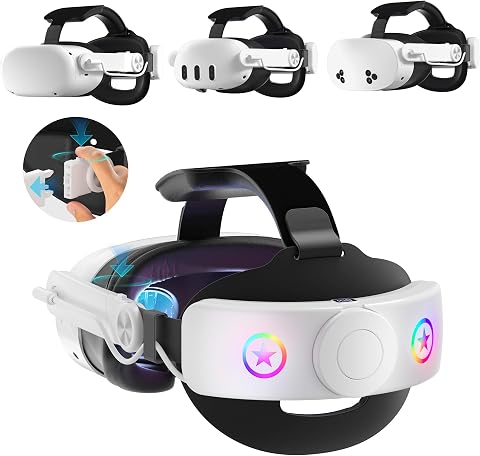
This adjustable VR head strap has a built-in 10,000 mAh battery that provides an advertised 2–4 extra hours of use. Its rear-mounted battery helps balance headset weight, and a one-click release with detachable connectors lets you switch between compatible Meta Quest headsets without tools.
Pros:
- Rear-mounted battery helps counterbalance headset weight and reduce facial pressure.
- One-click release and detachable connectors enable tool-free switching between compatible headsets.
- Adjustable fit is designed for adults and teens.
- Reinforced materials and locking mechanisms are designed for daily use.
Cons:
- Adds 16 ounces of weight to the headset setup.
- Compatibility is limited to Meta Quest 3S, Quest 3, and Quest 2.
Best for: Quest 3S or Quest 3 owners if the full listing confirms compatibility
Not ideal for: People who need a confirmed sweatproof claim or another headset fit
Bottom line: Confirm the full compatibility and care details before choosing this battery head strap for workouts.
Silicone Face Cover
A face cover is the headset’s contact point with your face, so comfort and fit matter during repeated sessions. This section is advice only; no product is named. Start by checking which headset models a cover supports and how it attaches. A cover that does not match the headset may sit poorly, shift during movement, or leave gaps around the facial interface.
A common buying mistake is treating “silicone” as enough information to judge comfort or upkeep. Check the product description for material details, cleaning instructions, and the shape of the contact area. Consider how the cover fits over or replaces your current interface, and whether it changes the headset’s position on your face. If you wear glasses, verify that the fit leaves suitable room and does not press frames against your face.
Look for a secure attachment and a shape that works with your specific headset. Follow the manufacturer’s cleaning directions, and make sure the cover is fully dry before using it again. A careful fit check with gentle movement can help you notice shifting or pressure points before a workout. Choose based on compatibility and comfort rather than assuming every face cover fits every headset.
What to look for:
- Compatibility with your exact headset model
- A secure attachment that does not shift when you move
- Material and cleaning instructions in the product details
- A facial shape that feels comfortable with your glasses, if worn
- A fit that preserves comfortable headset placement
Cooling Neck Fan
The listed pick is “Wearable Electric Heating Pad for Back, Neck, and Shoulders, Dark Gray.” The product name describes a heating pad, not a cooling neck fan, so it does not match this checklist slot based on the information provided. Check the full listing before considering it, and do not assume the title indicates cooling or fan functions.
A common buying mistake is relying on a product’s placement in a category instead of checking what the item is designed to do. For a cooling neck fan, look for an explicit fan or cooling function, how the device is worn, and whether its shape and controls are suitable for movement. Check the product’s instructions for use during exercise and whether it is intended to be worn around the neck. Confirm how it is powered and cared for from the listing rather than inferring details from its appearance or title.
Fit matters because a wearable item should stay comfortable without restricting head or neck movement. Check the size and adjustment information, and consider whether the device could contact your headset strap or interfere with turning your head. This named pick needs function verification before it can be treated as a cooling accessory; select a clearly described cooling fan if that is the feature you need.
What to look for:
- An explicit cooling or fan function in the product description
- A wearable design intended to sit comfortably around the neck
- Clear sizing or adjustment details
- Instructions addressing movement and intended use
- Power and care information in the full listing
Wearable Electric Heating Pad for Back, Neck, and Shoulders, Dark Gray

This wearable heating pad wraps around the back, neck, and shoulders, with straps to secure it around the abdomen for hands-free warmth. It has six heat levels, a 30–90 minute auto-off timer, an LCD display, and overheat protection.
Pros:
- Wearable, hands-free design wraps around the back, neck, and shoulders
- Integrated straps can secure the pad around the abdomen
- Six heat levels and seven auto-off timer settings
- Soft, washable flannel cover
Cons:
- Controller must be disconnected before washing
- Air drying is recommended; tumble drying and dry cleaning are not advised
Best for: Shoppers interested in the item if its full listing matches their intended use
Not ideal for: Anyone specifically seeking a cooling neck fan based on the given title
Bottom line: The listed name describes a heating pad, so verify the function before treating it as a cooling fan.
Non-Slip Workout Mat
The listed pick is “Non-slip Silicone Pastry Mat Extra Large 36″ x 24″ Baking Mat.” Its name describes a pastry mat, not a workout mat, even though it includes “non-slip” and dimensions. Those details do not establish that it is intended for exercise or suitable beneath a person during movement. Check the full product information before considering it for this slot.
A common mistake is treating a non-slip label or large surface as proof that a mat will stay safely in place during workouts. For a workout mat, check its intended use, the surface and floor compatibility, and whether its dimensions provide enough room for your planned movements. Confirm thickness and care instructions in the listing, and consider whether the mat can lie flat without curling or shifting at the edges. The stated 36 by 24 inch size should be compared with your available space and the movements you plan to do.
Test any exercise surface carefully before using it at speed: make sure it lies flat, does not slide, and gives you room to move while wearing your headset. Keep your play area clear of edges and obstacles. Because the given name identifies a baking mat, choose a mat specifically described for exercise unless the product listing confirms it is appropriate for your intended use.
What to look for:
- A product description that explicitly identifies the mat for exercise
- Dimensions that fit your available floor space and movements
- Floor compatibility and clear guidance about grip
- Thickness and care details in the listing
- A surface that lies flat without shifting or curling
Non-slip Silicone Pastry Mat Extra Large 36" x 24" Baking Mat

This extra‑large silicone pastry mat measures 36 by 24 inches and features a 0.7 mm thick, food‑grade non‑stick surface that tolerates temperatures from -30°F to 470°F. The upgraded non‑slip backing keeps the mat stable while rolling dough, and it doubles as an oven liner, pizza pad, and countertop protector.
Pros:
- Extra‑thick 0.7 mm silicone provides durability and resists wrinkling.
- Non‑stick surface works across a wide temperature range (-30°F to 470°F).
- Non‑slip backing keeps the mat stable during dough rolling.
- Large 36" x 24" size accommodates big pastries, sourdough loaves, and multiple tasks.
Cons:
- Red color may show staining or wear over time.
Best for: People comparing exercise mats for a VR play area
Not ideal for: Anyone relying on a pastry mat title as proof of workout suitability
Bottom line: The named item is described as a baking mat, so verify exercise suitability before using it as a workout surface.
Lens Cleaning Kit
The named pick is “Movo Deluxe Essentials DSLR Camera Cleaning Kit.” Its title identifies a DSLR camera cleaning kit, but the provided name does not say whether its contents are appropriate for a VR headset’s lenses. Read the full contents and instructions before using any component on a headset. Lens coatings and cleaning guidance can vary, so compatibility should be confirmed rather than assumed.
A common mistake is applying a liquid, cloth, or tool to a lens simply because it appears in a general camera kit. Check whether the kit specifically states that its items are safe for the type of lenses on your headset, and follow the headset maker’s cleaning instructions. Avoid guessing about liquids or pressure. Also check whether the kit includes a clean, soft cloth and whether instructions explain how each tool should be used and stored.
For routine care, start with the headset manufacturer’s directions and use only items the instructions permit. Keep cleaning materials free of dust and debris, and use gentle handling around the lenses. Before relying on this pick, verify the lens compatibility of each included item in the complete listing. A kit meant for camera equipment may be useful only if its specific contents and directions match your headset’s care requirements.
What to look for:
- A full list of kit contents and clear use instructions
- Explicit suitability for your headset’s lens type or manufacturer guidance
- A clean, soft cloth appropriate for the headset lenses
- Specific instructions for any liquid or tool included
- Storage guidance that helps keep cleaning items free of debris
Movo Deluxe Essentials DSLR Camera Cleaning Kit

This kit includes tools for cleaning APS-C camera sensors, lenses, and other precision optics, including sensor swabs, cleaning fluid, an air blower, a lens pen, a brush, microfiber cloths, and a carrying case. The soft cleaning materials are designed to remove dust, oil, fingerprints, and smudges from camera equipment and electronics.
Pros:
- Includes a variety of tools for sensor, lens, and optics cleaning
- Soft brush and air blower help remove dust from hard-to-reach areas
- Microfiber cloths are described as safe for optics and digital electronics
Cons:
- Sensor swabs are specified for APS-C sensors
- Not water resistant
Best for: Headset owners if the kit contents match their lens care instructions
Not ideal for: Anyone relying on the DSLR kit title alone to confirm VR lens safety
Bottom line: Verify each item against your headset’s lens care guidance before using this camera cleaning kit.
Build your setup in a comfort-first order: confirm headset fit and compatibility, choose face-contact accessories that are easy to care for, then assess wristbands and a suitable exercise surface for your routine. Check that each product is designed for the job you have in mind, especially when a listed name describes a different kind of item.
Use the checklist as a starting point, then compare full product details with your headset model, fit preferences, and workout space. A few careful checks can make it easier to choose gear that supports a comfortable routine. Start with the essentials that suit you, and adjust your setup as you learn what feels right.