
Building a competitive or comfortable gaming station requires more than just a powerful PC or console; it demands peripherals that enhance precision, comfort, and immersion. The Logitech G502 HERO stands out as the best overall accessory due to its unparalleled sensor accuracy and ergonomic design, making it the cornerstone for serious players. For those prioritizing desk aesthetics and functionality, the Gimars RGB Gaming Mouse Pad offers a rare combination of wireless charging and expansive surface area, while the Razer Tartarus V2 remains the definitive choice for MMO enthusiasts needing extra inputs. The primary tradeoff in this category is between dedicated utility and general versatility; some accessories excel at one specific task but clutter the desk, while others offer broad compatibility with less specialized performance. This guide breaks down these tradeoffs to help you select the right mix of tools for your specific gaming needs.

Play games on Amazon Luna for your next adventure, included with Prime
- A rotating selection of games, no download needed
- Play on TV, laptop or phone
- Fast, free delivery for your gear, too
Key Takeaways
- Desk real estate management is the primary differentiator between premium and budget accessories, with multi-functional items like charging mouse pads saving space.
- RGB lighting has evolved from pure decoration to functional feedback, with app-controlled bars and pads offering ambient synchronization rather than just static colors.
- Wired peripherals still dominate the high-performance segment for mice and headsets due to lower latency and lack of battery anxiety, despite the wireless trend.
- Specialized controllers like left-handed keypads and thumbstick rings address specific ergonomic pain points that generic bundles ignore.
- Cable management and storage solutions are often overlooked but significantly impact the longevity and tidiness of a gaming setup.
| DR CATCH RGB LED Gaming Mouse Pad |  | Best for Budget RGB Enthusiasts | Dimensions: 31.5″ x 11.8″ x 0.3″ | Lighting Modes: 14 | Power Source: USB | VIEW LATEST PRICE | See Our Full Breakdown |
| KontrolFreek Precision Rings |  | Best for Competitive Aim Improvement | Unit Count: 6 | Material: Rubber | Color: Black/Purple/Green | VIEW LATEST PRICE | See Our Full Breakdown |
| Call of Duty Monkeybomb Cable Guys Phone and Controller Holder |  | Best for Themed Desk Decor | Height: 8.5 inches | Material: PVC | Weight: 1.3 pounds | VIEW LATEST PRICE | See Our Full Breakdown |
| Gimars RGB Gaming Mouse Pad with 15W Wireless Charging |  | Best for Tech Integration | Dimensions: 31.5 x 11.8 x 0.16 inches | Charging Power: 15W (supports 15W, 10W, 7.5W) | Interface: USB Type-C | VIEW LATEST PRICE | See Our Full Breakdown |
| BladeHawks RGB Gaming Mouse Pad Extra Large | 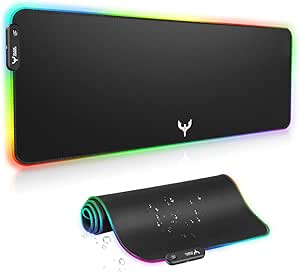 | Best Balanced Performance | Dimensions: 31.5 x 12 inches (800 x 300 mm) | Weight: 0.1 kg | Thickness: 4 mm | VIEW LATEST PRICE | See Our Full Breakdown |
| IC+RGBW USB-Powered LED Light Bar with App and Remote Control |  | Best Ambient Lighting Starter | Light Source: LED | Connectivity: Bluetooth | Control Methods: App, Remote, Line Control | VIEW LATEST PRICE | See Our Full Breakdown |
| Razer Tartarus V2 Left-Handed Gaming Keypad |  | Best for MOBA/MMO Efficiency | Number of Keys: 32 | Switch Type: Mecha-Membrane | Hand Orientation: Left | VIEW LATEST PRICE | See Our Full Breakdown |
| UPERGO Walnut Headphone Stand with Controller Holder |  | Best Premium Desk Organizer | Material: Solid Walnut Wood | Dimensions: 4.72 x 8.27 x 6.3 inches | Mounting Type: Tabletop | VIEW LATEST PRICE | See Our Full Breakdown |
| VSD M18 Macro Pad Programmable Keypad with LCD Keys |  | Best for Streamers and Productivity | Number of Keys: 18 (15 LCD, 3 Physical) | Display Support: JPG, PNG, GIF | Connectivity: USB-C | VIEW LATEST PRICE | See Our Full Breakdown |
| Orzly Hornet RX-250 4-in-1 Wired Gaming Bundle |  | Best Budget Starter Kit | Bundle Contents: Keyboard, Mouse, Headset, Mouse Pad | Keyboard Type: Full-size Membrane | Mouse DPI: 1200, 1600, 2400, 3200 | VIEW LATEST PRICE | See Our Full Breakdown |
| KDD RGB Headset Stand with Rotatable Headphone Holder and Detachable Controller Hook |  | Best Space-Saving Organizer | Brand: KDD | Material: Plastic | Lighting Modes: 9 | VIEW LATEST PRICE | See Our Full Breakdown |
| Logitech G502 HERO Wired Gaming Mouse |  | Best Precision Mouse | Sensor: HERO 25K Optical | Max DPI: 25,600 | Buttons: 11 Programmable | VIEW LATEST PRICE | See Our Full Breakdown |
| Govee RGBIC Gaming Light Bars H6047 with Smart Controller |  | Best Ambient Lighting System | Model: H6047 | Light Source Type: LED | Connectivity: Wi-Fi, Bluetooth | VIEW LATEST PRICE | See Our Full Breakdown |
| VELENTI Gamer Chair Phone Stand |  | Best Novelty Desk Accessory | Compatible devices: Smartphones, Kindle | Maximum device height: 19 cm | Mounting type: Tabletop | VIEW LATEST PRICE | See Our Full Breakdown |
More Details on Our Top Picks
DR CATCH RGB LED Gaming Mouse Pad
This large extended mouse pad stands out for its 14 customizable RGB lighting modes, offering more visual variety than the Gimars model. The waterproof microfiber surface is a practical choice for gamers prone to spills, as it wipes clean instantly without absorbing liquids. Compared to the BladeHawks alternative, the DR CATCH provides a slightly smoother glide, which benefits high-sensitivity mouse movements in FPS titles. However, the plastic button controls feel less premium than integrated touch sensors found on higher-end mats. You will also need to dedicate a USB port to power it, which might be inconvenient if your hub is already crowded. This pick makes the most sense for those who want extensive lighting customization without a high price tag.
Pros:- 14 customizable RGB lighting modes with brightness adjustment
- Large 31.5″ x 11.8″ surface area accommodates keyboard and mouse
- Waterproof microfiber surface is easy to clean and resistant to spills
- Non-slip rubber base ensures stability during use
Cons:- Requires a USB port for power, which may limit port availability
- Plastic button controls may feel less durable than integrated touch sensors
Best for: Gamers who prioritize extensive RGB lighting options and need a spill-resistant surface for long sessions.
Not ideal for: Users with limited USB ports who cannot spare one for peripheral lighting power.
- Dimensions:31.5″ x 11.8″ x 0.3″
- Lighting Modes:14
- Power Source:USB
- Material:Microfiber, Rubber
- Weight:0.69 kg
- Features:Waterproof, Non-slip, Power-off Memory
Our verdict“This mat is the smart choice for budget-conscious gamers who want maximum lighting variety and easy maintenance.”
KontrolFreek Precision Rings
Unlike the large desk accessories in this roundup, these precision rings directly impact gameplay performance by adding resistance to thumbsticks. The set includes soft, medium, and hard strengths, allowing you to fine-tune the feel for different game genres, from sniping to fast-paced movement. While the moisture-wicking material effectively resists hand oils and reduces stick noise, the universal fit means they may not be perfectly snug on all controller shapes. You should expect a short adjustment period as your muscle memory adapts to the increased friction. This model is better suited to competitive players than casual gamers who prefer the stock feel of their controllers.
Pros:- Improves aim accuracy by adding resistance to thumbsticks
- Includes mixed resistance levels (soft, medium, hard) for customization
- Moisture-wicking material resists hand oils and dampens stick noise
- Wide compatibility with major consoles and custom controllers
Cons:- May require adjustment period to adapt to increased thumbstick resistance
- Universal fit may not be perfectly snug on all controller stick shapes
Best for: Competitive console players seeking to improve aim accuracy through thumbstick resistance.
Not ideal for: Players who prefer the original, low-resistance feel of stock controller thumbsticks.
- Unit Count:6
- Material:Rubber
- Color:Black/Purple/Green
- Compatible Devices:PS4, PS5, Xbox One, Xbox Series X/S, Switch Pro, Scuf
- Resistance Levels:Soft, Medium, Hard
- Brand:KontrolFreek
Our verdict“These rings are a low-cost upgrade that significantly enhances control precision for serious console gamers.”
Call of Duty Monkeybomb Cable Guys Phone and Controller Holder
This item serves a different purpose than the functional mouse pads like the Gimars; it is primarily a collectible display piece that happens to hold devices. The weighted base provides excellent stability for controllers and phones, preventing the tipping issues common with lighter plastic stands. However, the PVC material lacks the premium tactile feel of the walnut or metal stands in this category. If you are not a fan of the Call of Duty franchise, the specific Monkeybomb design may clash with a minimalist or neutral gaming setup. This pick makes the most sense for fans who want to integrate their hobby into their workspace decor while keeping devices organized.
Pros:- Officially licensed by Activision with detailed Monkeybomb design
- Heavy-duty PVC construction with a weighted base prevents tipping
- Universal compatibility with major gaming controllers and mobile devices
- Combines functional device organization with collectible display appeal
Cons:- Plastic material may lack the premium feel of metal or wood accessories
- Specific design limits aesthetic versatility for non-Call of Duty fans
Best for: Call of Duty fans who want a functional desk accessory that doubles as a collectible display.
Not ideal for: Minimalists or users who prefer neutral, non-themed gaming accessories.
- Height:8.5 inches
- Material:PVC
- Weight:1.3 pounds
- Theme:Call of Duty Zombies
- Mounting Type:Tabletop
- Compatible Devices:PS5, Xbox, iPhone, Android, Remotes
Our verdict“This holder is best for dedicated fans who value character-themed aesthetics over premium material quality.”
Gimars RGB Gaming Mouse Pad with 15W Wireless Charging
What sets this pad apart from the DR CATCH and BladeHawks models is the integrated 15W Qi wireless charging station, which eliminates cable clutter for your phone. The raised platform ensures precise alignment, making it convenient to charge devices while gaming. However, achieving the full 15W speed requires a specific power adapter that is not included in the box, which adds hidden cost and complexity. Additionally, the pad may arrive with temporary curling due to packaging, requiring time to flatten before use. This option stands out for tech-savvy users who want to streamline their desk setup, provided they already own a compatible fast-charging wall block.
Pros:- Integrated 15W wireless charging with a raised platform for better alignment
- Extensive customization with 10 RGB lighting modes and memory function
- Extra-large surface area accommodates keyboard and mouse simultaneously
- Water-resistant, easy-to-clean fabric with high-precision tracking surface
Cons:- Fast charging requires a specific power adapter which is not included
- May arrive with temporary curling due to packaging, requiring time to flatten
Best for: Users who want to charge their phone wirelessly at their desk without extra cables.
Not ideal for: Buyers who do not own a compatible 15W USB-C power adapter.
- Dimensions:31.5 x 11.8 x 0.16 inches
- Charging Power:15W (supports 15W, 10W, 7.5W)
- Interface:USB Type-C
- Lighting Modes:10 (7 static, 3 dynamic)
- Material:Micro-textured fabric, Natural rubber base
- Compatibility:Qi-enabled devices
- Warranty:1 year
Our verdict“This pad is ideal for those who prioritize desk tidiness and have the necessary power adapter for fast charging.”
BladeHawks RGB Gaming Mouse Pad Extra Large
This pad offers a middle ground between the pure lighting focus of the DR CATCH and the tech-heavy Gimars. It features 14 RGB lighting modes and a waterproof micro-textured surface that balances speed and control effectively. At only 0.1 kg, it is significantly lighter than the DR CATCH, making it easier to transport if you take your setup to LAN parties. The single physical button for lighting controls is simple but less intuitive than touch interfaces. Compared to the Gimars, it lacks wireless charging, keeping the price lower and the setup simpler. This model is better suited to gamers who want reliable performance and aesthetics without the complexity of integrated charging.
Pros:- Extra-large size accommodates full keyboard and mouse setups plus peripherals
- 14 RGB lighting modes with power-off memory function
- Waterproof micro-textured surface ensures smooth mouse movement and easy cleaning
- Non-slip natural rubber base provides stability during intense gaming
Cons:- Requires a USB port for power, which may be limited on some devices
- Lighting controls are limited to a single physical button on the pad
Best for: Gamers seeking a lightweight, portable, and reliable RGB mat without extra tech features.
Not ideal for: Users who want integrated wireless charging or premium touch controls.
- Dimensions:31.5 x 12 inches (800 x 300 mm)
- Weight:0.1 kg
- Thickness:4 mm
- Lighting Modes:14 (7 static, 7 dynamic)
- Power Source:USB
- Surface Material:Micro-textured Cloth
- Base Material:Natural Rubber
- Warranty:1 Year Manufacturer
Our verdict“This is the most balanced choice for gamers who want solid RGB aesthetics and performance without unnecessary complexity.”
IC+RGBW USB-Powered LED Light Bar with App and Remote Control
This light bar stands out for its versatile control options, offering app, remote, and line control, which contrasts with the single-controller setup found in the Govee RGBIC Gaming Light Bars. The music sync feature adds dynamic flair to your setup, reacting to in-game audio or background music. However, the USB power dependency means you must reserve a port on your PC or hub, and the unintuitive button on the USB plug can be annoying when cycling modes without the app. It is a solid entry point for ambient lighting but lacks the advanced scene-sharing ecosystem of premium competitors.
Pros:- Over 64 lighting modes with music sync for dynamic atmosphere
- Flexible control via app, remote, and physical button
- Dimmable from 1% to 100% for precise brightness adjustment
- Built-in timer allows automatic on/off scheduling
Cons:- Requires a dedicated USB power source
- Physical button on the plug is less intuitive than dedicated controls
- Not water-resistant, limiting placement options
Best for: Streamers and casual gamers who want affordable, music-reactive ambient lighting with multiple control methods.
Not ideal for: Users with limited USB ports or those seeking advanced scene-sharing and smart home integration.
- Light Source:LED
- Connectivity:Bluetooth
- Control Methods:App, Remote, Line Control
- Brightness Range:1% to 100%
- Power Source:USB (5V)
- Water Resistance:Not Water Resistant
- Mounting:Tabletop
Our verdict“A flexible, feature-rich ambient lighting option for those who prefer multiple control methods over ecosystem integration.”
Razer Tartarus V2 Left-Handed Gaming Keypad
The Tartarus V2 excels in reducing hand movement by consolidating 32 keys and a thumbpad into a compact, left-handed form factor. Unlike the VSD M18 Macro Pad, which relies on LCD keys for visual feedback, the Tartarus uses tactile Mecha-Membrane switches for a traditional keystroke feel. The adjustable palm rest is a significant ergonomic advantage for long sessions, though the wired-only design restricts desk flexibility. It is a specialized tool that rewards users willing to relearn muscle memory for faster, more efficient inputs in complex games.
Pros:- 32 programmable keys with Mecha-Membrane tactile feedback
- 8-way thumbpad and scroll wheel for additional inputs
- Adjustable palm rest supports ergonomic positioning
- Individually backlit RGB keys for custom visibility
Cons:- Designed exclusively for left-handed use
- Wired USB-A connection limits placement flexibility
- Steep learning curve for new users
Best for: MOBA and MMO players who need quick access to numerous abilities and macros with minimal hand movement.
Not ideal for: Right-handed gamers or those who prefer wireless peripherals and standard keyboard layouts.
- Number of Keys:32
- Switch Type:Mecha-Membrane
- Hand Orientation:Left
- Connectivity:Wired USB-A
- Backlighting:RGB (Individually backlit)
- Dimensions:6.02 x 2.36 x 0.8 in
- Palm Rest:Adjustable (2 positions)
Our verdict“An ergonomic powerhouse for competitive players who prioritize speed and key density over standard keyboard familiarity.”
UPERGO Walnut Headphone Stand with Controller Holder
This stand distinguishes itself with solid walnut construction, offering a warmer, more premium aesthetic than the plastic-heavy KDD RGB Headset Stand. The dual-holder design efficiently organizes both headphones and controllers, while the hollow weighted base provides hidden storage for small items like SD cards. However, the fixed dimensions may not accommodate extremely bulky controllers or oversized headsets. It is a sophisticated choice for users who value material quality and clutter reduction over customizable RGB lighting effects.
Pros:- Solid walnut wood construction for premium look and feel
- Dual-holder design for headphones and controllers
- Weighted base with anti-slip silicone pads
- Integrated hidden storage tray for small accessories
Cons:- Limited compatibility with very large or irregular headsets
- Fixed dimensions may not fit all controller shapes
- No RGB lighting or electronic features
Best for: Aesthetic-focused gamers who want a natural wood finish and integrated storage for controllers and accessories.
Not ideal for: Users with oversized gaming headsets or those who prefer RGB lighting and plastic durability.
- Material:Solid Walnut Wood
- Dimensions:4.72 x 8.27 x 6.3 inches
- Mounting Type:Tabletop
- Compatibility:Headphones, PS5, Xbox, Switch Controllers
- Assembly:Tool-free snap-together
- Warranty:1 Year Manufacturer
- Base Feature:Weighted with storage tray
Our verdict“A stylish, functional organizer for gamers who prefer natural materials and practical storage over flashy electronics.”
VSD M18 Macro Pad Programmable Keypad with LCD Keys
The VSD M18 leverages 15 LCD keys to display dynamic icons, animations, and widgets, offering a level of visual feedback that the static keys of the Razer Tartarus V2 cannot match. This makes it exceptionally useful for streamers managing OBS scenes or professionals using Adobe suites. The USB-C connectivity is modern and fast, though the lack of wireless support and Linux compatibility limits its appeal. It is a powerful tool for workflow automation, provided the user is on Windows or macOS and values visual clarity over tactile key feel.
Pros:- 15 LCD keys support JPG, PNG, and GIF animations
- Supports complex multi-step macros and one-tap shortcuts
- Compatible with OBS, Streamlabs, and Adobe products
- Built-in widgets for clock, stopwatch, and weather
Cons:- No native Linux support
- Wired USB-C connection only
- LCD keys lack the tactile feedback of mechanical switches
Best for: Streamers and content creators who need visual context for complex macros and scene switching.
Not ideal for: Linux users or gamers who prioritize tactile feedback and wireless freedom.
- Number of Keys:18 (15 LCD, 3 Physical)
- Display Support:JPG, PNG, GIF
- Connectivity:USB-C
- Compatibility:Windows 11+, macOS 11.0+
- Lighting:RGB Surround Light Ring
- Hand Orientation:Ambidextrous
- Water Resistance:Water Repellent
Our verdict“A visual-first macro pad ideal for streamers and professionals who benefit from dynamic, customizable key displays.”
Orzly Hornet RX-250 4-in-1 Wired Gaming Bundle
This bundle offers a complete setup including keyboard, mouse, headset, and pad, making it a convenient entry point compared to buying separate items like the Logitech G502 HERO Mouse and a standalone headset. The anti-ghosting keyboard and adjustable DPI mouse provide decent functionality for casual play. However, the membrane switches lack the durability and feel of mechanical alternatives, and the all-wired design creates cable clutter. It is a practical choice for beginners who want to test the waters without a significant financial commitment, but serious gamers will likely outgrow the peripherals quickly.
Pros:- Includes four essential gaming accessories in one package
- Keyboard features anti-ghosting and 19-key rollover
- Mouse offers four adjustable DPI settings up to 3200
- Headset includes a foldable noise-reducing microphone
Cons:- Membrane keyboard switches offer less tactile feedback
- All components are wired, leading to potential cable clutter
- Audio quality is basic compared to dedicated gaming headsets
Best for: Beginners or casual gamers who want a complete, low-cost peripheral set to get started.
Not ideal for: Competitive gamers who require mechanical switches, wireless freedom, or high-end audio quality.
- Bundle Contents:Keyboard, Mouse, Headset, Mouse Pad
- Keyboard Type:Full-size Membrane
- Mouse DPI:1200, 1600, 2400, 3200
- Keyboard Durability:8 million keystrokes
- Mouse Switches:1 million clicks
- Connectivity:Wired
- Warranty:One-year replacement
Our verdict“A cost-effective, all-in-one solution for newcomers who need a full suite of peripherals without investing in individual high-end gear.”
KDD RGB Headset Stand with Rotatable Headphone Holder and Detachable Controller Hook
This stand stands out for its rotatable headphone holder, which allows easy access without removing the headset from the hook. Unlike the UPERGO Walnut Headphone Stand, which offers a premium wooden aesthetic, the KDD prioritizes functional lighting and compactness. The detachable controller hook is a clever feature for those who rotate between PC and console gaming, though the plastic construction feels less durable than metal or wood alternatives. It is an excellent choice for small desk setups where footprint matters more than material prestige. However, users with heavy, oversized headsets may find the single-headset capacity restrictive.Pros:- 360-degree rotating holder simplifies headset access
- Detachable hook offers flexible controller storage options
- RGB lighting adds ambient flair to dark setups
Cons:- Plastic body feels less premium than competitors
- Only holds one headset at a time
Best for: Gamers with limited desk space who need integrated cable management and controller storage.
Not ideal for: Users with multiple large headsets or those who prefer premium materials like wood or metal.
- Brand:KDD
- Material:Plastic
- Lighting Modes:9
- Capacity:1 headset and 2 controllers
- Headphone Holder:360-degree rotation
- Weight:0.53 kg
Our verdict“This is the ideal organizer for compact desks needing versatile storage and subtle lighting.”
Logitech G502 HERO Wired Gaming Mouse
The HERO 25K sensor sets a high bar for accuracy, outperforming the basic sensors found in the Orzly Hornet RX-250 bundle. What distinguishes this mouse is the adjustable weight system, letting users fine-tune balance for FPS or MMO titles. While the 11 programmable buttons offer deep customization, the wired connection restricts mobility compared to wireless rivals. It is a powerhouse for competitive play, but the right-handed design excludes left-handed users. Compared to simpler mice, the software requirement for full RGB sync adds a layer of complexity that casual players might find annoying.Pros:- High-precision HERO 25K sensor with zero smoothing
- Adjustable weights allow personalized balance
- Dual-mode scroll wheel aids rapid scrolling
Cons:- Wired connection limits desk mobility
- Requires software for full feature access
Best for: Competitive gamers who prioritize sensor accuracy and customizable weight distribution.
Not ideal for: Left-handed players or those who dislike managing software for peripheral settings.
- Sensor:HERO 25K Optical
- Max DPI:25,600
- Buttons:11 Programmable
- Connectivity:Wired
- Weight System:5 x 3.6g weights
- Hand Orientation:Right
Our verdict“A top-tier choice for players demanding maximum control and sensor precision over wireless convenience.”
Govee RGBIC Gaming Light Bars H6047 with Smart Controller
These light bars excel at creating dynamic multi-color gradients, offering a richer visual experience than the static single-color strips of the IC+RGBW LED Light Bar. The inclusion of a physical smart dial is a major advantage, allowing quick brightness adjustments without fumbling for a phone app. Integration with Razer Chroma makes it a strong ecosystem choice for Razer users. However, the lack of screen color picking means it cannot match on-screen action as precisely as some camera-based systems. It is best suited for users who want audio-reactive effects and easy manual control.Pros:- RGBIC tech creates multi-color gradient effects
- Physical dial allows quick tactile adjustments
- Syncs seamlessly with Razer Synapse 3
Cons:- No screen color picking capability
- Requires specific apps for full functionality
Best for: Users seeking synchronized, dynamic ambient lighting with easy manual control options.
Not ideal for: Those who need screen-matching colors or outdoor durability.
- Model:H6047
- Light Source Type:LED
- Connectivity:Wi-Fi, Bluetooth
- Control Methods:App, Touch Dial, Voice
- Compatibility:Razer Synapse 3, Alexa
- Power Source:Corded Electric
Our verdict“Perfect for gamers who want immersive, audio-reactive lighting with convenient physical controls.”
VELENTI Gamer Chair Phone Stand
This stand serves a niche purpose: keeping a secondary device within view while gaming. Unlike the Call of Duty Monkeybomb Cable Guys holder, which is character-themed, this offers a minimalist gamer chair aesthetic that blends into various desk themes. Its biodegradable material appeals to eco-conscious buyers, though the clip-style holder may restrict viewing angles for thicker cases. It is not a performance accessory but a convenience tool for multitaskers. Compared to larger stands, its compact footprint ensures it does not clutter the workspace, making it a low-risk addition for phone-centric gamers.Pros:- Distinctive gamer chair design adds character
- Keeps phone within easy reach and view
- Made from durable, biodegradable materials
Cons:- Limited device compatibility height
- Clip mechanism may limit positioning
Best for: Gamers who multitask with mobile devices and prefer minimalist desk aesthetics.
Not ideal for: Users with very large phones or thick protective cases that exceed height limits.
- Compatible devices:Smartphones, Kindle
- Maximum device height:19 cm
- Mounting type:Tabletop
- Style:Gamer chair
- Item weight:0.08 kg
- Color:Black
Our verdict“A charming, functional stand for keeping mobile devices accessible without cluttering the desk.”

How We Picked
To curate this list, I evaluated each accessory based on build quality, functional utility, and compatibility across major platforms (PC, Xbox, PlayStation, Nintendo Switch). Priority was given to items that solve specific gamer problems, such as wrist strain, cable clutter, or lack of programmable inputs, rather than purely aesthetic additions. I also considered the ease of setup and software integration, as accessories requiring complex drivers or proprietary apps were ranked lower unless their performance benefits justified the hassle. Durability was another key factor, with materials like walnut, metal, and high-density rubber receiving higher marks than cheap plastics that degrade quickly.
The ranking logic favors versatility and performance impact. Items that directly influence gameplay precision, such as high-DPI mice and responsive keypads, are placed higher than passive accessories like stands and holders, unless those passive items offer unique organizational benefits. I also balanced the list to include options for different budgets, ensuring that high-end premium picks were contrasted with value-oriented bundles to highlight where money is best spent.
Factors to Consider When Choosing Best Gaming Accessories
Choosing the right gaming accessories involves balancing your specific game genres, desk space, and aesthetic preferences. It is easy to get distracted by flashy marketing, but the best accessories are those that integrate seamlessly into your workflow and enhance your physical comfort during long sessions.Prioritize Ergonomics Over Aesthetics
Gaming sessions often last hours, making physical comfort a performance factor rather than just a luxury. Ergonomic design reduces strain on wrists and hands, which is critical for maintaining reaction times in competitive titles. While RGB lighting and sleek designs attract attention, they do not prevent carpal tunnel or finger fatigue. Look for accessories with textured grips, adjustable angles, or wrist rests. The Logitech G502 HERO is a prime example of form following function, offering a shape that accommodates various grip styles. If you experience discomfort, invest in ergonomic peripherals before spending on cosmetic upgrades like light bars or decorative stands.
Evaluate Desk Space and Cable Management
A cluttered desk leads to a cluttered mind and limited movement for your mouse. Before buying, measure your available surface area to ensure large accessories like extended mouse pads or multi-device charging docks fit without crowding your keyboard. Cable management is equally important; accessories with integrated cable routing or wireless capabilities keep your workspace clean and reduce the risk of snagging cords during intense play. Items like the UPERGO Walnut Headphone Stand help clear off desk space by moving headsets and controllers off the surface. If you have a small desk, prioritize compact or vertical storage solutions over wide, sprawling peripherals.
Match Accessories to Your Primary Game Genre
Not all accessories serve every type of gamer equally. MOBA and MMO players benefit immensely from programmable keypads like the Razer Tartarus V2, which allows for complex macros and ability assignments that a standard keyboard cannot support. Conversely, FPS players need a high-precision mouse and a large, low-friction surface for wide aiming movements. Console players might find thumbstick rings and controller stands more valuable than PC-specific peripherals. Identify your most-played genre first, then select accessories that directly enhance your mechanical efficiency in that specific context, rather than buying generic gear that offers marginal gains.
Consider Software Integration and Ease of Use
Many modern accessories rely on companion software for RGB control, macro programming, or firmware updates. Complex software can introduce bugs, consume system resources, or become obsolete if the manufacturer discontinues support. Plug-and-play functionality is a significant advantage for users who want reliability without technical overhead. Check if the accessory requires a dedicated app or if it works with standard OS settings. For example, simple light bars with remote controls offer immediate usability, whereas smart lighting systems might require Wi-Fi configuration and app downloads. If you dislike managing multiple background processes, stick to accessories with minimal software dependencies.
Frequently Asked Questions
Do RGB accessories actually improve gaming performance?
RGB lighting itself does not directly increase frame rates or aim precision, as it is primarily an aesthetic and atmospheric feature. However, it can improve the user experience by reducing eye strain in dark environments through ambient backlighting, which helps maintain contrast perception. Some advanced RGB accessories also use lighting for functional feedback, such as indicating health status or reload timers in supported games. If your goal is pure competitive performance, prioritize sensor quality and ergonomic build over lighting effects. Treat RGB as a comfort and immersion enhancement rather than a performance booster.Is it better to buy a gaming bundle or individual accessories?
Bundles like the Orzly Hornet RX-250 offer convenience and cost savings for beginners setting up a new PC, but they often compromise on the quality of individual components. The mouse or headset in a bundle is usually an entry-level model that may lack the durability or precision of standalone premium options. Individual accessories allow you to mix and match based on your specific needs, such as choosing a high-end mouse with a budget-friendly headset. For serious gamers, investing in separate, high-quality items typically yields better long-term value and performance than accepting the ‘average’ quality of a bundle.How do I choose the right size mouse pad for my setup?
The ideal mouse pad size depends on your mouse sensitivity (DPI) and desk space. High-sensitivity players make smaller movements and can use medium-sized pads, while low-sensitivity players who swing their arm for wide turns need extended or extra-large pads to avoid running off the edge. Measure your desk depth and width, ensuring the pad does not interfere with keyboard placement or cup holders. Materials matter too; cloth surfaces offer control for tactical shooters, while hard pads provide speed for fast-paced action games. Choose a size that allows your natural arm movement without restriction.Are wired accessories still worth buying in a wireless era?
Yes, wired accessories remain relevant for specific use cases despite the popularity of wireless technology. Wired mice and headsets eliminate battery anxiety and provide consistent, ultra-low latency connections, which is critical for competitive esports. They also tend to be lighter than wireless counterparts because they do not house batteries, reducing hand fatigue during long sessions. Additionally, wired connections do not suffer from interference in crowded wireless environments. If you do not travel with your setup and prioritize reliability and weight over cable freedom, wired options are a smart, cost-effective choice.How do I clean and maintain gaming accessories with fabric surfaces?
Fabric mouse pads and headset ear cushions accumulate oils, sweat, and dust, which can degrade performance and hygiene over time. For mouse pads, hand wash with mild soap and lukewarm water, then air dry flat to prevent warping; never use a washing machine or dryer. Headset cushions can often be removed and gently cleaned with a damp microfiber cloth, while leatherette materials should be wiped with alcohol-free disinfecting wipes. Regular maintenance extends the lifespan of these items and maintains consistent mouse glide and audio comfort. Avoid harsh chemicals that can break down adhesives or synthetic materials.Conclusion
Selecting the right gaming accessories depends on your specific priorities, whether that is competitive precision, ergonomic comfort, or aesthetic immersion. For the best overall performance, the Logitech G502 HERO provides the accuracy and reliability needed for serious play. If you are on a tight budget or setting up a first PC, the Orzly Hornet RX-250 bundle offers a functional starting point, though you should plan to upgrade individual components later. For MMO and MOBA players seeking a competitive edge, the Razer Tartarus V2 is an indispensable tool that expands your input capabilities significantly. Those looking to enhance their desk aesthetics and organization without sacrificing functionality should consider the Gimars RGB Gaming Mouse Pad or the UPERGO Walnut Headphone Stand for a clean, professional look. Ultimately, prioritize accessories that solve your specific pain points—whether it’s wrist strain, cable clutter, or lack of keys—to build a setup that feels effortless and responsive.