
When searching for the best handbrake for VR sim racing, you want a device that combines realism, reliability, and compatibility with your setup. The PXN HB S USB PC Handbrake stands out as the overall best for its solid performance and easy plug-and-play design. For those on a budget, the CNRAQR USB Handbrake offers excellent value with broad compatibility. Meanwhile, the MOZA HBP is the top choice for dedicated racers seeking premium build quality and advanced features. Every option involves tradeoffs between price, build, and flexibility, so continue reading to see which handbrake best matches your needs.

Get VR and gaming gear delivered free — and shop member deals
- Fast, free delivery on millions of items
- Access to Prime Big Deal Days deals on October 6–7
- Prime Video, Amazon Music and more included
Key Takeaways
- Compatibility with popular racing wheels and VR headsets is a major factor differentiating top picks.
- Build quality and sensor precision directly impact realism and responsiveness during intense races.
- Ease of installation and adjustability are often overlooked but crucial for seamless VR integration.
- Price range varies widely, with good value options often sacrificing some advanced features.
- Universal mounting options expand versatility but may compromise space efficiency or stability.
| PXN HB S USB PC Handbrake for Sim Racing Wheel |  | Best Overall for Versatile PC Compatibility | Compatibility: PC Windows, PXN V99 V10 V12, Logitech G27 G29 G920 G923 T500 T300 | Connection: USB plug-and-play | Adjustable stroke: 10mm to 16mm | VIEW ON AMAZON | See Our Full Breakdown |
| PXN HB S PC Handbrake for Sim Racing (Windows 7/8/10/11) |  | Best Value for Precise, Adjustable PC Handbrake | Material: Aluminum alloy | Sensor Technology: 16-bit Hall-effect | Compatibility: Windows 7/8/10/11, V3, V900, V9, V10, V12, G27, G29, G920, G923, T500, T300 | VIEW ON AMAZON | See Our Full Breakdown |
| CNRAQR PC Racing Game USB Handbrake for 16-Bit SIM |  | Best for Portable, Easy-Setup PC Racing | Compatibility: G27, G29, G920, G923, T500, T300 | Sensor: 16-bit non-contact | Cable Length: 2 m | VIEW ON AMAZON | See Our Full Breakdown |
| Nosxxus Universal Desk/Chair Mount Bracket Plate for USB Handbrake |  | Best for Custom Mounting Flexibility | Material: Stainless steel | Compatibility: USB handbrakes, Logitech G25/G27/G29, T500, Thrustmaster shifters | Features: Adjustable, sandblasted surface | VIEW ON AMAZON | See Our Full Breakdown |
| RYLNOK 64bit PC USB Handbrake for Sim Racing Games – Blue |  | Best for Broad Compatibility and Realism | Compatibility: Logitech G25, G27, G29, G920, T500, T300, Fanatec | Supported Games: ETS2, ATS, Forza Horizon, Assetto Corsa, DiRT Rally | Connection: USB, Plug & Play | VIEW ON AMAZON | See Our Full Breakdown |
| Aikeec USB Sim Racing Handbrake for PC, Compatible with G27 G29 G920 T300 T500 |  | Best Overall for Versatile PC Compatibility | Compatibility: PC Windows, supports Logitech G27, G25, G29, G920, G923, T500, T300 | Connection: USB | Adjustability: Handle height and angle adjustable | VIEW ON AMAZON | See Our Full Breakdown |
| Handbrake Sim Racing USB Handbrake for PC Windows |  | Best for Realistic Feel with Premium Materials | Compatibility: G920, G923, G27, G25, G29, T500, T300 (PC only) | Materials: CNC machined aluminum, mild steel | Sensor Technology: 64-bit Hall-effect sensors | VIEW ON AMAZON | See Our Full Breakdown |
| 64Bit PC/PS4/PS5 USB Handbrake for Sim Racing – Compatible with Logitech G29 G27 G25 G920 T300 | 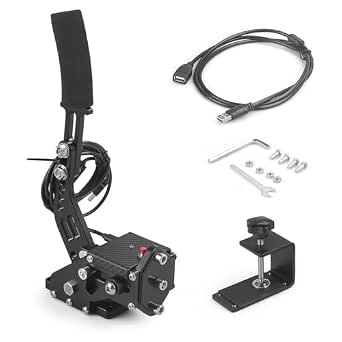 | Best for Multi-Platform Play with Easy Setup | Compatibility: PC, PS4, PS5 | Connectivity: USB | Cable Length: 1.8 meters | VIEW ON AMAZON | See Our Full Breakdown |
| 64 Bit USB PC Handbrake Compatible with Logitech G27 G29 G920 T500 T300 for Sim Racing Games |  | Best for High Compatibility and Adjustable Control | Compatibility: Logitech G27, G29, G920, T500, T300 | Connection: USB | Adjustments: Handle height and angle | VIEW ON AMAZON | See Our Full Breakdown |
| PC Racing Game USB Handbrake for Sim Racing, Compatible with G27 G29 T500 T300, Linear 16-Bit Sensor |  | Best for Precise Control with Simple Compatibility | Compatibility: G27, G29, G25, G920, T500, T300, LFS, DIRT RALLY | Sensor: 16-Bit Non-Contact | Material: Low-carbon Steel | VIEW ON AMAZON | See Our Full Breakdown |
| RYLNOK 64bit PC USB Handbrake for Sim Racing – Compatible with Logitech G25 G27 G29 G920 T500 T300 |  | Best Overall for Versatility and Precision | Compatibility: Logitech G25, G27, G29, G920, G923; Thrustmaster T500, T300; Fanatec models | Supported Games: ETS2/ATS, Forza Horizon 4/5/6, Assetto Corsa, DiRT Rally 2, Project CARS 2/3, WRC 7/8/9 | Connection: USB, Plug & Play | VIEW ON AMAZON | See Our Full Breakdown |
| MOZA HBP Sim Racing Handbrake for PC and Racing Simulators |  | Best for Premium Customization and Realism | Material: Aviation-grade aluminum | Sensor: 16-bit high precision | Mounting: Adjustable for horizontal or vertical | VIEW ON AMAZON | See Our Full Breakdown |
| handbrake for vr sim racing | Compatibility | Material | Connection | Sensor technology |
|---|---|---|---|---|
| PXN HB S USB PC Handbrake for | PC Windows, PXN V99 V10 V12, Logitech G27 G29 G920 G923 T500 T300 | Aluminum alloy | USB plug-and-play | 16-bit Hall effect |
| PXN HB S PC Handbrake for Sim | Windows 7/8/10/11, V3, V900, V9, V10, V12, G27, G29, G920, G923, T500, T300 | Aluminum alloy | — | 16-bit Hall-effect |
| CNRAQR PC Racing Game USB Hand | G27, G29, G920, G923, T500, T300 | Low-carbon steel | — | — |
| Nosxxus Universal Desk/Chair M | USB handbrakes, Logitech G25/G27/G29, T500, Thrustmaster shifters | Stainless steel | — | — |
| RYLNOK 64bit PC USB Handbrake | Logitech G25, G27, G29, G920, T500, T300, Fanatec | Metal | USB, Plug & Play | Hall sensor |
| Aikeec USB Sim Racing Handbrak | PC Windows, supports Logitech G27, G25, G29, G920, G923, T500, T300 | — | USB | — |
| Handbrake Sim Racing USB Handb | G920, G923, G27, G25, G29, T500, T300 (PC only) | — | USB, plug and play | 64-bit Hall-effect sensors |
| 64Bit PC/PS4/PS5 USB Handbrake | PC, PS4, PS5 | High-quality aluminum | — | 64-bit hall sensor |
| 64 Bit USB PC Handbrake Compat | Logitech G27, G29, G920, T500, T300 | — | USB | — |
| PC Racing Game USB Handbrake f | G27, G29, G25, G920, T500, T300, LFS, DIRT RALLY | Low-carbon Steel | USB | — |
| RYLNOK 64bit PC USB Handbrake | Logitech G25, G27, G29, G920, G923; Thrustmaster T500, T300; Fanatec models | Metal | USB, Plug & Play | Hall sensor |
| MOZA HBP Sim Racing Handbrake | MOZA R3, R5, R9 V2, R12, R16, R21 | Aviation-grade aluminum | USB or wheelbase port | — |
More Details on Our Top Picks
PXN HB S USB PC Handbrake for Sim Racing Wheel
This model stands out for its broad compatibility with many PC racing wheels, including Logitech, Thrustmaster, and PXN models. Its adjustable stroke, height, and grip modes allow a highly personalized experience, making it a strong contender against the RYLNOK, which offers similar customization but with a more straightforward setup. The durable aluminum alloy construction and 16-bit Hall effect sensors ensure precise, immersive control. However, its limitation to PC Windows systems and lack of console support means it’s less flexible for multi-platform setups. The plug-and-play nature simplifies installation, yet manual adjustments are necessary for optimal feel. This pick makes the most sense for serious PC racers seeking a highly adaptable handbrake without console compatibility.
Pros:- Highly compatible with multiple PC racing wheel models
- Adjustable stroke, height, and grip modes for customization
- Durable aluminum alloy construction with precise sensors
- Easy plug-and-play installation
Cons:- Limited to PC Windows systems only
- Requires manual adjustment for optimal feel
Best for: Dedicated PC sim racers who want maximum compatibility and customization options.
Not ideal for: Console racers or those seeking a plug-and-play solution with broad platform support.
- Compatibility:PC Windows, PXN V99 V10 V12, Logitech G27 G29 G920 G923 T500 T300
- Connection:USB plug-and-play
- Adjustable stroke:10mm to 16mm
- Material:Aluminum alloy
- Sensor technology:16-bit Hall effect
- Height adjustment:Yes
Our verdict“This handbrake is ideal for PC racers who prioritize versatility and customization over multi-platform compatibility.”
PXN HB S PC Handbrake for Sim Racing (Windows 7/8/10/11)
Compared with the PXN HB S USB PC Handbrake, this version emphasizes high-precision Hall-effect sensors and a sturdy aluminum alloy build, making it a reliable choice for serious sim racers. Its wide compatibility with several popular wheel models and adjustable strength and stroke give it a competitive edge over simpler models like the CNRAQR, which lacks adjustable travel. The switchable grip modes between vertical and horizontal add to its versatility. A notable tradeoff is that it’s limited strictly to Windows PCs, and manual adjustments are necessary for different spring setups. This makes it a strong pick for those who want a more refined feel at a reasonable price, especially if they prioritize sensor precision.
Pros:- High-precision Hall-effect sensors for realistic control
- Compatible with a wide range of PC sim racing wheels
- Adjustable strength and travel for personalized experience
- Switchable grip modes for versatility
Cons:- Limited to Windows PCs
- Requires manual adjustment for different spring setups
Best for: PC racers seeking a precise, customizable handbrake without needing console support.
Not ideal for: Console players or those looking for wireless or multi-system compatibility.
- Material:Aluminum alloy
- Sensor Technology:16-bit Hall-effect
- Compatibility:Windows 7/8/10/11, V3, V900, V9, V10, V12, G27, G29, G920, G923, T500, T300
- Adjustable Travel:10-16mm
- Warranty:12 months
Our verdict“This handbrake suits PC racers who value sensor accuracy and adjustable features at an affordable price point.”
CNRAQR PC Racing Game USB Handbrake for 16-Bit SIM
This USB handbrake offers a straightforward, portable solution for PC sim racers, with a robust low-carbon steel build and a 16-bit non-contact sensor that delivers reliable, precise control. While it shares the compatibility with popular G-series wheels like G27, G29, and T500 with the PXN models, it lacks adjustable parameters, making it less customizable. Its easy assembly and compact design are advantages for users with limited space or those who frequently move their setup. However, it’s limited to PC and doesn’t support consoles, and the absence of wireless options may limit convenience. Compared to the RYLNOK, which offers more adjustability, this is better suited for casual players or those prioritizing portability.
Pros:- High-precision 16-bit sensor for accurate control
- Easy to assemble and portable design
- Compatible with multiple popular racing wheel models
- Adjustable handle height for comfort
Cons:- Limited to PC systems only
- No adjustable resistance or spring tension
Best for: Casual PC racers who want a portable, simple handbrake setup without extensive customization.
Not ideal for: Competitive racers needing adjustable resistance and detailed calibration.
- Compatibility:G27, G29, G920, G923, T500, T300
- Sensor:16-bit non-contact
- Cable Length:2 m
- Material:Low-carbon steel
- Adjustable Height:Yes
- System Compatibility:Windows 11 and below
Our verdict“This handbrake is perfect for casual PC racers seeking a compact, reliable control device without the need for extensive customization.”
Nosxxus Universal Desk/Chair Mount Bracket Plate for USB Handbrake
This stainless steel mounting bracket offers a practical solution for securing your USB handbrake to various desks or chairs, making it a useful accessory for those with existing handbrakes like the PXN or RYLNOK. Its adjustable design and durable construction provide stability and reliable positioning. Compared to dedicated mounted systems like the MOZA HBP, this bracket is less comprehensive but more adaptable to different setups. However, it does not include the handbrake itself, so users must already own a compatible device. It’s an ideal choice for racers who want to customize their mounting without investing in specialized rigs, but it doesn’t enhance the control or features of the handbrake itself.
Pros:- Durable stainless steel construction
- Adjustable to fit various table and chair setups
- Compatible with popular USB handbrakes and racing shifters
Cons:- Does not include the handbrake
- Limited to mounting, no control features
Best for: Players who already own a USB handbrake and need a versatile mounting solution.
Not ideal for: Newcomers without a handbrake or those seeking an all-in-one package.
- Material:Stainless steel
- Compatibility:USB handbrakes, Logitech G25/G27/G29, T500, Thrustmaster shifters
- Features:Adjustable, sandblasted surface
Our verdict“This mount is best for racers who need a flexible, sturdy way to secure their existing handbrake setup.”
RYLNOK 64bit PC USB Handbrake for Sim Racing Games – Blue
The RYLNOK handbrake offers extensive compatibility across major wheel brands and racing games, making it an appealing choice for versatile PC racers. Its adjustable height and angle, combined with high-precision Hall sensor technology, deliver a realistic feel comparable to the PXN models but with a more durable metal construction. Its plug-and-play setup simplifies installation, and the wide game support—covering titles like ETS2, Assetto Corsa, and DiRT Rally—appeals to gamers seeking realism. However, it’s limited to PC and does not support consoles, and its size requires a dedicated space for optimal positioning. Compared to the PXN HB S, this model emphasizes broad compatibility and high build quality, suitable for serious simulation enthusiasts.
Pros:- Widely compatible with major wheel brands and PC games
- Adjustable height and angle for customization
- High-precision Hall sensor for accurate control
- Durable metal construction with smooth resistance
Cons:- Limited to PC systems only
- Requires space for setup and adjustment
Best for: PC racers needing a highly compatible, realistic handbrake for multiple racing titles.
Not ideal for: Console players or those with limited space who prefer compact setups.
- Compatibility:Logitech G25, G27, G29, G920, T500, T300, Fanatec
- Supported Games:ETS2, ATS, Forza Horizon, Assetto Corsa, DiRT Rally
- Connection:USB, Plug & Play
- Material:Metal
- Sensor Technology:Hall sensor
- Wire Length:2 m
Our verdict“This handbrake is designed for PC racers who prioritize broad compatibility and realistic feel over multi-platform support.”
Aikeec USB Sim Racing Handbrake for PC, Compatible with G27 G29 G920 T300 T500
The Aikeec USB Sim Racing Handbrake stands out for its broad compatibility with a wide range of PC racing wheels and popular titles like Assetto Corsa and Forza Horizon. Unlike the Handbrake Sim Racing USB Handbrake, which is limited to just a few models, Aikeec supports G27, G29, G920, and T300, making it a flexible choice for varied setups. Its adjustable height and angle enhance comfort, while the hall sensor ensures precise, realistic drifting. The plug-and-play design simplifies setup, but it remains exclusive to Windows PC, unlike some models that support consoles. This makes it ideal for dedicated PC racers who want a customizable, high-precision handbrake without extra fuss. However, users seeking multi-platform compatibility will need to look elsewhere.
Pros:- Supports a wide array of PC racing wheels and titles
- Adjustable handle height and angle for personalized comfort
- Hall sensor delivers high precision and realistic drifting
- Easy plug-and-play setup without drivers
Cons:- Limited to Windows PC only, not compatible with consoles
- No support for Mac or Xbox systems
Best for: Dedicated PC sim racers needing wide compatibility and customization
Not ideal for: Console players or Mac users due to platform limitations
- Compatibility:PC Windows, supports Logitech G27, G25, G29, G920, G923, T500, T300
- Connection:USB
- Adjustability:Handle height and angle adjustable
- Sensor:Hall sensor with automatic calibration
- Game Support:ETS2, ATS, Forza Horizon, Assetto Corsa, DiRT Rally 2, Project CARS 2/3, WRC 7/8/9
Our verdict“This pick is perfect for PC racers seeking a versatile, precise handbrake with extensive wheel support.”
Handbrake Sim Racing USB Handbrake for PC Windows
The Handbrake Sim Racing USB Handbrake is designed for racers who prioritize a realistic brake feel, thanks to its 64-bit Hall-effect sensors and curved handle. Compared with the 64Bit PC/PS4/PS5 USB Handbrake, which offers broad console compatibility, this model focuses solely on PC but delivers a superior, tactile experience. Its lightweight CNC-machined aluminum and mild steel construction boost durability and control. The curved handle enhances grip, making it ideal for precise drifting. However, its limited compatibility—excluding consoles—narrows its appeal. This makes it a solid choice for serious PC sim racers who want premium build quality and high fidelity, but not for those with multi-platform setups.
Pros:- High compatibility with popular PC racing titles
- Realistic brake feel with advanced 64-bit Hall-effect sensors
- Lightweight yet durable CNC-machined aluminum and steel construction
- Curved handle improves control and comfort
Cons:- Limited to PC; not compatible with consoles or Mac
- Requires USB connection, no wireless option
Best for: Enthusiast PC racers seeking a high-fidelity, durable handbrake
Not ideal for: Console players or casual racers needing multi-platform support
- Compatibility:G920, G923, G27, G25, G29, T500, T300 (PC only)
- Materials:CNC machined aluminum, mild steel
- Sensor Technology:64-bit Hall-effect sensors
- Connection:USB, plug and play
- Cable Length:2 meters (6.56 feet)
Our verdict“Best suited for dedicated PC sim racers demanding premium build quality and realism.”
64Bit PC/PS4/PS5 USB Handbrake for Sim Racing – Compatible with Logitech G29 G27 G25 G920 T300
This universal USB handbrake shines for gamers who want compatibility across PC and PlayStation consoles. Unlike the 64 Bit USB PC Handbrake for Sim Racing Games, which is limited to PC, this model supports PS4 and PS5, making it ideal for multi-platform setups. Its high-precision hall sensors ensure realistic drifting, with plug-and-play ease thanks to no driver requirements. The aluminum body provides durability in a compact form. The main tradeoff is its limited button functions—just one—so it’s less suited for complex control schemes. This makes it suitable for players who prefer a straightforward, reliable handbrake that works across multiple systems, but not for those wanting advanced button features.
Pros:- Supports PC, PS4, and PS5 with seamless plug-and-play
- High-precision hall sensors for realistic control
- Compact aluminum construction for durability
- Easy to install and use
Cons:- Limited to single-button operation
- No support for Xbox or Mac
Best for: Multiplatform gamers needing a reliable, easy-to-setup handbrake
Not ideal for: Pure PC racers or users seeking extensive button controls
- Compatibility:PC, PS4, PS5
- Connectivity:USB
- Cable Length:1.8 meters
- Material:High-quality aluminum
- Sensor Technology:64-bit hall sensor
Our verdict“Ideal for multi-platform gamers wanting a simple, durable handbrake with high precision.”
64 Bit USB PC Handbrake Compatible with Logitech G27 G29 G920 T500 T300 for Sim Racing Games
The 64 Bit USB PC Handbrake delivers broad support for popular Logitech G-series and Fanatec wheels, standing out for its adjustable handle height and angle. Compared with the Handbrake Sim Racing USB Handbrake, which offers a more premium sensor, this model emphasizes versatility and customization at a more accessible price. Its hall sensor ensures high-precision drifting, while the adjustable handle allows for tailored comfort. Still, it requires a separate steering wheel setup and is limited to PC, making it less suitable for console users. This pick appeals to racers who want extensive wheel compatibility and customizable ergonomic features without a high cost.
Pros:- Supports a wide range of Logitech and Fanatec wheels
- Adjustable handle height and angle for comfort
- High-precision hall sensor for realistic drifting
- Easy installation and setup
Cons:- Requires a separate steering wheel setup
- Limited to PC; no console support
Best for: PC racers with multiple wheel setups who want adjustable ergonomics
Not ideal for: Console players or those seeking an all-in-one integrated solution
- Compatibility:Logitech G27, G29, G920, T500, T300
- Connection:USB
- Adjustments:Handle height and angle
- Sensor:Hall sensor
- Cable Length:78 inches
Our verdict“Best for PC racers who need a flexible, adjustable handbrake compatible with multiple wheel models.”
PC Racing Game USB Handbrake for Sim Racing, Compatible with G27 G29 T500 T300, Linear 16-Bit Sensor
The PC Racing Game USB Handbrake emphasizes accuracy with its 16-bit non-contact sensor, making it ideal for players prioritizing precision. Compared with the RYLNOK 64bit PC USB Handbrake, which supports multiple models, this one is more streamlined, supporting only select G-series and Fanatec wheels but offering a straightforward plug-and-play experience. Its durable low-carbon steel construction ensures longevity, and adjustable handle height adds ergonomic comfort. Its main limitation is the absence of a mounting bracket, which may require additional hardware for stability. This makes it a strong option for dedicated PC racers who value high-precision control over multi-platform flexibility.
Pros:- High-precision 16-bit non-contact sensor
- Easy to connect and operate with plug-and-play
- Adjustable handle height for comfort
- Durable low-carbon steel build
Cons:- Excludes mounting hardware, may need extra purchase
- Limited to PC; no console support
Best for: Serious PC racers seeking ultimate precision and straightforward setup
Not ideal for: Casual players or those needing multi-platform compatibility
- Compatibility:G27, G29, G25, G920, T500, T300, LFS, DIRT RALLY
- Sensor:16-Bit Non-Contact
- Material:Low-carbon Steel
- Connection:USB
- Cable Length:2 meters
Our verdict“Ideal for dedicated PC racers who prioritize sensor accuracy and straightforward operation over multi-platform support.”
RYLNOK 64bit PC USB Handbrake for Sim Racing – Compatible with Logitech G25 G27 G29 G920 T500 T300
The RYLNOK USB handbrake stands out for its broad compatibility across many popular wheel brands and racing titles, making it a versatile choice for PC sim racers. Unlike the MOZA HBP, which is tailored to specific wheelbases, the RYLNOK offers plug-and-play simplicity with no driver installation, along with an adjustable height and angle to suit personal preferences. Its Hall sensor technology ensures precise, stable inputs, which is vital for competitive racing. However, its limitations become clear if you’re a console gamer—lacking compatibility with Xbox or PlayStation systems—and it demands a Windows PC, restricting portability. Compared to the MOZA HBP, which offers more customization in brake force and mounting options, the RYLNOK emphasizes ease of use and broad game support, though at the cost of some specialized control.
Pros:- Compatible with numerous popular wheel models and racing titles
- Plug-and-play setup with no driver installation needed
- Adjustable height and angle for personalized comfort
- High-precision Hall sensor for accurate input
Cons:- Limited to Windows PC, no console support
- Requires a PC for operation, reducing portability
- Fixed design with limited customization compared to premium options
Best for: PC racers who want a reliable, easy-to-integrate handbrake compatible with a wide range of wheels and games.
Not ideal for: Console users or those seeking a dedicated, adjustable brake force system within a specific ecosystem like MOZA.
- Compatibility:Logitech G25, G27, G29, G920, G923; Thrustmaster T500, T300; Fanatec models
- Supported Games:ETS2/ATS, Forza Horizon 4/5/6, Assetto Corsa, DiRT Rally 2, Project CARS 2/3, WRC 7/8/9
- Connection:USB, Plug & Play
- Material:Metal
- Sensor Technology:Hall sensor
- Length:2 meters
- Color:Black
Our verdict“This pick is best suited for PC sim racers seeking broad compatibility and straightforward setup without sacrificing precision.”
MOZA HBP Sim Racing Handbrake for PC and Racing Simulators
The MOZA HBP distinguishes itself with its aviation-grade aluminum build and high-precision sensors, catering to serious sim racers who prioritize realism and durability. Unlike the RYLNOK, which emphasizes broad compatibility, the MOZA HBP is primarily designed for users within the MOZA ecosystem, needing compatible wheelbases like R3, R5, or R9 V2. Its 16-bit high-precision sensor allows for nuanced control, particularly when adjustable brake force and mounting angles are essential for authentic racing feel. The tradeoff here is that setup can be more involved, requiring some configuration and familiarity with MOZA systems. While the RYLNOK offers straightforward plug-and-play functionality, the MOZA excels for those who want a highly customizable, professional-grade handbrake with long-term durability.
Pros:- Durable aviation-grade aluminum construction
- High-precision 16-bit sensor for detailed input
- Adjustable mounting and brake force for realistic feel
- Compatible with multiple MOZA wheelbases
Cons:- Limited compatibility outside MOZA ecosystem
- Requires some setup and calibration for optimal performance
- Less straightforward installation compared to simpler handbrakes
Best for: Dedicated MOZA ecosystem users and advanced sim racers seeking maximum realism and customization.
Not ideal for: Casual or PC racers using non-MOZA wheelbases or those seeking a simple, plug-and-play solution.
- Material:Aviation-grade aluminum
- Sensor:16-bit high precision
- Mounting:Adjustable for horizontal or vertical
- Connection:USB or wheelbase port
- Compatibility:MOZA R3, R5, R9 V2, R12, R16, R21
- Adjustability:Brake force and mounting angle
Our verdict“This option is ideal for serious sim racers within the MOZA system who demand high customization and durability, though it requires more initial setup than simpler models.”

How We Picked
I evaluated the handbrakes based on several key criteria: performance responsiveness, build quality, compatibility with VR and racing wheels, ease of installation, and overall value. How well each product integrates into a VR sim racing setup determines its practical usefulness, especially considering different levels of racing experience—from beginners to advanced users. The ranking reflects a balance between affordability and features, with priority given to devices that offer reliable, precise control and straightforward setup. Products with universal compatibility, solid construction, and positive user feedback earned higher positions, while tradeoffs like price or complexity influenced lower rankings.| handbrake for vr sim racing | Connection | Material |
|---|---|---|
| PXN HB S USB PC Handbrake for | USB plug-and-play | Aluminum alloy |
| PXN HB S PC Handbrake for Sim | — | Aluminum alloy |
| CNRAQR PC Racing Game USB Hand | — | Low-carbon steel |
| Nosxxus Universal Desk/Chair M | — | Stainless steel |
| RYLNOK 64bit PC USB Handbrake | USB, Plug & Play | Metal |
| Aikeec USB Sim Racing Handbrak | USB | — |
| Handbrake Sim Racing USB Handb | USB, plug and play | — |
| 64Bit PC/PS4/PS5 USB Handbrake | — | High-quality aluminum |
| 64 Bit USB PC Handbrake Compat | USB | — |
| PC Racing Game USB Handbrake f | USB | Low-carbon Steel |
| RYLNOK 64bit PC USB Handbrake | USB, Plug & Play | Metal |
| MOZA HBP Sim Racing Handbrake | USB or wheelbase port | Aviation-grade aluminum |
Factors to Consider When Choosing Handbrake For Vr Sim Racing
Choosing the right handbrake for VR sim racing involves understanding what factors influence realism, compatibility, and usability. A well-selected handbrake can significantly enhance immersion and control during races, but not all models are created equal. By considering key factors such as compatibility with your existing hardware, build quality, and ease of adjustment, you can avoid common pitfalls like poor responsiveness or mounting issues. This guide highlights what to look for to find a device that matches your skill level and setup complexity, helping you make a confident purchase.Compatibility with Your Hardware
Before choosing a handbrake, verify that it works with your existing VR headset, racing wheel, and PC or console. Some models are designed specifically for PC, while others offer cross-platform support for PlayStation or Xbox. Compatibility issues can lead to delays or frustration during installation, so prioritize devices with broad support or clear compatibility listings. An incompatible handbrake might require adapters or additional software, adding complexity and cost to your setup.
Build Quality and Sensor Precision
Realistic feedback depends heavily on the build quality and sensor accuracy of the handbrake. Cheaper models often rely on basic switches, which can feel imprecise or inconsistent. Higher-end devices use linear sensors or potentiometers that replicate the feel of a real handbrake, providing more precise control. Investing in a well-constructed product ensures durability and consistent performance, especially during long or intense racing sessions.
Ease of Mounting and Adjustability
A handbrake that is easy to mount and adjust can save time and frustration. Look for models with versatile mounting options, whether on desks, racing rigs, or chairs. Some units include adjustable tension or throw distance, allowing you to customize the feel to your preference. Poor mounting stability or lack of adjustability can lead to unwanted movement or inconsistent inputs, negatively impacting your immersion and control.
Price and Value
The price spectrum for handbrakes is broad, from budget-friendly options to premium setups. Cheaper models may lack advanced features, sensor quality, or durability, but still provide a decent experience for casual or beginner racers. Conversely, premium models deliver refined feedback, build quality, and extensive compatibility, but come at a higher cost. Consider your budget and how much you value realism and reliability when making your choice.
Learning Curve and Setup Complexity
Some handbrakes are plug-and-play, while others require configuration through software or calibration. Beginners should favor models with straightforward setup procedures to avoid technical frustrations. Advanced users might appreciate customizable options and firmware updates that enhance control. Understanding the setup process beforehand helps you choose a device that fits your technical comfort level and racing goals.
Frequently Asked Questions
Will my VR headset and racing wheel work with any handbrake?
Not all handbrakes are universally compatible. Many models support specific platforms or wheel brands, so it’s critical to check compatibility before purchasing. Devices designed for PC often work with a broad range of wheels and VR headsets, but some may require adapters or software configuration. Ensuring compatibility upfront prevents setup issues and guarantees a seamless racing experience.
Is a more expensive handbrake worth the investment?
Higher-priced handbrakes typically offer better build quality, more precise sensors, and greater durability, which translate into a more realistic feel and longer lifespan. If you are serious about sim racing and want a device that closely mimics real-world controls, investing in a premium model makes sense. However, for casual players or beginners, budget options can still provide a significant upgrade over standard controls without breaking the bank.
Can I mount a handbrake on my existing racing rig or desk?
Most handbrakes are designed with mounting versatility in mind, featuring clamp or bolt options suitable for desks, rigs, or chairs. Some models include adjustable brackets that accommodate different setups, but very compact or lightweight units might lack stable mounting solutions. Proper mounting is vital for consistent input and safety, so check the product specifications for compatibility with your setup before purchase.
How important is sensor linearity for VR sim racing?
Sensor linearity directly impacts how accurately the handbrake translates your physical input into game actions. Linear sensors simulate the resistance and throw of a real handbrake, providing more precise and predictable control. This is especially crucial in VR, where immersion depends on realistic feedback. Non-linear or switch-based models might feel less authentic, which could detract from the experience or cause control issues during critical moments.
Should I prioritize compatibility with specific racing games?
Yes, checking game compatibility ensures the handbrake will work smoothly with your preferred titles. Some models are optimized for popular sim racing games like Assetto Corsa, iRacing, or rFactor, supporting features like force feedback or custom profiles. Devices with broad compatibility and configurable settings offer more flexibility across different games, reducing the need for constant reconfiguration and maximizing your investment.
Conclusion
The best overall pick for most racers is the PXN HB S USB PC Handbrake, offering a reliable blend of performance, compatibility, and value. Budget-conscious enthusiasts will find the CNRAQR USB Handbrake to be a smart choice that doesn’t sacrifice too much realism. For those seeking premium craftsmanship and advanced features, the MOZA HBP stands out despite its higher price. Beginners or casual players should prioritize models with simple setup and universal compatibility, while dedicated racers will benefit from investing in more precise, durable options. Consider your setup, budget, and racing goals to pick the perfect handbrake for your VR sim racing experience.
As an affiliate, we earn on qualifying purchases.Halloween Picks
halloween