

For most gift buyers, the Touch Plus Replacement Controllers for Meta Quest 3 and 3S are my best overall pick because the left-and-right pair suits owners who need a complete replacement. The HTC Vive SteamVR Controller 1.0 is a better match for someone with a compatible Vive setup, while the VBESTLIFE Mini VR Bluetooth Remote keeps things simple for basic remote-style use. The main tradeoff is compatibility: a controller that looks like a useful upgrade may not work with the recipient’s headset or games. I’ve ranked these options by fit, usability, and how clear their intended use is as a gift. Read on for the full breakdown and a guide to choosing the right match.

Play games on Amazon Luna for your next adventure, included with Prime
- A rotating selection of games, no download needed
- Play on TV, laptop or phone
- Fast, free delivery for your gear, too
Key Takeaways
- Headset compatibility separates the strongest gifts from risky guesses: the Touch Plus pair targets Meta Quest 3 and 3S, while the HTC Vive controller is for a compatible SteamVR setup.
- A matched pair has an advantage over a single replacement: the Touch Plus pair covers both hands, whereas the Left Touch Plus Controller solves only a left-side replacement need.
- Bluetooth remotes are not substitutes for full motion controllers: the VBESTLIFE, GOWENIC, and VR Empire options suit simpler remote or gamepad-style tasks, not every VR game.
- The GFTVRCE controller is the lineup’s Quest 2-specific choice: it is a more sensible gift when the recipient’s headset is known to be a Meta Quest 2.
- The best gift is the one that matches the recipient’s setup: choosing by headset model and intended use matters more here than choosing the most feature-rich-sounding product.
| HTC Vive SteamVR Controller 1.0 |  | Best for HTC Vive Owners | Compatibility: HTC Vive Virtual Reality System; Base Station 1.0 | Sensors: 24 | Controls: Multi-function trackpad; dual-stage trigger | VIEW LATEST PRICE | See Our Full Breakdown |
| VBESTLIFE Mini VR Bluetooth Remote Controller | 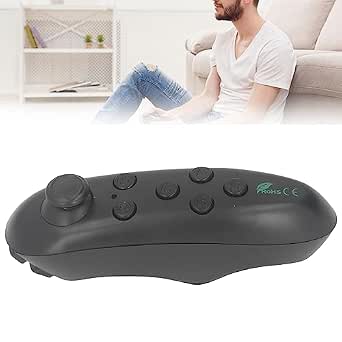 | Best Compact Phone-and-PC Remote | Compatible devices: Android, iOS | Connectivity: Bluetooth | Controller type: Gamepad | VIEW LATEST PRICE | See Our Full Breakdown |
| GFTVRCE Wireless Controller for Meta Quest 2 |  | Best Quest 2-Specific Gift | Compatible device: Meta Quest 2 | Connectivity: Bluetooth | Controller type: Gamepad | VIEW LATEST PRICE | See Our Full Breakdown |
| Touch Plus Replacement Controllers for Meta Quest 3 and 3S, Left and Right Pair |  | Best Complete Replacement Pair | Compatible devices: Meta Quest 3 and Meta Quest 3S | Controller type: Wireless motion controller | Package quantity: 2 controllers | VIEW LATEST PRICE | See Our Full Breakdown |
| VR Empire Bluetooth Remote Controller Gamepad for VR, Mobile, and PC |  | Best Multi-Use Remote | Brand: VR EMPIRE | Model: RM | Connectivity: Bluetooth | VIEW LATEST PRICE | See Our Full Breakdown |
| GOWENIC Bluetooth VR Remote Controller |  | Best for Multi-Device Basics | Connectivity: Bluetooth wireless | Compatible devices: VR headsets, smartphones, tablets, and computers | Controller type: Hand control | VIEW LATEST PRICE | See Our Full Breakdown |
| Left Touch Plus Controller for Meta Quest 3 / 3S |  | Best Replacement Gift for Quest Owners | Brand: Generic | Model: Touch Plus (Left) | Compatible devices: Meta Quest 3 and Meta Quest 3S | VIEW LATEST PRICE | See Our Full Breakdown |
| VR controllers for Christmas gift | Controller type | Compatible devices | Connectivity | Power source |
|---|---|---|---|---|
| HTC Vive SteamVR Controller 1. | — | — | — | — |
| VBESTLIFE Mini VR Bluetooth Re | Gamepad | Android, iOS | Bluetooth | AAA batteries |
| GFTVRCE Wireless Controller fo | Gamepad | — | Bluetooth | Battery |
| Touch Plus Replacement Control | Wireless motion controller | Meta Quest 3 and Meta Quest 3S | — | — |
| VR Empire Bluetooth Remote Con | Gamepad | Mobile phones, MIDs, TV boxes, Smart TVs, PC, Tablet, Laptop | Bluetooth | 2 AAA batteries |
| GOWENIC Bluetooth VR Remote Co | Hand control | VR headsets, smartphones, tablets, and computers | Bluetooth wireless | Battery powered |
| Left Touch Plus Controller for | VR controller | Meta Quest 3 and Meta Quest 3S | Wireless | Battery powered |
More Details on Our Top Picks
HTC Vive SteamVR Controller 1.0
For a gift recipient who already has an HTC Vive with Base Station 1.0, this is the most purpose-built choice in this group. Its 24 sensors, trackpad, and dual-stage trigger give VR software several ways to read movement and input, while HD haptics add tactile feedback. Unlike the VR Empire Bluetooth Remote, this is a dedicated VR motion controller, not a general-purpose remote for phones and TVs. The tradeoff is a narrow fit: it is listed for the original Vive tracking setup, and the box contains one controller, so it may not replace a complete pair. I would choose it as a targeted replacement gift, not as a starter present for someone whose headset model is unknown.
Pros:- Designed for wireless interaction with HTC Vive VR content
- 24 sensors support tracking input
- Trackpad and dual-stage trigger offer multiple control methods
- Rechargeable battery and HD haptic feedback
Cons:- Compatibility is listed for HTC Vive and Base Station 1.0, limiting its audience
- Only one controller is included, so replacing a pair requires another purchase
Best for: HTC Vive owners using Base Station 1.0 who need a replacement controller for their existing setup
Not ideal for: People with Meta Quest headsets or anyone needing a matched pair, since compatibility is limited and only one controller is included
- Compatibility:HTC Vive Virtual Reality System; Base Station 1.0
- Sensors:24
- Controls:Multi-function trackpad; dual-stage trigger
- Feedback:HD haptic feedback
- Battery capacity:960 mAh
- Battery type:Lithium Polymer
- Included components:Controller, lanyard, micro-USB cable, power adapter
- Weight:10.9 ounces
Our verdict“Choose this for a Vive Base Station 1.0 owner who needs a dedicated replacement, but skip it as a universal VR gift.”
VBESTLIFE Mini VR Bluetooth Remote Controller
This is the smallest, simplest gift option here for someone who wants a Bluetooth remote for compatible phones, PCs, or TV boxes rather than a tracked VR hand controller. Its 10 buttons and stated 2–10 m wireless range suit basic control from a short distance, and it also offers camera-shutter and media functions on iOS. That iOS support is limited, though, and the AAA power requirement means it is not rechargeable. Compared with the VR Empire Bluetooth Remote, the VBESTLIFE model is more compact and has fewer buttons, while the VR Empire adds a rocker and more named functions. Neither should be mistaken for the dedicated motion tracking of the HTC Vive SteamVR Controller 1.0. I would give this to a buyer who values small size and straightforward remote use over richer controls.
Pros:- Compact dimensions make it easy to carry and store
- Bluetooth connection works with compatible Android and PC devices
- Can control compatible phones, computers, and TV boxes
- Supports iOS camera-shutter and media-playback functions
Cons:- iOS functions are limited
- Requires AAA batteries rather than a rechargeable battery
- A basic remote, not a dedicated tracked VR motion controller
Best for: Android or PC users seeking a compact Bluetooth remote for basic phone, computer, or TV-box control
Not ideal for: VR players who expect tracked hand movement, or iPhone users who need broad game-control support
- Compatible devices:Android, iOS
- Connectivity:Bluetooth
- Controller type:Gamepad
- Buttons:10
- Wireless range:2–10 m
- Power source:AAA batteries
- Dimensions:1.7 × 1.3 × 1.65 in
- Package quantity:1
Our verdict“Pick this as a compact everyday Bluetooth remote, not as a substitute for a headset-specific VR controller.”
GFTVRCE Wireless Controller for Meta Quest 2
For a recipient with a Meta Quest 2, this controller’s stated focus on natural gestures and finger movement makes it a more headset-specific gift than the general Bluetooth remotes in this roundup. Its ergonomic, wireless design is intended for interacting in virtual environments, while the VBESTLIFE Mini VR Bluetooth Remote is better suited to basic phone or PC control. The key limitation is fit: this model is listed for Quest 2 only and is not compatible with Quest 1. It also arrives as a single controller, and the headset is sold separately, so a gift-giver should verify the recipient’s equipment and what they already own. Compared with the paired Touch Plus Replacement Controllers, this is a narrower replacement choice, not a complete left-and-right set.
Pros:- Designed for Meta Quest 2 compatibility
- Supports natural gestures and finger movement
- Wireless Bluetooth connectivity
- Ergonomic design
Cons:- Not compatible with Quest 1 and listed only for Quest 2
- Package contains one controller rather than a left-and-right pair
- Headset is sold separately
Best for: Meta Quest 2 owners who need one compatible wireless controller and can confirm it suits their setup
Not ideal for: Quest 1, Quest 3, or Quest 3S owners, and buyers seeking a complete controller pair or a headset bundle
- Compatible device:Meta Quest 2
- Connectivity:Bluetooth
- Controller type:Gamepad
- Features:Ergonomic, wireless
- Buttons:16
- Power source:Battery
- Color:Black
- Package quantity:1
Our verdict“This suits a confirmed Quest 2 owner replacing a single controller, but the listed compatibility makes it a risky surprise gift for other headset owners.”
Touch Plus Replacement Controllers for Meta Quest 3 and 3S, Left and Right Pair
This is the strongest gift fit for someone who owns a Meta Quest 3 or Quest 3S and needs both controllers: the package contains a left-and-right pair, unlike the single-controller GFTVRCE Quest 2 option. Capacitive touch, precision pinch input, two-stage triggers, and haptics give compatible VR experiences a wider range of hand inputs and tactile responses. Wrist straps are included, adding a practical safeguard during active play. The tradeoff is just as clear as the fit: these are replacement controllers, not a headset bundle, and they are listed only for Quest 3 and 3S. I would not give them without checking the recipient’s headset model and whether they need replacements. Compared with the HTC Vive controller, this is the better choice for newer Meta headset owners, but it cannot serve Vive systems.
Pros:- Includes both left and right controllers
- Capacitive touch, two-stage triggers, and precision pinch inputs support varied interactions
- Haptics provide tactile feedback
- Wrist straps are included
Cons:- Compatible only with Meta Quest 3 and Quest 3S
- Replacement controllers only; no headset is included
Best for: Meta Quest 3 or Quest 3S owners who need to replace both controllers or want a matched spare pair
Not ideal for: Quest 2, Quest 1, or HTC Vive owners, and anyone expecting a headset to be included
- Compatible devices:Meta Quest 3 and Meta Quest 3S
- Controller type:Wireless motion controller
- Package quantity:2 controllers
- Inputs:A/B/X/Y buttons, thumbstick, thumbrest, two-stage trigger, precision pinch
- Additional features:Capacitive touch, motion control, haptics
- Included accessories:Wrist straps / lanyards
- Colors:White, black, grey
- Manufacturer:Meta
Our verdict“Choose this as a complete replacement pair for a verified Quest 3 or 3S owner, not as a general-purpose VR gift.”
VR Empire Bluetooth Remote Controller Gamepad for VR, Mobile, and PC
The VR Empire stands out as the most flexible remote in this lineup: it combines gamepad, VR remote, wireless mouse, and media-control functions for compatible mobile devices, PCs, and TVs. Its 16 buttons and high-precision rocker give it more control options than the compact VBESTLIFE Mini VR Bluetooth Remote, while the arc-shaped body is designed to sit securely in the hand. Those extra functions make it a better gift for someone who wants one accessory for several everyday tasks, including presentation or e-book control. It is still a Bluetooth remote, not a tracked motion-controller pair like the Touch Plus Replacement Controllers. iOS game support is limited, it runs on two AAA batteries that are not included, and the listed social-video controls have restrictions. I would choose it for versatility, not for a specific headset’s full VR controls.
Pros:- Combines gamepad, VR remote, mouse, media, and presentation-related functions
- High-precision rocker supports 360-degree movement control
- Compatible-device list covers mobile phones, PCs, tablets, laptops, and TVs
- Arc-shaped design is intended to provide a secure grip
Cons:- iOS game compatibility is limited by system restrictions
- Requires two AAA batteries, which are not included
- Does not support TikTok or Instagram video controls without an upgraded model
Best for: A buyer seeking one Bluetooth accessory for compatible mobile, PC, TV, media, and basic VR-remote tasks
Not ideal for: VR players who need headset-tracked motion controls, or iOS gamers expecting broad game and social-video support
- Brand:VR EMPIRE
- Model:RM
- Connectivity:Bluetooth
- Controller type:Gamepad
- Compatible devices:Mobile phones, MIDs, TV boxes, Smart TVs, PC, Tablet, Laptop
- Button quantity:16
- Power source:2 AAA batteries
- Item weight:1.44 ounces
Our verdict“Give this to someone who wants a versatile Bluetooth remote across devices, but not to a headset owner seeking dedicated motion controllers.”
GOWENIC Bluetooth VR Remote Controller
For a gift recipient who wants one small remote for more than VR gaming, the GOWENIC Bluetooth VR Remote Controller has broader everyday uses than the headset-specific Touch Plus replacement. Its listed functions include basic gaming, selfies, page flipping, and sound adjustment, while Bluetooth support spans VR headsets, phones, tablets, and computers. That makes it a flexible add-on for someone who switches between devices, rather than a dedicated controller for a particular headset.
The tradeoff is control depth: the product data lists only one button, so I would not choose it for games that depend on several inputs or precise hand tracking. Battery type and life are also unspecified, which leaves gift-givers with less certainty about upkeep. Compared with the Left Touch Plus Controller for Meta Quest 3 / 3S, this is the simpler, more cross-device pick, but it cannot offer the same headset-specific control features.
Pros:- Supports several everyday uses, including basic gaming, selfies, page flipping, and sound adjustment
- Bluetooth wireless connection avoids a cable during use
- Lightweight, ergonomic hand-control design
- Listed for use with VR headsets, smartphones, tablets, and computers
Cons:- Only one button is listed, limiting control options for more involved games
- Battery type and battery life are not provided
- Compatibility is described broadly, without specific device models or supported functions for each
Best for: A recipient who wants a lightweight Bluetooth remote for simple VR controls, phone selfies, page turning, and sound adjustment across multiple device types
Not ideal for: VR players who need multiple buttons, detailed game inputs, or a dedicated Quest 3 or Quest 3S replacement controller
- Connectivity:Bluetooth wireless
- Compatible devices:VR headsets, smartphones, tablets, and computers
- Controller type:Hand control
- Buttons:1
- Power source:Battery powered
- Design:Lightweight and ergonomic
Our verdict“Choose this as a versatile small gift for someone who values simple controls across several devices more than full-featured VR gameplay.”
Left Touch Plus Controller for Meta Quest 3 / 3S
This is the more targeted gift in this pair: the Left Touch Plus Controller is an OEM-style replacement for the Meta Quest 3 and Quest 3S, not a general-purpose Bluetooth remote. Its ergonomic layout, capacitive touch inputs, and advanced haptics are intended to restore the familiar feel of those headsets, making it a practical choice when a Quest owner has lost or damaged a left controller. The included wrist strap adds a bit of reassurance during active play.
The main catch is right in the name: this is a single left-hand unit, so it does not replace a complete pair. The Touch Plus Pair for Quest 3 and 3S is the more suitable gift if both controllers are needed, while the GOWENIC remote suits someone seeking simple controls across different devices. This pick also depends on owning a compatible headset and requires battery power, so it is less flexible as a surprise gift.
Pros:- Designed as a replacement for Meta Quest 3 and Quest 3S
- Advanced haptics add physical feedback during supported experiences
- Capacitive touch inputs and ergonomic controls support headset-specific interaction
- Includes a wrist strap or lanyard for a more secure grip during motion
Cons:- Sold as a single left-hand controller; a right-hand unit must be sourced separately
- Requires battery power, with upkeep needed over time
- Limited to Meta Quest 3 and Quest 3S rather than serving as a cross-device remote
Best for: Meta Quest 3 or Quest 3S owners who need to replace a missing or damaged left controller and want headset-specific haptics and touch inputs
Not ideal for: People without a Quest 3 or Quest 3S, or buyers who need a complete left-and-right controller set in one gift
- Brand:Generic
- Model:Touch Plus (Left)
- Compatible devices:Meta Quest 3 and Meta Quest 3S
- Controller type:VR controller
- Connectivity:Wireless
- Power source:Battery powered
- Button quantity:3
- Color:White, black, and grey
- Included items:Touch Plus controller, wrist strap/lanyard, safety and warranty guide
Our verdict“Give this to a Quest 3 or Quest 3S owner who needs a left-controller replacement, but choose the pair version for a complete set.”

How We Picked
I ranked these controllers by how confidently a gift buyer can match them to a recipient’s setup. Compatibility and intended use came first: a full replacement controller for a named Quest generation or SteamVR system serves a different need from a Bluetooth remote designed for simpler control. I also weighed whether a product covers one hand or both, how clearly its role is defined, and whether its form of control suits common VR use rather than merely sounding versatile.
This order favors options with a clear headset match and a practical gift purpose, not products that claim the broadest range of uses. The Touch Plus pair leads because it addresses a complete replacement need for Quest 3 and 3S owners; the Vive and Quest 2 picks follow for buyers who already know the recipient’s platform. Bluetooth remotes rank lower for general VR gifting because their simpler controls can limit game compatibility, though they may suit basic navigation or mobile use. Before buying, check the exact headset generation and whether the recipient needs one controller or a pair.
| VR controllers for Christmas gift | Compatible devices | Connectivity | Controller type |
|---|---|---|---|
| HTC Vive SteamVR Controller 1. | — | — | — |
| VBESTLIFE Mini VR Bluetooth Re | Android, iOS | Bluetooth | Gamepad |
| GFTVRCE Wireless Controller fo | — | Bluetooth | Gamepad |
| Touch Plus Replacement Control | Meta Quest 3 and Meta Quest 3S | — | Wireless motion controller |
| VR Empire Bluetooth Remote Con | Mobile phones, MIDs, TV boxes, Smart TVs, PC, Tablet, Laptop | Bluetooth | Gamepad |
| GOWENIC Bluetooth VR Remote Co | VR headsets, smartphones, tablets, and computers | Bluetooth wireless | Hand control |
| Left Touch Plus Controller for | Meta Quest 3 and Meta Quest 3S | Wireless | VR controller |
Factors to Consider When Choosing VR Controllers For Christmas Gifts
Choosing VR controllers as a Christmas gift starts with the recipient’s headset, not the controller’s name or appearance. A replacement part, a motion controller, and a Bluetooth remote can all be described as VR controllers while serving very different jobs. These checks help reduce the chance of giving someone a device that cannot pair with their system or play the games they care about.
Match the Exact Headset Generation
Headset names can look similar across generations, but controller support is not always interchangeable. Ask for the exact model, such as Quest 2 versus Quest 3 or 3S, rather than relying on “Meta Quest” alone. If you cannot ask directly, check the headset label, its settings, or the recipient’s account details with their permission. Avoid treating a broad compatibility phrase as proof that a controller works with every model in a family. For older PC VR systems, confirm the headset and tracking setup as well as the controller name. A little discreet research is more useful than guessing from the product photo.
Decide Whether They Need One Controller or Two
Replacement gifts often solve a specific problem: one controller is lost, damaged, or has a faulty input. In that case, a single left- or right-hand unit may be exactly right, but only if you know which hand is needed. A matched pair is safer when both controllers are missing or when the gift is intended as a complete set. Do not assume a single controller can replace a pair for two-handed games. Also check whether the recipient needs a full controller or only a small accessory; these products are not interchangeable. When the missing side is uncertain, a pair may reduce the chance of choosing the wrong hand, though it can be more than the recipient needs.
Separate Motion Controllers From Simple Remotes
Motion controllers let players point, reach, and interact in games designed around hand movement. A Bluetooth remote or gamepad can handle simpler actions, but that does not make it a substitute for a tracked motion controller. Think about what the recipient actually plays: fitness, action, and room-scale titles often depend on tracked hands, while media navigation or basic mobile VR can need less. Product labels such as “VR remote” can blur this distinction, so look for clear information about tracking and game support. A simpler device may be a thoughtful fit for casual use, but it is a poor surprise for someone expecting full gameplay controls. Match the control style to the activity, not just the VR label.
Check Pairing, Setup, and Included Components
A gift that needs extra parts or a complicated setup can leave the recipient unable to use it on Christmas morning. Check whether the listing describes the required headset, wireless connection, tracking hardware, batteries, or other components. For PC VR systems, confirm that the recipient already has the compatible tracking setup rather than assuming the controller works alone. For Bluetooth devices, check the supported operating systems and whether the intended app or game accepts that input. Replacement controllers may also need pairing steps that differ by headset generation. Clear setup information is a better sign of gift readiness than a long list of broad device claims.
Choose Between a Safe Match and a Surprise Upgrade
When you know the headset model, a compatible replacement is usually a safer gift than an unfamiliar controller style. If the recipient already has working controllers, a remote may add convenience but might not expand the games they can play. A more specialized option makes sense when it solves a known need, such as a lost controller or a particular PC VR setup. Avoid paying for apparent versatility if compatibility details remain unclear. For an uncertain recipient, ask a family member to check the model or choose a gift receipt where available. The best present is often the one that fixes a real gap rather than adding another device to troubleshoot.
Frequently Asked Questions
Can I buy a VR controller without knowing the recipient’s headset model?
I would avoid buying a replacement controller on guesswork. Quest 2, Quest 3, and Quest 3S are not interchangeable labels, and the HTC Vive option is intended for a different setup. Ask the recipient or someone in the household to check the headset name before ordering. If that is not possible, a gift receipt or a non-controller accessory may be a safer choice. Compatibility is the first detail to settle, not something to infer from the word “VR.”
Should I choose the Touch Plus pair or the single left-hand controller?
Choose the pair when both controllers are needed, when the recipient lacks a complete set, or when you are unsure which side needs replacing. The single left-hand Touch Plus controller fits a narrower situation: the recipient owns a Quest 3 or 3S and specifically needs the left unit. Check that the existing right controller is present and functional before choosing the single option. A single replacement can avoid giving an unnecessary second controller, but the wrong hand will not solve the problem. If you cannot verify the missing side, the pair is the less ambiguous gift.
Are Bluetooth VR remotes good gifts for someone who plays VR games?
They can be useful, but they are not a safe stand-in for full motion controllers. Bluetooth remotes are better suited to simple navigation or compatible mobile VR tasks, while many games depend on tracked hand movement and dedicated controls. The VBESTLIFE, GOWENIC, and VR Empire remotes should be chosen for a known use, not as a universal VR upgrade. Check whether the recipient’s headset and intended apps accept the remote’s input. If they mainly play Quest or PC VR games, a compatible motion-controller replacement is usually the more relevant gift.
Is the HTC Vive SteamVR Controller 1.0 a sensible Christmas gift for a newer headset owner?
Only if you have confirmed that the recipient’s headset and tracking setup support this controller. The Vive option is aimed at a compatible SteamVR system, so ownership of a VR headset alone does not make it a match. Newer standalone headsets may use a different controller family and pairing process. Check the exact headset model and any required tracking hardware before choosing it. If the recipient uses Meta Quest, the Quest-specific options in this roundup are more relevant starting points.
What should I check if the recipient has lost only one controller?
Find out whether the missing unit is for the left or right hand and confirm the headset generation. Then verify that the replacement is sold for that exact platform and is a controller rather than a remote with a similar description. Ask whether the remaining controller still works, since a single replacement only addresses one side. Pairing steps and included accessories may also affect how quickly the gift can be used. If you cannot confirm the hand, choose a pair only when it is compatible with the recipient’s headset.
Conclusion
For the best overall gift, I’d choose the Touch Plus Replacement Controllers for Meta Quest 3 and 3S when the recipient needs a complete pair. The best value in practical fit is the GFTVRCE Wireless Controller for Meta Quest 2 if you know the recipient owns that headset; the best premium-style specialist pick is the HTC Vive SteamVR Controller 1.0 for someone with a compatible Vive setup. For beginners or casual users who mainly need simple remote-style control, the VBESTLIFE Mini VR Bluetooth Remote is the clearest starting point, provided its compatibility fits their use. For a specific repair, choose the Left Touch Plus Controller only when the recipient needs that exact side, or consider the Quest 3/3S pair if both are needed. I’d treat the GOWENIC and VR Empire remotes as targeted choices for confirmed Bluetooth use, not universal replacements. Before wrapping any of them, verify the headset model and intended task; those two details decide whether this gift will be useful.