Augmented reality glasses for gaming give you a large personal display without setting up a TV or monitor. My best overall pick is the XREAL One Pro, which pairs a 120Hz display with native 3DoF for a steadier virtual screen; the RayNeo Air 4 Pro stands out for HDR10 and 3D, while the Rokid Max2 with Station2 is a better fit for players who want a spatial-computing setup. The main tradeoffs are screen stability and gaming features versus comfort, device compatibility, and how much extra hardware a setup needs. A bigger advertised virtual screen does not automatically mean better gameplay, especially if the glasses lack the connection or tracking features you need. Read on for the full breakdown of all 15 options and guidance on choosing for your device and play style.

Play games on Amazon Luna for your next adventure, included with Prime
- A rotating selection of games, no download needed
- Play on TV, laptop or phone
- Fast, free delivery for your gear, too
Key Takeaways
- The XREAL One Pro leads this lineup for feature balance: its 120Hz display and native 3DoF make it a more gaming-focused choice than glasses that mainly act as a wearable screen.
- RayNeo Air 4 Pro puts image features first: HDR10 and 3D set it apart, but buyers should weigh those capabilities against the value of spatial tracking and their gaming device compatibility.
- VITURE Beast models emphasize a wider view: their stated 58° field of view and 1200p-per-eye display distinguish them from more screen-focused picks, though similar Beast listings make exact model details worth checking.
- The Rokid Max2 and Station2 are the bundle-led option: this pairing targets players seeking spatial features, while adding dedicated hardware makes it less straightforward than glasses used with a compatible device.
- Not every listing is a like-for-like AR gaming headset: the AOC Air Mega and Bigeyes H3 lean toward personal-display use, so buyers should confirm refresh rate, tracking, connections, and platform support rather than relying on virtual screen size alone.
| RayNeo Air 4 Pro AR/XR Glasses with HDR10, 201-Inch Virtual Display, 120Hz, and 3D |  | Best for HDR and 3D Gaming | Virtual display: 201 inches | Maximum resolution: 819 × 461 | Refresh rate: 120 Hz | VIEW LATEST PRICE | See Our Full Breakdown |
| VITURE Luma Pro XR Glasses, 1200p, 152-Inch Virtual Display, 1000 Nits, 52° FOV |  | Best for Flexible Device Compatibility | Display resolution: 1200p | Virtual screen: 152 inches | Brightness: 1000 nits | VIEW LATEST PRICE | See Our Full Breakdown |
| VITURE Beast XR/AR Glasses |  | Best for a Wide, Bright Virtual Screen | Virtual display: 174 inches | Resolution: 1200p per eye | Field of view: 58° | VIEW LATEST PRICE | See Our Full Breakdown |
| Viture Beast XR/AR Glasses – 174″ Screen, 1200p per eye, 58° FOV |  | Best for Fit Flexibility | Virtual screen: 174 inches | Resolution: 1200p per eye | Field of view: 58° | VIEW LATEST PRICE | See Our Full Breakdown |
| XREAL 1S AR Glasses, 500″ Virtual Screen, Powered by X1 Chip, Native 3DoF |  | Best for Native Spatial Tracking | Virtual screen: Up to 500 inches | Display type: OLED | Maximum resolution: 1920 × 1200; alternate listing: 1920 × 1080 | VIEW LATEST PRICE | See Our Full Breakdown |
| Rokid AR Spatial Video Glasses with 3-Screen Display (Max2) and Station2 Spatial Computer |  | Best for Multitasking Gamers | Display: Micro-OLED, 1920×1200 | Refresh rate: 120Hz | Brightness: 600 nits | VIEW LATEST PRICE | See Our Full Breakdown |
| AOC Air Mega AR/XR Glasses – 20.1″ Micro-OLED Wearable Monitor for Gaming and Movies |  | Best for Simple Plug-and-Play Gaming | Display: Micro-OLED | Resolution: 1920×1080 | Refresh rate: 120Hz | VIEW LATEST PRICE | See Our Full Breakdown |
| RayNeo Air 4 Pro AR/XR Glasses with HDR10 Display and B&O Audio |  | Best for HDR and 3D Gaming | Display: HDR10 | Refresh rate: 120Hz | Virtual display size: 201 inches | VIEW LATEST PRICE | See Our Full Breakdown |
| XREAL One Pro AR Glasses with X1 Chip, 171-Inch 120Hz FHD Display and Native 3DoF | 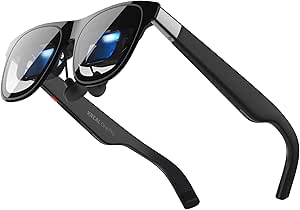 | Best for Spatially Anchored Gameplay | Display: Sony 0.55-inch Micro-OLED | Resolution: FHD | Refresh rate: 120Hz | VIEW LATEST PRICE | See Our Full Breakdown |
| RayNeo Air 3s AR/XR Glasses with 201-Inch 120Hz FHD HueView Display |  | Best for Eye-Comfort Features | Display: OLED, 1920×1080 | Virtual display size: 201 inches | Refresh rate: 120Hz | VIEW LATEST PRICE | See Our Full Breakdown |
| VITURE Beast AR Glasses, 1200p Micro-OLED Display, 58° FOV, 3DoF |  | Best for Big-Screen Gaming | Display: Sony Micro-OLED | Resolution: 1200p per eye; listed display resolution 1920 × 1200 | Virtual screen size: 174 inches | VIEW LATEST PRICE | See Our Full Breakdown |
| Bigeyes H3 Video Glasses, 300-Inch Virtual Screen Head-Mounted Display with HDMI |  | Best for HDMI Console Setups | Display type: Dual LCD panels | Listed resolution: 1280 × 720 | Refresh rate: 60 Hz | VIEW LATEST PRICE | See Our Full Breakdown |
| RayNeo GT Max AR/XR Glasses |  | Best for Spatial Screen Flexibility | Equivalent screen size: 227–307 inches; 267 inches listed | Field of view: 59 degrees | Refresh rate: 120 Hz | VIEW LATEST PRICE | See Our Full Breakdown |
| Xreal XBX A01+ AR Glasses – 147-inch Big Screen Display for Movies and Gaming |  | Best Lightweight Pick | Weight: 62 g | Virtual screen size: 147 inches | Display: Micro-OLED | VIEW LATEST PRICE | See Our Full Breakdown |
| VITURE Luma Ultra AR Glasses |  | Best for Advanced Spatial Gaming | Display resolution: 1200p | Virtual screen size: Up to 152 inches | Field of view: 52 degrees | VIEW LATEST PRICE | See Our Full Breakdown |
| augmented reality glasses for gaming | Refresh rate | Audio | Field of view | Weight |
|---|---|---|---|---|
| RayNeo Air 4 Pro AR/XR Glasses | 120 Hz | Four Bang & Olufsen speakers | — | 2.88 ounces |
| VITURE Luma Pro XR Glasses | 120Hz | HARMAN-tuned | 52° | 81 g |
| VITURE Beast XR/AR Glasses | 120 Hz | HARMAN AudioEFX | 58° | 88 g |
| Viture Beast XR/AR Glasses | 120 Hz | Harman AudioEFX | 58° | 88 g |
| XREAL 1S AR Glasses | 120 Hz | Bose-tuned open-ear audio | 52° | — |
| Rokid AR Spatial Video Glasses | 120Hz | — | — | — |
| AOC Air Mega AR/XR Glasses | 120Hz | Built-in speakers | — | 63 g |
| RayNeo Air 4 Pro AR/XR Glasses | 120Hz | Four Bang & Olufsen-tuned speakers | — | 2.72 ounces |
| XREAL One Pro AR Glasses with | 120Hz | — | 57° | — |
| RayNeo Air 3s AR/XR Glasses wi | 120Hz | Built-in speakers with dual opposing acoustic chambers | — | — |
| VITURE Beast AR Glasses | 120 Hz | — | 58 degrees | 88 g |
| Bigeyes H3 Video Glasses | 60 Hz | — | 57 degrees | — |
| RayNeo GT Max AR/XR Glasses | 120 Hz | Bang & Olufsen-tuned racetrack quad-speaker system | 59 degrees | 2.72 ounces |
| Xreal XBX A01+ AR Glasses | — | Open-ear directional speakers with four modes | 50 degrees | 62 g |
| VITURE Luma Ultra AR Glasses | 120 Hz | — | 52 degrees | — |
More Details on Our Top Picks
RayNeo Air 4 Pro AR/XR Glasses with HDR10, 201-Inch Virtual Display, 120Hz, and 3D
The RayNeo Air 4 Pro is a strong fit for players who want a big, vivid screen without setting up a separate spatial-computing system. Its 201-inch virtual display, HDR10, and 120Hz refresh rate prioritize colorful, smooth play, while native 3D and AI 2D-to-3D conversion offer extra ways to view supported content. USB-C connectivity keeps the setup straightforward with compatible consoles, computers, and phones. Compared with the XREAL 1S, which adds native 3DoF tracking, the RayNeo leans more on HDR and 3D than spatial positioning. The tradeoff is a tethered setup: there is no built-in battery, and the optional Sound Tube accessory is separate. Choose it for plug-in gaming and 3D viewing, not standalone play.
Pros:- 201-inch virtual display pairs with HDR10 for large, vivid game imagery.
- 120Hz refresh rate supports smoother motion in compatible games.
- Native 3D and AI 2D-to-3D conversion add viewing options.
- USB-C connection works with supported consoles, computers, and smartphones.
Cons:- No built-in battery, so play depends on a connected device or power source.
- Optional Sound Tube accessory is sold separately.
Best for: Console and PC players with a compatible USB-C video-output device who want HDR visuals and 3D viewing on a large virtual screen.
Not ideal for: Gamers seeking untethered play or native spatial tracking; this model has no built-in battery and does not list tracking.
- Virtual display:201 inches
- Maximum resolution:819 × 461
- Refresh rate:120 Hz
- Connectivity:USB-C
- Compatible devices:Game consoles, computers, smartphones
- Weight:2.88 ounces
- Audio:Four Bang & Olufsen speakers
- Warranty:1-year manufacturer warranty
Our verdict“Choose the RayNeo Air 4 Pro if HDR, 120Hz gaming, and 3D matter more to you than built-in spatial tracking or untethered use.”
VITURE Luma Pro XR Glasses, 1200p, 152-Inch Virtual Display, 1000 Nits, 52° FOV
The VITURE Luma Pro is the lineup’s adaptable pick for players who switch between a handheld, console, phone, and computer. Its 1200p display, 120Hz refresh rate, and 1000-nit brightness give games clear, responsive visuals, while the 52° field of view offers a broad virtual screen without matching the wider view of the VITURE Beast. Support for devices ranging from Steam Deck to PlayStation and Xbox makes it easier to keep one pair for several gaming setups, though compatible USB-C video output is still required. Electrochromic dimming helps adapt the lenses to different surroundings, and adjustable temples allow some fit tuning. Compared with the RayNeo Air 4 Pro, it trades HDR10 and 3D features for higher listed resolution and wider device coverage. Customizable lighting is described as coming soon, not ready now.
Pros:- 1200p resolution and 120Hz refresh rate suit detailed, fast-moving games.
- Broad compatibility includes Steam Deck, Nintendo Switch, PlayStation, Xbox, computers, and supported phones.
- Electrochromic lens dimming adapts viewing to different light conditions.
- Adjustable temples offer fit customization.
Cons:- Customizable lighting is described as coming soon rather than currently available.
- Requires a compatible USB-C video connection, which limits some phone setups.
- The 152-inch virtual display and 52° field of view are smaller and narrower than the VITURE Beast’s listed screen and view.
Best for: Multi-platform players who use compatible phones, computers, handhelds, and consoles and want one pair of glasses for several setups.
Not ideal for: Buyers who need confirmed customizable lighting now, or who prioritize the widest field of view over broad device support.
- Display resolution:1200p
- Virtual screen:152 inches
- Brightness:1000 nits
- Field of view:52°
- Refresh rate:120Hz
- Connectivity:USB Type-C
- Weight:81 g
- Audio:HARMAN-tuned
- Compatible devices:iPhone 15–17, Android, Mac, PC, Steam Deck, Nintendo Switch, PlayStation, Xbox
Our verdict“Pick the Luma Pro if you want one 120Hz, 1200p pair for several compatible gaming devices and can do without the Beast’s wider view.”
VITURE Beast XR/AR Glasses
The VITURE Beast earns its place for gamers who want a larger, more expansive view than the Luma Pro offers. A 174-inch virtual display with a 58° field of view gives game scenes more room, while 1200p-per-eye Sony Micro-OLED panels, 1250-nit brightness, and a 120Hz refresh rate target crisp, smooth play. Its built-in 3DoF tracking can keep the virtual screen positioned as you move your head, without an external dongle or software. That makes it more spatially capable than the RayNeo Air 4 Pro, which focuses on HDR10 and 3D instead. The Beast still is not a full room-scale headset: tracking is limited to 3DoF, and battery life is not specified. At 88 g, it remains wearable, but buyers should not mistake that for a self-powered system.
Pros:- 174-inch virtual display and 58° field of view create a more expansive view than the Luma Pro.
- 1200p-per-eye Micro-OLED panels, 1250-nit brightness, and 120Hz refresh rate suit vivid, fluid gaming.
- Built-in 3DoF tracking works without external software or dongles.
- 88 g weight and aerospace-grade alloy frame support a lightweight fit.
Cons:- 3DoF tracking does not provide the full room-scale movement of a 6DoF headset.
- Battery life is not specified, leaving portable-session endurance unclear.
- Its feature-rich design may be more than players need if they only want a simple USB-C display.
Best for: Players who want a bright, wide virtual screen with built-in 3DoF positioning for compatible phones or computers.
Not ideal for: Gamers seeking 6DoF room-scale movement or a clearly documented battery runtime for untethered sessions.
- Virtual display:174 inches
- Resolution:1200p per eye
- Field of view:58°
- Refresh rate:120 Hz
- Brightness:1250 nits
- Weight:88 g
- Tracking:Built-in VisionPair 3DoF
- Audio:HARMAN AudioEFX
- Compatibility:iOS, Android, macOS, Windows
Our verdict“Choose the VITURE Beast for a wide, bright, tracked virtual screen, but skip it if you need 6DoF movement or documented battery endurance.”
Viture Beast XR/AR Glasses – 174″ Screen, 1200p per eye, 58° FOV
This VITURE Beast listing is a fit-focused version of the same wide-screen gaming proposition as the other Beast entry. It combines a 174-inch virtual screen, 58° field of view, 1200p-per-eye resolution, and 120Hz refresh rate, so it offers a broader view than the Luma Pro’s 52° field of view. Built-in VisionPair 3DoF and auto-transparency add screen positioning and a way to stay aware of surroundings, while the metal frame keeps the listed weight to 88 g. Its IPD range options are a useful point of distinction: the regular fit supports up to 70 mm and the large fit up to 74 mm. Like the other Beast listing, this is not a 6DoF headset, and battery life is unspecified. The two Beast listings share core gaming specs, so fit range—not a different performance tier—is the meaningful separator here.
Pros:- 174-inch virtual screen and 58° field of view provide a wider view than the Luma Pro.
- 1200p-per-eye resolution, 1250-nit brightness, and 120Hz refresh rate target sharp, bright gameplay.
- Built-in 3DoF tracking and auto-transparency work without an external dongle.
- Two listed IPD fit ranges provide a more specific fit choice.
Cons:- Tracking is 3DoF, not full 6DoF room-scale tracking.
- Battery life is not specified in the product data.
- Its core gaming specifications closely match the other VITURE Beast listing, so buyers should check which fit option they are ordering.
Best for: Players choosing a Beast who want listed interpupillary-distance fit options, especially those whose IPD may exceed the regular model’s stated range.
Not ideal for: Buyers who need 6DoF room-scale gaming, specified battery runtime, or a clearly different feature set from the other VITURE Beast listing.
- Virtual screen:174 inches
- Resolution:1200p per eye
- Field of view:58°
- Refresh rate:120 Hz
- Brightness:1250 nits
- Weight:88 g
- Tracking:VisionPair 3DoF
- IPD range:Regular up to 70 mm; large up to 74 mm
- Audio:Harman AudioEFX
Our verdict“Choose this Beast listing if its stated IPD fit range suits you; otherwise, compare it with the other Beast listing because their core gaming capabilities are similar.”
XREAL 1S AR Glasses, 500″ Virtual Screen, Powered by X1 Chip, Native 3DoF
The XREAL 1S is the most direct choice here for players who want a virtual screen that can stay spatially anchored. Its custom X1 chip supports native 3DoF tracking, while the 120Hz OLED display and multiple viewing modes suit console, PC, and smartphone gaming. The listed 500-inch screen is the largest virtual size in this group, though the 52° field of view means that figure should not be read as a wider view than the VITURE Beast’s 58°. Compared with the RayNeo Air 4 Pro, the XREAL adds spatial tracking and eye-comfort certification rather than HDR10 and 3D conversion. Its main compatibility caveat is practical: the connected device needs USB-C DisplayPort output for full functionality. It is a better match for supported setups than for players expecting universal phone compatibility.
Pros:- X1 chip enables native 3DoF tracking without relying on an external tracking accessory.
- 120Hz OLED display supports smooth motion in compatible games.
- 500-inch stated virtual screen offers a large viewing scale.
- TÜV-Rheinland eye-comfort certification and Bose-tuned open-ear audio add gaming-session comfort features.
Cons:- Full functionality requires a USB-C DisplayPort-capable device, which some phones lack.
- The 52° field of view is narrower than the VITURE Beast’s 58°.
- The listed maximum resolution differs between the supplied spec entries: 1920 × 1200 and 1920 × 1080.
Best for: Players with a USB-C DisplayPort-capable phone, PC, or console setup who want a large virtual display with native 3DoF positioning.
Not ideal for: Gamers whose phones lack USB-C DisplayPort output or who want a wider field of view than 52°.
- Virtual screen:Up to 500 inches
- Display type:OLED
- Maximum resolution:1920 × 1200; alternate listing: 1920 × 1080
- Refresh rate:120 Hz
- Field of view:52°
- Tracking:Native 3DoF, powered by X1 chip
- Connectivity:USB-C DisplayPort
- Sensors:Accelerometer, gyroscope
- Audio:Bose-tuned open-ear audio
Our verdict“Pick the XREAL 1S if your device supports USB-C DisplayPort and native 3DoF matters more than a wider field of view.”
Rokid AR Spatial Video Glasses with 3-Screen Display (Max2) and Station2 Spatial Computer
The Rokid Max2 with Station2 is the lineup’s pick for players who want more than a single floating screen. Its three-screen setup can keep multiple apps visible at once, while the 1920×1200 micro-OLED display at 120Hz gives games a detailed, fluid image. Compared with the plug-and-play AOC Air Mega, this bundle is more of a standalone spatial system, with 8GB RAM, 128GB storage, and gesture, voice, and gamepad input. That flexibility comes with setup and app limitations: three-screen Android use is limited to DLNA, and some apps have reduced functionality or 0DoF operation. The Station2’s listed runtime is 3.5 hours, so long sessions may need charging. I’d choose it for multitasking and supported gaming, not for the simplest single-screen connection.
Pros:- Three-screen mode supports simultaneous use of up to three apps.
- 1920×1200 micro-OLED display with a 120Hz refresh rate.
- Station2 includes 8GB RAM, 128GB storage, and Wi-Fi 6.
- Adjustable IPD and myopia correction up to 600°.
Cons:- Three-screen Android mode is limited to DLNA; Miracast and Chromecast support only one screen.
- Some apps have restricted features or operate only in 0DoF.
- Station2 runtime is listed at 3.5 hours, and vision correction does not support astigmatism.
Best for: Gamers who want to keep a game and other apps visible together and are comfortable using a dedicated spatial computer.
Not ideal for: Players seeking a simple, single-screen connection or reliable three-screen casting from Miracast or Chromecast.
- Display:Micro-OLED, 1920×1200
- Refresh rate:120Hz
- Brightness:600 nits
- Glasses weight:75 g
- Station2 battery:5000 mAh
- Station2 runtime:3.5 hours
- Memory and storage:8GB RAM, 128GB storage
- Wireless:Wi-Fi 6, Bluetooth 5.2
- Controls:Gesture, voice, touch, keyboard, and gamepad
Our verdict“Choose the Rokid bundle if multitasking across a spatial interface matters more than straightforward setup or unrestricted app support.”
AOC Air Mega AR/XR Glasses – 20.1″ Micro-OLED Wearable Monitor for Gaming and Movies
The AOC Air Mega favors a straightforward gaming setup: connect a compatible USB-C device with DisplayPort Alt Mode and use it as a personal screen, without a separate spatial computer. Its 1920×1080 micro-OLED panel at 120Hz suits fast-moving games, and the stated 900-nit maximum brightness is higher than the RayNeo Air 3s’s listed 650 nits. Built-in speakers and a carry case make it a practical travel option, while its 63g weight is the lightest listed here. The tradeoff is that AOC offers fewer gaming-specific extras than the XREAL One Pro’s native 3DoF tracking, and it depends on a compatible video-output port. I’d shortlist it for handheld or laptop gaming when simplicity matters more than spatial anchoring.
Pros:- 1920×1080 micro-OLED display with a 120Hz refresh rate.
- Listed maximum brightness of 900 nits.
- 63g weight, adjustable nose pads, and included carry case.
- Built-in speakers and direct USB-C DisplayPort Alt Mode connection.
Cons:- Requires a device that outputs video over USB-C DisplayPort Alt Mode.
- No native 3DoF tracking is listed, unlike the XREAL One Pro.
- Not water resistant.
Best for: Handheld and laptop gamers whose USB-C device supports DisplayPort Alt Mode and who want a lightweight personal display.
Not ideal for: Players whose source device lacks USB-C DisplayPort output or who want native spatial tracking.
- Display:Micro-OLED
- Resolution:1920×1080
- Refresh rate:120Hz
- Maximum brightness:900 nits
- Connection:USB-C with DisplayPort Alt Mode
- Weight:63 g
- Audio:Built-in speakers
- Warranty:1 year
Our verdict“Pick the AOC Air Mega for light, direct-connected gaming when your device supports USB-C video and spatial tracking is not a priority.”
RayNeo Air 4 Pro AR/XR Glasses with HDR10 Display and B&O Audio
For players drawn to vivid visuals and 3D content, the RayNeo Air 4 Pro combines a 120Hz HDR10 display with native 3D viewing and AI-assisted 2D-to-3D conversion. Four Bang & Olufsen-tuned speakers add open-ear audio without requiring headphones, a useful distinction from the AOC Air Mega’s simpler built-in speaker setup. It connects over USB-C to compatible devices, so the glasses themselves do not need Wi-Fi or an internal battery. That keeps the setup lean, but it also means play depends on a connected source and its power. The listed compatibility includes devices such as Steam Deck, PS5, and Switch 2, though USB-C video support remains a requirement. I’d pick it over the RayNeo Air 3s for HDR and 3D features, not for standalone use.
Pros:- HDR10 display with a 120Hz refresh rate.
- Supports native 3D and AI-assisted 2D-to-3D conversion.
- Four Bang & Olufsen-tuned speakers provide open-ear audio.
- Listed compatibility includes Steam Deck, PS5, and Switch 2.
Cons:- Requires a compatible USB-C video source.
- No internal battery, so it relies on the connected device.
- Offers no standalone spatial-computing system like the Rokid Station2 bundle.
Best for: Gamers with compatible USB-C video devices who value HDR presentation, 3D viewing, and open-ear audio.
Not ideal for: Players who need glasses that run without a connected device or whose console setup lacks a compatible USB-C video connection.
- Display:HDR10
- Refresh rate:120Hz
- Virtual display size:201 inches
- Processor:Vision 4000
- Audio:Four Bang & Olufsen-tuned speakers
- Connection:USB Type-C
- Weight:2.72 ounces
- Power:No internal battery
Our verdict“Choose the Air 4 Pro if HDR, 3D modes, and built-in spatial audio matter more than standalone operation.”
XREAL One Pro AR Glasses with X1 Chip, 171-Inch 120Hz FHD Display and Native 3DoF
The XREAL One Pro is the strongest fit here for players who want the virtual screen to stay positioned in space rather than simply follow their view. Its X1 chip enables native 3DoF tracking, and the listed 3ms motion-to-photon latency supports responsive head movement. The optional XREAL Eye adds 6DoF anchoring, but that capability requires an extra accessory; without it, this is not a full 6DoF system. Compared with the AOC Air Mega, the XREAL has more spatial control and a wider 57° field of view, while the AOC is lighter and simpler. USB-C video output is still required, and some HDMI sources need an additional Beam or adapter. This is my pick for spatial viewing, not the most effortless setup.
Pros:- Native 3DoF tracking is enabled by the X1 chip.
- 120Hz Sony Micro-OLED display with a 57° field of view.
- Listed motion-to-photon latency is 3ms.
- Optional XREAL Eye adds 6DoF spatial anchoring.
Cons:- 6DoF anchoring requires the optional XREAL Eye.
- Some HDMI devices need a Beam or adapter.
- Requires a compatible USB-C video-output source.
Best for: Gamers who want native 3DoF screen positioning for compatible USB-C devices and may later add 6DoF anchoring.
Not ideal for: Players who need 6DoF tracking included in the box or want to connect HDMI devices without extra hardware.
- Display:Sony 0.55-inch Micro-OLED
- Resolution:FHD
- Refresh rate:120Hz
- Field of view:57°
- Virtual screen size:Up to 171 inches
- Brightness:Up to 700 nits
- Tracking:Native 3DoF; optional 6DoF with XREAL Eye
- Motion-to-photon latency:3ms
- Connection:USB-C video output
Our verdict“Choose the XREAL One Pro if native 3DoF screen positioning matters more than included 6DoF or a simple HDMI connection.”
RayNeo Air 3s AR/XR Glasses with 201-Inch 120Hz FHD HueView Display
The RayNeo Air 3s keeps gaming focused on a large, high-refresh-rate virtual screen, with 1920×1080 OLED resolution and a listed 120Hz refresh rate. Its 3840Hz DC dimming, PWM dimming, and TÜV SÜD low-blue-light and flicker-free certifications make eye-comfort features a more prominent part of the package than they are on the AOC Air Mega. Those features do not change the basic connection requirement: gaming still depends on a compatible phone, computer, Switch, or PS5 source. Unlike the XREAL One Pro, the Air 3s does not list native 3DoF tracking, so it suits players who want a straightforward floating display rather than spatial anchoring. The product information also recommends breaks every 30 minutes; I’d treat this as a personal screen, not a replacement for regular pauses.
Pros:- 1920×1080 OLED display with a 120Hz refresh rate.
- 3840Hz DC dimming and PWM dimming features.
- TÜV SÜD low-blue-light and flicker-free certifications are listed.
- Built-in speakers with dual opposing acoustic chambers.
Cons:- Requires a compatible connected device for gaming.
- Native 3DoF tracking is not listed, unlike the XREAL One Pro.
- The product information recommends breaks every 30 minutes; the glasses are not water resistant.
Best for: Players who want a 120Hz personal gaming display and prioritize listed dimming and eye-comfort features.
Not ideal for: Gamers seeking native 3DoF tracking or a standalone headset that runs without a connected device.
- Display:OLED, 1920×1080
- Virtual display size:201 inches
- Refresh rate:120Hz
- Maximum brightness:650 nits
- Dimming:3840Hz DC dimming and PWM dimming
- Audio:Built-in speakers with dual opposing acoustic chambers
- Compatible devices:iPhone, Android, Mac, Nintendo Switch, PS5
- Warranty:1 year
Our verdict“Pick the RayNeo Air 3s for a simple 120Hz gaming screen with specified dimming features, not for spatial tracking.”
VITURE Beast AR Glasses, 1200p Micro-OLED Display, 58° FOV, 3DoF
I’d choose the VITURE Beast for a spacious virtual screen without giving up the high refresh rate many games benefit from. Its 1200p-per-eye Micro-OLED display, 120 Hz refresh rate, and built-in 3DoF tracking make it better suited to anchored or repositioned play than the simpler Xreal XBX A01+, which has no listed spatial tracking. Auto Transparency and nine dimming levels also help adapt the view to different rooms. The tradeoff is that the Beast relies on compatible USB-C DisplayPort output, and some gaming devices need a separate VITURE dock. At 88 g, it is also heavier than the 62 g Xreal, so buyers prioritizing the lightest frame may prefer that model. I’d rank it for players who value screen scale and control over the least complicated setup.
Pros:- 120 Hz refresh rate supports smooth-feeling gameplay.
- Built-in 3DoF tracking provides more screen positioning control than the Xreal XBX A01+.
- Nine dimming levels and Auto Transparency help tailor viewing to different surroundings.
- 88 g frame includes adjustable fit.
Cons:- Device support depends on USB-C DisplayPort output or additional accessories.
- Some gaming device connections require a separate VITURE dock.
- Heavier than the 62 g Xreal XBX A01+.
Best for: Handheld and laptop gamers with USB-C DisplayPort devices who want a large, adjustable virtual screen and built-in 3DoF.
Not ideal for: Players who need broad plug-and-play compatibility, want to avoid accessory docks, or prioritize the lightest possible glasses.
- Display:Sony Micro-OLED
- Resolution:1200p per eye; listed display resolution 1920 × 1200
- Virtual screen size:174 inches
- Field of view:58 degrees
- Refresh rate:120 Hz
- Peak brightness:1250 nits
- Tracking:VisionPair 3DoF
- Connectivity:USB-C
- Weight:88 g
Our verdict“Choose the VITURE Beast if you want a large 120 Hz gaming display with built-in 3DoF and have a compatible connection path.”
Bigeyes H3 Video Glasses, 300-Inch Virtual Screen Head-Mounted Display with HDMI
The Bigeyes H3 takes a different route from the USB-C glasses in this group: its HDMI connection can suit a console or other video source that already outputs HDMI, while the VITURE Beast and VITURE Luma Ultra focus on USB-C-connected devices. Its enclosed viewing design, adjustable focus for 0–5D myopia, and adjustable interpupillary distance make it more like a personal screen for seated or reclined play than lightweight, open-frame AR glasses. That can help cut distractions, but it also means less awareness of the room. The H3’s listed display resolution is 1280 × 720 per eye at 60 Hz, well below the 120 Hz, 1200p-class options in this roundup. Product details also conflict on screen size and battery duration, so I would treat the headline 300-inch and three-hour claims cautiously.
Pros:- HDMI input suits compatible consoles and computers without relying on USB-C DisplayPort.
- Adjustable focus supports users with 0–5D myopia.
- Adjustable interpupillary distance from 60–70 mm helps tailor the viewing fit.
- Built-in battery allows some use away from a direct power source.
Cons:- Listed 1280 × 720 resolution and 60 Hz refresh rate trail the VITURE Beast and Luma Ultra.
- Enclosed eye-mask design reduces awareness of the surrounding room.
- Published screen-size and battery-life details are inconsistent.
Best for: Console players with HDMI output who want an enclosed personal screen for relaxed gaming and need adjustable focus for mild myopia.
Not ideal for: Players seeking high-refresh competitive play, room-aware AR, or a lightweight glasses-style frame; its listed 60 Hz display and enclosed fit are less suited to those needs.
- Display type:Dual LCD panels
- Listed resolution:1280 × 720
- Refresh rate:60 Hz
- Field of view:57 degrees
- Connectivity:HDMI
- Interpupillary distance:Adjustable from 60–70 mm
- Focus adjustment:0–5D for nearsighted users
- Battery life:Listed as up to 3 hours in the description; specs list 2 hours average
Our verdict“Pick the Bigeyes H3 for HDMI-connected, enclosed viewing rather than fast-refresh gaming or spatial AR features.”
RayNeo GT Max AR/XR Glasses
I’d put the RayNeo GT Max on the shortlist for players who want to move or resize their virtual screen without adding an external computing box. Its native 3DoF modes and adjustable 227–307-inch equivalent screen give it more spatial viewing flexibility than the Xreal XBX A01+, whose listed features focus on a gaze-following screen rather than native 3DoF. The 120 Hz refresh rate and wide 59-degree field of view also suit immersive play, while the Bang & Olufsen-tuned quad-speaker system adds sound without requiring separate headphones. The fit is less universal: buyers need the right S, M, or L IPD size. USB-C DisplayPort support or an adapter may also be needed, and Dolby Vision features require the RayNeo Pocket TV Pro, limiting that feature’s usefulness for a direct gaming setup.
Pros:- Native 3DoF offers Steady, Pinned, and Follow viewing modes without an external computing box.
- 59-degree field of view and adjustable screen size support an expansive virtual view.
- 120 Hz refresh rate is suited to smooth gameplay.
- Quad-speaker audio is tuned by Bang & Olufsen.
Cons:- Available S, M, and L IPD sizing makes fit selection important.
- Some devices may need a USB-C DisplayPort adapter.
- Dolby Vision features require the RayNeo Pocket TV Pro.
Best for: Players who want native 3DoF screen positioning, a wide viewing area, and built-in spatial audio across compatible phones, PCs, and consoles.
Not ideal for: Buyers who cannot confirm their IPD size, need a simple connection to devices without USB-C DisplayPort, or expect Dolby Vision without extra hardware.
- Equivalent screen size:227–307 inches; 267 inches listed
- Field of view:59 degrees
- Refresh rate:120 Hz
- Brightness:Up to 1200 nits
- Tracking:Native 3DoF with Steady, Pinned, and Follow modes
- Audio:Bang & Olufsen-tuned racetrack quad-speaker system
- IPD sizes:S: under 64 mm; M: 64–67 mm; L: over 67 mm
- Weight:2.72 ounces
- Compatibility:iPhone 15+, Android, iPad, Mac, PC, Steam Deck, Nintendo Switch, and PS5
Our verdict“Choose the RayNeo GT Max if native 3DoF and flexible screen placement matter more than a universal fit or adapter-free connections.”
Xreal XBX A01+ AR Glasses – 147-inch Big Screen Display for Movies and Gaming
At 62 g, the Xreal XBX A01+ is the lightest clearly specified option in this group, making it a sensible pick for handheld sessions or travel when frame weight matters more than spatial controls. Its 147-inch Full HD Micro-OLED screen and 1600-nit maximum brightness offer a straightforward personal-display experience, while the open-ear directional speakers leave the ears uncovered. Compared with the VITURE Beast, it gives up built-in 3DoF and a wider 58-degree field of view, but it is 26 g lighter and avoids that model’s listed dock requirement for some gaming devices. The tradeoff is a narrower 50-degree field of view and no built-in battery: it draws power over USB-C, and some sources, including older iPhones and Nintendo Switch, need adapters.
Pros:- 62 g frame is lighter than the VITURE Beast and VITURE Luma Ultra.
- Full HD Micro-OLED display reaches 1600 nits maximum brightness.
- Single USB-C DisplayPort cable carries video and power.
- Open-ear directional speakers keep the ears uncovered.
Cons:- No built-in battery, so the glasses draw power from the connected device.
- 50-degree field of view is narrower than the RayNeo GT Max and VITURE Beast.
- Some devices require adapters, including older iPhones and Nintendo Switch.
Best for: Traveling handheld and laptop gamers who value a light sunglasses-style frame and have a USB-C DisplayPort source.
Not ideal for: Players who want native 3DoF, a wider field of view, battery-powered untethered use, or direct compatibility with older phones and Switch hardware.
- Weight:62 g
- Virtual screen size:147 inches
- Display:Micro-OLED
- Resolution:1920 × 1080 per eye
- Maximum brightness:1600 nits
- Field of view:50 degrees
- Connectivity:USB-C DisplayPort
- Audio:Open-ear directional speakers with four modes
- Battery:None; powered via USB-C
Our verdict“Choose the Xreal XBX A01+ for lightweight, wired big-screen gaming when built-in 3DoF is not a priority.”
VITURE Luma Ultra AR Glasses
The VITURE Luma Ultra is the most ambitious spatial-gaming choice here: its cameras support 6DoF tracking, moving beyond the VITURE Beast’s 3DoF screen positioning. That distinction matters for buyers who want richer spatial interaction, though gesture recognition requires the separate VITURE Pro Neckband. The display pairs 1200p resolution with 120 Hz refresh and 1500-nit peak brightness, while built-in myopia adjustment up to -4.0D can reduce dependence on prescription inserts. Compared with the RayNeo GT Max, the Luma Ultra offers 6DoF rather than 3DoF, but its 52-degree field of view is narrower than the RayNeo’s 59 degrees. IPD fit is limited to 58–70 mm, and some expanded XR features are not supported through the XR USB-C Adapter Pro.
Pros:- 6DoF tracking supports more spatial movement than the 3DoF VITURE Beast and RayNeo GT Max.
- 1200p display and 120 Hz refresh rate suit detailed, smooth gameplay.
- 1500-nit peak brightness supports viewing in brighter environments.
- Built-in myopia adjustment reaches -4.0D.
Cons:- Gesture recognition requires the separate VITURE Pro Neckband.
- 52-degree field of view is narrower than the RayNeo GT Max’s 59 degrees.
- IPD support is limited to 58–70 mm, and the XR USB-C Adapter Pro does not support expanded XR features.
Best for: XR-curious gamers with a compatible phone, PC, or console who want 6DoF tracking and are willing to add accessories for gesture controls.
Not ideal for: Buyers who want the widest field of view, guaranteed fit outside the 58–70 mm IPD range, or gesture features without buying a separate Neckband.
- Display resolution:1200p
- Virtual screen size:Up to 152 inches
- Field of view:52 degrees
- Peak brightness:1500 nits
- Refresh rate:120 Hz
- Tracking:6DoF
- Cameras:One RGB camera and two depth cameras
- Myopia adjustment:Up to -4.0D
- Supported IPD range:58–70 mm
Our verdict“Choose the VITURE Luma Ultra if 6DoF spatial gaming is your priority and its fit and accessory requirements work for your setup.”
How We Picked
I ranked these augmented reality glasses for gaming by how clearly their stated features support play, not by advertised screen size alone. I gave more weight to refresh rate, native spatial tracking, display resolution and field of view, then considered whether a product appears to need a separate computing accessory or offers a more direct display connection. Compatibility matters: a headset is only useful for gaming if it can connect to the console, handheld, phone, or computer the buyer plans to use.
I also considered comfort-related design tradeoffs, versatility, and listing clarity. Models with a clear gaming-relevant feature set rank ahead of products described mainly as personal cinemas, while bundles receive credit for adding capability but not automatically for being simpler or better value. Several names in the supplied list overlap or have very similar specifications, so I treat them as distinct listings rather than assume they are different hardware revisions. Where essential details such as connection requirements or refresh rate are not stated, I avoid filling in gaps and recommend verifying the exact configuration before purchase.
Factors to Consider When Choosing Augmented Reality Glasses For Gaming
Before choosing, match the glasses to your gaming setup and the way you play. Display specs matter, but compatibility, tracking, and comfort can decide whether a headset becomes a regular gaming screen or stays in its case.
Match the connection to your gaming device
Start with the exact device you plan to connect: a console, handheld PC, laptop, or phone may support different video outputs and adapters. Do not assume that a USB-C port automatically sends video; the device and port need to support the required display signal. Some setups may also need an adapter, dock, or separate computing accessory, which adds cost, cables, and another point of failure. Check whether the glasses can receive both video and power through your intended connection, and whether your console setup needs an HDMI conversion. A bundle such as Rokid Max2 with Station2 may suit buyers who want a dedicated spatial device, but it is a different proposition from simple screen mirroring. If you cannot confirm compatibility from the exact product listing, treat that as a reason to pause rather than guess.
Choose refresh rate and tracking for your games
Refresh rate has more practical impact in fast games than an oversized virtual-screen claim: a higher supported rate can make motion appear smoother, provided the source device and game can output it. The 120Hz options in this roundup are worth prioritizing for players focused on action or competitive titles, but verify which resolution and connection modes support that rate. Native 3DoF can keep a virtual display anchored as you move your head, which can feel more monitor-like than a screen that follows every movement. It does not replace a gaming monitor or guarantee low latency, so check for specific latency and platform information when those are priorities. For slower, turn-based, or single-player games, comfort and compatibility may matter more than maximizing refresh rate. Avoid treating a large virtual-screen figure as proof of better responsiveness.
Interpret resolution, field of view, and screen claims together
Resolution, field of view, and virtual screen size describe different parts of the viewing experience. A wider field of view can make the image feel more expansive, while higher resolution may help fine text and interface details; neither spec alone says how clear or immersive the image will seem to you. Advertised screen measurements can be calculated or presented in different ways, so compare them cautiously rather than assuming that a 500-inch claim beats a 174-inch one. If you mainly play games with small menus or subtitles, prioritize legibility and image clarity over a dramatic screen-size number. Buyers who want immersive visuals may care more about field of view, but should still check how much of their view is occupied by the image. Look for per-eye resolution and the exact viewing mode, not just a headline display measurement.
Check fit, focus, and long-session comfort
Glasses that feel fine for a short session can become uncomfortable during a long gaming session, so fit deserves attention before visual extras. Nose pads, temple pressure, weight balance, and how securely the frame sits can affect whether you keep the image aligned while playing. Buyers who wear prescription glasses should confirm prescription-lens support or the available adjustment range; do not assume that focus adjustment replaces corrective lenses. Adjustable focus, as listed for the Bigeyes H3, may help some users but does not settle questions about fit or optical compatibility. Also check what is included in the box, since replacement pads or prescription inserts can change the practical setup. When comfort details are sparse, favor sellers with clear fit guidance and a return policy that suits your needs.
Decide whether you need AR features or a wearable display
Some products marketed as AR glasses function mainly as personal displays, showing a large virtual screen without the spatial features many buyers associate with augmented reality. That can still work well for gaming, especially if your priority is a private screen for travel, but it is different from a display that stays anchored in space. Native 3DoF and multi-screen features may justify a more feature-rich setup if you want the screen to behave more like a desk monitor. A basic display can be the simpler choice when you only want to mirror a game and do not need spatial controls. Before paying extra for AR or XR language, identify the feature you will actually use: tracking, multiple virtual screens, 3D, or simply a private image. This distinction helps prevent buying specialized hardware for a screen-mirroring job.
Weigh audio, battery, and travel setup
Audio and power can shape a portable gaming setup as much as the display does. Built-in speakers can reduce the number of accessories you carry, but they may not provide the isolation or privacy of headphones, especially in shared spaces. The Bigeyes H3 listing specifies a built-in battery and up to three hours of playtime, a concrete portability detail that should be compared with how long you typically play away from an outlet. For other models, confirm whether the glasses draw power from the connected device or need a separate source. More accessories can add flexibility, but also increase cable clutter and setup time. If you travel often, prioritize a compact, complete kit and check that your device, adapters, audio, and power source all work together.
Frequently Asked Questions
Will these AR glasses work with my console or handheld gaming device?
Compatibility depends on the exact device, its video output, and the glasses’ connection requirements. Check that the device can send video through the port you plan to use; a USB-C connector by itself does not guarantee display output. Some console setups may need an HDMI adapter, while certain products may rely on a separate accessory such as a spatial computer. Confirm which adapters are supported and whether they pass the resolution and refresh rate you want. If the listing does not name your platform or connection method, verify it with the manufacturer before buying.
Is 120Hz more important than a larger advertised virtual screen?
For fast-moving games, a supported 120Hz mode can matter more than a huge virtual-screen measurement because it relates to how smoothly motion can appear. The benefit depends on the glasses, source device, connection, and game all supporting that mode together. A larger screen claim describes apparent size, not response time, clarity, or tracking. For slower games and movies, you may prefer image quality, comfort, or a wider view instead. Compare the supported refresh rate at the resolution you will actually use, rather than relying on the headline specification.
Do I need native 3DoF to play games in AR glasses?
No; glasses without native 3DoF can still serve as a personal screen if they display your device’s video feed. Tracking becomes more relevant if you want the image to stay positioned in space as you move your head, rather than follow your gaze. That can make a virtual screen feel more like a fixed monitor, but it does not automatically improve every game or replace traditional head tracking. Players who sit still and use a straightforward screen-mirroring setup may not need it. Check whether the feature is built into the glasses or depends on an added device.
Can I use AR gaming glasses if I wear prescription glasses?
Possibly, but fit and optical support differ by model. Check whether the glasses can be worn over your prescription frames, accept custom prescription inserts, or provide a focus adjustment that suits your eyesight. Focus adjustment is not necessarily a substitute for prescription correction, so confirm what the product specifically supports. Frame size, nose-pad options, and temple clearance can also affect comfort and image alignment. If you cannot find clear prescription guidance, ask the manufacturer or seller before committing.
Should I buy a spatial-computing bundle or a simpler wearable display?
Choose a bundle if you plan to use its spatial features and value having the added computing hardware as part of the setup. That route may suit users who want multi-screen or spatial workflows, but it can bring more equipment to carry and more setup steps. A simpler wearable display is often a better match for playing games from a compatible phone, handheld, or computer when all you need is a private screen. Compare the complete system, including adapters, power, and platform support, rather than comparing the glasses alone. Paying for spatial capability makes less sense if you expect to use only basic video mirroring.
Conclusion
For most gaming-focused buyers, I would start with the XREAL One Pro as the best overall pick because its 120Hz display and native 3DoF align closely with a stable, responsive virtual-screen setup. Choose the RayNeo Air 4 Pro if HDR10 and 3D matter more to you than spatial tracking, and consider the Rokid Max2 with Station2 as the best premium-style bundle for buyers who want dedicated spatial features. The best value depends on your device and the exact listing: compare connection requirements and gaming specs before choosing a lower-feature personal display. For beginners, a model with a clearly supported connection to your existing device is the safest starting point; do not pay for spatial functions you will not use. Players prioritizing a wider view can look at the VITURE Beast listings, while travel-focused buyers may prefer a compact screen-first option after checking power and fit. My final recommendation is to verify compatibility and comfort details first, then choose the display features that match the games you actually play.