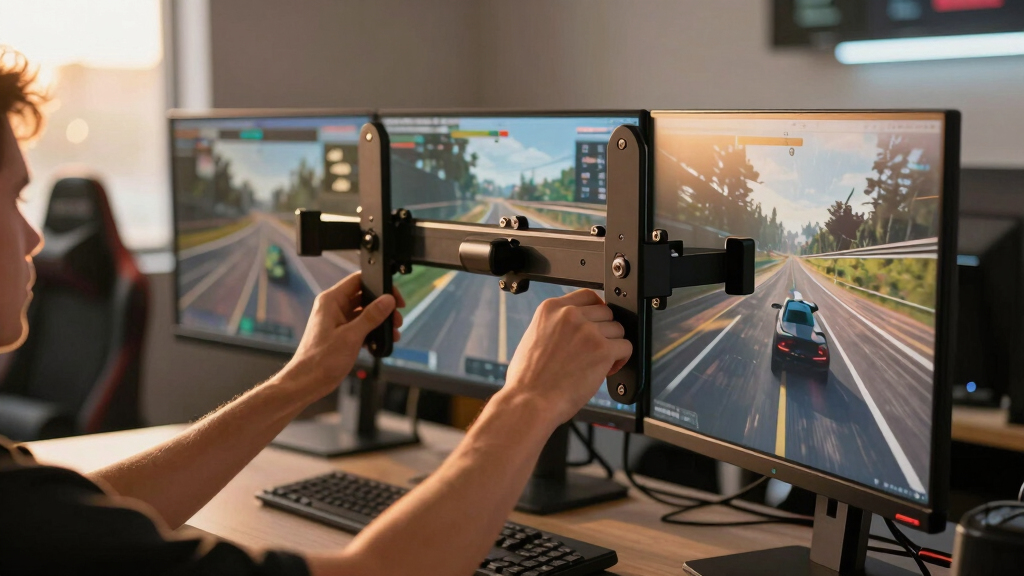

For sim room enthusiasts, a reliable triple monitor mount can significantly enhance immersion and comfort. The best models balance stability, adjustability, and build quality, with some designed specifically for racing or flight simulators. The SimFab Triple Monitor and TV Floor Stand stands out for its versatility with large displays, while the WALI Triple Monitor Mount offers a budget-friendly, solid desk solution. Tradeoffs often involve choosing between maximum height and depth adjustability versus ease of installation or price. Continue reading for a detailed breakdown of the top options and what makes each one unique.
Key Takeaways
- Sturdy construction and load capacity are critical for keeping three monitors stable during intense sim sessions.
- Adjustability features like tilt, swivel, and height vary widely, impacting ease of setup and comfort.
- Mounting options (desk clamp vs. grommet) influence installation flexibility and stability.
- Larger monitors up to 49 inches require heavy-duty arms with gas springs for balanced support.
- Specialized stands for racing or flight sims often prioritize quick adjustments and space efficiency.



More Details on Our Top Picks
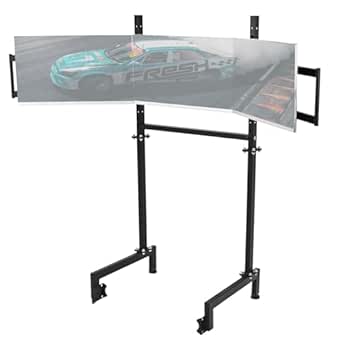
SimFab Triple Monitor and TV Floor Stand for Racing and Flight Simulators Model HD
This stand excels for sim rooms where maximum immersion matters, thanks to its adjustable height, tilt, and independent axis for stability. Unlike the MOUNTUP or PUTORSEN mounts, which are focused on desk setups, this floor stand wraps around your cockpit, offering a broader field of view and more dynamic positioning. However, its size and weight make it less ideal for smaller spaces or desktop installations. The flexible angles and compatibility with large curved or flat screens from 43″ to 55″ set it apart, but setup can be more complex and requires dedicated space. Overall, this stand suits serious sim enthusiasts seeking a highly adjustable, space-consuming solution for a full surround experience.
Pros:- Very flexible height, tilt, and roll adjustments for optimal immersion
- Independent axes for superior stability and customization
- Supports large 43-55 inch curved or flat screens
Cons:- Bulky design requires significant space and may be difficult to reposition
- Installation is more involved and less portable than desk mounts
Best for: Buyers who want a highly adjustable, immersive setup with large screens and have ample space for a dedicated floor stand.
Not ideal for: Small room owners or those seeking a compact, desktop-based mount due to its size and footprint.
- Screen Size Compatibility:43-55 inches
- Mount Type:Floor stand
- Adjustability:Height, tilt, roll
- Stability Features:Independent turning axes
- Material:Tested with various monitor sizes
- Base Type:Independent legs with wrap-around design
Bottom line: Ideal for serious sim room setups where maximum customization and immersion outweigh space and portability concerns.
WALI Triple Monitor Mount, 3 Monitor Desk Mount for 13-27 inch Computer Screens, Holds up to 22 lbs, Triple Monitors Stand for Desk, with Tilt, Swivel, Rotation, VESA 75/100mm (M003S), Black
Compared with the SimFab stand, the WALI mounts prioritize desk space efficiency, offering adjustable tilt, swivel, and rotation for monitors up to 27″. While it’s a great choice for those with limited room or who prefer a desk-mounted solution like the MOUNTUP, it doesn’t support large 43-55 inch screens or full surround setups. Its ease of installation and sturdy steel construction make it perfect for home or office use, but lighter in adjustability and coverage than the SimFab floor stand. For sim rooms that focus on a compact, flexible desk setup, the WALI provides excellent versatility, though it isn’t suitable for very large screens or immersive cockpit environments.
Pros:- Supports monitors up to 27 inches and 22 lbs per arm
- Adjustable tilt, swivel, and rotation for ergonomic positioning
- Easy to install with sturdy high-grade steel construction
Cons:- Limited to monitors 27 inches or smaller, not suitable for large screens
- Less suited for immersive sim room setups due to size constraints
Best for: Buyers seeking a space-saving, adjustable desk mount for multiple monitors up to 27 inches, especially in limited space environments.
Not ideal for: Those requiring large screens over 32 inches or a floor-standing setup for full immersion, as it’s limited to smaller displays and desk mounting.
- Supported Screen Size:13-27 inches
- Max Weight per Arm:22 lbs
- VESA Compatibility:75/100mm
- Mounting Type:Desk mount
- Tilt Range:Up to 90 degrees
- Swivel Range:Full 360 degrees
Bottom line: Best for users who want flexible, space-efficient multi-monitor configurations on a desk, rather than full surround setups.
MOUNTUP Triple Monitor Mount for 17-32 inch Screens, Full Motion Triple Monitor Stand, 3 Monitors Desk Mount Holds 4.4-19.8 lbs Each, Clamp & Grommet Mounting, Black
This mount makes a strong case for ergonomic flexibility, supporting monitors from 17 to 32 inches with full motion articulation—swivel, tilt, and rotation—much like the PUTORSEN but with easier assembly and more customizable angles. Unlike the SimFab floor stand, it’s designed for desktop use, providing a clutter-free workspace with cable management options. While it doesn’t support the larger 43-55 inch displays, its versatility with multiple sizes makes it suitable for gaming, work, or streaming in a typical sim room. The tradeoff is that it requires a sturdy desk and may be less stable than a floor stand, especially with heavier monitors.
Pros:- Supports monitors from 17 to 32 inches and up to 19.8 lbs each
- Full motion capabilities with swivel, tilt, and rotation
- Easy to assemble with clamp or grommet mounting options
Cons:- Limited to monitors up to 32 inches, not suitable for very large displays
- Less suitable for immersive cockpit environments due to desk mounting
Best for: Buyers who want a highly adjustable, full-motion desktop mount for multiple monitors up to 32 inches, ideal for gaming or productivity setups requiring flexibility.
Not ideal for: Users needing ultra-large screens over 32 inches or a floor-standing solution for maximum immersion, as this is optimized for smaller, desktop-based setups.
- Supported Screen Size:17-32 inches
- Maximum Load:19.8 lbs
- Tilt Range:Up to 35 degrees
- Mounting Options:Clamp & Grommet
- Full Motion:Yes
- Assembly Time:Less than 20 minutes
Bottom line: Ideal for users wanting a flexible, highly adjustable desktop mount for multiple smaller monitors with full motion range.
Marada Aluminum Profile Cockpit Triple Monitor Stand for Racing Simulator Stand
Designed exclusively for the Marada aluminum profile 8040 racing cockpits, this stand offers a tailored solution for sim racers who want a seamless integration with their cockpit setup. Unlike the more universal desk or floor stands like the MOUNTUP or PUTORSEN, this mount is optimized for quick installation on compatible racing rigs, supporting triple screens up to 32 inches and adjustable height and width. Its key strength is in the fast setup and customization for a specific cockpit system, but it isn’t compatible with other brands or large screens beyond 65 inches. For dedicated racing sim rooms with the Marada cockpit, this stand provides a clean, stable, and easy-to-adjust platform—yet it limits versatility outside that ecosystem.
Pros:- Quick installation on Marada 8040 aluminum profile
- Supports triple screens up to 32 inches with adjustable height and width
- Allows free movement of monitor angles under 3-screen mode
Cons:- Limited to Marada 8040 cockpits, not compatible with other brands
- Restricted to monitors up to 32 inches, not suitable for larger displays
Best for: Buyers with a Marada 8040 racing cockpit seeking a quick, integrated triple monitor solution for racing sims.
Not ideal for: Owners of other cockpit brands or those wanting a universal or large-screen setup, as it is custom-fit for the Marada system.
- Supported Screen Size:24-32 inches
- Compatibility:Marada aluminum profile 8040
- Adjustability:Height and horizontal width
- Installation:Quick, standardized kit
- Monitor Mode:Single or triple-screen
- Flexibility:Unrestricted angle adjustment
Bottom line: Best for owners of Marada cockpits who need a dedicated, easy-to-install triple monitor setup for racing sims.
PUTORSEN Triple Monitor Mount for 17 to 32 inch Screens, Fully Adjustable 3 Monitor Stand with Heavy Duty Clamp and Grommet Mounting, 22 lbs per Arm
The PUTORSEN mount offers a balanced mix of adjustability and ease of use, supporting monitors up to 32 inches with VESA 75/100mm and a weight limit of 22 lbs per arm. While it’s comparable to the MOUNTUP in terms of size and flexibility, it emphasizes a straightforward installation with both clamp and grommet options. Unlike the SimFab stand, which is more immersive and larger, this mount is better suited for everyday gaming and productivity, especially in limited space. Its independent arm movement allows portrait or landscape orientation, but it’s not designed for large, full surround setups or very heavy monitors.
Tradeoffs include reduced size and immersion capabilities compared to SimFab, but higher portability and simpler setup.
Pros:- Supports monitors up to 32 inches and 22 lbs per arm
- Independent swivel, tilt, and rotation for each arm
- Includes both clamp and grommet mounting for versatility
Cons:- Limited to monitors up to 32 inches, not suitable for larger screens
- Less suited for full cockpit immersion compared to SimFab
Best for: Buyers who want a flexible, full-motion mount for multiple monitors up to 32 inches in a typical desk environment, for gaming or work.
Not ideal for: Those seeking full surround immersion or supporting large screens over 32 inches, as this mount is optimized for smaller displays and desktop use.
- Supported Screen Size:17-32 inches
- Max Load:22 lbs per arm
- Tilt Range:Up to 35 degrees
- Mounting Options:Clamp & Grommet
- Rotation:Landscape and portrait
- Assembly Time:Under 20 minutes
Bottom line: Great for users needing a versatile, adjustable mount for multiple smaller monitors on a desk, balancing flexibility with ease of setup.
Playseat Triple Monitor Stand XL Multi3 | Floor TV Stand for up to 4 Screens | Supports TVs and PC Monitors | Sturdy & Stable | Height & Distance Easily Adjustable
This floor-standing option excels at creating an immersive cockpit experience, especially for those who want to mount multiple screens with minimal desk clutter. Unlike the MOUNT PRO Triple Monitor Mount, which requires a desk surface, this stand sits directly on the floor, providing exceptional stability for larger setups. The support for up to 4 screens and the ability to position one on top offers unparalleled surround views. However, this design sacrifices some adjustability in tilt and rotation compared to arm-based mounts, making fine-tuning more cumbersome. Its high-quality materials ensure reliability during long racing sessions, but the bulkiness and floor footprint may be less suited for smaller rooms. This pick makes the most sense for sim racers seeking an all-in-one immersive setup without the need for desk mounting.
Pros:- Supports up to 4 screens for maximum surround immersion
- Very sturdy and stable for intense racing sessions
- Adjustable height and distance for optimal positioning
- Supports TVs and monitors up to 4 screens
Cons:- Bulky footprint on the floor may be space-consuming
- Limited tilt and rotation adjustments compared to arm mounts
- Installation is more involved due to floor setup
Best for: Sims enthusiasts who want a stable, all-in-one floor solution for multiple screens and maximum immersion.
Not ideal for: Limited space environments or users seeking highly adjustable, compact mounts for smaller desks.
- Supports Screens:Up to 4 screens
- Mount Type:Floor stand
- Adjustability:Height & distance adjustable
- Supports TVs/Monitors:Yes
- Material:High-quality sturdy materials
- Footprint:Large floor space
Bottom line: Ideal for sim racers prioritizing stability and immersive multi-screen setups over fine tilt adjustments.
MOUNT PRO Triple Monitor Mount for Max 32″ Computer Screen, Adjustable 3 Monitor Desk Mount, up to 19.8lbs Each, Three Display Arm with Tilt Swivel Rotation, VESA Mount 75×75/100x100mm
This mount offers excellent value with full motion capabilities, making it a versatile choice for users who want maximum flexibility on a desk. Compared to the HUANUO Triple Monitor Mount, which is more straightforward but less adjustable, the MOUNT PRO provides tilt, swivel, and rotation for each arm, allowing precise ergonomic positioning. Its VESA compatibility and sturdy construction support most 13” to 32” monitors, but it doesn’t support larger or heavier screens, which could limit future upgrades. The installation is straightforward with clamp options, and the cable management system keeps clutter minimal. Still, its maximum weight capacity of 19.8 lbs per arm may not suit very heavy or ultrawide monitors, a potential drawback for high-end displays. This model is best for budget-conscious gamers or professionals who need flexible, full-motion adjustments.
Pros:- Full motion with tilt, swivel, and rotation for ergonomic comfort
- Supports monitors up to 32 inches and 19.8 lbs each
- Easy to install with clamp or grommet options
- Integrated cable management for a tidy workspace
Cons:- Limited to monitors under 32 inches and 19.8 lbs
- Less suitable for ultrawide or very heavy displays
- No support for larger or curved screens
Best for: Users needing a full-motion, budget-friendly mount for standard-sized monitors on a desk.
Not ideal for: Owners of ultrawide or heavier monitors over 19.8 lbs who require more robust support.
- Max Screen Size:32 inches
- Max Weight per Arm:19.8 lbs
- Mount Type:Desk clamp/grommet
- Tilt:+90° to -90°
- Swivel:180°
- Rotation:360°
Bottom line: A highly flexible, cost-effective choice perfect for standard monitors in a sim room where space and budget are considerations.
HUANUO Triple Monitor Mount for 17 to 32 inch Screens, Adjustment Gaming Triple Monitor Stand with Swivel, Tilt, Rotation, Clamp & Grommet Kit
This mount offers a solid balance of adjustability and space-saving features, making it suitable for users who want to free up desk space. Compared with the SimDoo Triple Monitor Stand which is more flexible, the HUANUO mount stands out for its clamp and grommet mounting options, accommodating various desk types. It supports monitors between 17 and 32 inches, with tilt, swivel, and rotation, but it doesn’t support heavier or ultrawide screens, which limits its future-proofing. Its sturdy alloy steel construction ensures stability, but some users find the setup slightly more complex, especially when adjusting multiple arms simultaneously. The design is best suited for standard-sized gaming or work monitors, but not for larger ultrawides. This model is ideal for gamers and professionals seeking space efficiency with reliable adjustability.
Pros:- Supports monitors 17-32 inches with tilt, swivel, and rotation
- Supports clamp & grommet mounting for flexible desk compatibility
- Sturdy alloy steel construction for stability
- Space-saving design frees up valuable desk space
Cons:- Limited to monitors under 32 inches and 17.6 lbs
- Not suitable for ultrawide or very heavy displays
- Complex adjustment process for multiple arms
Best for: Gamers or professionals with 17-32 inch monitors who need a space-saving, adjustable mount.
Not ideal for: Owners of ultrawide or heavier monitors over 17.6 lbs, or those needing ultra-heavy-duty support.
- Max Screen Size:32 inches
- Max Weight:17.6 lbs
- Mounting Options:Clamp & Grommet
- Tilt:+90° to -90°
- Swivel:180°
- Rotation:360°
Bottom line: A space-efficient, adjustable mount perfect for standard-sized monitors in a compact sim setup.
Dardoo Sim Racing Triple Monitor Stand with Adjustable Height & Width for 24-32 Inch Display 3 Screens TV Mount Compatible with Round Tube Racing Sim Cockpit
This stand offers a unique, adjustable solution designed specifically for round tube racing cockpits, making it highly compatible and customizable. Compared to the HUANUO Mount, which is more generic, this stand is tailored for racing sims with round tubes, providing a sturdy flange structure and wide adjustability for height and width. Its support for 24-32 inch monitors makes it ideal for most gaming setups, but it isn’t suitable for ultrawides or larger screens. The non-slip pads enhance stability during intense racing, but the installation process can be more complex due to the specific mounting requirements for round tubes. Its durability and custom fit make it a great choice for dedicated racing sims, although it’s less versatile for non-racing environments. This mount is best for sim racers with round tube cockpits needing flexible, stable monitor support.
Pros:- Designed specifically for round tube racing cockpits
- Adjustable height and width for precise fit
- Supports 24-32 inch monitors
- Durable flange structure ensures stability
Cons:- Installation is more complex due to specific mounting requirements
- Limited to round tube rigs, not compatible with flat desks
- Supports only monitors up to 32 inches
Best for: Racing sim enthusiasts with round tube cockpits who need customizable, stable multi-monitor support.
Not ideal for: Users with flat-surface desks or ultrawide monitors over 32 inches seeking universal support.
- Supports Monitors:24-32 inches
- Max Weight:Varies with model
- Mount Type:Round tube flange
- Adjustability:Height & width adjustable
- Material:Durable flange structure
- Compatibility:Round tube racing cockpits
Bottom line: Perfect for dedicated racing rigs needing a tailored, stable monitor mount with adjustable dimensions.
Triple Monitor Mount up to 49 inches, Fully Adjustable Heavy Duty 3 Monitor Arm with Gas Spring, Desk Mount for 3 Screens, C-Clamp & Grommet Base, Holds 44 lbs, Black
This mount shines in its ability to support ultrawide and large monitors up to 49 inches, with smooth gas spring arms that provide effortless adjustment. Compared to the MOUNT PRO, which supports only up to 32 inches, this model caters to ultra-wide setups or high-end displays, making it ideal for immersive sim rooms. The full adjustability, including tilt, swivel, and height, ensures ergonomic comfort, but the heavier weight capacity requires a sturdy desk surface for optimal stability. Its installation via clamp or grommet mount offers versatility, and the cable management system keeps the workspace tidy. However, the larger size and weight might limit compatibility with some desks or require additional support. Its premium features make it best for users with demanding, large monitor setups. This pick is ideal for those who want maximum size support and effortless, high-precision adjustability.
Pros:- Supports ultrawide monitors up to 49 inches
- Gas spring arms for effortless, smooth adjustments
- Full motion with tilt, swivel, and rotation
- Supports up to 44 lbs per monitor
Cons:- Requires a sturdy desk surface for stability
- Larger footprint may not suit small rooms
- Higher price point compared to smaller mounts
Best for: Gamers or professionals with ultrawide or large monitors up to 49 inches seeking ease of adjustment and strong support.
Not ideal for: Smaller desks or users with standard-sized monitors under 32 inches who don’t need heavy-duty capacity.
- Supports Monitors:up to 49 inches
- Max Weight:44 lbs per monitor
- Mount Type:Desk clamp & grommet
- Tilt:±35°
- Swivel:±90°
- Rotation:360°
Bottom line: A robust, large-support mount perfect for ultrawide or high-end monitors in expansive sim setups.

How We Picked
Products were evaluated based on build quality, load capacity, range of adjustability, ease of installation, and compatibility with different monitor sizes. We prioritized mounts that offered reliable stability for intense sim sessions and considered overall value, including features like grommet and clamp mounting options. Our rankings reflect a balance between versatility, durability, and affordability, aiming to recommend options suitable for both casual and professional sim room setups.Factors to Consider When Choosing Best Triple Monitor Mounts For Sim Rooms
Choosing the best triple monitor mount for a sim room involves considering several key factors that impact performance and usability. Not all mounts are created equal, especially when dealing with large, heavy displays or demanding simulation environments. Understanding these considerations can help you avoid common pitfalls and select a mount that enhances your setup without unnecessary compromises.Monitor Size and Weight Capacity
Ensure the mount can support your specific monitor sizes and weights. Larger screens up to 49 inches often require mounts with gas springs or reinforced arms to prevent sagging or instability. Overloading a mount can lead to wobbling or even damage, so match the mount’s specified weight capacity to your monitors. For lighter or smaller displays, a less robust mount may suffice, saving cost and space.
Adjustability and Range of Motion
Look for mounts that offer tilt, swivel, and height adjustments to customize your viewing angles. Full-motion arms improve comfort during long sessions and allow you to quickly switch between racing and viewing modes. However, more adjustability often means increased complexity or price. Balance your need for flexibility with ease of use, especially if you prefer quick setup changes.
Mounting Type and Compatibility
Decide between clamp and grommet mounting based on your desk setup. Clamp mounts are easier to install and reposition but may be less stable on thin desks. Grommet mounts require drilling but offer a more secure attachment, ideal for heavy setups. Also, verify VESA compatibility—most mounts support 75x75mm or 100x100mm, but larger monitors may need special brackets.
Build Quality and Materials
Heavy-duty materials like aluminum or steel ensure durability and stability, especially for aggressive sim racing. Cheaper plastic components might lead to wobbling or breakage over time. Consider the quality of joints and locking mechanisms—smooth, secure adjustments contribute to a more reliable setup. Investing in well-built mounts can prevent frustration and the need for replacements.
Price and Value
Prices range from budget-friendly to premium options, with tradeoffs in features and durability. Cheaper mounts may lack full adjustability or heavy load support but can be suitable for lighter setups or beginners. Premium mounts often include gas springs and extensive adjustability, making them worth the extra cost if you prioritize performance. Evaluate your specific needs and budget to find the best value.
Special Features for Sim Rooms
Some mounts are designed specifically for racing or flight simulators, with features like quick-release arms or wider adjustments for cockpit compatibility. Consider those if you need quick adjustments during gameplay or have space constraints. Also, look for mounts that support multiple configurations, such as supporting TVs or larger displays, to maximize versatility in your sim room.
Frequently Asked Questions
Can I use a triple monitor mount for ultrawide or curved monitors?
Many triple monitor mounts support ultrawide or curved displays, but compatibility depends on the VESA pattern and weight capacity. Larger, curved monitors may require mounts with higher load limits and wider VESA brackets. Always check the mounting specifications and ensure your monitors are within the supported size and weight ranges to prevent sagging or instability.
How difficult is it to install a triple monitor mount on my desk?
Installation difficulty varies by model and mounting type. Clamp mounts are typically straightforward, requiring just tightening onto the desk edge. Grommet mounts involve drilling, which can be more complex but provides a more secure fit. Reading the manufacturer’s instructions and having basic tools can make installation smoother, but if you’re not comfortable with drilling or adjustments, choosing a clamp model might be easier.
Will a heavy-duty mount damage my desk or surface?
Heavy-duty mounts, especially those with grommet fixtures, generally distribute load well and are designed to be safe when installed properly. However, on delicate or thin desks, excessive clamping pressure can cause damage or indentation. It’s advisable to use protective pads or choose mounts with adjustable clamping force. For very heavy or large monitors, a dedicated stand or reinforced surface may provide better stability.
Are gas spring mounts worth the extra cost for sim racing setups?
Gas spring mounts offer smoother, more precise adjustments and can handle heavier loads with less effort, making them ideal for intense racing simulations. They also allow for quick repositioning during gameplay, which can significantly enhance immersion. While more expensive, their durability and ease of use often justify the investment if you frequently change monitor positions or use large displays.
What is the best way to ensure my monitors stay level and aligned?
Choosing mounts with adjustable arms and locking mechanisms helps maintain level, aligned displays. Regularly tightening joints and checking alignment after initial setup prevents sagging over time. It’s also useful to organize your cables to avoid pulling or shifting the monitors inadvertently. Investing in mounts with calibration features can also improve long-term stability and visual consistency.
Conclusion
For most sim room users, the SimFab Triple Monitor and TV Floor Stand offers unmatched versatility and stability if space allows. The WALI Triple Monitor Mount provides a budget-friendly, reliable option for those starting out or with lighter monitors. The Giant 49-inch support mount stands out for users with large displays needing robust support. Beginners should prioritize simple, clamp-mounted options, while advanced users or those with large, heavy monitors should consider premium mounts with gas springs. Ultimately, selecting the right mount depends on your monitor size, space constraints, and how much adjustability you need for an immersive, stable sim experience.