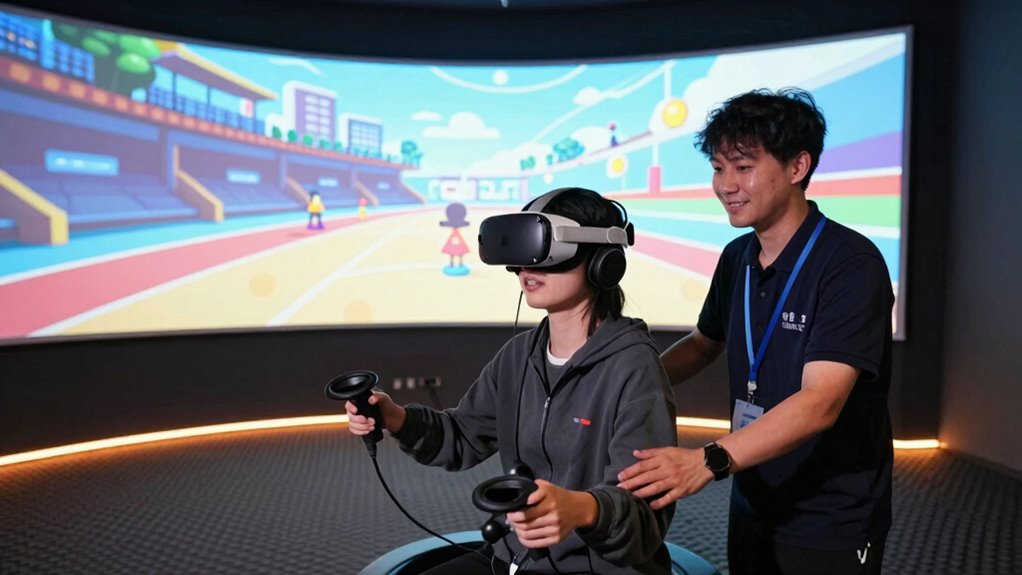

When guiding first-time VR users, keep your words calm, friendly, and reassuring to ease any nerves. Start by normalizing feelings like excitement or nervousness, emphasizing that they’re normal and help is available if needed. Give simple, clear instructions on controls, encouraging them to take their time and ask questions. If they get overwhelmed or make mistakes, stay supportive and positive. Continue with easy guidance, and if you stay this supportive, you’ll help create a comfortable, enjoyable experience—there’s more to learn to make it even better.
Key Takeaways
- Start with a calm, friendly greeting and normalize feelings of nervousness or excitement.
- Demonstrate controls clearly, then allow players to practice at their own pace with reassurance.
- Offer positive reinforcement and normalize mistakes as part of learning.
- Remind players their safety is the top priority and encourage breaks if needed.
- Create a supportive atmosphere, using consistent reassurance to turn initial nerves into a positive experience.
When introducing first-time players to virtual reality, your goal is to create a smooth and welcoming experience from the start. The moment they put on the headset, they might feel a mix of excitement and nervousness. Your words and actions can ease that tension by providing clear tutorial guidance and consistent player reassurance. Begin with a warm, friendly tone, and let them know that it’s perfectly normal to feel a little overwhelmed initially. Emphasize that they’re in control and that you’re there to help them every step of the way. Simple, reassuring statements like “Take your time,” or “You’re doing great,” can make a big difference.
Start by guiding them through the basic controls in a calm, step-by-step manner. Use concise instructions and demonstrate first, then let them try. If they seem confused or hesitant, pause to offer reassurance. Say things like, “No rush, just follow along at your own pace,” or “If you’re unsure about anything, just ask.” This helps to establish trust and encourages them to feel comfortable asking questions or pausing whenever needed. Remember, the key is not just the instructions but the tone—friendly, patient, and encouraging.
Guide them gently through controls, reassuring and encouraging at each step.
During the tutorial guidance, be observant of their reactions. If they’re struggling with a movement or control, offer gentle corrections or alternative options. Keep your language simple and positive, reinforcing that mistakes are normal and part of the learning process. For example, if they’re having trouble with a gesture, you might say, “That’s okay, just try again slowly,” which normalizes difficulty and fosters confidence. Reassuring players that it’s okay to take breaks or step back if they feel overwhelmed helps prevent panic and builds trust. Additionally, understanding the importance of color accuracy in creating an immersive environment can help you better tailor visual cues and feedback during the demo.
Throughout the demo, continue to provide player reassurance. Remind them that their safety is your priority and that they can remove the headset at any time if they feel uncomfortable. Use affirmations like “You’re doing fantastic,” or “You’re getting the hang of it,” to boost confidence. As they progress, acknowledge their achievements, no matter how small, to reinforce positive feelings. This ongoing reassurance keeps their mind at ease, making the experience enjoyable rather than intimidating.
In essence, your role is to create a supportive environment through thoughtful tutorial guidance and consistent player reassurance. When first-time players feel safe, guided, and encouraged, they’re more likely to enjoy the experience and develop confidence in their virtual reality skills. Your calm, friendly approach can turn what might be a nerve-wracking introduction into an exciting adventure they’ll want to revisit.
Frequently Asked Questions
How Do I Reset the Demo if I Get Disoriented?
If you get disoriented in the virtual environment, simply pause the demo and look for the reset option in the user guidance menu. Most VR systems let you restart or recalibrate easily—just follow the prompts. Take a moment to breathe, hold onto a stable surface if needed, and then use the reset feature. This helps you regain orientation and enjoy the experience without feeling overwhelmed.
What Should I Do if I Experience Motion Sickness?
If you experience motion sickness or disorientation, don’t panic—stay calm. Remove the headset gently and sit down if needed. Take slow, deep breaths and focus on a fixed point in your environment. Hydrate and give yourself a few minutes to recover. Remember, motion sickness is common and temporary. Listening to your body is key—your comfort is the top priority to guarantee a safe, enjoyable experience.
Can I Pause or Exit the Demo at Any Time?
Yes, you can pause or exit the demo anytime. Use the pause options available in the menu if you need a break or want to step away briefly. If you decide to restart or leave completely, a demo reset option allows you to start fresh or exit smoothly. Don’t hesitate to take a break whenever you feel overwhelmed, ensuring your experience remains comfortable and enjoyable.
Are There Accessibility Options for Different Needs?
Yes, there are accessibility options designed for your needs. You can personalize visual settings for visual impairment, enhancing contrast or enabling text-to-speech features. For those with hearing assistance needs, the demo offers subtitles and audio descriptions to guarantee you don’t miss any critical details. These options work together, creating a seamless experience where visual and auditory elements support each other, making your VR journey comfortable and inclusive.
How Long Does the Typical VR Demo Last?
A typical VR demo lasts around 10 to 20 minutes, giving you enough time to explore the environment and try out the features without feeling overwhelmed. The demo duration varies depending on the experience, but most are designed to keep your attention engaged while being short enough to prevent fatigue. If you’re new, expect the typical length to be on the shorter side, around 10 minutes, to guarantee a comfortable introduction.
Conclusion
So, there you have it—armed with these lines, you’ll gently guide first-timers through the chaos, preventing panic while secretly turning their awe into a well-rehearsed performance. Remember, your calm reassurance is the magic potion that transforms trembling newbies into VR enthusiasts—at least for a few minutes. Just don’t forget, behind every brave face is someone secretly wishing they’d stayed in bed. Happy demo-ing, and may your patience outlast their squeals of delight and terror.