Small errors in floor height calibration can seriously break your immersion by making environments feel off or causing discomfort during gameplay. Even tiny adjustments impact how realistic your avatar moves, how sounds sync with visuals, and how you perceive space around you. Issues like uneven floors or sensor misalignment are common causes. Keeping your calibration precise through routine checks and maintenance ensures a smoother, more believable experience—if you want to learn how to get it just right, keep exploring.
Key Takeaways
- Small miscalibrations of floor height can distort spatial perception, making environments feel unreal or disorienting users.
- Tiny adjustments in floor level can disrupt audio-visual sync, breaking immersion and affecting the sense of presence.
- Overlooking precise calibration leads to floating avatars and misaligned interactions, reducing realism and comfort.
- Regular calibration is essential because minor drift in floor height settings can cause significant immersion issues.
- Accurate, consistent calibration ensures stable tracking and an authentic virtual environment, preventing immersion-breaking errors.
Understanding the Role of Floor Height in Virtual Environments
Understanding the role of floor height in virtual environments is essential because it directly affects how realistic and comfortable the experience feels. If the floor isn’t calibrated correctly, you might find yourself constantly adjusting your posture or feeling off-balance, which breaks immersion. Proper floor height ensures your avatar’s feet align naturally with the virtual ground, making movements feel authentic. It also impacts how objects and interfaces interact with you, affecting your overall sense of space. When the floor height matches your real-world position, your sense of presence increases, making the virtual environment more believable. Ignoring this detail can cause discomfort, disorientation, or even nausea. Additionally, precise calibration helps prevent physical strain during extended use. Achieving accurate floor height calibration is a key step in creating a seamless and immersive virtual experience, especially since consistent environment scaling contributes to maintaining user comfort and immersion over time. Proper alignment of virtual and real-world measurements enhances user comfort and reduces fatigue during prolonged sessions. Ensuring accurate spatial measurements are maintained helps sustain immersion and reduces the risk of motion sickness.
How Small Adjustments Can Transform Your Immersion

Even tiny adjustments to your floor height can considerably change how you perceive space, making environments feel more realistic or more disorienting. When your visual cues and audio sync perfectly, your immersion deepens, pulling you further into the experience. Small tweaks can therefore make a big difference in how immersed you feel in virtual worlds. Additionally, understanding the importance of contrast ratio can help optimize your setup for clearer, more vivid images that enhance overall immersion.
Perception of Space
Have you ever noticed how tiny changes in floor height can dramatically alter your sense of space? Slight adjustments can make a room feel larger or more confined, influencing how you perceive depth and distance. When the floor is just a little higher or lower, your brain interprets spatial cues differently, affecting immersion. For example, consider this table:
| Floor Adjustment | Effect on Space Perception |
|---|---|
| Slight increase | Room feels more expansive |
| Slight decrease | Space feels tighter |
| No change | Maintains original perception |
| Larger change | Creates unnatural distortion |
Small tweaks have a big impact on spatial awareness, shaping how you experience your environment and making your virtual or physical spaces more convincing.
Audio-Visual Synchrony
Did you realize that tiny adjustments in audio and visual timing can considerably boost your sense of immersion? When sounds sync perfectly with what you see, your brain seamlessly integrates the experience, making it feel authentic. If an audio cue lags even slightly behind its visual event, it creates a disconnect that pulls you out of the moment. Conversely, perfectly synchronized audio and visuals deepen your engagement, making environments feel real. Adjusting the timing by mere milliseconds can eliminate that distracting mismatch, whether it’s footsteps matching a character’s movement or environmental sounds aligning with actions. Small tweaks here can transform a good experience into a truly immersive one, reinforcing the illusion that you’re genuinely part of the virtual world.
Common Causes of Floor Calibration Issues
Floor calibration issues often stem from environmental factors or equipment-related problems that disrupt accurate measurements. One common cause is uneven flooring, which can cause sensors or devices to read inconsistent data, leading to incorrect height settings. Additionally, vibrations from nearby machinery or foot traffic may interfere with sensitive calibration tools, causing fluctuations. Temperature and humidity changes can also affect equipment, especially if sensors are not designed to handle such variations. Poorly mounted or damaged sensors can produce inaccurate readings, resulting in calibration errors. Furthermore, sensor accuracy can decline over time if sensors are not properly maintained or calibrated regularly, contributing to persistent issues. Finally, outdated or malfunctioning hardware may fail to deliver precise measurements, making calibration unreliable. Recognizing measurement stability as a crucial aspect helps you troubleshoot effectively, ensuring your calibration process yields accurate, stable results essential for seamless immersion.
Step-by-Step Guide to Calibrating Your Floor Height
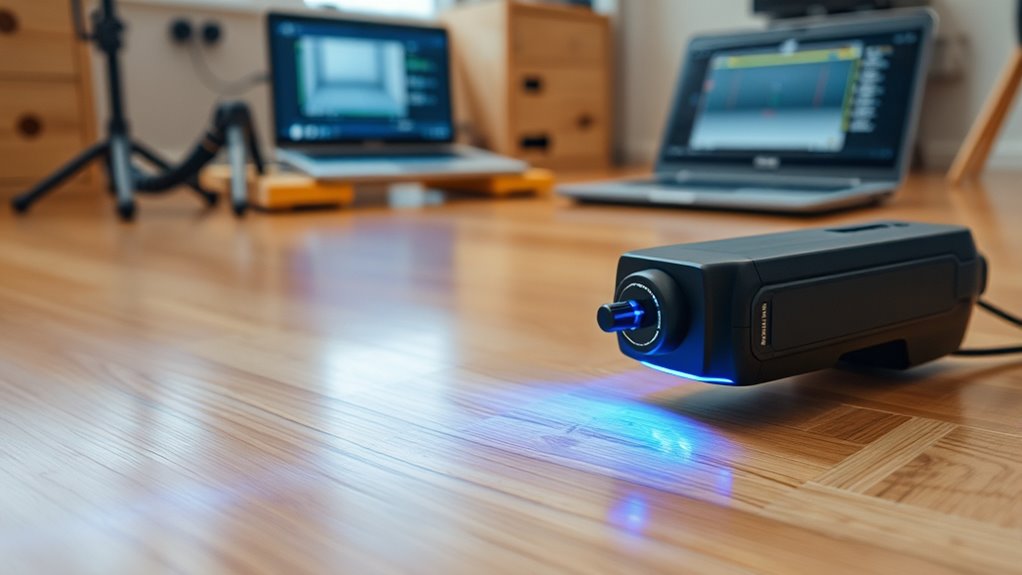
Calibrating your floor height accurately is essential for ensuring smooth operation and safety. To start, turn on your device and access the calibration menu. Place a level or a known flat surface on the floor, then position the device’s sensor or probe directly above it. Follow the on-screen instructions to initiate calibration mode. You may need to manually adjust the sensor or input the measured height to match the known surface. Make sure to stay still and avoid any movement during this process. Once complete, test the calibration by walking over the area or using a test object. If the device still reports inconsistent readings, repeat the process or verify that the floor surface is even and free from obstructions. Proper calibration ensures accurate tracking and safe operation. Additionally, consulting the device’s navigation and mapping features can help verify calibration accuracy and improve overall performance. Remember, an accurately calibrated sensor can prevent misreadings that might compromise your safety or cause operational issues. Regularly checking calibration can help maintain optimal device function over time. Ensuring the calibration process considers floor surface consistency will further enhance reliability and help prevent potential sensor drift that could affect your data accuracy.
The Impact of Incorrect Calibration on Gameplay and Experience
Incorrect calibration can substantially disrupt your gameplay experience, causing the device to misjudge your movements and surroundings. This leads to frustrating inaccuracies, like your avatar not moving as intended or objects appearing out of sync. You might find yourself constantly readjusting or losing immersion entirely. Here’s how calibration issues impact different scenarios:
| Issue | Effect |
|---|---|
| Misaligned player height | Clipping through objects or missing targets |
| Incorrect floor level | Falling through virtual floors or floating |
| Unresponsive controls | Delayed or missed actions |
| Disorienting visuals | Feeling disconnected from the environment |
These problems diminish fun and can even cause motion sickness. Ensuring precise calibration keeps gameplay smooth, realistic, and fully immersive, especially when incorporating Free Floating techniques to enhance spatial awareness. Regularly calibrating your device helps prevent these issues and maintains optimal performance during gameplay. Additionally, accurate floor height calibration is crucial for maintaining a seamless experience and avoiding common frustrations. Proper calibration is essential for reliable tracking, which directly affects the accuracy of your interactions and overall experience. Maintaining consistent setup conditions can also help sustain calibration accuracy over time.
Tips for Maintaining Accurate Floor Settings Over Time
To guarantee your virtual environment remains accurate over time, regular maintenance of your floor settings is essential. Start by periodically recalibrating your setup, especially after moving or changing your play area. Keep sensors and tracking devices clean and free of dust or obstructions to ensure precise readings. Establish a routine, such as monthly checks, to verify the floor height remains consistent. If you notice any drifting or misalignment, recalibrate immediately to preserve immersion. Avoid sudden movements or adjustments during calibration, as they can introduce errors. Document your calibration sessions to track any patterns or recurring issues. Additionally, update your firmware and software regularly, as updates often include fixes for calibration bugs. Understanding calibration procedures can also help you troubleshoot issues effectively. Incorporating proper ergonomic setup into your home environment can help reduce fatigue and improve overall accuracy during long sessions. Regularly reviewing sensor calibration settings helps maintain consistent performance and prevents long-term drift.
Frequently Asked Questions
Can Floor Height Calibration Be Adjusted During Gameplay?
Yes, you can usually adjust floor height calibration during gameplay. Most VR systems allow you to recalibrate on the fly to guarantee your virtual environment matches your real-world position. Look for quick calibration options in the system menu or settings, often accessible through your VR interface or controllers. Doing this helps maintain immersion, especially if you notice your avatar feeling off or if you move to a different play area.
What Hardware Tools Assist With Precise Floor Height Calibration?
You can use tools like a laser distance meter or a digital level for precise floor height calibration. These devices cut to the chase and provide accurate measurements, ensuring your VR setup stays spot-on. A laser distance meter quickly gauges distances, while a digital level guarantees your floor isn’t giving you the runaround. With these tools, you’ll keep your immersion intact and avoid stepping into a world of inaccuracies.
Does Room Size Affect Calibration Accuracy?
Yes, room size can impact calibration accuracy. Larger rooms may introduce more variables like uneven floors or environmental factors, making precise calibration trickier. Smaller spaces tend to be easier because there’s less room for error and less environmental interference. To guarantee accurate calibration, you should take extra care in larger rooms, double-check settings, and consider using additional hardware tools like laser distance meters or level sensors.
How Often Should You Recalibrate Your Floor Height?
You should recalibrate your floor height whenever you notice your VR experience feels off, like drifting or uneven movement. Regular recalibration, ideally weekly or after significant changes to your setup, keeps your experience smooth. If you move furniture or change the room layout, recalibrate immediately. Staying attentive guarantees your virtual environment remains immersive and accurate, preventing discomfort or missteps during gameplay.
Are There Software Updates That Improve Calibration Stability?
Did you know that over 60% of VR users notice calibration issues within their first month? Yes, there are software updates that improve calibration stability. Developers frequently release patches addressing calibration glitches, making your experience smoother. Keep your device’s firmware up-to-date, and check for updates regularly. These updates often include fixes and enhancements that prevent calibration drift, ensuring your gameplay remains immersive and accurate without constant recalibration.
Conclusion
Getting your floor height just right is like tuning a delicate instrument—you may not notice it at first, but when it’s off, everything feels out of tune. Small adjustments can restore the harmony, pulling you deeper into your virtual world. Keep your calibration precise, and your immersion will soar, turning your gameplay into a seamless dance between reality and digital fantasy. Remember, sometimes the tiniest tweak makes the biggest difference.