
To build a cleaner VR network setup, position your router centrally, away from interference, and use Wi-Fi 6 or newer standards for faster, more reliable connections. Create separate networks for guests and IoT devices to enhance security, and regularly update firmware. Choose energy-efficient hardware and manage traffic to reduce congestion. Keep your setup optimized with routine checks and adjustments. By following these steps, you’ll guarantee a secure, efficient, and smooth VR experience—more tips await to help you perfect your network.

Get VR and gaming gear delivered free — and shop member deals
- Fast, free delivery on millions of items
- Access to Prime Big Deal Days deals on October 6–7
- Prime Video, Amazon Music and more included
Key Takeaways
- Position routers centrally and away from interference sources to ensure a stable, high-quality VR connection.
- Use mesh networks or multiple access points to provide seamless coverage across large VR spaces.
- Segment networks by creating dedicated VR, guest, and IoT networks for better organization and security.
- Regularly update firmware and security settings to maintain optimal performance and protect against vulnerabilities.
- Monitor network traffic and environmental factors to identify congestion and minimize signal interference.
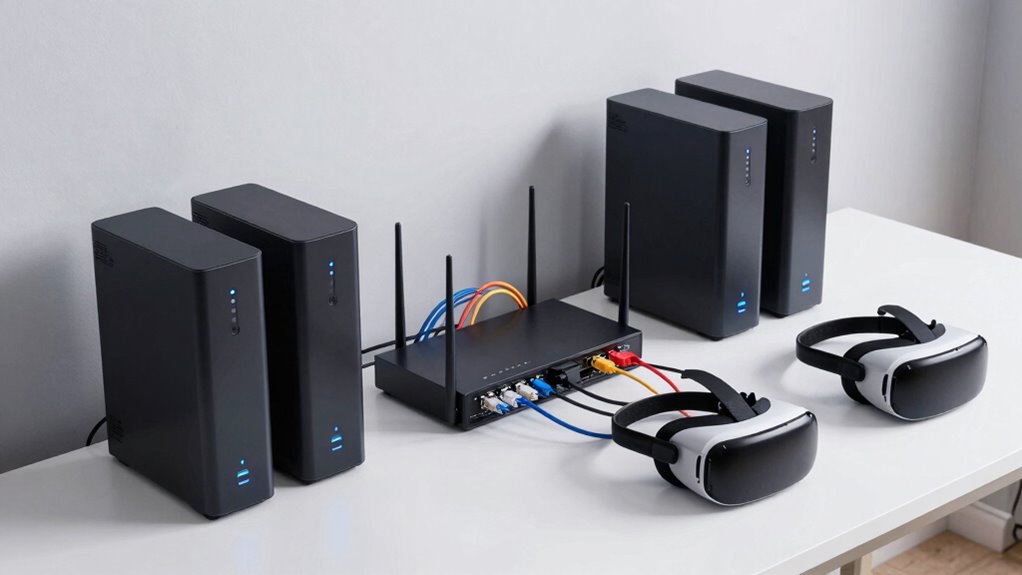
Have you ever wondered how to create a more efficient and environmentally friendly VR network? Building a cleaner VR setup isn’t just about reducing energy consumption; it’s also about maximizing your wireless connectivity and strengthening network security. To start, focus on guaranteeing your wireless connections are as reliable and fast as possible. Use the latest Wi-Fi standards, like Wi-Fi 6, which offer higher speeds, better range, and improved capacity, reducing lag and disconnections during intense VR sessions. Position your router centrally and away from interference sources like microwaves or thick walls to enhance signal strength. Consider investing in mesh network systems if your space is large, so every corner receives a strong, stable signal. This not only improves user experience but also minimizes the need for multiple access points, reducing overall energy use.
Next, prioritize network security to protect your VR environment from potential threats. A secure network prevents unauthorized access that could compromise your data or disrupt your VR experience. Use strong, unique passwords for your Wi-Fi and enable WPA3 encryption if available. Regularly update your router’s firmware to patch vulnerabilities and keep your network safe from cyber threats. Segment your network by creating a dedicated guest or IoT network separate from your primary VR setup. This isolates your VR devices, reducing the risk of malware or hacking attempts affecting your primary network. Additionally, consider setting up a VPN for added privacy, especially if you’re sharing your network with others or using public Wi-Fi. Employing energy-efficient hardware can also significantly reduce your environmental footprint while maintaining optimal performance. Incorporating advanced encryption protocols further enhances your network security and safeguards your data. Being aware of your network environment helps identify and minimize sources of interference that could impact performance. Additionally, understanding your network congestion patterns can help you adjust settings and avoid performance drops during peak usage times.
Implementing energy-efficient hardware also contributes to a cleaner VR network. Choose routers and networking equipment that are Energy Star certified, which consume less power and have a smaller environmental footprint. Turn off or disconnect devices when they’re not in use, and consider using smart plugs to automate power management. Regularly evaluating your network setup ensures you’re optimizing your system for both efficiency and security. These steps help reduce unnecessary energy consumption and extend the lifespan of your equipment.
Finally, maintaining your network regularly ensures maximum performance and security. Perform routine checks for firmware updates, monitor network traffic for suspicious activity, and adjust your settings as needed. By focusing on robust wireless connectivity and strong network security, you create a VR environment that’s not only more efficient but also safer and more sustainable. Building a cleaner VR network means you’re doing your part to reduce environmental impact while enjoying a seamless, secure virtual experience.
As an affiliate, we earn on qualifying purchases.
Frequently Asked Questions
How Often Should I Update My VR Network Hardware?
You should update your VR network hardware every 2 to 3 years to guarantee maximum network security and device compatibility. Regular updates help protect against security vulnerabilities and improve performance. Pay attention to manufacturer recommendations and tech advancements, as outdated hardware can cause lag or disconnects. Staying current also ensures your VR system remains compatible with new devices and software, providing a seamless, secure experience.
What Is the Ideal Wi-Fi Frequency for VR Setups?
Choosing the ideal Wi-Fi frequency for your VR setup is like tuning a musical instrument—it guarantees perfect harmony. Use the 5 GHz band for less wireless interference and faster speeds, which is essential for bandwidth optimization and seamless experiences. The 2.4 GHz band, though better at penetrating walls, often faces more wireless interference, causing lag. For the best VR experience, prioritize 5 GHz whenever possible.
Can I Use Mesh Networks for Better VR Connectivity?
Yes, you can use mesh networks to improve VR connectivity. Mesh topology guarantees multiple devices work together to maintain a strong signal, reducing lag and dead zones. It also boosts signals by relaying data through various nodes, so your VR headset stays consistently connected. This setup is especially useful in larger spaces, providing a seamless experience by minimizing interference and maintaining stable, high-speed connections essential for VR gameplay.
How Do I Troubleshoot Latency Issues in VR Networks?
To troubleshoot latency issues in your VR network, start by checking for signal interference from other wireless devices and minimize obstacles between your router and VR headset. Make certain you’re optimizing bandwidth by limiting background app usage and prioritizing VR traffic via Quality of Service (QoS) settings. Also, test your connection speed and stability, and consider upgrading your router or reducing network congestion to improve overall latency and responsiveness.
Is Wired or Wireless Connection Better for VR?
Choosing a wired connection is like anchoring your VR experience in a steady harbor, offering lower latency and more reliable performance. Wireless can be tempting for freedom, but it often struggles with VR headset compatibility and network security issues, risking lag and disconnections. For smooth, immersive gameplay, a wired setup is generally better, ensuring your network remains secure and your VR experience stays seamless and responsive.
mesh Wi-Fi system for large homes
As an affiliate, we earn on qualifying purchases.
As an affiliate, we earn on qualifying purchases.
Conclusion
Now that you’ve taken steps to create a cleaner VR network, you’re almost there. But the true test lies ahead—will your setup hold up under the most demanding experiences? As you prepare for tomorrow’s VR adventures, remember that the best networks aren’t just built—they’re refined over time. Keep an eye on performance, stay vigilant for interference, and the immersive worlds you seek will be more vivid than ever. The next level awaits—are you ready?
As an affiliate, we earn on qualifying purchases.
As an affiliate, we earn on qualifying purchases.
Fall Picks
fall essentials
As an affiliate, we earn on qualifying purchases.