
TL;DR

Play games on Amazon Luna for your next adventure, included with Prime
- A rotating selection of games, no download needed
- Play on TV, laptop or phone
- Fast, free delivery for your gear, too
A Nov. 1 XDA Developers article argues that PC owners should try Steam Link on a compatible TV box before buying Valve’s Steam Machine for living-room play. Streaming uses the existing gaming PC to run games, which can save the cost of a second system, but adds latency and video compression and depends on the box and home network.
XDA Developers argued Nov. 1 that PC owners considering Valve’s Steam Machine for television gaming should first try Steam Link on a compatible TV box. The approach streams games from an existing gaming PC, potentially avoiding a second gaming computer, though picture quality and responsiveness depend on the network and receiving device.
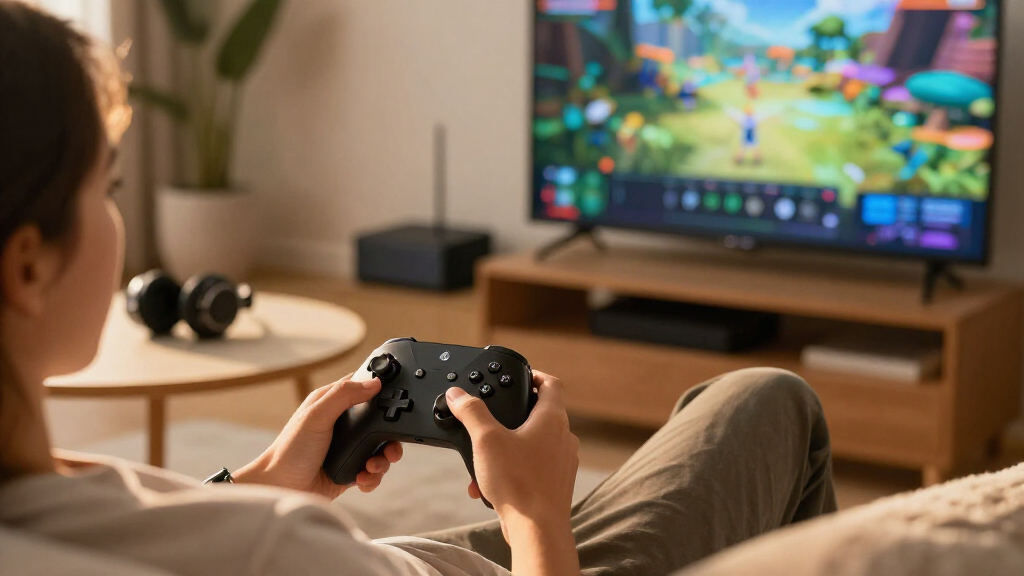
With Steam Link, the game runs on the gaming PC, which sends its video and audio over the home network to a television-connected device. Controller inputs travel back to the computer. The TV box does not need to render the game itself, but it does need to decode the stream and maintain a reliable connection. XDA says owners of a compatible Android TV box can test the app without paying for another gaming system.
The setup can also keep the living-room experience tied to the same Steam library and game installations. Steam’s Big Picture mode provides a controller-friendly interface for browsing and launching games on a television. Games remain installed and updated on the PC, so players do not need to install another copy or manage a separate library on a second machine.
The article contrasts that option with a Steam Machine listed as starting at $1,049, arguing that buying another computer may be unnecessary for people whose existing PC already runs their games. That price and recommendation are presented in the XDA article; the case for streaming is an assessment, not a guarantee that a TV box will suit every player.
Living-room gaming · A practical cost check
Could a Cheap TV Box with Steam Link Be the Steam Machine Most People Need?
Already own a gaming PC? XDA Developers says to try streaming your Steam library to a compatible TV box before buying another gaming computer. It could save a purchase, if your setup delivers the experience you want.
“You still need your PC running the games, but you can play them on your television from the couch without buying another gaming computer.”
— XDA Developers01 / The idea
One PC, another room
Steam Link sends a game’s video and audio from your gaming PC to a compatible TV-connected device. Controller inputs travel back to the PC. Big Picture mode makes Steam easier to browse and launch with a controller from the couch.
02 / The trade-off
Potential savings come with dependencies
An Android TV box you already own may make a trial effectively free. A new box still plays a different role from a gaming PC, and streaming quality depends on the complete setup.
Avoid a second PC
If your current computer already runs your games, you may not need another gaming system for couch play.
Keep one installation
Games remain installed and updated on the PC, with the same Steam library and save files.
Extra steps add latency
Encoding, network transmission and decoding can affect responsiveness and picture quality.
03 / Compare the routes
Streaming or a dedicated living-room system?
The right choice depends on what you own and how the setup feels in the games you play. The article’s $1,049 starting price and recommendation are XDA’s framing, not a guarantee that streaming will suit every player.
| Consideration | Steam Link + existing PC | Steam Machine |
|---|---|---|
| Where games run | Existing gaming PC | Dedicated living-room system |
| Extra hardware cost | Potentially none if you own a compatible box | Article cites a starting price of $1,049 |
| Network required | Yes, for streaming | Not for the local game-to-TV connection |
| Local TV rendering | No; the box receives and decodes | Runs games on the system itself |
| Performance certainty | Varies by PC, box, router and connection | Depends on the system and game |
04 / What affects the experience
Your setup sets the ceiling
XDA provides no tested-box list, benchmarks or latency measurements. These are the links in the chain to check; the article establishes no universal performance result.
05 / A low-cost test
Try before buying extra hardware
Test with what you already have, if it is compatible. Judge the experience using your own games and living-room setup.
Start with available gear
Install Steam Link on a compatible TV box and confirm your gaming PC is ready to stream.
Improve the connection
Use Ethernet where possible and turn on the television’s Game Mode to reduce display processing.
Test the games you play
Check image quality and input response. If they fall short, consider a direct PC-to-TV connection or a dedicated system.
Quick answers
What to know before you decide
Does the TV box run the game?
No. The gaming PC runs the game and streams video and audio. The box receives and decodes the stream; controller inputs return to the PC.
Could this save the cost of a Steam Machine?
It may, if you already own a capable PC and compatible TV device. Your PC still needs to be running and available.
Will it feel as responsive as HDMI?
Not necessarily. Streaming adds encoding, network transmission and decoding. The article reports no measured performance figures.
Does 4K mean high-refresh-rate gaming?
No. Check the capabilities of the box, PC and television, along with the connection and streaming settings.
A Lower-Cost Route to Couch Gaming
For people who already own a capable gaming PC, Steam Link offers a way to play in another room without purchasing a second machine. The possible saving matters most to households that want a couch-friendly interface but do not need games to run locally on the television device. A box they already own could make the trial effectively free, while a new streaming box would still generally serve a different role from a gaming PC.
The trade-off is that streaming adds processing and network steps between a player’s input and the image on screen. The computer encodes the game, the network carries it, and the TV device decodes it. That can affect responsiveness and image quality. A cheaper setup is not automatically an equivalent substitute for a console or a dedicated gaming PC connected directly to the TV.
Products Worth Considering

DJI Mic 3 Wireless Microphone System (2 Transmitters, 1 Receiver, Charging Case)

LG UltraGear 34GX90SA-W 34-inch WQHD Curved OLED Gaming Monitor

Bose QuietComfort True Wireless Earbuds with Active Noise Cancellation, Black
As an affiliate, we earn on qualifying purchases.
How Steam Link Uses an Existing PC
Valve’s Steam Machine is presented as a console-style way to play a Steam library on a TV. The alternative described by XDA is not a standalone console: Steam Link depends on a separate computer to run each game. The TV box functions as the streaming receiver, while the gaming PC remains the source of the game, graphics processing and installation.
Steam’s Big Picture mode is designed for television use and controller navigation, so a player can browse the library and launch a game from the couch. The same PC can serve both desk and living-room play, with the same installation and save files. XDA uses games including Red Dead Redemption 2 and Baldur’s Gate 3 as examples of titles someone might prefer to play from the couch; those examples do not establish how well any particular network or box will perform.
““You still need your PC running the games, but you can play them on your television from the couch without buying another gaming computer.””
— XDA Developers
Performance Depends on Your Setup
The article does not provide benchmarks, latency measurements or a list of tested TV boxes. Actual results will vary with the PC, receiving device, router and connection quality, and no single level of image quality or responsiveness is established. Ethernet is recommended where possible, but that does not guarantee a particular result.
It is also unclear which inexpensive boxes can decode a stream at a player’s preferred resolution and refresh rate. 4K support alone does not establish high-refresh-rate capability, and television, PC and box specifications all matter. Streaming may be acceptable for slower-paced games but less appealing to players who need especially quick input response, such as in competitive shooters.
Test Before Buying Extra Hardware
The practical next step is to try Steam Link with hardware already available, if it is compatible, before spending money on another gaming system. Players can check how the setup performs in the games they actually play, connect over Ethernet where possible and enable the television’s Game Mode to reduce display processing. If the results are unsatisfactory, a direct PC-to-TV connection or a dedicated living-room system may be a better fit.
There is no announced test result or hardware comparison in the article that settles which option is best for everyone. The decision depends on whether the convenience and potential cost saving of streaming outweigh its compromises for a particular home setup.
Source: XDA Developers
Key Questions
Does Steam Link run games directly on a TV box?
No. The gaming PC runs the game and streams its video and audio to a compatible TV device. The box receives and decodes the stream, while controller inputs go back to the PC.
Can Steam Link save the cost of a Steam Machine?
It may avoid buying another gaming computer if you already own a PC that runs your games and have a compatible TV device. It is not a standalone replacement: the PC must be running and available for streaming.
Will Steam Link feel as responsive as a direct connection?
Not necessarily. Streaming adds encoding, network transmission and decoding, which can add latency and compression. Results depend on the home network and devices, and the article does not provide measured performance figures.
Does a 4K TV box guarantee 4K high-refresh-rate gaming?
No. A device’s 4K video support does not by itself confirm high-refresh-rate gaming. Check the capabilities of the box, PC and television, as well as the connection and streaming settings.
Source: XDA Developers