When selecting a flight sim switch panel, the key considerations revolve around compatibility, build quality, and the range of controls offered. The Honeycomb Alpha Flight Controls Yoke & Switch Panel stands out as the best overall, offering a seamless experience for serious sim enthusiasts. For those on a budget, the Pro-Flight Switch Panel provides solid functionality at a more accessible price. Meanwhile, the Logitech G Multi Panel excels for users who want a compact, reliable option with excellent integration. The main tradeoffs involve balancing cost against features, size, and ease of setup. Keep reading to find out which panel fits your needs best and what to watch out for.

Play games on Amazon Luna for your next adventure, included with Prime
- A rotating selection of games, no download needed
- Play on TV, laptop or phone
- Fast, free delivery for your gear, too
Key Takeaways
- High-end panels like the Honeycomb Alpha offer extensive controls but come with a higher price and larger size.
- Budget options such as the Pro-Flight Switch Panel deliver core functionality without extra frills, ideal for beginners.
- Compatibility with specific flight simulators varies; ensure your chosen panel supports your software before purchasing.
- Build quality and tactile feedback differ significantly, impacting long-term durability and realism.
- Size and setup complexity are important—smaller panels are easier to integrate into compact cockpits, but may lack certain controls.
| Honeycomb Aeronautical Alpha Flight Controls Yoke & Switch Panel |  | Best Overall Flight Sim Switch Panel for Realism and Quality | Yoke Rotation: 180° | Control Mechanism: Dual linear ball bearings | Switch Panel Features: Master, alternator, avionics, light switches, 5-position ignition | VIEW ON AMAZON | See Our Full Breakdown |
| C172 Breaker Panel with Ignition Switch for Flight Simulators |  | Best Value for Authentic Visuals and Basic Functionality | Design: Authentic | Build Quality: Premium | Features: Non-functional breakers, key ignition | VIEW ON AMAZON | See Our Full Breakdown |
| Aero Series FlightMate Simulation Panel (Dual Magneto) for PC |  | Best for Multi-Engine Realism and Customization | Compatibility: PC only | Controls: 11 toggle switches with customizable backlighting | Magneto Controls: Dual with spring-back START positions | VIEW ON AMAZON | See Our Full Breakdown |
| Thrustmaster MFD Cougar Flight Sim Multi-Function Display Set – PC |  | Best for Multi-Function Control and PC Compatibility | Number of Panels: 2 | Controls: 48 programmable controls per panel | Buttons: 20 per panel | VIEW ON AMAZON | See Our Full Breakdown |
| Flight Simulator Digital Autopilot Panel for Home Cockpit & Desktop Setup |  | Best for Realistic Autopilot Functionality and Home Cockpits | Material: Aluminum alloy | Lighting: Automatic ambient light | Compatibility: Most popular flight platforms | VIEW ON AMAZON | See Our Full Breakdown |
| Aero Series FlightMate Simulation Panel | 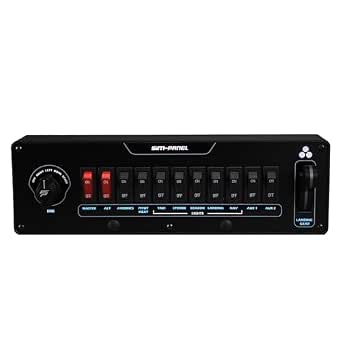 | Best for Realistic Single-Engine Control Experience | Compatible Devices: PC | Controller Type: Flight Control Switch Panel | Connectivity Technology: USB | VIEW ON AMAZON | See Our Full Breakdown |
| Logitech G USB G Pro Flight Multi Panel |  | Best for Versatile Control and Compatibility | VIEW ON AMAZON | See Our Full Breakdown | |||
| Pro-Flight Switch Panel |  | Best for Compatibility and Simplicity | Compatibility: X-Plane 11, MSFS2020, Prepar3D, FSX | Switch Type: 5-position ignition switch with spring return | Connectivity: USB | VIEW ON AMAZON | See Our Full Breakdown |
| flight sim switch panel | Compatibility |
|---|---|
| Honeycomb Aeronautical Alpha F | PC (via compatible flight sim software) |
| C172 Breaker Panel with Igniti | Multi-setup |
| Aero Series FlightMate Simulat | PC only |
| Thrustmaster MFD Cougar Flight | PC only |
| Flight Simulator Digital Autop | Most popular flight platforms |
| Aero Series FlightMate Simulat | — |
| Logitech G USB G Pro Flight Mu | — |
| Pro-Flight Switch Panel | X-Plane 11, MSFS2020, Prepar3D, FSX |
More Details on Our Top Picks
Honeycomb Aeronautical Alpha Flight Controls Yoke & Switch Panel
The Honeycomb Alpha Flight Controls Yoke & Switch Panel stands out for offering a highly realistic flying experience, combining a full 180° yoke rotation with smooth, precise control via dual linear ball bearings. Compared with the Thrustmaster MFD Cougar, this yoke provides a more authentic feel and comprehensive control setup, making it ideal for serious flight enthusiasts or aspiring pilots. The integrated switch panel adds convenience, but its size and complexity might overwhelm beginners. The dual mounting options—clamps or micro-suction pad—offer versatility for different setups, though the lack of programmable controls limits customization. Overall, this model is perfect for those seeking high fidelity and durability, provided they are willing to invest in a premium device.
Pros:- Realistic full 180° yoke rotation for authentic control
- Durable, high-quality construction designed by pilots and engineers
- Versatile mounting options for different setups
Cons:- High price point may be a barrier for casual users
- Lack of extensive programmable controls limits customization
Best for: Aviation enthusiasts or flight students aiming for a professional-grade setup with maximum realism.
Not ideal for: Casual simmers or those with limited space, as its size and cost may be prohibitive.
- Yoke Rotation:180°
- Control Mechanism:Dual linear ball bearings
- Switch Panel Features:Master, alternator, avionics, light switches, 5-position ignition
- Mounting Options:Clamps or micro-suction pad
- Construction:Steel shaft, aerospace-grade materials
- Compatibility:PC (via compatible flight sim software)
Our verdict“This yoke and switch panel combination is best suited for dedicated flight enthusiasts seeking a premium, realistic experience.”
C172 Breaker Panel with Ignition Switch for Flight Simulators
The C172 Breaker Panel offers an authentic cockpit look with premium build quality, including non-functional breakers and a key ignition switch that boost immersion. While it doesn’t provide functional electrical connections, this makes it more suitable for visual realism than operational control. Unlike the Aero Series FlightMate Panel, which offers more advanced features, this panel focuses on aesthetic accuracy and durability at a more accessible price point. It’s ideal for cockpit builders who prioritize visual authenticity over complex controls, but those wanting programmable switches or full autopilot functions should look elsewhere. This panel strikes a balance for hobbyists who want an eye-catching addition without breaking the bank.
Pros:- Authentic, realistic appearance enhances cockpit immersion
- Premium build quality ensures long-lasting durability
- Includes key ignition switch for added realism
Cons:- Breakers are non-functional, limiting practical use
- Limited features may not satisfy advanced users
Best for: Casual sim pilots or cockpit builders who value visual authenticity over advanced controls.
Not ideal for: Advanced flight simmers seeking functional switch panels with programmable options or autopilot features.
- Design:Authentic
- Build Quality:Premium
- Features:Non-functional breakers, key ignition
- Compatibility:Multi-setup
Our verdict“This panel is a strong visual upgrade for hobbyists wanting a realistic cockpit look without complex controls.”
Aero Series FlightMate Simulation Panel (Dual Magneto) for PC
The Aero Series FlightMate Panel is tailored for serious PC flight simmers, featuring dual magneto controls that replicate multi-engine aircraft systems with accuracy. Unlike the Thrustmaster MFD Cougar, which focuses on multi-function displays, this panel emphasizes engine management and control fidelity, making it ideal for advanced users. The customizable backlit toggle switches improve visibility and personalization, while the landing gear lever with LED indicators adds a professional touch. However, its PC-only compatibility limits flexibility, and the complexity might challenge newcomers. This panel makes the most sense for experienced pilots or enthusiasts who need realistic engine controls and are comfortable with some setup effort.
Pros:- Dual magneto controls for realistic multi-engine operation
- Customizable backlit toggle switches for visibility
- Robust, professional-grade construction
Cons:- Limited to PC platforms, reducing versatility
- Requires setup and configuration for optimal use
Best for: Advanced PC flight simmers focused on multi-engine aircraft and detailed control customization.
Not ideal for: Beginners or users with consoles, due to its PC-only design and setup complexity.
- Compatibility:PC only
- Controls:11 toggle switches with customizable backlighting
- Magneto Controls:Dual with spring-back START positions
- Landing Gear:Lever with LED indicators
- Build Quality:Professional-grade
- Material:High-quality plastics and metal accents
Our verdict“This panel is ideal for dedicated PC flight sim enthusiasts seeking authentic engine management controls.”
Thrustmaster MFD Cougar Flight Sim Multi-Function Display Set – PC
The Thrustmaster MFD Cougar set delivers extensive control options with two multi-function displays featuring 48 programmable controls each, making it well-suited for detailed flight simulation. While its pre-printed layouts streamline setup for Microsoft Flight Simulator, the need for initial programming and configuration can be daunting for newcomers. Unlike the Honeycomb Alpha, which focuses on control fidelity, this set emphasizes customization and expandability, appealing to advanced users who want to tailor their cockpit. The weighted, non-slip bases add stability during intense sessions, but the complexity and setup time may frustrate beginners. Overall, this set is best for experienced simmers wanting extensive control options in a PC environment.
Pros:- 48 programmable controls per display for detailed customization
- Weighted bases for stability during vigorous use
- Preset layouts simplify initial configuration for MSFS
Cons:- Requires time and effort for setup and programming
- Limited to PC platforms, reducing flexibility
Best for: Experienced flight sim enthusiasts who want high control density and extensive customization on PC.
Not ideal for: Beginners or casual users seeking plug-and-play simplicity without extensive setup.
- Number of Panels:2
- Controls:48 programmable controls per panel
- Buttons:20 per panel
- Switches:4 per panel
- LED Indicators:2 per panel
- Compatibility:PC only
Our verdict“This multi-function display set suits advanced PC users demanding extensive control options and customization.”
Flight Simulator Digital Autopilot Panel for Home Cockpit & Desktop Setup
This autopilot panel offers a full-scale, authentic feel with ergonomic controls and automatic backlighting that greatly enhances realism. It differs from the Aero Series FlightMate by focusing on full autopilot functions rather than engine or multi-engine controls, making it ideal for simmers aiming to replicate real cockpit procedures. The sturdy aluminum stand and versatile mounting options support various setups, but it requires compatible flight software and some configuration effort. While not suitable for those seeking programmable or multi-engine controls, this panel excels in delivering a genuine IFR autopilot experience in a home cockpit environment. It’s a great choice for pilots wanting operational autopilot features in a compact, plug-and-play form.
Pros:- Authentic full-scale cockpit design enhances realism
- Automatic ambient backlighting improves visibility
- Plug-and-play with customizable button mapping
Cons:- Requires compatible flight software for full functionality
- Additional hardware may be needed for cockpit integration
Best for: Serious flight sim pilots or cockpit builders wanting authentic autopilot controls and full IFR functionality.
Not ideal for: Beginners or casual users seeking simple switch panels or multi-engine controls without autopilot features.
- Material:Aluminum alloy
- Lighting:Automatic ambient light
- Compatibility:Most popular flight platforms
- Stand Included:Yes
- Mounting Options:Back holes, desktop stand
- Control Type:Standard HID
Our verdict“This autopilot panel is best for pilots and enthusiasts seeking genuine IFR autopilot control in a realistic, desktop setup.”
Aero Series FlightMate Simulation Panel
The Aero Series FlightMate Simulation Panel stands out for its highly authentic controls tailored specifically for PC flight sims. Its professional-grade build and customizable, backlit toggle switches provide an immersive experience that appeals to serious enthusiasts. Compared with the Pro-Flight Switch Panel, this model offers more realistic magneto controls and a greater number of switches, making it ideal for simmers focused on single-engine aircraft. However, its exclusivity to PC and somewhat involved setup process might deter casual users or those with console setups. The durable construction and authentic controls make this a top choice for dedicated flight simmers who prioritize realism.
Pros:- Highly realistic controls for immersive flight simulation
- Customizable backlit toggle switches for personalization
- Durable, professional-grade construction
Cons:- Limited to PC compatibility, not suitable for consoles
- May require some setup for optimal use
- Designed primarily for single-engine aircraft simulations
Best for: PC users seeking a realistic, single-engine aircraft control panel with customization options.
Not ideal for: Console gamers or casual simmers who need plug-and-play simplicity or broad platform compatibility.
- Compatible Devices:PC
- Controller Type:Flight Control Switch Panel
- Connectivity Technology:USB
- Additional Features:11 Toggle Switches with Customizable Backlighting, Authentic Single-Engine Magneto Control, Professional-Grade
Our verdict“This panel is perfect for dedicated PC flight sim enthusiasts who want highly authentic controls for single-engine aircraft.”
Logitech G USB G Pro Flight Multi Panel
The Logitech G Pro Flight Multi Panel offers a broad set of switches and an LED display, making it well-suited for users who want to control multiple aspects of their flight sim with ease. It integrates seamlessly with Microsoft Flight Simulator X and 2004, and can mount onto the Pro Flight Yoke System or other cockpit setups. Unlike the Aero Series FlightMate, which emphasizes realism, this panel prioritizes versatility and ease of use across different platforms. Its lack of detailed customization or dedicated single-engine controls means it’s better suited for users who want multi-faceted control rather than ultra-authentic simulation. Its plug-and-play design makes it accessible, but limited customization might be a drawback for advanced users.
Pros:- Works with multiple flight simulation platforms
- Mounts onto existing yoke systems for integrated control
- Full autopilot panel with setting controls
Cons:- Limited customization options for switch functions
- Lack of detailed realism compared to dedicated panels
- Basic display features may not suit advanced cockpit setups
Best for: Flight sim enthusiasts who want a versatile, easy-to-integrate control panel compatible with multiple simulators.
Not ideal for: Purists seeking highly authentic, dedicated controls for single-engine aircraft or those who prefer customizable switches.
Our verdict“This pick makes the most sense for users wanting a flexible, multi-platform control interface for various flight sims.”
Pro-Flight Switch Panel
The Pro-Flight Switch Panel excels in delivering a straightforward, aircraft-style control experience with its 5-position ignition switch and easy USB plug-and-play setup. It’s compatible with popular flight sims like X-Plane 11, MSFS2020, and Prepar3D, making it accessible for a wide range of users. Compared to the Aero Series FlightMate, which offers more switches and customization, this panel keeps things simple and focused on core functions, making it attractive for beginners or those who prefer a no-fuss installation. Its limited switch functions mean it’s not ideal for complex cockpit setups, but the realistic switches and broad software compatibility make it a solid choice for casual and intermediate flight simmers.
Pros:- Realistic aircraft-style switches
- Easy USB plug-and-play setup
- Compatible with multiple flight simulation platforms
Cons:- Limited to specific switch functions
- No advanced customization options
- Basic feature set may not satisfy experienced simmers
Best for: Beginners or casual users who want a simple, reliable switch panel compatible with major flight sims.
Not ideal for: Advanced users or those looking for a wide array of customizable controls or dedicated single-engine features.
- Compatibility:X-Plane 11, MSFS2020, Prepar3D, FSX
- Switch Type:5-position ignition switch with spring return
- Connectivity:USB
- Backlighting:Yes
Our verdict“Ideal for entry-level or casual flight enthusiasts seeking quick setup and reliable controls without complexity.”
How We Picked
These products were evaluated based on a combination of build quality, compatibility, feature set, user feedback, and value for money. Priority was given to panels that offer comprehensive control options suitable for serious flight simmers, while also considering affordability for casual users. Ease of installation and compatibility with popular flight simulators like Microsoft Flight Simulator and X-Plane were key factors. The ranking reflects a balance between performance, durability, and cost, highlighting options that serve different user needs—from beginners to advanced enthusiasts.| flight sim switch panel | Compatibility |
|---|---|
| Honeycomb Aeronautical Alpha F | PC (via compatible flight sim software) |
| C172 Breaker Panel with Igniti | Multi-setup |
| Aero Series FlightMate Simulat | PC only |
| Thrustmaster MFD Cougar Flight | PC only |
| Flight Simulator Digital Autop | Most popular flight platforms |
| Aero Series FlightMate Simulat | — |
| Logitech G USB G Pro Flight Mu | — |
| Pro-Flight Switch Panel | X-Plane 11, MSFS2020, Prepar3D, FSX |
Factors to Consider When Choosing Flight Sim Switch Panel
Choosing the right flight sim switch panel involves several critical factors beyond just price. First, consider compatibility with your existing setup and preferred flight simulator software to avoid frustration. Next, evaluate the range of controls offered—more buttons and switches provide greater realism but can increase complexity. Build quality and tactile feedback are also essential, as they influence durability and immersion. Size and layout matter if you’re working within a limited cockpit space or want a more portable setup. Finally, think about ease of installation and future expandability, especially if you plan to upgrade your simulator or add peripherals.Compatibility and Software Support
The most important aspect when selecting a switch panel is ensuring it works seamlessly with your flight simulator software. Some panels are designed specifically for certain platforms, while others offer broad compatibility. Confirm whether the panel supports popular simulators like Microsoft Flight Simulator, X-Plane, or Prepar3D, and check for driver support and software updates. Incompatibility can lead to limited functionality or frustration, so invest in a panel that’s proven to integrate well with your setup.Range of Controls and Customization
A wider array of switches, buttons, and knobs allows for more realistic and functional cockpit replication. However, more controls can also mean a steeper learning curve and increased setup time. Consider what controls you genuinely need—such as autopilot toggles, engine switches, or lighting controls—and prioritize panels that include these. Some panels also support customization, letting you assign functions to buttons, which can enhance your experience and adapt to different aircraft types.Build Quality and Feedback
Durability and tactile response are vital for a satisfying experience. Cheaper plastic panels may feel flimsy and have inconsistent switch action, reducing immersion and risking long-term damage. High-quality panels often feature metal switches, robust construction, and positive feedback, which replicate real aircraft switches more convincingly. While premium options cost more, they tend to last longer and offer a more authentic feel—an important consideration for dedicated simmers.Size, Layout, and Space Considerations
The physical dimensions of a switch panel influence how easily it fits into your cockpit or desktop setup. Smaller panels are ideal for limited space or for those who prefer a minimalist approach, but they may lack certain controls. Larger, more comprehensive panels can provide a full suite of switches and knobs, improving immersion but requiring more desk space. Think about your available area and whether you prefer a portable solution or a more integrated cockpit configuration.Ease of Setup and Expandability
Ease of installation varies between panels; some feature plug-and-play USB connectivity, while others require driver installation or custom configuration. Consider how comfortable you are with technical setup—simpler options save time and frustration. Additionally, if you plan to expand your cockpit later, choose panels that support daisy-chaining or modular setups. This flexibility can save money and effort down the line.Frequently Asked Questions
Will my flight sim work with any switch panel?
Not all switch panels are universally compatible; many are designed for specific platforms or require particular drivers. Before purchasing, check the manufacturer’s specifications to confirm support for your chosen flight simulator. Some panels offer broad compatibility through standard protocols like USB HID, but others may need custom software or firmware updates. Ensuring compatibility in advance prevents setup issues and maximizes functionality.Is it better to buy a large panel with many switches or a smaller, simpler one?
The best choice depends on your simulation goals and space constraints. Larger panels with extensive controls provide greater realism and immersion, especially for complex aircraft, but they require more space and can be more expensive. Smaller panels are easier to incorporate into compact cockpits and are often more affordable, making them suitable for beginners or casual players. Consider your needs for control variety versus practical setup considerations.How durable are these panels for long-term use?
Durability varies widely; budget models may use cheap plastics and switches that wear out quickly, while premium panels often feature metal components and reinforced construction. For a long-lasting setup, investing in a panel with high-quality switches and sturdy mounting options is advisable. Reading user reviews can also provide insight into how well a panel holds up over time, especially if you plan frequent or intensive use.Can I expand my switch panel setup later?
Many modern switch panels support expansion through daisy-chaining or modular designs, allowing you to add controls as your needs grow. However, not all panels are compatible with future upgrades, so check whether the panel supports additional modules or custom configurations. Planning for expandability can save money and hassle in the long run, especially if you’re building a comprehensive cockpit system.What should I prioritize if I’m new to flight simming?
For beginners, ease of setup and straightforward functionality are key. Look for panels that are compatible with your simulator, simple to install, and include essential controls without overwhelming complexity. Budget options can provide a good starting point, but investing in a slightly more robust panel can improve durability and realism as you learn. Focus on a setup that offers a good balance of cost, usability, and support for your current simulator platform.Conclusion
For newcomers or casual users, a compact and affordable panel like the Pro-Flight Switch Panel makes sense, providing essential controls without complexity. Dedicated flight enthusiasts will appreciate the Honeycomb Alpha Flight Controls Yoke & Switch Panel for its extensive features and durability, making it the best overall choice. Those seeking a premium, highly customizable experience should consider high-end options that support expandability and advanced control sets. If space is limited, smaller panels or modular setups can still deliver a satisfying simulation experience. Ultimately, matching the panel’s complexity and features to your flying style and space will ensure a more immersive and enjoyable flight sim experience.Fall Picks
fall essentials
As an affiliate, we earn on qualifying purchases.