
TL;DR

Play games on Amazon Luna for your next adventure, included with Prime
- A rotating selection of games, no download needed
- Play on TV, laptop or phone
- Fast, free delivery for your gear, too
A do-it-yourself presence sensor built with an ESP32-C6 and an LD2410C mmWave radar module costs about $15 per room, compared with the source’s $80 price for the Aqara FP2. The radar can detect small movements such as breathing, but it needs configuration to limit false readings and does not include a USB power adapter or cable.
An ESP32-C6 board and LD2410C mmWave radar module can form a do-it-yourself presence sensor for about $15 per room, according to an XDA Developers report published November 10. The setup is designed to detect small movements, including breathing, which can help smart-home lights stay on when someone is sitting or lying still; it costs less than the report’s listed $80 Aqara FP2, but requires setup and tuning.
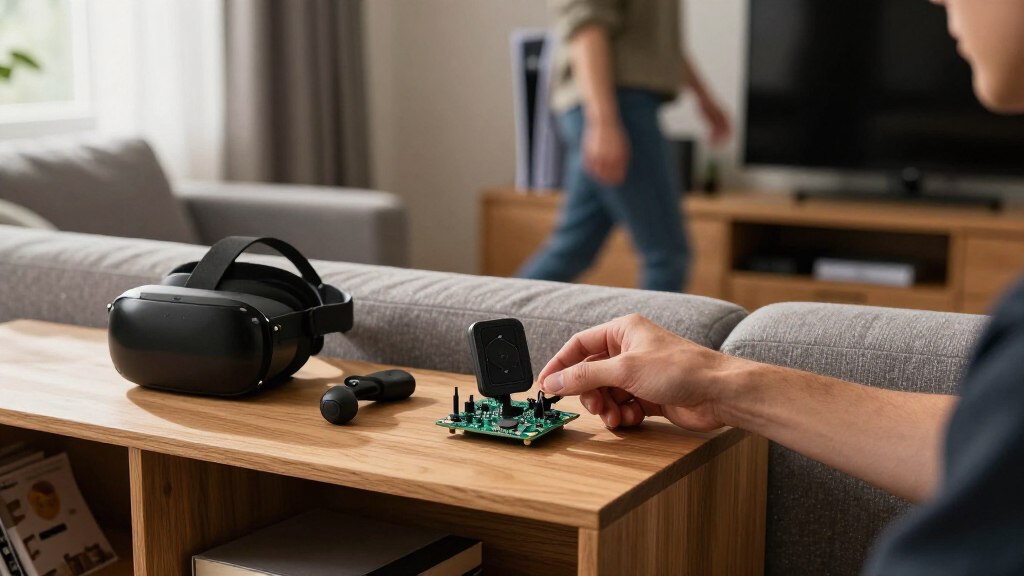
The proposed build connects an ESP32-C6 board, estimated at about $5, to an HLK-LD2410C radar module, which the report says can be found for under $10. The devices communicate over UART using four connections: 5-volt power, ground, and transmit and receive wires. The LD2410C uses a 24-gigahertz radar signal and has a stated range of about six meters, making it suitable for a typical bedroom or office, according to the report.
With ESPHome, the UART connection can be configured at 256,000 baud and the LD2410 platform added. The resulting Home Assistant setup exposes presence, moving-target and still-target entities. The report suggests using the moving-target signal for quick light activation and the still-target signal to inform decisions about when lights should turn off. It recommends positioning the unit toward the place people usually sit or sleep.
The estimated $15 price is for the board and radar module, not a complete room installation. The hardware also needs USB power, so a suitable cable and adapter may add cost. The report says the radar signal weakens substantially through walls, meaning the estimate is per room rather than for an entire home. It also describes combining radar with an ESP32 Bluetooth proxy and Home Assistant’s Bermuda integration to estimate which room a person’s phone or watch is in.
Room presence for less with radar and ESP32
A DIY sensor can detect subtle movement such as breathing for about $15 per room. The lower price comes with wiring, setup, and room-by-room tuning.
What the radar changes
MmWave can register subtle movement when someone sits or lies still.
- Detects changes in heat as people move.
- May miss someone staying still.
- Reads changes in reflected radar signals.
- Can detect movement associated with breathing.
The build and setup
An ESP32-C6 connects to the LD2410C module and can expose presence readings through ESPHome and Home Assistant.
Wire 5-volt power, ground, transmit, and receive.
Set up the UART connection and LD2410 platform.
Observe readings and adjust sensitivity and distance gates.
Where the estimate falls short
The listed $15 covers the board and radar module, not a complete room installation.
Power is separate
A USB cable and power adapter may add cost.
False readings need tuning
Fans, moving curtains, and thin walls can affect readings.
Performance varies
The report gives no controlled comparison with the Aqara FP2.
A practical way to test it
Start with the room and routine where stillness detection matters most.
- Point the sensor toward the usual seating or sleeping area.
- Check presence readings in Home Assistant before changing settings.
- Adjust one distance gate at a time and watch for false positives.
- Budget for power accessories and tuning time in each room.
Lower Cost, More Setup
The price difference could matter to people who want presence detection across several rooms. At the report’s stated prices, a $15 DIY sensor is far less expensive per room than an $80 Aqara FP2. The lower hardware cost may make it more practical to add room-level sensing beyond a single hallway or living area, although the figures do not include power accessories or the value of the time spent installing and adjusting the system.
The technical distinction is also relevant: ordinary PIR motion sensors respond to movement, so they may stop detecting someone who remains still. The radar approach is intended to register subtle movement instead. That could reduce cases where lights switch off while someone is still in a room, but results depend on placement and sensor settings. The report describes a budget alternative, not a guarantee of identical performance to a commercial product.
Using Home Assistant and ESPHome also gives users a locally managed route to occupancy data, according to the report. Pairing radar with Bluetooth signals may add an estimate of which person’s device is nearby. That identification is conditional: the person must be carrying a phone or watch that is advertising Bluetooth signals, while the radar can report occupancy without identifying who is present.
Products Worth Considering

Sonos Arc Ultra Soundbar with Dolby Atmos, Black

Apple Watch SE 3 GPS 40mm Smartwatch

Samsung Galaxy Tab A9+ 11-Inch Android Tablet, 64GB, Graphite
As an affiliate, we earn on qualifying purchases.
Why Motion Sensors Miss Stillness
Passive infrared, or PIR sensors detect changes in heat across their field of view. They are useful for detecting someone walking into a space, but can miss a person who sits or lies still. The source report says Wi-Fi-based sensing has a similar limitation for this use: it can detect movement but does not reliably establish that a motionless person remains in the room.
MmWave radar works by sending a signal and reading its reflections. Small changes in those reflections can indicate subtle movement, including the rise and fall of a person’s chest. The source compares this approach with an earlier ESP32-C6 Zigbee motion build and the ESPectre Wi-Fi sensing project, describing both as motion-focused rather than a substitute for still-presence detection.
The LD2410C is one of several related modules; the report also names the LD2410 and LD2410B. It says the C model has standard 2.54-millimeter pin spacing, Bluetooth configuration support and room for jumper-wire connections. Bluetooth setup is available through the HLKRadarTool app, while ESPHome provides the integration described for Home Assistant.
“The pair costs around $15.”
— XDA Developers report
False Readings Need Testing
The report does not provide independent, controlled performance tests comparing the DIY setup with the Aqara FP2, nor does it establish how reliably the radar detects breathing across different room layouts. Its six-meter range and approximate prices are reported specifications and market estimates; actual range and cost may vary with placement, seller and installation.
False readings are a practical concern. The source says radar may detect fans, moving curtains or movement through a thin wall, and may continue to report presence in an empty room until thresholds are adjusted. ESPHome’s LD2410 component has a presence timeout that defaults to five seconds, according to the report. The right timeout and sensitivity will depend on the room and how people use it.
The author says the hardware assembly took less than an hour, while tuning false positives took a couple of days, and reports that the installation across the remaining rooms was still in progress. That is one user’s experience, not a standardized setup time. The report does not provide a complete bill of materials including a power adapter and cable, or a final cost for a whole-home installation.
Room-by-Room Tuning
The next step for anyone testing the build is to install and power the hardware, check its presence readings in Home Assistant, and adjust settings for the specific room. The report recommends starting with default sensitivity, observing the Presence entity for a day, then changing one distance gate at a time. Mounting the sensor toward the usual seating or sleeping area and away from fans or moving curtains may reduce unwanted readings.
Users considering a multi-room setup will also need to account for USB power in every room and test whether walls or room geometry affect detection. Bluetooth-based room estimates can be added for devices such as phones and watches, but should not be treated as a replacement for radar occupancy detection when people leave their devices elsewhere.
The source does not report a completed, independently tested whole-home deployment or provide a final cost beyond the approximate component estimate. A plug-and-play commercial unit remains an option for people who prefer to avoid wiring and tuning; the DIY approach trades a lower stated hardware price for hands-on setup.
Key Questions
What does the DIY presence sensor cost?
The report estimates about $15 per room for an ESP32-C6 board and LD2410C radar module. That estimate does not include the USB cable and power adapter needed to run the hardware.
Can the radar detect someone sitting still?
It is designed to detect subtle movement in reflected radar signals, including movement associated with breathing. The report says this can help detect someone sitting or sleeping, but does not provide controlled performance results for different rooms or conditions.
Does the sensor identify who is in the room?
Radar reports presence, not identity. The report describes adding an ESP32 Bluetooth proxy and the Bermuda Home Assistant integration to estimate which room a phone or watch is in. That method depends on the person carrying a device that sends Bluetooth advertisements.
Why can the sensor report presence in an empty room?
MmWave radar can react to movement from sources such as fans or moving curtains, and may pick up motion through a thin wall. Placement, sensitivity and distance settings may need adjustment to reduce false positives.
Is this easier than buying a commercial presence sensor?
No. The DIY build may lower the stated hardware cost, but it requires wiring, USB power, ESPHome configuration and time spent tuning. The report names the Aqara FP2 at $80 as a ready-made alternative for people who prefer a simpler installation.
Source: XDA Developers