
If you’re serious about VR flight simulation, choosing the right hotas can make or break your experience. The Logitech G X56 stands out as the best overall for its versatility and build quality, while the Thrustmaster HOTAS Warthog offers unmatched realism for dedicated enthusiasts. Many controllers face tradeoffs between affordability and realism, ease of setup and durability. Keep reading to see how these options compare and find the best fit for your VR flight setup.
Key Takeaways
- The Logitech G X56 offers the best balance of features and durability for most users.
- Enthusiasts should consider the Thrustmaster HOTAS Warthog for its superior realism, despite its higher price.
- Budget-friendly options like the T-Flight Hotas X are suitable for beginners but lack advanced features.
- Compatibility with multiple platforms varies, so check your VR system’s requirements before buying.
- Build quality and comfort significantly impact long-term usability, especially for extended VR sessions.
| Logitech G X56 H.O.T.A.S Throttle and Joystick Flight Simulator Game Controller + Pro Flight Rudder Pedals Bundle |  | Best Overall VR-Compatible HotAS for Serious Flight Enthusiasts | Control Surfaces: All control surface options for performance customization | Mini Analog Stick: Control pitch, roll, yaw, and weapons separately | RGB Backlighting: Yes, customizable via software | VIEW ON AMAZON | See Our Full Breakdown |
| Thrustmaster T-Flight Hotas One MSFS 2024 Collector Edition – Xbox & PC |  | Best Value HotAS for Microsoft Flight Simulator 2024 | Axes: 5 | Buttons: 14 | Compatibility: Xbox Series X|S, PC | VIEW ON AMAZON | See Our Full Breakdown |
| Thrustmaster HOTAS Warthog A-10 Replica Flight Stick & Throttle Set – PC |  | Best Authentic Military-Grade HotAS for Serious PC Pilots | Compatibility: PC | Build Material: All-metal | Number of Programmable Buttons: 55 | VIEW ON AMAZON | See Our Full Breakdown |
| Thrustmaster T-Flight Hotas One Flight Stick & Throttle – Xbox & PC |  | Best Ergonomic HotAS for Versatile Gaming and VR | Compatibility: Xbox Series X|S, Windows PC | Detachable Throttle: Yes | Programmable Buttons: 14 | VIEW ON AMAZON | See Our Full Breakdown |
| Thrustmaster T16000M FCS Space Sim Duo Combat Flight Stick for PC |  | Best Dual Stick for Space Sim Fans and Ambidextrous Comfort | Sensor Technology: Hall-effect magnetic sensors | Number of Buttons: 32 programmable buttons | Design: Ambidextrous dual stick | VIEW ON AMAZON | See Our Full Breakdown |
| Thrustmaster T16000M FCS HOTAS (Compatible with PC) |  | Best for High-Precision Control and Customization | Compatibility: PC via USB, Windows 32-bit and 64-bit | Action Buttons: 16 | Axes: 4 (including twist rudder) | VIEW ON AMAZON | See Our Full Breakdown |
| Thrustmaster T-Flight Hotas X USB Flight Sim Stick & Throttle – PC | 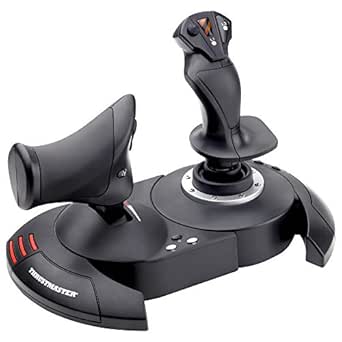 | Best for Ergonomic Comfort and Customizable Play | Connectivity: USB | Number of Buttons: 12 programmable buttons | Axes: 5 axes | VIEW ON AMAZON | See Our Full Breakdown |
| Thrustmaster T-Flight Full Kit HOTAS with Rudder Pedals – Xbox & PC |  | Best for Realistic Experience on Multiple Platforms | Compatibility: Xbox Series X|S, PC | Axes: 5 | Buttons: 14 | VIEW ON AMAZON | See Our Full Breakdown |
| Logitech G X56 H.O.T.A.S Throttle and Joystick Flight Simulator Game Controller |  | Best for Extreme Customization and Visual Flair | Control Surface Options: All control surface options | Number of Programmable Controls: 189 | Lighting: RGB backlighting | VIEW ON AMAZON | See Our Full Breakdown |
| hotas for vr flight sim | Compatibility | Axes |
|---|---|---|
| Logitech G X56 H.O.T.A.S Throt | — | — |
| Thrustmaster T-Flight Hotas On | Xbox Series X|S, PC | 5 |
| Thrustmaster HOTAS Warthog A-1 | PC | — |
| Thrustmaster T-Flight Hotas On | Xbox Series X|S, Windows PC | — |
| Thrustmaster T16000M FCS Space | — | 4 axes |
| Thrustmaster T16000M FCS HOTAS | PC via USB, Windows 32-bit and 64-bit | 4 (including twist rudder) |
| Thrustmaster T-Flight Hotas X | PC | 5 axes |
| Thrustmaster T-Flight Full Kit | Xbox Series X|S, PC | 5 |
| Logitech G X56 H.O.T.A.S Throt | — | — |
More Details on Our Top Picks
Logitech G X56 H.O.T.A.S Throttle and Joystick Flight Simulator Game Controller + Pro Flight Rudder Pedals Bundle
This comprehensive bundle stands out for its high degree of customization, making it ideal for dedicated flight simmers who want a fully immersive VR experience. Unlike the Thrustmaster T-Flight Hotas One, which offers straightforward controls, the X56 provides adjustable control surfaces, RGB lighting, and a full rudder pedal set, translating into a more authentic cockpit feel. The tradeoff is a complex setup process that might overwhelm newcomers, and its premium price may deter casual players. Still, for those who prioritize realism and VR integration, this bundle offers unmatched control and aesthetic appeal.
Pros:- Highly customizable controls for realistic flight simulation
- RGB backlighting enhances gaming aesthetics
- Includes joystick, throttle, and rudder pedals for a full cockpit experience
Cons:- Complex setup may be challenging for beginners
- Premium price point
Best for: Advanced flight sim enthusiasts seeking a customizable and immersive VR experience
Not ideal for: Beginners or casual players who prefer simple plug-and-play controls without extensive setup
- Control Surfaces:All control surface options for performance customization
- Mini Analog Stick:Control pitch, roll, yaw, and weapons separately
- RGB Backlighting:Yes, customizable via software
- VR Compatibility:Yes
- Rudder Pedals:Self-centering with adjustable tension
- Toe Brakes:Differential for full control
Our verdict“This bundle is perfect for serious VR flight simmers who want maximum control and realism, despite its complex setup and higher cost.”
Thrustmaster T-Flight Hotas One MSFS 2024 Collector Edition – Xbox & PC
Compared with the Logitech X56, the Thrustmaster T-Flight Hotas One offers a more accessible entry point with high precision controls, making it suitable for beginners and intermediate players. Its detachable throttle and dual rudder system provide flexibility without the complexity of the full X56 bundle. However, it lacks the extensive customization and RGB lighting of the X56, which may matter to advanced users. Its compatibility across Xbox and PC makes it a versatile choice for those who want a reliable, officially licensed controller at a more affordable price.
Pros:- Officially licensed for Microsoft Flight Simulator 2024
- High-precision controls with 10-bit accuracy
- Detachable throttle for flexible setups
Cons:- Requires additional purchase for TFRP rudder pedals
- May be complex for users unfamiliar with flight controls
Best for: Enthusiasts new to VR flight sims who want quality controls without a high price or complex setup
Not ideal for: Expert simmers seeking maximum customization and immersive cockpit features
- Axes:5
- Buttons:14
- Compatibility:Xbox Series X|S, PC
- Precision:10-bit
- Detachable Throttle:Yes
- Rudder Control:Dual rudder system
Our verdict“This pick makes the most sense for newcomers or casual VR flight sim fans who want reliable controls at a reasonable price, sacrificing some customization options.”
Thrustmaster HOTAS Warthog A-10 Replica Flight Stick & Throttle Set – PC
This model stands apart from the more casual T-Flight options by offering a highly detailed, all-metal construction and a genuine replica of the A-10C controls, making it ideal for hardcore simulation fans. The Hall Effect sensors ensure ultra-smooth, precise control, surpassing the accuracy of the Hall sensors in the T16000M FCS. However, its exclusive PC compatibility and complex programmable system make it less suitable for newcomers or console players. Its durability and authenticity appeal most to those seeking a long-term, premium cockpit setup.
Pros:- All-metal build for durability and realism
- Hall Effect sensors for ultra-smooth control
- Extensive 55 programmable buttons for customization
Cons:- Limited to PC, reducing flexibility for console users
- May be overwhelming for casual or first-time users
Best for: Dedicated PC flight simmers who want authentic, military-grade controls and are comfortable with complex setups
Not ideal for: Casual gamers or console players who prefer plug-and-play or simpler interfaces
- Compatibility:PC
- Build Material:All-metal
- Number of Programmable Buttons:55
- Hat Switch:8-way
- Sensors:Hall Effect (H.E.A.R.T)
- Dual Throttle:Yes
Our verdict“This set is perfect for serious PC flight enthusiasts who prioritize realism and durability over ease of setup or multi-platform compatibility.”
Thrustmaster T-Flight Hotas One Flight Stick & Throttle – Xbox & PC
This pick offers a balanced experience for Xbox and PC users who want an ergonomic, adjustable HotAS with decent programmability. Unlike the Warthog, it is less complex and more accessible, but still supports a detachable throttle and optional pedals. Its adjustable resistance and responsive trigger add to the immersive feel, though it falls short of the customization and realism offered by higher-end models like the Logitech X56. It suits players looking for a flexible, comfortable controller that works across platforms but isn’t overly complicated.
Pros:- Realistic flight control with adjustable resistance
- Detachable throttle for versatile setups
- Compatible with both Xbox and PC
Cons:- Requires additional pedals for full cockpit feel
- Limited to specific flight simulator software compatibility
Best for: VR flight sim players on Xbox or PC who want a comfortable, adjustable setup for casual or moderate use
Not ideal for: Hardcore sim pilots seeking full cockpit realism and extensive customization
- Compatibility:Xbox Series X|S, Windows PC
- Detachable Throttle:Yes
- Programmable Buttons:14
- Adjustable Resistance:Yes
- Responsive Trigger:Yes
- Additional Compatibility:Thrustmaster TFRP rudder pedals (sold separately)
Our verdict“This controller is ideal for users who want a comfortable, adaptable HotAS for VR gaming on multiple platforms without the complexity of premium setups.”
Thrustmaster T16000M FCS Space Sim Duo Combat Flight Stick for PC
This dual-stick setup caters especially to space simulation lovers who want precise, customizable controls. The Hall-effect sensors provide high accuracy, surpassing many other controllers like the T-Flight X, and the ambidextrous design makes it comfortable for either hand. Its extensive programmable buttons and integrated rudder allow for a highly personalized experience. However, the complex setup and higher price tag may deter casual or new players. For space sim veterans or those seeking detailed control, this duo offers remarkable precision and comfort.
Pros:- High-precision Hall-effect sensors for accurate control
- Fully programmable buttons for customization
- Ambidextrous design for comfort and flexibility
Cons:- Complex setup for newcomers
- Higher price limits accessibility for casual players
Best for: Experienced space simulation players who value precision and customization in a dual-stick setup
Not ideal for: Beginners or casual gamers looking for simple, straightforward controls
- Sensor Technology:Hall-effect magnetic sensors
- Number of Buttons:32 programmable buttons
- Design:Ambidextrous dual stick
- Axes:4 axes
- Hat Switch:8-way
- Additional Features:Weighted bases, twist rudder, integrated throttle
Our verdict“This dual-stick system excels for space sim enthusiasts demanding precise, customizable controls, despite its complexity and cost.”
Thrustmaster T16000M FCS HOTAS (Compatible with PC)
The Thrustmaster T16000M FCS stands out for its high-precision Hall effect sensors, which deliver more accurate and consistent control than many other options like the Thrustmaster T-Flight Hotas X. This makes it ideal for more serious flight sim enthusiasts who prioritize realism. Compared with simpler models, it offers a more nuanced control experience, but the learning curve can be steep for newcomers. Its customizable buttons and switches provide extensive options for tailored setups, though it’s limited to PC, which could exclude console players. The build quality is solid, but the complexity might intimidate beginners. Best for users seeking precise, customizable controls on PC who don’t mind a steeper learning curve.
Pros:- High-precision Hall effect sensors for accurate control
- Multiple customizable buttons and switches
- Compatible with PC via USB
Cons:- Limited to PC compatibility
- May have a learning curve for new users
Best for: Dedicated PC flight sim enthusiasts who want high accuracy and extensive customization
Not ideal for: Casual gamers or console players who need plug-and-play simplicity or console compatibility
- Compatibility:PC via USB, Windows 32-bit and 64-bit
- Action Buttons:16
- Axes:4 (including twist rudder)
- Sensors:Hall effect magnetic sensors
- Additional Controls:8-way POV hat, two 4-way switches, 3 buttons, 1 2-position slider, 1 mini-stick
Our verdict“This pick suits serious PC flight sim fans who value precision over simplicity.”
Thrustmaster T-Flight Hotas X USB Flight Sim Stick & Throttle – PC
The Thrustmaster T-Flight Hotas X offers a comfortable, ergonomic design with a fully programmable control scheme, making it a practical choice for casual and intermediate players. Its 12 action buttons and 5 axes allow a decent level of control customization, comparable to the Thrustmaster T16000M FCS, but with a simpler layout. The detachable throttle adds flexibility, though it doesn’t match the high precision or build quality of premium models like the Logitech G X56. Setup is straightforward thanks to plug-and-play functionality, but users seeking advanced profiles may find its customization options limited. While it’s more durable than some entry-level options, it’s better suited for casual or moderate enthusiasts rather than hardcore simmers. Best for gamers seeking comfort and decent customization without the complexity of high-end gear.
Pros:- Ergonomic design for comfortable long sessions
- Fully programmable controls for customization
- Detachable throttle for flexible setup
Cons:- May require initial configuration for advanced profiles
- Build quality could be more durable
Best for: Casual to mid-level flight sim players who prioritize comfort and ease of use
Not ideal for: Hardcore flight sim fans seeking maximum precision or advanced control features
- Connectivity:USB
- Number of Buttons:12 programmable buttons
- Axes:5 axes
- Rudder Control:Dual rudder control via handle rotation or tilting lever
- Detachable Throttle:Yes
- Compatibility:PC
Our verdict“Ideal for casual or mid-level players who want comfort and straightforward controls.”
Thrustmaster T-Flight Full Kit HOTAS with Rudder Pedals – Xbox & PC
The T-Flight Full Kit delivers a highly immersive flying experience with a Hall-effect joystick and ergonomic rudder pedals, making it a strong choice for players on Xbox Series X|S or PC. Compared to the Thrustmaster T-Flight Hotas X, this kit offers smoother and more precise rudder control thanks to the pedals, which are essential for realistic flight simulation. The detachable throttle and multiple axes enable flexible setups, though the complexity of the system can challenge newcomers. Its compatibility with both Xbox and PC broadens its appeal, but the higher price may deter casual users. The overall build quality and authentic feel justify the investment for dedicated sim enthusiasts seeking cross-platform compatibility. Best for players who want a comprehensive, realistic flight setup on Xbox or PC.
Pros:- Highly realistic and immersive flight controls
- Smooth and precise rudder pedals with ergonomic design
- Compatible with both Xbox and PC
Cons:- Complex setup may be challenging for beginners
- Premium price may be high for casual users
Best for: Serious flight sim players on Xbox or PC who appreciate realistic controls and pedals
Not ideal for: Casual gamers or those with limited space seeking a simple, budget-friendly controller
- Compatibility:Xbox Series X|S, PC
- Axes:5
- Buttons:14
- Joystick Type:Hall-Effect
- Throttle:Detachable
- Pedals:Rudder with S.M.A.R.T slide rail
Our verdict“A solid choice for dedicated sim pilots seeking realism and cross-platform flexibility.”
Logitech G X56 H.O.T.A.S Throttle and Joystick Flight Simulator Game Controller
The Logitech G X56 excels in offering a highly customizable experience with 189 programmable controls and RGB lighting, making it suitable for advanced users who want total control over their setup. Its dual throttles and hall-effect sensors provide precise handling, surpassing simpler controllers like the Thrustmaster T-Flight Hotas X. However, its extensive configuration options come with a steep learning curve, and the need for multiple USB ports can be a hassle for some users. The complex setup may be overwhelming for beginners, but it’s worth considering for those who demand maximum control and visual integration. The premium price reflects its feature set, positioning it as a niche choice for dedicated enthusiasts rather than casual players. Best for experienced flight sim players who crave deep customization and advanced features.
Pros:- Highly customizable with 189 programmable controls
- RGB lighting for visual appeal
- Precise control with hall-effect sensors and dual throttles
Cons:- Requires multiple USB ports and complex setup
- Premium price point may be prohibitive
Best for: Expert users who want maximum control, RGB lighting, and extensive programmability
Not ideal for: Newcomers or budget-conscious buyers who need simple, plug-and-play controls
- Control Surface Options:All control surface options
- Number of Programmable Controls:189
- Lighting:RGB backlighting
- Connectivity:2x USB
- Spring Options:4 spring options for adjustable stick force
- Sensors:Hall-effect sensors for aileron and elevator axes
Our verdict“Best suited for seasoned flight sim fans who prioritize control depth and visual customization.”

How We Picked
Our evaluation focused on performance, build quality, ease of setup, compatibility, and value for money. We prioritized products that deliver precise control and durability, essential for immersive VR flight sims. The ranking reflects a balance between affordability and realism, ensuring options are suitable for beginners, enthusiasts, and those seeking premium features. We also considered user reviews and industry reputation to identify controllers that stand out in real-world use.| hotas for vr flight sim | Compatibility |
|---|---|
| Logitech G X56 H.O.T.A.S Throt | — |
| Thrustmaster T-Flight Hotas On | Xbox Series X|S, PC |
| Thrustmaster HOTAS Warthog A-1 | PC |
| Thrustmaster T-Flight Hotas On | Xbox Series X|S, Windows PC |
| Thrustmaster T16000M FCS Space | — |
| Thrustmaster T16000M FCS HOTAS | PC via USB, Windows 32-bit and 64-bit |
| Thrustmaster T-Flight Hotas X | PC |
| Thrustmaster T-Flight Full Kit | Xbox Series X|S, PC |
| Logitech G X56 H.O.T.A.S Throt | — |
Factors to Consider When Choosing Hotas For Vr Flight Sim
Choosing the right hotas for VR flight sim requires understanding key factors that influence your experience. Beyond raw features, consider how comfortable the controls are during long sessions, and whether the device integrates smoothly with your VR setup. Compatibility with your gaming platform and software is critical to prevent frustration. Additionally, assess the build quality and adjustability, which affect durability and customization. Finally, think about your budget and whether splurging on premium features aligns with your playing style.Performance and Precision
In VR flight sims, control accuracy is vital for immersive realism. Look for hotas with high-resolution sensors and responsive joysticks that reduce latency and provide precise feedback. Cheaper models often have less tactile feedback, which can diminish the experience. Investing in controllers with Hall effect sensors or high-quality potentiometers can significantly improve control fidelity, especially during complex maneuvers.
Build Quality and Comfort
Since VR sessions can last hours, comfort and durability matter. Robust construction with sturdy materials prevents wear and tear, and ergonomic design reduces fatigue. Some models offer adjustable grips, customizable buttons, or detachable components, which enhance comfort and usability. Avoid overly plastic builds that feel flimsy or buttons that lack tactile feedback, as these can impact immersion and control accuracy.
Platform Compatibility
Ensure the hotas you choose works seamlessly with your VR headset and PC or console. Many controllers are designed primarily for PC, with some offering Xbox compatibility. Check if the device supports your specific VR system, especially if using platforms like Oculus or Vive, to prevent connectivity issues. Wireless options can offer more freedom, but wired models often provide more reliable signal and lower latency.
Customization and Adjustability
For a personalized flight experience, look for hotas with programmable buttons, adjustable tension, and customizable mappings. These features allow you to tailor controls to your preferred flying style and improve responsiveness. Some controllers also support software profiles, making it easier to switch between different aircraft or simulation settings. However, more complex customization often comes with a steeper learning curve.
Value and Price Point
Hotas controllers range from budget models to premium setups costing several hundred dollars. While affordable options provide basic functionality, they may lack durability or advanced features. Conversely, high-end controllers offer superior realism, build quality, and extensive customization but at a higher cost. Consider your level of commitment and how much realism you need—investing more can significantly enhance your VR flight experience if you’re a dedicated pilot.
Frequently Asked Questions
Can I use a regular joystick for VR flight sims?
While a standard joystick can work for some VR flight sims, a dedicated hotas offers much better control fidelity and immersion. Hotas controllers are specifically designed for flight, providing more axes, buttons, and realistic feedback. They also facilitate more natural hand positioning during VR sessions, which can improve comfort and precision. If you want a truly immersive experience, investing in a hotas is generally worth it.
Do I need a specific hotas for VR, or will any work?
Most hotas controllers work across different platforms and are compatible with VR systems, but not all are optimized for VR use. Look for models with adjustable mounting options, comfortable grips, and reliable connectivity. Some controllers may require additional software for optimal VR integration. Checking compatibility with your VR headset and flight sim software ensures smoother operation and a more seamless experience.
Is wireless hotas a good choice for VR flight sims?
Wireless hotas controllers can offer greater freedom of movement, reducing cable clutter in VR setups. However, they often come with tradeoffs such as higher latency, potential connection issues, and increased cost. For the most reliable and responsive control, wired models tend to be preferred, especially during intense or precise maneuvers. If convenience outweighs absolute control fidelity, a high-quality wireless hotas might suit your needs.
How important is the number of buttons on a hotas for VR flight sim?
The number of programmable buttons directly impacts how easily you can access essential controls without breaking immersion. More buttons allow for quick adjustments, weapon controls, and communication commands, all vital during complex flights. However, a cluttered or poorly labeled button layout can be confusing. Choose a hotas with a logical arrangement that matches your flying style and software customization options for optimal performance.
Should I prioritize a high-end hotas or a budget model for VR?
If you are committed to serious VR flight simming and want the most realistic experience, investing in a high-end hotas like the Thrustmaster Warthog makes sense. These models tend to have better build quality, more precise controls, and longer durability. However, if you’re just starting out or testing the waters, a budget model like the T-Flight Hotas X can provide a good introduction, though it may lack some premium features and longevity.