Choosing the right aio liquid cooler for a VR PC can significantly impact your gaming experience. The best models balance cooling performance, noise levels, and aesthetic features like customizable RGB. The Thermalright FW360 SE ARGB V2 stands out for its high-end LCD screen and robust cooling, making it ideal for demanding VR setups. Meanwhile, the ARCTIC Liquid Freezer III Pro 360 offers excellent performance at a more affordable price. Keep in mind that some coolers prioritize aesthetics over cooling efficiency, or vice versa, and installation complexity varies. Continue reading for a detailed breakdown of each option and which one fits your needs best.

Get VR and gaming gear delivered free — and shop member deals
- Fast, free delivery on millions of items
- Access to Prime Big Deal Days deals on October 6–7
- Prime Video, Amazon Music and more included
Key Takeaways
- 360mm radiators dominate the high-performance VR cooling market, offering better thermal dissipation for demanding setups.
- Models with customizable LCD screens add aesthetic value but tend to increase price and complexity.
- ARGB lighting is common but may impact airflow or noise levels depending on fan quality and design.
- Cooling performance and noise levels are tightly linked; quieter fans often mean slightly reduced airflow.
- Installation complexity varies, with some models better suited for experienced builders while others favor ease of setup.




More Details on Our Top Picks
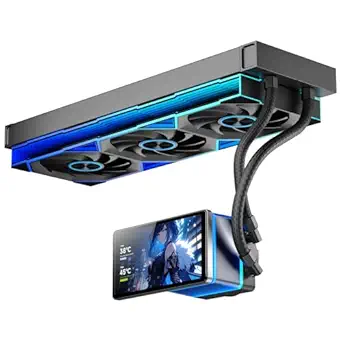
Thermalright FW360 SE ARGB V2 360mm AIO Liquid CPU Cooler with 2″ LCD Screen
The Thermalright FW360 SE ARGB V2 stands out for its large 360mm radiator and a highly customizable 2″ LCD screen, making it ideal for users who want both effective cooling and personalized system displays. Compared with the ARCTIC Liquid Freezer III Pro 360, it offers a more interactive visual experience thanks to the LCD, but this comes with increased complexity in installation and reliance on motherboard USB headers. Its high-performance pump and wide compatibility support high-end builds, yet the need for a USB connection could be a hurdle for some. This cooler is perfect for gamers and enthusiasts who want to showcase their setup visually while maintaining strong thermal performance.
Pros:- High-performance cooling with a 360mm radiator and robust pump
- Customizable LCD screen for images, GIFs, and system info
- Clean cable routing with daisy-chain fan design
- Supports latest AMD and Intel platforms
Cons:- Requires motherboard USB 9-pin connection for LCD control
- Installation can be complex due to multiple components
- Max noise level may be noticeable in quiet environments
Best for: Users who prioritize system aesthetics and customization in their VR PC build
Not ideal for: Builds with limited motherboard headers or those seeking a plug-and-play solution without extra software or connections
- Cooling Type:360mm AIO Liquid CPU Cooler
- LCD Screen:2″ LCD, 320×320 resolution
- Pump Dimensions:67×68×59mm
- Radiator Dimensions:397×120×27mm
- Tube Length:400mm
- Pump Speed:3000RPM±10%
Our verdict“This cooler is ideal for users who want a visually striking, customizable cooling solution with robust thermal performance, accepting a more involved setup process.”
Thermalright Aqua Elite 360 V6 ARGB Black CPU Liquid Cooler
The Thermalright Aqua Elite 360 V6 offers a balanced approach with a 360mm radiator and vivid ARGB lighting, making it suitable for users who want eye-catching visuals alongside solid thermal performance. Unlike the ARCTIC Liquid Freezer III Pro 360, which emphasizes VRM cooling and quieter operation, this model leans into aesthetics with customizable lighting effects that sync with most motherboards. Its high airflow and easy mounting make it a good choice for high-performance builds, though the need for motherboard ARGB headers can limit compatibility for some users. This pick is best for those who desire a combination of style and cooling efficiency without complex features like LCD screens.
Pros:- Effective cooling with a 360mm radiator and high airflow
- Vivid ARGB lighting synchronized with motherboard
- Easy installation with compatible mounting accessories
- Vibration-reducing fan feet
Cons:- Requires motherboard ARGB and 5V 3-pin headers for lighting
- Potential noise at maximum fan speeds
- Limited socket compatibility compared to broader options
Best for: Gamers and PC builders who want striking ARGB lighting with dependable cooling
Not ideal for: Users seeking minimal setup or those without ARGB motherboard headers, since lighting depends on compatible connections
- Radiator Size:360mm
- Fan Size:3x120mm
- Pump Speed:2800RPM±10%
- Airflow:70.84 CFM
- Noise Level:29.8 dBA
- Compatibility:AMD: AM4/AM5, Intel: LGA115X/1200/1700/1851
Our verdict“This cooler suits users who want vibrant lighting effects paired with strong cooling, provided their motherboard supports ARGB features.”
ARCTIC Liquid Freezer III Pro 360 – AIO CPU Cooler, 3 x 120mm Water Cooling
The ARCTIC Liquid Freezer III Pro 360 delivers excellent thermal performance with its three 120mm fans and large radiator, making it well-suited for demanding VR gaming setups. It excels in heat dissipation and features an integrated VRM cooling fan, which benefits high-end CPUs and overclocked systems. Compared to more feature-rich models like the Thermalright FW360 SE ARGB V2, it prioritizes cooling efficiency over visual flair, but its installation can be less straightforward for beginners. This cooler is a good fit for gamers who need reliable, quiet performance under sustained VR loads, but it doesn’t include customizable lighting or LCD displays.
Pros:- High cooling capacity with a 360mm radiator and three fans
- Efficient contact pressure for optimized heat transfer
- Integrated VRM cooling enhances motherboard stability
- Quiet operation at high RPMs
Cons:- Installation may be complex for newcomers
- Large size may not fit smaller cases
- Higher price point compared to air coolers
Best for: High-performance VR gamers needing reliable cooling without extra visual features
Not ideal for: Builds where aesthetic customization or display features are a priority, as it lacks RGB or LCD options
- Power Connector Type:4-Pin
- Voltage:12 volts
- Wattage:3.96 watts
- Cooling Method:Liquid
- Maximum Rotational Speed:3000 rpm
- Air Flow Capacity:77 cfm
Our verdict“This cooler is best for users seeking dependable, high-performance cooling that handles VR loads with minimal noise, accepting a more involved setup process.”
Thermalright Aqua Elite 360 V3 AIO CPU Cooler
The Thermalright Aqua Elite 360 V3 emphasizes low noise operation while providing effective cooling for high-end CPUs, making it ideal for quiet VR gaming environments. Unlike the Thermalright FW360 SE ARGB V2, which offers customizable LCD features, this model focuses on sleek aesthetics with synchronized ARGB lighting and high airflow. Its easy installation with pre-installed fans and compatibility across many socket types make it suitable for builders prioritizing simplicity without sacrificing performance. However, it’s generally more expensive than air coolers and relies on ARGB motherboard support for lighting effects. It’s best for users who want a balance of silence, style, and cooling power in their VR setup.
Pros:- Effective cooling with high airflow and low noise
- Synchronized ARGB lighting for a sleek look
- Wide compatibility with Intel and AMD sockets
- Easy installation with pre-installed fans
Cons:- More costly than comparable air coolers
- Lighting effects depend on ARGB motherboard support
- Limited to liquid cooling setups
Best for: Quiet PC builders who want stylish, effective cooling without complex features
Not ideal for: Users who prefer LCD screens or advanced customization features, as this model lacks those options
- Cooling Method:Water
- Fan Size:120x120x25mm
- Fan Speed:1500 RPM ± 10%
- Airflow:66.17 CFM
- Noise Level:≤ 23 dBA
- Compatibility:Intel/AMD sockets
Our verdict“This cooler makes sense for those seeking a quiet, stylish solution that balances performance with minimal noise for VR gaming.”
ARCTIC Liquid Freezer III Pro 240 – AIO CPU Cooler, 2 x 120 mm Water Cooling
The ARCTIC Liquid Freezer III Pro 240 offers a strong cooling solution in a more compact 240mm form, making it suitable for smaller VR PC cases. Its dual 120mm fans and efficient contact pressure deliver solid thermal performance comparable to larger 360mm models like the Thermalright Aqua Elite 360 V6, but with less space requirement. While it excels in heat dissipation and VRM cooling, installation might challenge beginners due to its smaller size and tighter fit. This pick is ideal for those who want dependable cooling in a more limited case footprint, though it lacks the customizable lighting features found in higher-end models.
Pros:- Efficient cooling with dual 120mm fans
- Optimized contact pressure for effective heat transfer
- Compatible with both Intel and AMD sockets
- Good performance in smaller case environments
Cons:- Installation can be tricky for beginners
- No detailed noise level info available
- Limited aesthetic customization options
Best for: Owners of mid-tower or compact cases needing reliable cooling without overhang issues
Not ideal for: Enthusiasts seeking extensive RGB or display features, as this cooler doesn’t offer those options
- Power Connector Type:4-Pin
- Voltage:12 volts
- Wattage:3.96 watts
- Cooling Method:Water
- Maximum Rotational Speed:3000 rpm
- Air Flow Capacity:77 cfm
Our verdict“This cooler suits users who need a compact yet effective cooling system for VR PCs, focusing on reliability over flashy features.”
Thermalright Aqua Elite 240 V3 Liquid CPU Cooler with ARGB Fans
This cooler excels as a balanced choice, combining strong heat dissipation with customizable ARGB lighting, making it ideal for users who want reliable performance and aesthetics without complexity. Compared to the ARCTIC Liquid Freezer III Pro 360, it offers a more straightforward installation and a more modest radiator size that fits most mid-tower cases. Its quieter operation at ≤23 dBA is a plus, but the pump lifespan of 40,000 hours is shorter than some premium models, which might concern long-term durability. This pick is well-suited for enthusiasts seeking a solid all-rounder that supports a broad range of AMD and Intel sockets.
Pros:- High-quality ARGB lighting with customizable colors
- Supports a wide range of AMD and Intel sockets
- Quiet operation with adjustable fan speeds
- Easy to install with included accessories
Cons:- Pump life expectancy of 40,000 hours may be shorter than high-end custom cooling solutions
- Limited to 240mm radiator size, not suitable for larger cases requiring bigger radiators
- No mention of included thermal paste or extra accessories
Best for: Mid-range gamers and PC builders who prioritize quiet operation and flexible socket compatibility.
Not ideal for: Case owners with large full-tower setups requiring larger radiators or users seeking extreme longevity, since the pump lifespan is somewhat limited.
- Pump Head Speed:up to 2800 RPM ± 10%
- Fan Speed:1500 RPM ± 10%
- Fan Size:120 x 120 x 25 mm
- Airflow:66.17 CFM
- Noise Level:≤ 23 dBA
- Cooling Method:Water
Our verdict“This cooler is best for users seeking a reliable, quiet, and visually customizable cooling solution for mainstream builds.”
ARCTIC Liquid Freezer III Pro 360 A-RGB – AIO CPU Cooler, Water Cooling
This model delivers impressive cooling with a 360mm radiator and high RPM fans, making it suitable for overclocked CPUs or demanding workloads. Its integrated VRM fan adds an extra layer of motherboard stability, a feature not present on the Thermalright Aqua Elite 240 V3. However, its larger size can be a challenge in compact cases, and the installation process is more complex, especially for newcomers. Noise levels can reach higher at maximum RPM, which might be disruptive in quiet environments. It’s best for those who have spacious cases and need maximum cooling capacity for overclocking or intense gaming.
Pros:- High cooling performance with a 360mm radiator and high RPM fans
- Optimized contact pressure for CPU longevity
- Integrated VRM fan improves voltage regulator cooling
- Flexible cable management for cleaner build
Cons:- Bulky design may not fit in small cases
- Installation can be complex for beginners
- Higher noise levels at maximum fan speeds
Best for: Enthusiasts with full-tower cases and overclocked CPUs needing robust cooling and additional VRM airflow.
Not ideal for: Small form factor builds or users seeking simple, quick installations, as the setup can be intricate and bulky.
- Power Connector Type:4-Pin
- Voltage:12 volts
- Wattage:3.96 watts
- Cooling Method:Liquid
- Maximum Rotational Speed:3000 rpm
- Air Flow Capacity:77 cfm
Our verdict“This cooler is perfect for users with spacious cases who need maximum thermal performance and VRM cooling capacity.”
Thermalright Aqua Elite 240 V3 Water Cooling CPU Cooler with ARGB Fans
Similar to the Thermalright Aqua Elite 240 V3 with ARGB fans, this version emphasizes visual appeal alongside solid cooling thanks to dual ARGB fans and a high-quality pump. Its broad socket support makes it versatile across AMD and Intel platforms, ideal for builders who want aesthetic customization with reliable performance. A drawback is that installation can be slightly more technical, and the ARGB lighting, while customizable, may not sync flawlessly with all motherboards. Noise levels are manageable, but at maximum RPM, it can be noticeable. This cooler targets users who value style equally with cooling efficiency for their mid-tier systems.
Pros:- Effective cooling with dual ARGB fans and high-quality pump
- Supports a wide range of AMD and Intel sockets
- Customizable ARGB lighting synchronized with motherboard
- Good compatibility with most mid-tower cases
Cons:- Installation may require some technical skill
- ARGB lighting features might not be compatible with all motherboards
- Noise level can be noticeable at higher RPM
Best for: Aesthetic-conscious users building a balanced gaming or workstation setup that supports multiple CPU platforms.
Not ideal for: Users with limited case space or those preferring ultra-quiet operation, as noise can rise at higher RPMs.
- Compatibility:AMD: AM4/AM5, Intel: LGA1150/1151/1155/1156/1200/1700/1851
- Pump Speed:2800 RPM ± 10%
- Fan Speed:1500 RPM ± 10%
- Fan Size:120 x 120 x 25 mm
- Fan Noise:≤25.6 dBA
- Airflow:66.17 CFM
Our verdict“This cooler is ideal for builders who want a visually striking system without sacrificing solid cooling performance.”
Thermalright FW 360 White ARGB V2 CPU Water Cooler with 3 PWM Fans and IPS LCD Screen
This cooler stands out by combining high cooling capacity with a vibrant aesthetic, thanks to its 360mm radiator, three PWM fans, and a dedicated IPS LCD screen for personalized displays. Its support for multiple CPU platforms and ARGB lighting makes it suitable for custom builds that emphasize style and performance. The inclusion of an LCD adds a unique visual element but also introduces complexity during installation and setup, especially for beginners. Noise levels are low at 23 dB, but maximum RPM fans can be loud. It’s tailored for enthusiasts who want a showpiece with top-tier cooling for demanding workloads.
Pros:- High cooling performance with 360mm radiator and high RPM fans
- Customizable ARGB lighting synchronized with motherboard
- IPS LCD screen with modular magnetic design for easy viewing
- Supports a wide range of CPU platforms
Cons:- Installation may be complex for less experienced users
- Requires compatible motherboard ARGB header and USB for LCD
- Higher noise at maximum fan RPM
Best for: Enthusiasts who want a visually impressive build with advanced customization features and high cooling capacity.
Not ideal for: Casual builders or those seeking a simple, plug-and-play cooling solution, due to the complex installation and setup.
- Radiator Size:360mm
- Fan Speed:2000 RPM
- Fan Quantity:3
- LCD Screen Resolution:320 x 240
- Lighting:ARGB
- Maximum Rotational Speed:3000 rpm
Our verdict“This cooler is best for users who want a combination of extreme cooling and eye-catching display features for their high-end builds.”
ARCTIC Liquid Freezer III Pro 360 A-RGB – AIO CPU Cooler, Water Cooling
Similar in design to the ARCTIC Liquid Freezer III Pro 360, this model emphasizes high-performance cooling with a 360mm radiator and an integrated VRM fan, making it a strong choice for high-load or overclocked systems. Its efficient contact pressure and sleek cable management contribute to cleaner builds and better heat transfer. While it offers excellent thermal performance, its size demands ample space inside the case, and installation can be challenging for less experienced builders. Noise levels are acceptable but can become noticeable at full RPM. This cooler suits users who need enterprise-level reliability and VRM cooling for demanding tasks.
Pros:- High-performance cooling with a 360mm radiator and powerful fans
- Integrated VRM fan enhances motherboard stability
- Optimized contact pressure for better heat dissipation
- Sleek cable management reduces clutter
Cons:- Large size requires significant case space
- Installation can be complex for some users
- Higher price compared to basic air coolers
Best for: Power users with spacious cases, overclockers, and those seeking a comprehensive cooling solution with VRM support.
Not ideal for: Compact case owners or casual users who prefer simpler, low-profile cooling options, due to its large size and complex setup.
- Power Connector Type:4-Pin
- Voltage:12 volts
- Wattage:3.96 watts
- Cooling Method:liquid
- Maximum Rotational Speed:3000 rpm
- Air Flow Capacity:77 cfm
Our verdict“This cooler is ideal for users who prioritize high thermal performance and VRM cooling in spacious cases with demanding workloads.”
PF 360 CPU Water AIO Cooler Liquid Cooling with 5.5-inch LCD Screen, 360mm ARGB Infinity Mirror Fans, and Lower Noise
This cooler stands out for its large, vibrant 5.5-inch LCD screen, which offers customizable displays that can show anything from system stats to animated visuals. Compared with the CORSAIR Nautilus 360 RS, which emphasizes low noise and broad compatibility, the PF 360 invests heavily in visual flair, making it ideal for users who want their cooling setup to double as a display centerpiece. However, the advanced features and large screen make installation more complex, and compatibility with some PC cases isn’t guaranteed. The high airflow fans and 360mm radiator ensure excellent thermal performance, but the extra setup steps and premium price are tradeoffs for those not prioritizing aesthetics.
Pros:- Vivid, customizable 5.5-inch LCD screen with multiple display options
- High airflow 360mm radiator with three fans for efficient cooling
- Synchronized ARGB lighting for a cohesive look
- Magnetic, multi-angle design for easy assembly and viewing
Cons:- Complex setup due to advanced LCD and lighting features
- Potential compatibility issues with some PC cases
- Higher price point compared to simpler AIOs
Best for: PC builders who prioritize visual customization and want a centerpiece display for their VR gaming setup
Not ideal for: Users seeking a straightforward, hassle-free cooling solution without elaborate aesthetics or LCD features
- Screen Size:5.5 inches
- Resolution:480*960
- Radiator Size:379 * 120 * 27mm
- Waterway Length:400mm
- Fan Size:360 * 120 * 25mm
- Noise Level:≤30 dBA
- Pump Speed:2700 ± 10%
- Maximum TDP:320W
Our verdict“This cooler is best suited for users who want a highly customizable, visually striking cooling solution for their VR setup and do not mind a more involved installation process.”
CORSAIR Nautilus 360 RS ARGB Liquid CPU Cooler – 360mm AIO – Low-Noise – Compatible with Intel LGA 1851/1700, AMD AM5/AM4 – Includes 3 RS120 ARGB Fans
The CORSAIR Nautilus 360 RS offers a balanced mix of thermal efficiency and noise reduction, making it a strong choice for users who prioritize quiet operation over flashy features. It supports a wide range of Intel and AMD sockets, similar to the Thermalright Aqua Elite 360 V6, but simplifies installation with pre-applied thermal paste and easy-to-control ARGB lighting via motherboard headers. While it doesn’t feature a large LCD like the PF 360, it compensates with a low-noise pump and broad compatibility, making it ideal for VR setups where noise levels matter. The optional iCUE controller adds more customization but is sold separately, which could be inconvenient for some.
Pros:- Efficient, low-noise cooling performance with a quiet pump
- Easy motherboard control of ARGB lighting and fan speeds
- Broad compatibility with Intel and AMD sockets
- Simple wiring with daisy-chain connections
Cons:- Requires motherboard ARGB headers for full lighting control
- Optional iCUE controller sold separately for advanced customization
- Less visual flair compared to LCD-equipped options
Best for: Gamers and VR enthusiasts seeking a dependable, quiet cooling solution with straightforward installation
Not ideal for: Aesthetic-focused builders who want elaborate LCD displays and highly customizable lighting effects
- Power Connector Type:4-Pin
- Voltage:12 volts
- Wattage:10 watt-hours
- Cooling Method:Water
Our verdict“This cooler is ideal for users who want reliable, quiet performance and broad compatibility without the complexity of advanced displays.”
CORSAIR Nautilus 360 RS ARGB Liquid CPU Cooler – 360mm AIO – Low-Noise – Compatible with Intel LGA 1851/1700, AMD AM5/AM4 – Includes 3 RS120 ARGB Fans
The CORSAIR Nautilus 360 RS excels in straightforward, hassle-free setup, making it an attractive choice for those who prefer reliable cooling without fuss. Its pre-applied thermal paste and broad socket support simplify installation, comparable to the Thermalright Aqua Elite 360 V3. While it doesn’t feature the LCD display of the PF 360, it offers robust thermal performance with quiet operation, suitable for VR systems needing steady cooling. The easy control of ARGB lighting through motherboard headers and optional iCUE controller makes customization accessible but not as elaborate as the LCD-based options. Overall, this model balances performance, ease, and aesthetic control well.
Pros:- Efficient and quiet cooling performance
- Simple installation with pre-applied thermal paste
- Supports a wide array of Intel and AMD sockets
- Controlled via motherboard headers for ARGB lighting
Cons:- Requires motherboard ARGB headers for lighting control
- Optional iCUE controller is sold separately
- Lacks LCD display for real-time info or customization
Best for: VR users who want a dependable, easy-to-install cooling solution with good aesthetics and low noise
Not ideal for: Users seeking highly customizable displays or those who want maximum visual customization in their cooling setup
- Power Connector Type:4-Pin
- Voltage:12 volts DC
- Wattage:16 watts
- Supported CPU Sockets:Intel LGA 1851/1700, AMD AM5/AM4
Our verdict“This cooler makes the most sense for users prioritizing straightforward installation and reliable performance over visual displays or elaborate lighting effects.”

How We Picked
The products were evaluated based on cooling performance, noise levels, build quality, ease of installation, feature set, and value for money. Priority was given to models that excel in maintaining optimal VR temperatures during extended gaming sessions, while also considering aesthetic features like RGB and LCD screens. We also assessed user feedback and reliability reports, ensuring that each cooler is a durable choice. The ranking reflects a balance between performance, usability, and price, with a slight preference for models that offer innovative features or better build quality for high-end VR systems.Factors to Consider When Choosing Aio Liquid Cooler For Vr Pc
When selecting an aio liquid cooler for a VR PC, it’s important to consider several key factors that impact both cooling efficiency and overall system compatibility. VR setups often generate significant heat, especially with overclocked CPUs, so choosing a cooler that can handle sustained loads is essential. Additionally, ease of installation and maintenance can save time and frustration, particularly for first-time builders. Aesthetic features like RGB lighting and LCD screens can enhance your build’s look but should not compromise cooling performance. Understanding your space constraints and noise preferences will help narrow down the best options for your specific needs.Cooling Performance and Radiator Size
For VR PCs, thermal management is critical due to prolonged gaming sessions and high CPU loads. A 360mm radiator generally provides better heat dissipation than smaller options, making it a preferred choice for high-performance setups. However, larger radiators require more space inside your case, so compatibility is a key consideration. If your case supports 360mm radiators, opting for one will typically deliver more stable temperatures, especially under load. Conversely, if space is limited, a 240mm cooler can still offer solid performance but may not handle extended VR sessions as effectively.
Noise Levels and Fan Quality
VR gaming can be loud, but your cooling system shouldn’t add excessive noise. High-quality fans with good bearings and optimized blades tend to run quieter at similar airflow levels. Keep in mind that larger fans spinning at lower RPMs usually produce less noise compared to smaller, faster-spinning fans. Some coolers include noise-reduction features or adjustable fan curves, which can help balance cooling and acoustics. If you prefer a quiet environment, prioritize models with premium fans and noise-dampening features, even if they come at a higher cost.
Aesthetic Features and Additional Functionality
Many aio coolers now include customizable RGB lighting and LCD screens, adding visual flair to your VR build. These features can be appealing, especially if you want a synchronized lighting setup or detailed system info at a glance. However, they often come with added complexity, higher prices, and sometimes slightly increased power consumption. If aesthetics are a priority and you’re comfortable with setup, choose models with configurable LCDs and RGB. Otherwise, simpler designs without these features can still deliver excellent cooling without the extra cost or potential for issues.
Ease of Installation and Maintenance
Installing an aio cooler can range from straightforward to challenging, depending on the design and your experience. Look for models that include clear instructions and tool-less mounting options if you’re a first-time builder. Maintenance considerations include the availability of replacement parts and the potential need to refill or replace coolant over time. Although most aio coolers are low-maintenance, those with larger radiators and additional features may require more careful handling. Choosing a cooler with accessible mounting brackets and good documentation can save frustration later.
Compatibility and Space Requirements
Before making a purchase, verify your case supports the radiator size and fan configuration. VR PCs often have space constraints near the CPU socket and within the case’s overall dimensions. Some coolers are designed specifically for compact builds, while others assume a spacious case. Check clearance for RAM modules and GPU placement, as large radiators or fans can interfere with other components. Ensuring compatibility upfront avoids costly returns or modifications after installation.
Frequently Asked Questions
Can I use a 360mm aio cooler in a mid-tower case for VR?
Many mid-tower cases support 360mm radiators, but it’s important to check your specific case’s specifications before purchasing. Even if space is available, consider clearance for RAM modules and other components. Proper airflow management inside the case will also influence cooling efficiency. If your case supports a 360mm radiator, this size generally provides better cooling for demanding VR setups, especially if you plan to overclock or run intensive workloads.
Is it worth paying extra for an aio cooler with LCD screen and RGB lighting?
Adding an LCD screen and RGB lighting can enhance your build’s visual appeal and provide useful system information at a glance. However, these features usually come with a higher price tag and may slightly increase noise levels or complexity during installation. If aesthetics are a priority and you value customization, investing in a cooler with these features makes sense. For purely performance-focused builds, simpler models without these extras often deliver similar cooling without the added cost.
How much should I expect to spend on a high-quality aio cooler for VR?
High-performance 360mm aio coolers typically range from $150 to $250, depending on features like LCD screens, RGB lighting, and brand reputation. Investing in a slightly more expensive model can provide better cooling stability, quieter operation, and longer durability, which are important for extended VR sessions. It’s worth considering value over price, especially if you plan to overclock or run intensive workloads that generate more heat.
Are all aio coolers compatible with overclocked CPUs in VR builds?
Most modern aio coolers are capable of handling overclocked CPUs, but their cooling capacity varies. Look for models with larger radiators, higher-quality fans, and good thermal dissipation ratings. Overclocked CPUs produce more heat, so selecting a cooler designed for high thermal loads will help maintain stable temperatures during long VR gaming sessions. Always verify compatibility with your specific CPU model and motherboard before purchase.
How often do aio coolers need maintenance or coolant replacement?
Most aio coolers are designed to be low-maintenance, typically only requiring inspection every few years. Coolant refill or replacement is usually not necessary for several years unless there is a leak or performance decline. Some high-end models with larger radiators or custom features might need more careful upkeep, but generally, they are meant to be set-and-forget solutions. Regularly checking for leaks and cleaning dust filters helps prolong the cooler’s effectiveness.
Conclusion
For those seeking the best overall performer, the Thermalright FW360 SE ARGB V2 offers top-tier cooling with innovative features. Budget-conscious buyers should consider the ARCTIC Liquid Freezer III Pro 360 for excellent value without sacrificing much performance. If you prioritize aesthetics and advanced features, the PF 360 CPU Water AIO Cooler with LCD and RGB might be the right pick. Beginners or those with space constraints will find the CORSAIR Nautilus 360 RS ARGB easier to install and maintain. Ultimately, your choice depends on your specific needs—whether you want maximum cooling, visual flair, or simplicity.
Halloween Picks
halloween
As an affiliate, we earn on qualifying purchases.