For most smartphone users, I’d start with the XREAL One Pro: its X1 chip, 120Hz display, and native 3DoF give it a more self-contained spatial experience than basic wearable screens. The VITURE Luma Ultra stands out for its 1200p display, while the RayNeo Air 4 Pro is a notable option for viewers who want HDR10. The main tradeoffs are phone compatibility, how securely the virtual screen stays positioned, fit and vision adjustments, and whether a wider field of view matters more than simplicity. Keep reading for a comparison of all 15 options and guidance on matching the glasses to your phone and habits.

Play games on Amazon Luna for your next adventure, included with Prime
- A rotating selection of games, no download needed
- Play on TV, laptop or phone
- Fast, free delivery for your gear, too
Key Takeaways
- Spatial features separate the most capable options. The XREAL One Pro and RayNeo GT Max with native 3DoF add screen-position control that a large virtual-screen figure alone does not promise.
- Display claims describe different things. Resolution, refresh rate, HDR support, field of view, and advertised screen size each affect viewing in a different way; no single number settles the choice.
- VITURE’s lineup offers several vision-focused choices. Myopia adjustment appears on the Luma and Pro 2, while the Luma Ultra and Beast emphasize higher-resolution displays and a wider field of view, respectively.
- Smartphone compatibility needs checking before features. These glasses are not guaranteed to work with every phone or connection method, so verify the exact model’s requirements before choosing.
- There are several near-duplicate entries. Two XREAL One Pro listings and two VITURE Luma Ultra listings have overlapping names, so confirm the exact version, size, and included configuration rather than relying on the model name alone.
| RayNeo GT Max AR/XR Glasses with 267-Inch Virtual Display |  | Best for Spatial Viewing | Field of view: 59 degrees | Native tracking: 3DoF | Refresh rate: 120Hz | VIEW LATEST PRICE | See Our Full Breakdown |
| VITURE Luma Ultra XR Glasses with 1200p Display |  | Best for Multi-Screen Workspaces | Display: 1200p Sony Micro-OLED | Brightness: Up to 1500 nits | Refresh rate: Up to 120Hz | VIEW LATEST PRICE | See Our Full Breakdown |
| XREAL a01+ AR Glasses with 147-Inch Virtual Display |  | Best Lightweight Pick | Weight: 62 g | Display: Dual Full HD 1080p-per-eye Micro-OLED | Resolution: 1920 × 1080 | VIEW LATEST PRICE | See Our Full Breakdown |
| XREAL One Pro AR Glasses with X1 Chip, 171-Inch 120Hz FHD Display and Native 3DoF | 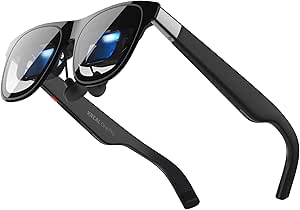 | Best for Native 3DoF at 120Hz | Display: Sony 0.55-inch Micro-OLED, FHD | Refresh rate: 120Hz | Field of view: 57 degrees | VIEW LATEST PRICE | See Our Full Breakdown |
| RayNeo Air 3s AR/XR Glasses with 201-Inch 120 Hz FHD HueView Display |  | Best for Phone Entertainment | Display: OLED | Resolution: 1920 × 1080 | Claimed display size: 201 inches | VIEW LATEST PRICE | See Our Full Breakdown |
| VITURE Beast XR/AR Glasses, 1200p Micro-OLED Display, 58° FOV |  | Best for Built-In Spatial Controls | Display: Sony Micro-OLED | Resolution: 1200p per eye | Field of view: 58° | VIEW LATEST PRICE | See Our Full Breakdown |
| VITURE Luma XR/AR Glasses with 1200p Display and Myopia Adjustment |  | Best for Prescription-Free Vision Correction | Display resolution: 1200p | Virtual screen size: 146 inches | Field of view: 50° | VIEW LATEST PRICE | See Our Full Breakdown |
| RayNeo Air 4 Pro AR/XR Glasses with HDR10 Display |  | Best for HDR Smartphone Entertainment | Display technology: HDR10 | Virtual display size: 201 inches | Refresh rate: 120 Hz | VIEW LATEST PRICE | See Our Full Breakdown |
| AOC Air Mega AR/XR Glasses, 201-Inch Micro-OLED Wearable Display |  | Best Lightweight Plug-and-Play Screen | Display type: Micro-OLED | Resolution: 1920 × 1080 | Virtual display size: 201 inches | VIEW LATEST PRICE | See Our Full Breakdown |
| XREAL 1S AR Glasses with 500-Inch Virtual Screen and X1 Chip |  | Best for Native Spatial Viewing | Display type: OLED | Resolution: 1920 × 1200 | Field of view: 52° | VIEW LATEST PRICE | See Our Full Breakdown |
| RayNeo GT Max AR/XR Glasses with 59° FOV, Native 3DoF, and Bang & Olufsen Audio |  | Best for the Widest Immersive View | Field of view: 59° | Virtual screen size: 227″, 267″, or up to 307″ equivalent | Spatial tracking: Native 3DoF | VIEW LATEST PRICE | See Our Full Breakdown |
| VITURE Luma Ultra XR Glasses |  | Best for Multi-Screen Workspaces | Display resolution: 1200p | Display type: Sony Micro-OLED | Virtual screen size: 152 inches | VIEW LATEST PRICE | See Our Full Breakdown |
| VITURE Pro 2 XR Glasses with Adjustable Myopia Correction |  | Best for Prescription Flexibility | Virtual screen size: 146-inch | Resolution: 1080p | Refresh rate: 120Hz | VIEW LATEST PRICE | See Our Full Breakdown |
| XREAL One Pro AR Glasses with X1 Chip, 57° FOV, 120Hz FHD Display, M Size |  | Best for Native Low-Latency Tracking | Chip: XREAL X1 | Tracking: Native 3DoF; 6DoF spatial anchoring with optional XREAL Eye | Motion-to-photon latency: 3ms | VIEW LATEST PRICE | See Our Full Breakdown |
| TOZO VIZO V1 AR Glasses with 118-Inch Virtual Screen and Adjustable Myopia Correction |  | Best for Simple 2D/3D Viewing | Virtual display size: 118 inches | Maximum display brightness: 1800 nits | Brightness at eye level: 800 nits | VIEW LATEST PRICE | See Our Full Breakdown |
| AR glasses for smartphone | Refresh rate | Field of view | Virtual screen size | Audio |
|---|---|---|---|---|
| RayNeo GT Max AR/XR Glasses wi | 120Hz | 59 degrees | — | B&O-tuned quad-speaker spatial audio |
| VITURE Luma Ultra XR Glasses w | Up to 120Hz | 52 degrees | 152 inches | HARMAN-tuned open-ear audio |
| XREAL a01+ AR Glasses with 147 | — | — | 147 inches | Built-in directional speakers |
| XREAL One Pro AR Glasses with | 120Hz | 57 degrees | Up to 171 inches | — |
| RayNeo Air 3s AR/XR Glasses wi | 120Hz | — | — | — |
| VITURE Beast XR/AR Glasses | 120 Hz | 58° | 174 inches | — |
| VITURE Luma XR/AR Glasses with | 120 Hz | 50° | 146 inches | — |
| RayNeo Air 4 Pro AR/XR Glasses | 120 Hz | — | — | Four Bang & Olufsen-tuned open-ear speakers |
| AOC Air Mega AR/XR Glasses | Up to 120 Hz | — | — | Built-in speakers |
| XREAL 1S AR Glasses with 500-I | 120 Hz | 52° | Up to 500 inches | Bose-tuned open-ear audio |
| RayNeo GT Max AR/XR Glasses wi | Up to 120Hz | 59° | 227", 267", or up to 307" equivalent | Racetrack Quad-Speaker system co-tuned by Bang & Olufsen |
| VITURE Luma Ultra XR Glasses | Up to 120Hz | 52° | 152 inches | HARMAN-tuned open-ear audio |
| VITURE Pro 2 XR Glasses with A | 120Hz | 50° | 146-inch | — |
| XREAL One Pro AR Glasses with | 120Hz | 57° | 171 inches | — |
| TOZO VIZO V1 AR Glasses with 1 | — | — | — | Built-in stereo speakers |
More Details on Our Top Picks
RayNeo GT Max AR/XR Glasses with 267-Inch Virtual Display
The RayNeo GT Max is the strongest fit here for buyers who want a large, repositionable virtual screen from a phone, not just a fixed display in front of them. Its native 3DoF tracking works without an external processing box, and selectable screen sizes up to 307 inches let viewers trade a more immersive image for a more manageable one. Compared with the XREAL One Pro, it offers a wider 59° field of view and a higher stated perceived-brightness ceiling, while both provide native 3DoF and 120Hz refresh rates.
The tradeoff is that the phone must support USB-C DisplayPort video output; some devices need an adapter, so connector shape alone does not confirm compatibility. Dolby Vision also requires a separate Pocket TV Pro. I’d choose this over the RayNeo Air 3s for spatial tracking and screen placement, but the Air 3s may suit buyers who mainly want straightforward movie viewing.
Pros:- Native 3DoF tracking works without an external processing box
- Selectable virtual screen sizes reach up to 307 inches
- 120Hz refresh rate and up to 1200 nits perceived brightness
- Built-in B&O-tuned spatial audio
Cons:- Requires a compatible USB-C DisplayPort video output; some devices need an adapter
- Dolby Vision viewing requires the separate RayNeo Pocket TV Pro
Best for: Phone and handheld-console users who want native 3DoF screen positioning and selectable large virtual-screen sizes without adding a processing box.
Not ideal for: Buyers whose phones lack USB-C DisplayPort video output, or anyone who expects Dolby Vision playback without purchasing a separate accessory.
- Field of view:59 degrees
- Native tracking:3DoF
- Refresh rate:120Hz
- Perceived brightness:Up to 1200 nits
- Virtual screen sizes:227, 267, and up to 307 inches
- Connector:USB Type-C
- Audio:B&O-tuned quad-speaker spatial audio
- IPD sizes:S: under 64 mm; M: 64–67 mm; L: over 67 mm
Our verdict“Choose the RayNeo GT Max if native screen positioning and multiple large virtual-screen sizes matter more to you than a simple plug-in viewing setup.”
VITURE Luma Ultra XR Glasses with 1200p Display
The VITURE Luma Ultra is the work-focused pick for smartphone owners who want more than a single floating video screen. Its 1200p Sony Micro-OLED displays, up-to-120Hz refresh rate, and SpaceWalker multi-screen workspaces can make compatible phones a more flexible viewing or productivity setup. Built-in myopia adjustment up to -4.0D may also reduce the need for prescription inserts for some users. Compared with the RayNeo GT Max, the Luma Ultra emphasizes workspace features and vision adjustment rather than a wider field of view or selectable screens as large as 307 inches.
There are real caveats: spatial features depend on the device, software, and connection, while full 6DoF tracking and hand gestures require a compatible Pro Neckband. Its open-ear audio keeps surrounding sounds audible, but gives up some listening privacy compared with the XREAL One Pro’s Bose-tuned audio. I’d pick it for supported multi-screen workflows, not for buyers seeking a fully self-contained spatial system.
Pros:- 1200p Sony Micro-OLED display with refresh rates up to 120Hz
- SpaceWalker supports multi-screen workspaces on compatible setups
- Built-in myopia adjustment up to -4.0D
- Open-ear audio allows awareness of surrounding sounds
Cons:- Full 6DoF tracking and hand gestures require a compatible Pro Neckband
- Feature availability varies by device, app, and connection method
- Open-ear audio may be audible to nearby people
Best for: Phone users who want compatible multi-screen workspace features and built-in vision adjustment for mild myopia.
Not ideal for: Buyers who expect full 6DoF tracking or hand gestures directly from the glasses, or who need private audio in shared spaces.
- Display:1200p Sony Micro-OLED
- Brightness:Up to 1500 nits
- Refresh rate:Up to 120Hz
- Field of view:52 degrees
- Virtual screen size:152 inches
- Spatial tracking:3DoF with supported software; full 6DoF requires Pro Neckband
- Myopia adjustment:Up to -4.0D
- Audio:HARMAN-tuned open-ear audio
Our verdict“Pick the VITURE Luma Ultra for supported multi-screen phone workflows and built-in myopia adjustment, provided you accept its accessory and compatibility limits.”
XREAL a01+ AR Glasses with 147-Inch Virtual Display
At 62 g, the XREAL a01+ is the lightest-feeling choice on this list by its stated weight, making it a sensible option for phone viewers who put wear comfort ahead of spatial extras. Its dual Full HD Micro-OLED panels and HDR10 support give compatible video a clear, high-contrast presentation, while stabilized screen tracking helps keep the image from simply following every head movement. Compared with the XREAL One Pro, the a01+ is a more basic, lightweight display: it does not list native 3DoF tracking or a 120Hz refresh rate, but avoids making spatial tracking the central reason to buy.
The main phone check is USB-C DisplayPort compatibility; some devices need an adapter, and USB-C alone does not guarantee video output. Prescription inserts are sold separately, and the glasses are not water resistant. I’d choose this over the RayNeo Air 3s when low stated weight and HDR10 are the priorities, but not when high refresh rate or built-in native 3DoF is a must.
Pros:- Lightweight 62 g design
- Dual Full HD 1080p-per-eye Micro-OLED panels with HDR10 support
- Maximum stated brightness of 1600 nits
- Built-in directional speakers and stabilized screen tracking
Cons:- Some devices require an adapter for USB-C DisplayPort video
- Prescription inserts are sold separately
- Not water resistant
Best for: Phone viewers who prioritize a lightweight 62 g design and a Full HD HDR10 virtual screen for compatible video sources.
Not ideal for: Buyers who want native 3DoF, a 120Hz refresh rate, included prescription lenses, or glasses suitable for wet conditions.
- Weight:62 g
- Display:Dual Full HD 1080p-per-eye Micro-OLED
- Resolution:1920 × 1080
- Virtual screen size:147 inches
- Maximum brightness:1600 nits
- Connectivity:USB-C DisplayPort
- Audio:Built-in directional speakers
- Water resistance:Not water resistant
Our verdict“Choose the XREAL a01+ if low weight and Full HD HDR10 viewing matter more to you than native 3DoF or a 120Hz display.”
XREAL One Pro AR Glasses with X1 Chip, 171-Inch 120Hz FHD Display and Native 3DoF
The XREAL One Pro suits smartphone users who want a screen that can stay positioned in space without relying on a separate processing box. Its native 3DoF tracking, stated 3 ms motion-to-photon latency, and 120Hz refresh rate make it the more spatially capable choice over the lightweight XREAL a01+, which does not list native 3DoF or 120Hz. The 57° field of view and virtual screen up to 171 inches also put it between that model and the RayNeo GT Max, whose claimed maximum screen size and field of view are larger.
For smartphone use, the key requirement remains a USB-C port with video output; the glasses are not a universal wireless phone display. Brightness is listed up to 700 nits, lower than the stated maximum for the a01+ and the perceived-brightness figure for the GT Max. Full 6DoF anchoring requires the optional XREAL Eye, and HDMI sources may need extra hardware.
Pros:- Native 3DoF tracking without an optional processing accessory
- 120Hz Sony Micro-OLED display with a virtual screen up to 171 inches
- Stated 3 ms motion-to-photon latency
- Bose-tuned audio and adjustable lens tint
Cons:- Full 6DoF spatial anchoring requires the optional XREAL Eye
- Requires USB-C video output; some HDMI devices need extra hardware
- Listed brightness is up to 700 nits, below the stated figures for the a01+ and GT Max
Best for: Smartphone users with USB-C video output who want a high-refresh virtual display with native 3DoF screen positioning.
Not ideal for: Buyers who need full 6DoF without an add-on, lack USB-C video output, or prioritize maximum stated brightness over spatial tracking.
- Display:Sony 0.55-inch Micro-OLED, FHD
- Refresh rate:120Hz
- Field of view:57 degrees
- Virtual screen size:Up to 171 inches
- Tracking:Native 3DoF; optional 6DoF with XREAL Eye
- Motion-to-photon latency:3 ms
- Brightness:Up to 700 nits
- IPD sizes:M: 57–66 mm; L: 66–75 mm
Our verdict“Choose the XREAL One Pro if you want native 3DoF and 120Hz from a compatible phone, but skip it if full 6DoF must work without an add-on.”
RayNeo Air 3s AR/XR Glasses with 201-Inch 120 Hz FHD HueView Display
The RayNeo Air 3s is the straightforward entertainment pick: its OLED panel, Full HD resolution, and 120Hz refresh rate are aimed at films and gaming rather than spatial computing. HueView color technology, adjustable brightness, and flicker reduction give viewers more display controls, while built-in speakers keep a phone-based setup simple. Compared with the RayNeo GT Max, the Air 3s offers a smaller claimed screen and does not list native 3DoF tracking, so it makes more sense for watching a fixed virtual display than repositioning one in space.
The tradeoff is that the product data does not specify a USB-C DisplayPort requirement or detail how each listed device connects, so smartphone buyers should confirm the connection method for their exact phone before choosing it. Its 650-nit maximum brightness is below the figures listed for the XREAL a01+ and VITURE Luma Ultra. It is not water resistant, and the manufacturer recommends regular breaks during use.
Pros:- Full HD OLED display with a 120Hz refresh rate
- Claimed 201-inch viewing experience
- HueView color technology, adjustable brightness, and flicker reduction
- Built-in speakers with dual opposing acoustic chambers
Cons:- Does not list native 3DoF tracking
- Maximum brightness is listed at 650 nits
- Not water resistant; manufacturer recommends regular breaks during use
Best for: Phone owners seeking a Full HD OLED screen with 120Hz refresh for movies and gaming, after confirming their device’s connection method.
Not ideal for: Buyers who want native 3DoF screen positioning, higher listed brightness, water resistance, or clearly specified phone connectivity.
- Display:OLED
- Resolution:1920 × 1080
- Claimed display size:201 inches
- Refresh rate:120Hz
- Maximum brightness:650 nits
- Color technology:HueView
- Built-in speakers:Yes; dual opposing acoustic chambers
- Compatibility:iPhone, Android, Mac, Nintendo Switch, and PS5
Our verdict“Choose the RayNeo Air 3s for phone-based movies and gaming if its connection method works with your device and spatial tracking is not a priority.”
VITURE Beast XR/AR Glasses, 1200p Micro-OLED Display, 58° FOV
I’d choose the VITURE Beast when smartphone viewing should feel more spatial without relying on an app for every adjustment. Its built-in 3DoF controls let you position and manage the virtual screen, while 1200p-per-eye Micro-OLED resolution and a 120 Hz refresh rate suit both video and fast-moving games. The 58° field of view is wider than the VITURE Luma’s 50°, giving the Beast a more expansive presentation. Adjustable electrochromic dimming and auto transparency also make it easier to switch between a more immersive view and awareness of your surroundings. The tradeoff is that some spatial features still depend on compatible devices or software, and its 88 g frame is heavier than the 2.72-ounce Luma. I’d pick the Luma instead for built-in myopia adjustment.
Pros:- 1200p-per-eye Micro-OLED display with a 120 Hz refresh rate
- Built-in 3DoF controls work without additional software for basic spatial screen adjustments
- Adjustable dimming and auto transparency support changing between immersion and awareness
- Prescription-ready design and aluminum-magnesium alloy frame
Cons:- Some spatial features depend on compatible devices and software
- At 88 g, it is heavier than the VITURE Luma
- The feature set may be more involved than needed for simple phone mirroring
Best for: Smartphone users who want a wider view, on-glasses screen controls, and flexible dimming for both immersive viewing and everyday awareness.
Not ideal for: Buyers who want myopia correction built into the glasses or prefer the lighter VITURE Luma frame.
- Display:Sony Micro-OLED
- Resolution:1200p per eye
- Field of view:58°
- Refresh rate:120 Hz
- Virtual screen size:174 inches
- Tracking:Built-in 3DoF
- Dimming:9+ electrochromic levels
- Weight:88 g
- Compatibility:SpaceWalker for iOS, Android, macOS, and Windows
Our verdict“Choose the Beast for built-in spatial controls and a wider view, but favor the Luma if lighter weight and myopia adjustment matter more.”
VITURE Luma XR/AR Glasses with 1200p Display and Myopia Adjustment
The VITURE Luma is the most practical choice here for buyers who need vision correction but would rather avoid prescription inserts: its myopia adjustment reaches -6.0D. The 1200p display and 120 Hz refresh rate keep the experience capable for phone video and gaming, while USB-C connection supports a broad mix of smartphones and other devices. Compared with the VITURE Beast, the Luma is lighter at 2.72 ounces and adds direct myopia adjustment, but its 50° field of view is narrower and its multi-screen features require the separate SpaceWalker app. The 146-inch virtual screen is also less expansive on paper than the RayNeo Air 4 Pro’s 201-inch display. I’d treat this as a comfortable, adaptable personal screen rather than a glasses-first spatial computing setup.
Pros:- Built-in myopia adjustment up to -6.0D can remove the need for prescription inserts
- 1200p resolution and 120 Hz refresh rate suit video and gaming
- USB-C compatibility spans smartphones, tablets, laptops, and gaming handhelds
- Lightweight 2.72-ounce design
Cons:- Multi-screen functionality requires the separate SpaceWalker app
- 50° field of view is narrower than the VITURE Beast’s 58°
- Not water resistant, and fit may not suit every IPD range
Best for: Smartphone viewers with myopia up to -6.0D who want a lightweight USB-C display without separate prescription inserts.
Not ideal for: Buyers seeking the widest view, app-free multi-screen controls, or glasses suited to wet conditions.
- Display resolution:1200p
- Virtual screen size:146 inches
- Field of view:50°
- Brightness:1000 nits
- Refresh rate:120 Hz
- Myopia adjustment:Up to -6.0D
- Weight:2.72 ounces
- Connectivity:USB-C
- Compatibility:Android, iOS, Mac, Windows, smartphones, tablets, laptops, and gaming handhelds
Our verdict“Pick the Luma if you want lightweight smartphone viewing with built-in myopia adjustment, and skip it if app-free spatial controls are a priority.”
RayNeo Air 4 Pro AR/XR Glasses with HDR10 Display
For a phone-first viewer who cares more about cinematic color and sound than on-glasses spatial controls, the RayNeo Air 4 Pro has a clear angle: HDR10, a claimed 201-inch virtual display, and four open-ear speakers tuned by Bang & Olufsen. Its 120 Hz refresh rate also makes it a sensible pick for gaming on a compatible phone. Compared with the AOC Air Mega, the RayNeo emphasizes HDR and audio rather than a specified 1920 × 1080 resolution and exceptionally low 63 g weight. Compared with the XREAL 1S, it lacks stated native 3DoF spatial viewing, so it’s less suited to repositioning a screen in space. The USB-C plug-and-play connection is convenient, but there’s no internal battery; the glasses draw power from the connected device.
Pros:- HDR10 display supports a more cinematic presentation
- 120 Hz refresh rate suits fast-moving games
- Four Bang & Olufsen-tuned speakers provide open-ear audio
- USB-C connection supports compatible phones and several other devices
Cons:- No internal battery, so it relies on the connected device for power
- Optional Sound Tube is sold separately
- No native 3DoF spatial viewing is listed in the provided product data
Best for: Smartphone movie and game viewers who prioritize HDR presentation, high refresh, and open-ear audio over spatial screen positioning.
Not ideal for: Buyers who need independent battery operation, native 3DoF spatial viewing, or a separately specified display resolution.
- Display technology:HDR10
- Virtual display size:201 inches
- Refresh rate:120 Hz
- Audio:Four Bang & Olufsen-tuned open-ear speakers
- Connectivity:USB Type-C
- Compatible devices:iPhone 15/16/17, Android devices, MacBook, iPad, Steam Deck, PS5, and Switch 2
- Processor:Vision 4000
- Weight:2.72 ounces
- Power:No internal battery
Our verdict“Choose the RayNeo Air 4 Pro for HDR phone entertainment and integrated open-ear audio, not for battery-free operation or spatial screen placement.”
AOC Air Mega AR/XR Glasses, 201-Inch Micro-OLED Wearable Display
The AOC Air Mega is a straightforward pick for smartphone owners who want a portable screen without paying for a deep spatial feature set. At just 63 g, it is lighter than the VITURE Beast and the RayNeo Air 4 Pro, while its 1920 × 1080 Micro-OLED panel and 120 Hz refresh rate cover everyday video and gaming needs. Built-in speakers, adjustable nose pads, and a carry case make it a practical companion for compatible devices. Unlike the XREAL 1S, the AOC does not list native 3DoF viewing or a large set of screen modes, so its appeal is simple display output rather than spatial flexibility. The main compatibility catch is important: a USB-C socket alone is not enough. The phone or other device must support DisplayPort Alt Mode.
Pros:- 63 g weight makes it the lightest option in this five-product group
- 1920 × 1080 Micro-OLED display with up to 120 Hz refresh
- USB-C connection supports plug-and-play use with compatible devices
- Adjustable nose pads and included carry case support portability and fit
Cons:- Requires USB-C DisplayPort Alt Mode, which not every smartphone supports
- No native 3DoF spatial viewing is listed
- Not water resistant
Best for: Travelers and phone users who want a light, uncomplicated wearable display and already own a USB-C device with DisplayPort video output.
Not ideal for: Buyers whose smartphones lack DisplayPort Alt Mode or who want native spatial tracking and richer viewing modes.
- Display type:Micro-OLED
- Resolution:1920 × 1080
- Virtual display size:201 inches
- Refresh rate:Up to 120 Hz
- Maximum brightness:900 nits
- Connectivity:USB-C with DisplayPort Alt Mode
- Audio:Built-in speakers
- Weight:63 g
- Warranty:1 year
Our verdict“Choose the AOC Air Mega for a light, direct phone-connected screen if your device supports DisplayPort video, but look to the XREAL 1S for native spatial viewing.”
XREAL 1S AR Glasses with 500-Inch Virtual Screen and X1 Chip
The XREAL 1S is the strongest fit here for smartphone owners who want more than a screen fixed in front of their eyes. Its native 3DoF viewing supports spatial screen positioning without the separately sold XREAL Eye needed for 6DoF anchoring, and the X1 chip enables on-glasses 3D conversion and multiple viewing modes. The 1920 × 1200 OLED display and 120 Hz refresh rate give it a higher stated resolution than the AOC Air Mega’s 1920 × 1080 panel. Its advertised screen size reaches 500 inches, though that figure is not a direct measure of image quality or field of view: the listed FOV is 52°. The key limitation for phone buyers is connection compatibility: the device needs USB-C DisplayPort output, just like the AOC, and the listed IPD range may not suit every wearer.
Pros:- Native 3DoF spatial viewing supports screen positioning without the XREAL Eye
- 1920 × 1200 OLED resolution and 120 Hz refresh rate
- On-glasses 3D conversion and multiple viewing modes
- Bose-tuned open-ear audio and USB-C DisplayPort connectivity
Cons:- Requires a USB-C DisplayPort-enabled device
- 6DoF spatial anchoring requires the separately mentioned XREAL Eye
- Listed IPD range of 59.5–70.5 mm may not fit every wearer
Best for: Smartphone users with USB-C DisplayPort output who want native 3DoF screen positioning, 3D conversion, and high-resolution viewing.
Not ideal for: Buyers whose phones lack USB-C DisplayPort output, need 6DoF anchoring without an add-on, or fall outside the listed IPD range.
- Display type:OLED
- Resolution:1920 × 1200
- Field of view:52°
- Refresh rate:120 Hz
- Virtual screen size:Up to 500 inches
- Spatial viewing:Native 3DoF
- Connectivity:USB-C DisplayPort
- IPD range:59.5–70.5 mm
- Audio:Bose-tuned open-ear audio
Our verdict“Pick the XREAL 1S for native 3DoF and spatial features on a compatible phone, but choose a simpler display if you only need screen mirroring.”
RayNeo GT Max AR/XR Glasses with 59° FOV, Native 3DoF, and Bang & Olufsen Audio
The RayNeo GT Max is the strongest match here for buyers who want a large, spatially anchored screen without adding a separate computing box. Its 59° field of view is wider than the XREAL One Pro’s 57°, while native 3DoF tracking can keep the virtual display positioned as you move your head. That combination suits films and games better than a basic fixed-screen setup. The claimed display size reaches 307 inches equivalent, though the actual viewing experience depends on content and connection. Its B&O-tuned speakers add an audio advantage over glasses that leave sound as a secondary feature. The tradeoff is phone compatibility: some devices need an adapter, and Dolby Vision playback requires the separate RayNeo Pocket TV Pro. I’d choose it over the VITURE Pro 2 for a wider, more spatial presentation, not for vision correction or a simpler accessory setup.
Pros:- Native 3DoF tracking works without an external computing box
- 59° field of view is wider than the XREAL One Pro’s 57°
- Refresh rates up to 120Hz support smoother compatible content
- B&O-tuned spatial audio brings sound into the glasses
Cons:- Some phones and other devices may require an adapter
- Dolby Vision support requires the separate RayNeo Pocket TV Pro
- The largest advertised virtual-screen size does not indicate a fixed, device-independent viewing experience
Best for: Phone and handheld gaming users who want native 3DoF, a wide field of view, and integrated spatial audio for entertainment.
Not ideal for: Buyers seeking adjustable myopia correction or a guaranteed adapter-free phone connection; some devices need an adapter, and Dolby Vision requires the Pocket TV Pro.
- Field of view:59°
- Virtual screen size:227″, 267″, or up to 307″ equivalent
- Spatial tracking:Native 3DoF
- Refresh rate:Up to 120Hz
- Perceived brightness:Up to 1200 nits
- Color gamut:145% sRGB; 98% DCI-P3
- Audio:Racetrack Quad-Speaker system co-tuned by Bang & Olufsen
- Weight:2.72 ounces
Our verdict“Choose the RayNeo GT Max if a wide, tracked display and built-in spatial audio matter more than adjustable vision correction or a minimal accessory setup.”
VITURE Luma Ultra XR Glasses
The VITURE Luma Ultra earns its place for phone owners who also want a path to a larger virtual workspace on a compatible computer. Its 1200p Sony Micro-OLED display and up-to-120Hz refresh rate prioritize sharpness and fluid motion, while supported SpaceWalker platforms can arrange multiple virtual screens. That makes it a more work-oriented choice than the entertainment-focused TOZO VIZO V1, which offers 2D and 3D viewing but no listed multi-screen workspace feature. For smartphone use, compatibility still depends on USB-C video output, and some devices need an adapter or dock. The advertised 3DoF and workspace features also vary by device, operating system, app, and connection method. Full 6DoF tracking and hand gestures require the VITURE Pro Neckband, so I would not buy this expecting every spatial feature straight from a phone. Open-ear audio is useful when awareness of nearby sounds matters.
Pros:- 1200p Sony Micro-OLED display with refresh rates up to 120Hz
- Supports multi-screen workspaces on compatible Mac and Windows devices
- Works with compatible USB-C video-output phones and handheld gaming devices
- Open-ear audio allows awareness of surrounding sounds
Cons:- Full 6DoF tracking and hand gesture control require the VITURE Pro Neckband
- Feature availability varies by device, operating system, app, and connection method
- Some devices require a compatible adapter or dock
Best for: People who want glasses for a compatible USB-C phone and also plan to use SpaceWalker multi-screen workspaces with a supported Mac or Windows computer.
Not ideal for: Buyers who expect full 6DoF or hand gesture control from the glasses alone, or whose phone lacks USB-C video output.
- Display resolution:1200p
- Display type:Sony Micro-OLED
- Virtual screen size:152 inches
- Brightness:Up to 1500 nits
- Refresh rate:Up to 120Hz
- Field of view:52°
- Tracking:3DoF with supported SpaceWalker platforms; 6DoF with VITURE Pro Neckband
- Audio:HARMAN-tuned open-ear audio
Our verdict“Pick the VITURE Luma Ultra if you want one set of glasses for compatible phone viewing and computer-based virtual screens, and can accept feature and accessory dependencies.”
VITURE Pro 2 XR Glasses with Adjustable Myopia Correction
The VITURE Pro 2 is the clearest pick in this group for phone users who need built-in focus adjustment rather than relying on prescription inserts or contacts. Its independent 0 to -5.00D myopia controls let each eye be tuned, and seven nose-pad sizes offer more fit flexibility than the TOZO VIZO V1’s adjustable diopters paired with flexible nose pads. The Pro 2 also gives compatible USB-C video-output devices a 1080p, 120Hz virtual display, making it suitable for video and gaming. Its 63 g frame is lightweight, but the listed peak brightness is below the TOZO’s maximum, and the 50° field of view is narrower than the RayNeo GT Max’s 59°. Some devices need accessories, and the glasses may feel warm during use. I’d favor it for vision adjustment and fit options, not for the widest view.
Pros:- Independent myopia adjustment from 0 to -5.00D per eye
- Seven nose-pad sizes offer fit options
- 1080p Sony Micro-OLED display supports up to 120Hz
- Supports real-time 2D-to-3D conversion through compatible software
Cons:- Some devices require compatible accessories sold separately
- The 50° field of view is narrower than the RayNeo GT Max’s 59°
- May feel warm during use
Best for: Phone users with mild myopia, including people whose eyes need different focus settings, who want a lightweight display without separate corrective inserts.
Not ideal for: Buyers needing correction beyond -5.00D, a wider viewing angle, or a connection that works with every phone without compatible accessories.
- Virtual screen size:146-inch
- Resolution:1080p
- Refresh rate:120Hz
- Optics:Sony Micro-OLED
- Peak brightness:1600 nits
- Field of view:50°
- Myopia adjustment:0 to -5.00D per eye
- Weight:63 g
Our verdict“Choose the VITURE Pro 2 if adjustable myopia correction and a customizable fit matter more than a wider view or higher listed peak brightness.”
XREAL One Pro AR Glasses with X1 Chip, 57° FOV, 120Hz FHD Display, M Size
The XREAL One Pro stands out for phone users who want spatial tracking handled by the glasses themselves. Its X1 chip provides native 3DoF with a stated 3ms motion-to-photon latency, so the virtual display can stay anchored without requiring the optional XREAL Eye. That makes it a more self-contained spatial pick than the VITURE Luma Ultra, whose 6DoF and gesture control depend on a separate Neckband. The 57° field of view and 120Hz 1080p Micro-OLED display also suit gaming and video, while REAL 3D mode adds another way to view compatible content. The limits are practical: a phone must support USB-C video output, HDMI devices may need an adapter, and 6DoF anchoring costs an additional accessory. The M-size IPD range is specific, so fit is not universal.
Pros:- X1 chip enables native 3DoF with stated 3ms motion-to-photon latency
- 120Hz 1080p Sony Micro-OLED display
- 57° field of view and REAL 3D mode support immersive viewing
- Adjustable arms and nose pads allow fit adjustment
Cons:- 6DoF spatial anchoring requires the optional XREAL Eye
- Phone connection depends on USB-C video output
- HDMI devices may require an additional adapter
Best for: USB-C video-output phone owners and handheld gamers who want native 3DoF tracking, low stated latency, and a high-refresh display without a separate tracking box.
Not ideal for: People whose phones lack USB-C video output, buyers needing 6DoF without an add-on, or users outside the M-size IPD range.
- Chip:XREAL X1
- Tracking:Native 3DoF; 6DoF spatial anchoring with optional XREAL Eye
- Motion-to-photon latency:3ms
- Field of view:57°
- Virtual screen size:171 inches
- Display and resolution:Sony 0.55-inch Micro-OLED; 1920 x 1080
- Refresh rate:120Hz
- IPD range:57–66mm (M size)
Our verdict“Choose the XREAL One Pro for native, low-latency 3DoF on a compatible phone, but budget for an add-on if you need 6DoF anchoring.”
TOZO VIZO V1 AR Glasses with 118-Inch Virtual Screen and Adjustable Myopia Correction
The TOZO VIZO V1 takes a straightforward approach: it offers a private virtual screen, built-in stereo speakers, switchable 2D and 3D modes, and adjustable myopia correction. That makes it a practical entertainment option for compatible phones, especially for buyers who want focus adjustment without separate corrective lenses. Compared with the VITURE Pro 2, the VIZO V1 lists a brighter maximum display and 3D viewing modes, while the Pro 2 offers 120Hz refresh, Sony Micro-OLED panels, and more defined per-eye correction. The VIZO’s central limitation is connectivity: USB-C alone is not enough; the connected device must provide DisplayPort output. It also has no built-in battery, so it draws power from the connected device. I’d choose it for basic viewing and adjustment, not spatial tracking or a particularly feature-rich phone workspace.
Pros:- 118-inch virtual screen for private viewing
- Adjustable myopia correction from 0–500°
- Switchable 2D and 3D viewing modes
- Flexible nose pads and built-in stereo speakers
Cons:- Requires a connected device with DisplayPort output, not just USB-C
- No built-in battery; operation depends on the connected device
- No tracking or refresh-rate specification is provided in the supplied product data
Best for: Phone viewers who want switchable 2D/3D playback and adjustable myopia correction, and who have a compatible DisplayPort-output device.
Not ideal for: Owners of phones without USB-C DisplayPort output, people who need glasses with their own battery, or buyers seeking native spatial tracking and high-refresh specifications.
- Virtual display size:118 inches
- Maximum display brightness:1800 nits
- Brightness at eye level:800 nits
- Myopia correction:0–500°
- Audio:Built-in stereo speakers
- Viewing modes:2D and 3D
- Connectivity:USB-C; connected device must support DisplayPort output
- Power:No built-in battery; requires a connected device with DisplayPort output
Our verdict“Pick the TOZO VIZO V1 for adjustable-focus 2D/3D viewing if your phone supports DisplayPort output and you do not need tracking or standalone power.”

How We Picked
I ranked these glasses around the smartphone use case, prioritizing whether a buyer can connect them to their phone and get a useful viewing experience without extra confusion. I compared the stated display characteristics, including resolution, refresh rate, HDR support, field of view, and spatial features such as native 3DoF. I also gave weight to practical fit considerations, including myopia adjustment, because a sharp display is of limited use if the wearer cannot see it comfortably.
The order favors models with a clearer balance of smartphone viewing, useful features, and flexibility; it does not treat the largest virtual-screen claim as an automatic win. Premium positioning comes from features that can change how or where content is viewed, while simpler models may suit buyers who mainly want a private screen. Since several listings share names and the product details provided do not establish universal phone compatibility, I treat exact model and connection verification as part of the buying decision—not as a guaranteed feature.
Factors to Consider When Choosing AR Glasses For Smartphones
AR glasses for smartphones can function more like a personal display than a standalone phone replacement. Before choosing, I’d match the glasses to the way you use your phone: watching video, gaming, multitasking, or viewing a screen that stays anchored as you move. These five checks help separate useful differences from headline specifications.
Check Your Phone’s Connection Before Comparing Displays
Do not assume a USB-C port means your phone can send video to glasses. Phone models vary in their support for video output, and some setups may require a compatible adapter or other accessories. Check the glasses maker’s compatibility information for your exact phone model and operating system before buying. Also confirm whether the connection is wired and whether you can charge the phone at the same time. A mismatch here can matter more than a resolution upgrade: a display cannot help if your phone cannot feed it an image. I would verify the connection path first, then compare the glasses that actually work with it.
Match Spatial Tracking to What You Watch
A large virtual-screen number does not tell you whether the image stays fixed in space or follows your head. Native 3DoF, listed on options such as the XREAL One Pro and one RayNeo GT Max version, is a separate feature that can affect how spatially stable viewing feels. For a stationary film or a simple mirrored phone screen, a basic display may be enough. If you want the screen to feel positioned in your surroundings as you move your head, spatial features may justify paying more. Check which functions work from the glasses alone and which depend on a phone app or accessory. Avoid choosing based only on the advertised screen size.
Read Display Specs as a Set, Not a Contest
Resolution can influence detail, refresh rate can matter for motion, and HDR support concerns compatible content and presentation; these are not interchangeable upgrades. Field of view affects how much of the virtual image you see at once, while a very large screen claim describes a different kind of viewing scale. A model with a wider field of view may suit immersive viewing, but that does not automatically make it the better fit for every face or use. Look for the combination that matches your content: fast-moving games may put refresh rate higher on your list, while films may lead you to prioritize image characteristics and comfort. If the listing does not clarify how a feature works with your phone, treat it as a question to verify.
Treat Vision Adjustment as a Fit Feature
Myopia adjustment can help some nearsighted wearers view the display without relying on their usual correction, but it is not a universal substitute for prescription lenses. Check whether the adjustment range covers your needs and whether the listing refers to independent adjustment for each eye. Buyers with astigmatism, strong prescriptions, or other vision needs should confirm support rather than infer it from the phrase “myopia adjustment.” Fit also affects whether the image appears centered and clear, so nose pads, frame shape, and available sizes matter. If you wear glasses, confirm how the product handles prescription inserts or over-glasses use before committing. A comfortable fit can be more valuable than a modest spec bump.
Separate the Exact Model and Version
This roundup includes repeated or closely related names, including two XREAL One Pro entries, two VITURE Luma Ultra entries, and two RayNeo GT Max listings with different stated features. Do not assume those entries are identical or that every variation includes the same size, chip, or spatial capability. Compare the full product title and configuration, and check what comes in the box. A name shared across listings can conceal a meaningful difference—or simply reflect a different size or seller configuration. I would save the exact model number and confirm it against the manufacturer’s details before ordering. This small check can prevent buying a version that lacks the feature that drove your decision.
Decide What You Will Carry and How You Will Use It
Smartphone glasses are most useful when their cable, case, and any required accessories fit the way you travel. A wired setup can be straightforward, but it ties the viewing experience to the phone and may affect how you hold or charge it. Think through where the phone will sit during a film, whether you plan to use the glasses while seated or moving, and how long you expect to wear them at a stretch. A lightweight personal-screen setup may suit occasional viewing better than a feature-heavy configuration that depends on extra components. Check how audio is handled too, since the glasses’ built-in sound and your preferred headphones may lead to different choices. The right setup is the one you will actually bring and use.
Frequently Asked Questions
Will these AR glasses work with any smartphone that has USB-C?
No. A USB-C connector by itself does not confirm that a phone can output video to AR glasses. Support can vary by phone model, operating system, and the connection method the glasses require. Check the manufacturer’s compatibility list for your exact phone and confirm whether an adapter or app is needed. If compatibility is unclear, ask the seller or manufacturer before buying rather than relying on the port shape.
Are 3DoF glasses worth choosing if I mainly watch movies?
They can be, but the value depends on how you prefer to watch. Native 3DoF can help a virtual screen remain positioned rather than simply following your head, which some viewers may find more natural during longer sessions. If you only want a straightforward private display and sit still, a simpler model may meet your needs. Compare the specific spatial features and supported phone setup instead of assuming every “AR” label offers the same behavior. For occasional video, comfort and reliable phone connection may matter more than spatial tracking.
Should I prioritize 1200p resolution, 120Hz, HDR10, or a wider field of view?
There is no single winner because these specifications describe different viewing qualities. Higher resolution is relevant to image detail, a higher refresh rate can be useful for smoother motion, HDR10 concerns supported high-dynamic-range content, and field of view affects how much of the image fills your view. Start with your main activity and the content you actually use, then compare models that support it. Also check whether the phone and apps can deliver the relevant content or feature. A prominent spec is less useful when it does not match your viewing habits.
Can I use my prescription glasses or rely on myopia adjustment?
That depends on the glasses’ frame design, the wearer’s prescription, and the adjustment range. Some products in this roundup advertise myopia adjustment, but that does not confirm suitability for every prescription or for astigmatism. Check whether prescription inserts are supported and whether the product can be worn over your existing glasses. If your prescription is outside the stated range, ask the manufacturer or an eye-care professional before relying on built-in adjustment. Comfort and a clear image should both be confirmed before treating vision adjustment as a solution.
Why are there multiple listings for the same or similar model names?
Some entries share a product family name but list different features, sizes, or configurations, while others may be duplicate listings. The two XREAL One Pro entries, for example, do not present identical details in their titles, and the RayNeo GT Max listings emphasize different features. Compare the complete title, model identifier, size, and included accessories rather than matching on the family name alone. Manufacturer specifications are the best way to confirm which version a listing describes. If the exact configuration is not clear, do not assume it includes the feature you want.
Conclusion
For a balanced smartphone-focused pick, I’d choose the XREAL One Pro, especially if native 3DoF and a 120Hz display matter to how you watch. For a best value choice, compare simpler options such as the XREAL a01+ or RayNeo Air 3s after confirming phone compatibility and deciding whether you need spatial features. The VITURE Beast is the premium-leaning choice for buyers drawn to its 1200p display and 58° field of view, while the RayNeo Air 4 Pro suits viewers who specifically want HDR10 support. For beginners, I’d favor the option with the clearest phone compatibility and least complicated setup over the longest feature list. For vision-specific needs, look first at the VITURE Luma or Pro 2 with myopia adjustment, then verify the adjustment range. Whichever you choose, confirm the exact model and your phone’s video-output support before buying.