Finding the best budget GPU for VR can be tricky, as you need a balance between performance and affordability. The GeForce GTX 1660 Super stands out for delivering solid 1080p VR experiences without breaking the bank. The RX 580 offers excellent value for those seeking smooth gameplay at a lower price point, while the RTX 3050 provides a bit more future-proofing with better ray tracing capabilities. The main challenge lies in balancing cost with VR-specific performance, especially since not all budget cards handle the demands of VR smoothly. Keep reading for a detailed breakdown of these options and what to watch for when choosing your GPU for VR.
Key Takeaways
- The GeForce GTX 1660 Super offers reliable VR performance at a lower cost, making it ideal for budget-conscious gamers.
- The RX 580 remains a strong value choice, especially for those with existing setups, but it struggles with newer VR titles requiring higher power.
- The RTX 3050 provides a noticeable performance boost and better future-proofing despite a slightly higher price point, making it suitable for gamers wanting more longevity.
- Size and compatibility matter: compact models like the ZOTAC GTX 1660 Super excel in smaller cases but may have limited cooling options.
- VR headsets vary in hardware demands; pairing a GPU with a headset like Meta Quest 2 can reduce bottlenecks, but higher-end VR headsets benefit from more powerful GPUs.



More Details on Our Top Picks
ZER-LON GeForce GTX 1660 Super 6GB Graphics Cards, GDRR6 192Bit PCIE 3.0X16 Computer Gaming Gpu, Dual Freeze Fans Video Card with HDMI/DP/DVI Ports Support 4K and 8K HD
This GTX 1660 Super stands out for delivering a solid VR experience without breaking the bank, thanks to its 6GB GDDR6 memory and 1530 MHz core clock that handle most VR titles smoothly. Compared with the lower-powered GTX 1650, the 1660 Super supports higher resolutions and multi-monitor setups, making it more future-proof for VR. The dual freeze fans and advanced cooling system help maintain performance during prolonged play, but it still isn’t ideal for ultra-high-end VR on the most demanding titles, which require more GPU power. This card is best suited for gamers who want to enjoy VR comfortably without spending too much, but it may struggle with the latest AAA VR games at max settings. Overall, it offers a great balance of performance and affordability for entry-level VR users.
Pros:- Supports up to 8K resolution for future-proof VR and gaming
- Excellent cooling with dual freeze fans prolongs GPU lifespan
- Supports multi-monitor setups for immersive VR environments
Cons:- Limited to PCI-Express 3.0 interface, slightly restricting bandwidth compared to newer PCIe 4.0 cards
- Core clock speed may limit performance in the latest AAA VR titles
Best for: Budget-conscious gamers seeking reliable VR performance on a mid-tier GPU
Not ideal for: Enthusiasts aiming for ultra-high-fidelity VR experiences with demanding titles
- Graphics Coprocessor:NVIDIA GeForce GTX 1660 Super
- Ram:6GB GDDR6
- GPU Clock Speed:1530 MHz
- Video Output Interface:DVI, DisplayPort, HDMI
- Graphics Ram Type:GDDR6
- Compatible Devices:Desktop
- Interface:PCI-Express x16
- Display Maximum Resolution:8K
- Number of Fans:2
Bottom line: This card is perfect for budget VR gamers who prioritize stable performance and good visuals without the need for the latest hardware.
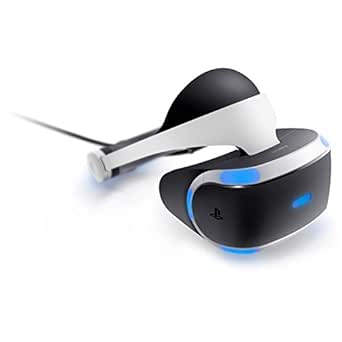
PlayStation VR
This PlayStation VR headset offers a straightforward entry into VR gaming with its 5.7” OLED display and seamless compatibility with PS4, making it ideal for newcomers. Compared with PC-based VR headsets like the Oculus Quest 2, the PS VR provides a more integrated console experience at a lower initial cost, but it’s limited by its reliance on PlayStation hardware and the need for additional accessories like the camera. The headset’s design is balanced for comfort, and the 120Hz refresh rate ensures smooth visuals, though it lacks the higher resolution of more advanced VR headsets. This pick makes the most sense for casual gamers or those who already own a PS4 or PS5, as it offers immersive VR without requiring a high-end PC setup. If you’re looking for an easy, affordable way to try VR, this is a solid choice, but it won’t match the fidelity of newer PC VR systems.
Pros:- Easy plug-and-play setup with PS4 or PS5
- Comfortable, balanced design for extended play sessions
- Good library of exclusive VR titles
Cons:- Limited resolution compared to high-end VR headsets
- Requires PlayStation Camera and additional accessories (sold separately)
- Dependence on PS4/PS5 hardware limits upgrade flexibility
Best for: PlayStation owners new to VR who want an affordable, hassle-free experience
Not ideal for: Hardcore VR enthusiasts seeking cutting-edge graphics and resolution
- Display Resolution:1920 × 1080 (per eye)
- Display Type:OLED
- Field Of View:180 Degrees
- Connector Type:HDMI and USB
- Platform:PlayStation 4
- Weight:2.84 Pounds
Bottom line: Perfect for casual gamers wanting to dip into VR within the PlayStation ecosystem without the complexity of PC VR systems.
VR Headset with Built-in Headphones, 120° FOV & Aspherical Lenses for Smartphones – Immersive 3D Movies and Gaming Glasses
This VR headset provides an impressive 120° field of view and high-resolution 1080P display, making it an appealing option for those new to VR who want an immersive experience without the cost of dedicated VR systems like Oculus Quest 2. Compared with more expensive standalone headsets, this model offers broad compatibility with smartphones between 4.7 and 7.2 inches, making it highly versatile. The built-in stereo headphones enhance immersion with good sound quality, and the ergonomic design ensures comfort during extended use. However, as it relies on smartphones, it lacks the processing power of dedicated VR headsets, limiting graphics fidelity and tracking accuracy. This makes it well-suited for casual viewing and light gaming, but it won’t deliver the high-end VR experience that requires standalone or PC-based headsets. It’s an excellent starter option for VR curious consumers on a budget.
Pros:- Compatible with most smartphones with 4.7-7.2 inch screens
- 120° ultra-wide viewing angle for immersive visuals
- Built-in high-quality stereo headphones
Cons:- Dependent on smartphone performance, limiting graphics quality
- No motion tracking or controller support
- Less suitable for demanding VR gaming
Best for: VR newcomers and casual users with compatible smartphones seeking affordable immersive entertainment
Not ideal for: Serious gamers or VR enthusiasts looking for high-fidelity, tracking, and motion controls
- Field Of View:120°
- Display Resolution:1080P
- Lens Type:Aspherical
- Headphone:Built-in stereo
- Compatibility:Smartphones 4.7-7.2 inches
- Connectivity:Headphone jack and data cables
Bottom line: Ideal for entry-level VR users who want immersive media experiences on a budget using their existing smartphones.
XFX Radeon RX 580 GTS XXX Edition 1386MHz OC+, 8GB GDDR5, VR Ready, Dual BIOS, 3xDP HDMI DVI, AMD Graphics Card (RX-580P8DFD6) (Renewed)
The RX 580 GTS XXX Edition stands out for its robust 8GB GDDR5 memory and factory overclocked core at 1386 MHz, making it capable of supporting most VR titles on a budget. Compared to Nvidia’s GTX 1660 Super, this AMD card offers similar VR-ready features with a slightly wider memory interface, which benefits VR environments that demand high textures and complex scenes. Its dual BIOS provides added reliability, but it does run hotter and noisier than newer cards, especially during extended VR sessions. This card is ideal for AMD fans or budget builders who want decent VR performance without investing in higher-tier models. However, it may struggle with the most demanding VR experiences, where newer GPUs like the RX 6600 XT or NVIDIA’s RTX series are more future-proof. Still, it delivers a compelling VR experience at an affordable price point.
Pros:- 8GB GDDR5 memory supports high-resolution VR textures
- Factory overclocked for better performance out of the box
- Dual BIOS for added stability
Cons:- Runs hotter and louder compared to newer models
- Supports only PCIe 3.0, limiting bandwidth on newer systems
- May not handle the latest VR titles at max settings
Best for: Budget-conscious AMD users wanting solid VR performance and upgrade potential
Not ideal for: VR power users who demand the latest high-fidelity experiences or ultra-smooth frame rates
- Graphics Coprocessor:AMD Radeon RX 580
- Ram:8GB GDDR5
- GPU Clock Speed:1386 MHz
- Video Output Interface:DP, HDMI, DVI
- Graphics Ram Type:GDDR5
- Compatible Devices:Desktop
- Interface:PCI-Express 3.0
- Display Maximum Resolution:8K
- Additional Features:Dual BIOS
Bottom line: A solid choice for AMD fans or budget VR gamers who want decent performance without upgrading to the latest hardware.
XFX Radeon RX 580 GTS XXX Edition 1386MHz OC+, 8GB GDDR5, VR Ready, Dual BIOS, 3xDP HDMI DVI, AMD Graphics Card (RX-580P8DFD6)
This RX 580 model offers a reliable foundation for budget VR setups, with 8GB of GDDR5 memory and factory OC at 1386 MHz that make it capable of handling most VR applications comfortably. Compared to the higher-clocked versions like the B07Q25L8KY, this card provides similar VR readiness but with slightly lower factory overclocking, making it more accessible for users with less power supply headroom. Its dual BIOS enhances stability, but the 14nm Polaris architecture makes it less power-efficient compared to newer options, and it may generate more heat during intensive VR sessions. This GPU suits budget builders who want a versatile, VR-capable AMD card that can also serve for regular gaming at 1080p. For those seeking the latest features or higher frame rates, a more recent GPU would be preferable.
Pros:- Supports multiple display outputs (3xDP, HDMI, DVI)
- 8GB VRAM ideal for high-res textures in VR
- Dual BIOS for enhanced reliability
Cons:- Older Polaris architecture limits efficiency
- Higher power consumption and heat output
- Limited to PCIe 3.0 bandwidth
Best for: Budget AMD users needing a versatile, VR-ready GPU with good connectivity options
Not ideal for: High-end VR users or gamers requiring maximum frame rates and future-proofing
- Graphics Coprocessor:AMD Radeon RX 580
- Ram:8GB GDDR5
- GPU Clock Speed:1386 MHz
- Video Output Interface:3xDP, HDMI, DVI
- Graphics Ram Type:GDDR5
- Compatible Devices:Desktop
- Interface:PCI-Express 3.0
- Display Maximum Resolution:8K
- Additional Features:Dual BIOS
Bottom line: Suitable for budget AMD users seeking a flexible, VR-capable GPU for moderate gaming and multimedia use.
msi Gaming RTX 3050, 6G Graphics Card, NVIDIA (96-Bit, Boost Clock: 1507 MHz, 6GB GDDR6 14 Gbps, HDMI/DP, Ampere Architecture)
This MSI RTX 3050 stands out for delivering solid VR performance at an accessible price point, especially when compared to the GTX 1660 Super, which lacks Ray Tracing features. Its dedicated Ray Tracing Cores and AI Tensor Cores provide a noticeable upgrade in visual fidelity and future-proofing, though it still struggles with high-demand VR titles at maximum settings. Compared to more expensive options, it offers a good balance of performance and affordability, but it does involve tradeoffs in raw power and longevity. This card is perfect for budget-conscious gamers who want reliable VR without sacrificing too much visual quality.
Pros:- Solid VR performance for its price range
- Supports Ray Tracing and DLSS for enhanced visuals
- Two HDMI 2.1a and DisplayPort outputs for versatile connectivity
Cons:- Limited 6GB VRAM may bottleneck future VR titles
- Lower 96-bit memory interface compared to higher-end cards
Best for: Entry-level VR enthusiasts and gamers on a tight budget who want decent performance without overspending.
Not ideal for: Power users aiming for ultra-settings or high-fidelity VR experiences, who should consider higher-tier GPUs.
- Boost Clock:1507 MHz
- Video Memory:6GB GDDR6
- Memory Speed:14 Gbps
- Video Output:HDMI 2.1a, DisplayPort
- Architecture:Ampere
- Video Memory Interface:96-bit
Bottom line: This pick makes the most sense for budget buyers seeking a balanced VR experience with room to grow.
GIGABYTE Radeon RX 9070 XT Gaming OC 16G Graphics Card, PCIe 5.0, 16GB GDDR6
Compared with the MSI RTX 3050, the GIGABYTE RX 9070 XT offers a substantial leap in VR power thanks to its 16GB of GDDR6 memory and PCIe 5.0 support, making it more future-proof for demanding titles. Its server-grade cooling system and dual BIOS options ensure reliable operation during extended gaming sessions, but it does come with a higher price tag and slightly larger size. While the RTX 3050 is more accessible for newcomers, this card is better suited for gamers who want a longer-lasting investment and are willing to pay a premium for extra headroom in VR.
Pros:- 16GB GDDR6 for demanding VR applications
- Supports PCIe 5.0 for maximum bandwidth
- Robust cooling with Windforce design and dual BIOS
Cons:- Higher price compared to mid-range options
- Requires larger case space due to size
Best for: Budget-conscious gamers looking for a high-performance, future-ready VR GPU with extra memory headroom.
Not ideal for: Casual VR users or those with smaller cases, as its size and cost may be prohibitive.
- Memory Size:16GB GDDR6
- PCIe Support:PCIe 5.0
- Cooling System:Windforce
- Thermal Gel:Server-grade
- Outputs:HDMI, DP
- RGB Lighting:Yes
Bottom line: This GPU is ideal for gamers who want more power and longevity without stepping into high-end price tiers.
ZOTAC Gaming GeForce GTX 1660 Super 6GB GDDR6 192-bit Gaming Graphics Card
Compared to the RTX 3050, the GTX 1660 Super is more limited in VR features, lacking Ray Tracing but compensating with a smaller form factor suitable for compact builds. Its 6GB GDDR6 memory provides decent performance for entry-level VR, though it may struggle with newer, more demanding titles. The card’s smaller size—just 6.83 inches—makes it a perfect fit for tight cases, but it sacrifices some future-proofing and advanced rendering features. This choice is best for users with limited space who want a capable VR GPU without the need for cutting-edge visuals.
Pros:- Very compact size fits most small cases
- Supports 4K HDR and VR out of the box
- Good balance of performance and affordability
Cons:- Lacks Ray Tracing capabilities
- Limited to 6GB VRAM, which may bottleneck future titles
Best for: Owners of small or pre-built systems needing a compact, VR-ready GPU at an affordable price.
Not ideal for: Users seeking high-fidelity VR experiences or planning to run the latest AAA titles at max settings.
- Video Memory:6GB GDDR6
- Memory Interface:192-bit
- Core Clock:1785 MHz
- Length:6.83 inches
- Outputs:3x DisplayPort 1.4, HDMI 2.0b
- VR Ready:Yes
Bottom line: This GPU suits users with space constraints who want decent VR performance without extra frills.
Meta Quest 2 — Advanced All-In-One Virtual Reality Headset — 256 GB (Renewed)
Compared to PC-based options like the MSI RTX 3050 or GIGABYTE RX 9070 XT, the Meta Quest 2 offers a truly wireless VR experience with no need for a dedicated GPU, making it ideal for casual users or those with limited space. Its 256GB storage supports a wide library of VR titles, and features like hand tracking and high-resolution displays provide immersive gameplay without additional hardware. However, it’s not suitable for high-end PC VR users seeking maximum graphics fidelity, as it relies on its built-in Snapdragon XR2 processor. This headset is perfect for newcomers or casual gamers wanting a portable VR setup at an affordable price.
Pros:- Wireless, untethered experience
- Built-in high-resolution display
- Portable and easy to set up
Cons:- Limited to 2 hours of battery life per charge
- Less powerful graphics compared to PC-based VR headsets
Best for: Casual VR users or those new to VR wanting an all-in-one experience without investing in a high-end PC GPU.
Not ideal for: Power users demanding the highest graphical fidelity or those needing a tethered setup for advanced VR applications.
- Storage:256 GB
- Display Resolution:1832 x 1920 per eye
- Battery Life:2 hours
- Processor:Snapdragon XR2 Gen 2
- Weight:No external GPU needed
- Connectivity:Wi-Fi
Bottom line: This headset is ideal for users seeking a hassle-free, portable VR experience on a budget.
Meta Quest 3S 256GB | VR Headset — Thirty-Three Percent More Memory — 2X Graphical Processing Power — Virtual Reality Without Wires — Access to 40+ Games with a 3-Month Trial of Meta Horizon+ Included
While the Meta Quest 3S doesn’t rely on a dedicated GPU like the MSI RTX 3050, it introduces significant improvements in graphical power and memory over previous standalone headsets, making it more capable in demanding VR scenarios. Its 8GB RAM and 2X processing power facilitate smoother, more detailed experiences, akin to a mid-range PC VR setup, but without the need for external hardware. Unlike the RTX 3050, which is suited for PC VR, this headset targets users wanting a fully untethered experience, though with some limitations in battery life and maximum graphical fidelity. This makes it an excellent choice for casual users who prioritize freedom of movement over ultra-high graphics.
Pros:- Wireless, untethered experience with high graphics power
- Increased memory for smoother gameplay
- Access to a library of 40+ games with free trial
Cons:- Limited 2-hour battery life
- Still not as powerful as high-end PC GPUs for demanding VR titles
Best for: Casual VR users and newcomers who want high-quality, wireless VR without investing in a costly PC GPU.
Not ideal for: Hardcore VR gamers seeking the highest fidelity and extended play sessions, due to battery constraints.
- Storage:256 GB
- Memory:8GB RAM
- Processing Power:2X
- Display Resolution:1832 x 1920 per eye
- Battery Life:2+ hours
- Wireless:Yes
Bottom line: This headset offers a compelling, portable VR experience with impressive graphical capabilities for casual users.
How We Picked
The products in this roundup were selected based on a combination of performance benchmarks relevant to VR, price point, and user value. We prioritized GPUs that can deliver smooth, consistent VR experiences at 1080p or 1440p, focusing on real-world usability rather than theoretical specs alone. Compatibility with common VR headsets and form factor considerations also influenced the selection, ensuring options are accessible for various build sizes and budgets. The ranking reflects a balance of cost-to-performance ratio, reliability, and future-proofing, helping buyers find the best fit for their VR gaming needs within a limited budget.Factors to Consider When Choosing Best Budget GPUs For VR
Choosing the best budget GPU for VR involves understanding key factors that influence gaming experience, compatibility, and future readiness. While price is a significant concern, it should not come at the cost of essential features like sufficient VR-optimized performance and system compatibility. Considering these factors carefully can prevent costly mistakes and ensure your VR setup remains enjoyable for years to come.Performance Levels for VR
VR gaming demands a GPU capable of maintaining high frame rates, typically 90Hz or higher, to ensure smooth and comfortable experiences. Budget GPUs like the GTX 1660 Super and RX 580 can handle most VR titles at 1080p, but performance may dip with more demanding games or higher resolutions. If you plan to explore more graphically intense VR experiences, investing slightly more in a GPU like the RTX 3050 can provide noticeable improvements, reducing lag and motion sickness risks.
Compatibility and System Requirements
Not all GPUs are compatible with every system, especially compact builds or older motherboards. Check your PC’s power supply, PCIe slot availability, and physical space before choosing a GPU. Some budget cards come in smaller, more energy-efficient models, but these may have limited cooling or fewer ports. Ensuring your setup supports the GPU’s requirements prevents bottlenecks and installation issues, making your VR experience smoother.
Future-Proofing and Longevity
While sticking to a budget might tempt you to choose the cheapest option, consider how long the GPU will serve your VR needs. Cards like the RTX 3050 offer features like DLSS and ray tracing, which can extend usability as VR titles become more graphically advanced. Conversely, older models like the RX 580 may struggle with future updates, requiring an upgrade sooner. Think about your long-term plans to avoid needing a costly replacement just after purchase.
Price-to-Performance Ratio
Balancing cost with performance is key. Some budget GPUs perform remarkably well for their price, but others may offer diminishing returns at higher prices. Avoid overspending on minor upgrades if your primary goal is VR gaming at 1080p. Conversely, investing a bit more can significantly enhance your experience, especially if you aim to run more demanding VR titles or want better visuals and frame rates.
VR Headset Compatibility
Different VR headsets have varying hardware demands. The Quest 2, for example, is less demanding and runs well with mid-range GPUs, while the Meta Quest 3 benefits from more powerful graphics. Make sure your chosen GPU supports the required outputs, such as HDMI or DisplayPort, and check recommended specs for your headset. Proper pairing ensures a smoother, more immersive experience without lag or visual artifacts.
Frequently Asked Questions
Can I use a budget GPU for high-end VR gaming?
Budget GPUs like the GTX 1660 Super or RX 580 can run many VR titles at 1080p with acceptable performance, but they may struggle with newer, more demanding games or higher resolutions. For the most immersive and fluid experience, especially with advanced VR headsets, investing in a slightly more capable card like the RTX 3050 is advisable. Budget options are best suited for casual or less graphically intense VR experiences rather than AAA-quality, high-fidelity gaming.
Will my existing PC be compatible with these budget GPUs?
Compatibility depends on your PC’s power supply, available PCIe slots, and physical space inside the case. Many budget GPUs are designed for standard systems, but some compact models may fit better in small cases. Always verify your power supply’s wattage and connector types before purchasing. Upgrading to a new GPU might also require driver updates or BIOS adjustments, so checking your system’s specifications beforehand helps prevent surprises.
Is it worth upgrading from an integrated graphics setup to a budget GPU for VR?
Absolutely. Integrated graphics generally lack the horsepower needed for smooth VR experiences. Upgrading to a budget GPU like the GTX 1660 Super or RX 580 significantly improves frame rates, reduces lag, and enhances visual clarity. Even a modest dedicated GPU can transform your VR sessions from choppy to immersive, making the investment worthwhile for anyone serious about VR gaming.
How much should I spend on a GPU for a good VR experience?
For a solid VR experience at a budget, spending between $150 and $250 typically covers most entry-level and mid-range GPUs like the GTX 1660 Super or RX 580. This range balances affordability with performance, allowing you to enjoy smooth gameplay without overspending. If you want a bit more future-proofing or plan to run more demanding titles, increasing your budget slightly to around $300 can provide noticeable benefits without stretching into high-end territory.
Do I need a specific GPU for Meta Quest 2 or Quest 3?
The Meta Quest 2 is less demanding and can run well with mid-range GPUs, including many budget options, especially when connected via Oculus Link. The Quest 3, with higher graphical capabilities, benefits from more powerful GPUs like the RTX 3050 or higher for PC-based VR. Matching your GPU with your headset’s requirements ensures optimal performance, reducing lag and improving visual fidelity in your VR sessions.
Conclusion
For most budget-conscious gamers, the GeForce GTX 1660 Super emerges as the best overall choice, offering reliable VR performance at a reasonable price. If you’re looking for the best value, the RX 580 still holds up well, especially if you already own a compatible system. Those seeking a bit more longevity and future-proofing should consider the RTX 3050, despite its slightly higher price. Beginners or casual users will find the compact models like the ZOTAC GTX 1660 Super ideal, while serious VR enthusiasts aiming for more immersive experiences should look towards the higher-tier options. Ultimately, your choice depends on your budget, system compatibility, and the VR experience you desire.