
TL;DR

Play games on Amazon Luna for your next adventure, included with Prime
- A rotating selection of games, no download needed
- Play on TV, laptop or phone
- Fast, free delivery for your gear, too
A Nov. 1 report warns that USB hubs should not be treated as direct replacements for a computer’s ports: connected devices share the hub’s upstream bandwidth and available power, and the extra controller can add latency. The author describes capture-card interruptions during file transfers and streaming, but these are personal examples, not evidence that every hub or setup will behave the same way.
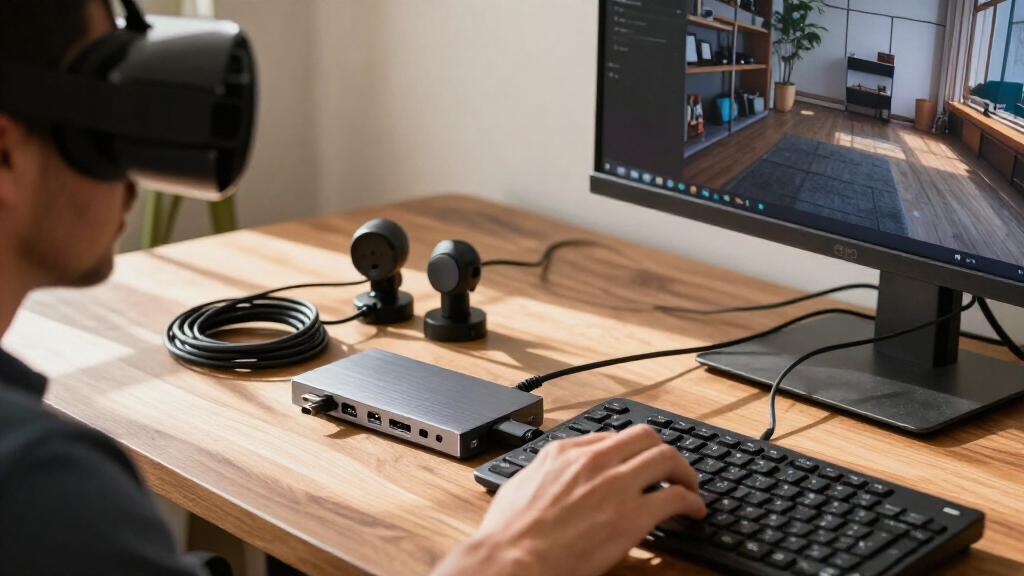
XDA Developers published a report Nov. 1 warning that USB hubs can struggle when several demanding devices share the same connection to a computer. The report says bandwidth, latency and power limits can disrupt workloads such as capturing video while transferring files, so a hub’s advertised port count should not be mistaken for a set of independent computer ports.
A hub’s individual ports can advertise data rates as high as 10Gbps, but devices connected to those ports still share the hub’s link to the computer. If the hub itself connects over a 10Gbps USB link, two devices cannot each receive that full upstream bandwidth at the same time. The report says this can slow transfers and other device activity, with the outcome depending on the connected hardware and workload.
The author describes a problem while using a Satechi Stand & Hub for Mac Mini, which combines ports with an internal SSD slot. During a large file transfer to the SSD, a connected capture card stopped showing video for several seconds, while the transfer nearly stalled. The author says unplugging the capture card allowed the transfer to finish; this is a first-person account, not a controlled test of all hubs or capture cards.
The report also points to latency and power as possible constraints. A hub adds a controller between peripherals and the computer, and the author says a Keychron Q16 HE keyboard set to an 8,000Hz polling rate coincided with video feed blackouts during a livestream. The article says many hubs draw power from the laptop and may reserve only about 10–15W for peripherals, even when passthrough charging supplies substantially more power to the laptop itself.
FIELD GUIDE / USB CONNECTIVITY
Please Stop Treating Your USB Hubs As Port Replicators
More sockets do not mean more independent connections. A hub’s devices share its link to the computer, and bandwidth, power and latency can matter when demanding gear works at the same time.
01 / WHAT THE REPORT SAYS
One upstream link carries the load
A hub can advertise fast downstream ports, but they still feed into its single connection to the computer. When several devices transfer data or draw power together, the actual result depends on the hub, computer, peripherals and workload.
Shared capacity
Two devices on a 10Gbps hub cannot each receive 10Gbps over that same 10Gbps upstream link at once.
Another controller
The hub adds a step between peripherals and the computer. How much that affects a setup is not measured in the report.
Peripheral budget
Passthrough charging mainly describes power delivered to the laptop. Many hubs reserve roughly 10–15W for peripherals, with product-by-product variation.
02 / A SIMPLE BANDWIDTH MODEL
Port speed is not a private lane
Illustration only: this shows the shared-link concept, not measured throughput or a prediction for a particular hub.
Real throughput varies with protocol overhead, device capabilities and activity. The graphic does not assign an exact share to either device.
03 / THE REPORTED EXPERIENCE
When workloads collide
The XDA Developers author describes personal examples involving a Satechi Stand & Hub for Mac Mini and a high polling rate keyboard. These anecdotes illustrate possible trouble; they are not controlled tests or proof that every hub behaves this way.
Transfer nearly stalled
During a large transfer to the hub’s internal SSD, the author says a connected capture card stopped showing video for several seconds. Unplugging it let the transfer finish.
Video feed blackouts
The author says a Keychron Q16 HE keyboard set to 8,000Hz polling coincided with blackouts in a livestream video feed.
Not a universal rule
The report provides no controlled measurements, broad model comparisons or precise device power readings for these examples.
“The two devices will be fighting for bandwidth at every turn.”
XDA Developers report
04 / CHOOSE FOR YOUR SETUP
Check the connection, power and workload
For time-sensitive or demanding work, assess the computer, dock and devices as a group. Port count alone does not describe how the complete setup will perform.
Check the hub’s connection to the computer and its total bandwidth, not just each port’s advertised speed.
Read the peripheral power specifications. Laptop passthrough wattage is not the same as the hub’s device power budget.
Run the actual storage, capture and audio devices together before relying on them for a stream or other live task.
Try a device directly on the computer or disconnect other peripherals to help identify whether the hub is involved.
The report says Thunderbolt 4 supports up to 40Gbps and that docks commonly use external power supplies and more sophisticated controllers. Those features may help with bandwidth and peripheral power limits.
Compatibility and performance still depend on the dock, computer and connected devices. The report offers no comparative product tests, and notes Thunderbolt 5 docks are less common.
05 / QUICK ANSWERS
Key questions
Why can two devices slow down on one hub?
They share the hub’s connection to the computer. If their combined activity exceeds the available capacity, one or both may slow down.
Does every hub cause latency or interruptions?
No. The report describes possible limits and personal examples. Results depend on the hub, computer, peripherals and workload.
Can a hub deliver nearly 100W to peripherals?
Passthrough charging close to 100W generally refers to power for the laptop. Peripheral power varies by hub; the report cites roughly 10–15W for many models.
Would Thunderbolt solve the problem?
A Thunderbolt 4 dock can offer a 40Gbps link and often has external power. It may help, but it is not a guarantee for every setup.
For people connecting storage, capture cards, audio equipment and other power-hungry or high-traffic devices, a hub’s port count alone does not show how well the whole setup will perform. Bandwidth is shared across the connection to the computer, and a device’s ability to work on its own does not guarantee it will work smoothly alongside other peripherals.
This matters most when interruptions have immediate consequences: a video feed can drop during a stream, a transfer can slow, or an audio device may not receive enough power. The report’s examples are specific anecdotes, so they do not establish that hubs generally cause these failures. They do illustrate why users should test their actual equipment together before relying on a hub for a live production or other time-sensitive task.
Products Worth Considering

Jackery Explorer 2000 v2 Portable Power Station with Two 200W Solar Panels

Jackery Explorer 300 Portable Power Station, 292Wh

Logitech MX Keys S Wireless Keyboard, Graphite
As an affiliate, we earn on qualifying purchases.
Modern laptops often have fewer built-in ports than users need, making USB-C hubs and Thunderbolt docks common ways to attach peripherals. For a mouse, keyboard or external drive used on its own, a basic hub may be adequate. The concern raised in the report is that multiple downstream ports do not create separate upstream links: the hub still has to carry their data over its connection to the computer.
The report distinguishes ordinary USB hubs from Thunderbolt docks. It says Thunderbolt 4 supports up to 40Gbps and that docks commonly have external power supplies and more sophisticated controllers. Those features may provide more bandwidth and power, but they do not make every dock or connected device unlimited; the report also notes Thunderbolt 5 docks are still less common. It offers no comparative test results or product-by-product measurements.
““The two devices will be fighting for bandwidth at every turn.””
— XDA Developers report
What Depends on Your Setup
The report does not provide controlled measurements of how much bandwidth or latency each named device and hub adds, nor does it test a range of hub models. It is unclear how often the cited interruptions would occur in other configurations. Results can depend on the hub’s design, the computer, the devices, their settings and what they are doing at the same time.
Power figures also vary by product. The report describes roughly 10–15W as typical peripheral power for many hubs, not a guarantee that applies to every model. It does not identify the precise power draw of the devices in the examples or establish that power caused either streaming problem.
Check Specs Before Adding Devices
Users planning a demanding setup should check the hub’s upstream connection, total bandwidth and peripheral power specifications, rather than relying only on the number and advertised speed of its ports. If a capture card, storage drive or audio device misbehaves, testing it directly on the computer or disconnecting other devices can help identify whether the hub is involved. The report recommends considering a powered Thunderbolt dock for workloads that need more bandwidth or peripheral power.
No product tests, manufacturer responses or further technical measurements are included in the source material. The practical next step is to assess the specific computer, dock and peripherals as a group; the report does not establish that switching to Thunderbolt will resolve every compatibility or performance issue.
Key Questions
Why can two devices slow down on the same USB hub?
They share the hub’s connection to the computer. If their combined activity exceeds the bandwidth available on that link, one or both may slow down.
Does a USB hub always cause latency or interruptions?
No. The report describes possible limits and specific personal examples, not a rule for every hub. The effect depends on the hub, computer, peripherals and workload.
Can a hub provide nearly 100W to connected devices?
The report says passthrough charging close to 100W generally refers to power delivered to the laptop, not to all peripherals. Many hubs reserve roughly 10–15W for connected devices, though specifications vary by model.
Would a Thunderbolt dock fix the problem?
A Thunderbolt 4 dock can offer a 40Gbps connection and often has an external power supply, which may help with bandwidth and power limits. It is not a guarantee: performance still depends on the dock, computer and connected devices.
Source: XDA Developers