
TL;DR

Play games on Amazon Luna for your next adventure, included with Prime
- A rotating selection of games, no download needed
- Play on TV, laptop or phone
- Fast, free delivery for your gear, too
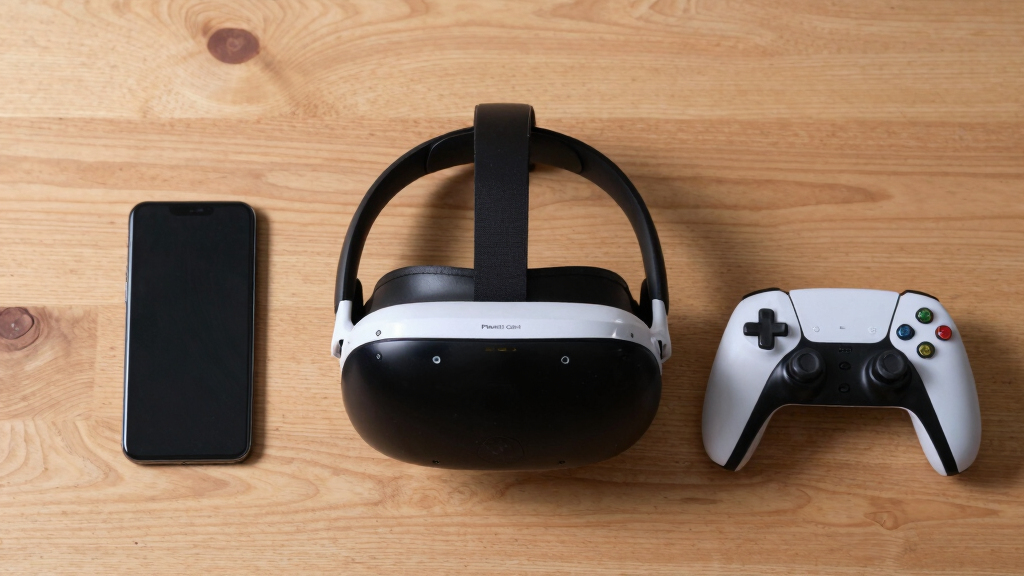
The Pimax Crystal Light offers ultra-wide FOV and top-tier resolution, ideal for immersive gaming. Bigscreen Beyond excels in social features and media, focusing on comfort and versatility. Your choice hinges on what you value most in VR.
High-end PCVR in 2026 isn’t just about sharper visuals anymore. It’s about immersion that pulls you into worlds, social experiences that feel natural, and comfort that lets you forget you’re wearing a headset. Two headsets stand out: the Pimax Crystal Light and Bigscreen Beyond. Both aim to redefine what high-end VR can do, but they take very different paths to get there.
If you’re eyeing premium VR, you need to understand what each headset offers — and what they leave out. Whether you’re a hardcore gamer, a social butterfly, or a media junkie, this comparison will help you pick the best fit for your virtual adventures.
High-End PCVR in 2026
Pimax Crystal Light vs Bigscreen Beyond
Premium PCVR is no longer just a contest of sharper panels. It is a choice between panoramic immersion for sims and gaming, or a smaller, comfort-first headset tuned for social VR, media, and long sessions.
Ultra-wide field of view and top-tier combined resolution aim at maximal presence.
Sharper, focused visuals with a compact fit for media, social rooms, and virtual desktops.
Choose the headset that matches how you actually spend time in VR.
Panoramic, sim-forward immersion.
Focused clarity for media and social use.
High-end GPUs unlock the experience.
Premium hardware, bundle-dependent.
Sims and gaming vs social media VR.
Display technology
The fight is panoramic presence against focused clarity.
Pimax leans into scale: wider views, higher combined resolution, and a cockpit-like sense of space. Bigscreen Beyond narrows the window but sharpens the experience for films, desktops, and social rooms.
Pimax feels like looking through the world.
A 200° field of view reduces the need to turn your head in flight sims, racing, and large exploratory worlds.
Beyond feels like a private cinema.
A tighter 100° field concentrates detail, which suits movies, virtual screens, productivity, and close social spaces.
More pixels ask more from the PC.
Both headsets benefit from RTX 4080 or 4090 class hardware, but Pimax’s wider, denser output pushes harder.
Field of view scale
Resolution emphasis
Feature comparison
Where each headset wins, compromises, and overlaps.
Neither headset is universally better. Pimax stretches the visual envelope for serious simulation and gaming. Bigscreen Beyond turns high-end PCVR into something easier to wear for social, media, and hybrid work sessions.
| Feature | Pimax Crystal Light | Bigscreen Beyond | Reader takeaway |
|---|---|---|---|
| Field of view | ✓Up to 200°, tuned for panoramic immersion. | ~Around 100°, more conventional but clear. | Wider helps cockpit, racing, and world-scale VR. |
| Display priority | ✓High combined resolution and spectacle. | ✓High clarity per eye for media and desktops. | Both are sharp; they optimize for different moments. |
| Tracking depth | ✓Inside-out plus SteamVR base station compatibility. | ~Integrated inside-out tracking focused on ease. | Pimax favors enthusiasts; Beyond favors simple setup. |
| Long-session comfort | ~Adjustable straps and padding, but larger frame. | ✓Lightweight design for long social sessions. | Comfort becomes decisive after the first hour. |
| Ecosystem | ✓SteamVR and Viveport compatibility. | ✓Social VR, media sharing, virtual desktop, SteamVR. | Pimax is broader for games; Beyond is stronger for social media use. |
| Best buyer | ✓Hardcore gamers, sim pilots, racers, developers. | ✓Social users, media fans, remote collaborators. | Start with your primary use case, then check specs. |
Tracking, comfort, ecosystem
The headset experience is bigger than the screen.
Precision tracking makes high-speed interactions feel believable. Comfort decides whether you stay. Software determines what you can actually do once the headset is on.
Pimax favors precision.
Multiple camera inside-out tracking, optional SteamVR base station support, and finger-focused controllers suit games that demand accuracy.
Beyond favors endurance.
A lighter, smaller form factor is better suited to movie nights, social hangouts, virtual events, and long desktop sessions.
The libraries overlap.
Both can reach SteamVR, but Pimax leans gaming-first while Bigscreen centers media sharing, virtual desktops, and collaborative spaces.
Decision matrix
Score the headset against the way you actually use VR.
The smartest purchase is not the biggest spec sheet. It is the device whose strengths show up in your daily sessions.
You want maximum presence.
Choose it for flight sims, racing, high-end gaming, and scenarios where ultra-wide FOV changes how naturally you read the virtual world.
You want VR to disappear.
Choose it for comfort, movies with friends, virtual desktop work, social sessions, and a lighter headset you can wear longer.
Traceability chain
From priority to headset to best-fit experience.
Use this as the quick purchase logic: name the thing you care about most, then follow the device that serves it with the fewest compromises.
Priority: total immersion
Pimax Crystal Light connects wide FOV, high resolution, and precise tracking into the strongest simulation path.
Priority: people and media
Bigscreen Beyond connects comfort, virtual events, media sharing, and social gestures into the stronger everyday path.
Priority: cost of ownership
Both are premium PCVR devices, so factor in GPU, controllers, base stations, prescription inserts, and bundle differences.
Key Takeaways
- Pimax Crystal Light’s 12K combined resolution and 200° FOV create an unparalleled immersive experience, ideal for high-end gaming and simulations.
- Bigscreen Beyond shines in social VR and media, offering excellent comfort and versatile use cases, especially for extended social sessions.
- Both headsets require powerful PCs—think NVIDIA RTX 4080/4090—to fully harness their capabilities.
- Choosing depends on your priority: immersive visuals versus social versatility and media focus.
- Keep an eye on updates; both headsets are actively evolving, adding features that could sway your decision.
As an affiliate, we earn on qualifying purchases.
Why Display Tech in 2026 Is a Game Changer
The display tech in 2026 is stunning. Pimax Crystal Light boasts a combined resolution of up to 12K, with a field of view stretching to 200°, painting a picture so vivid it’s like stepping inside a painting. Bigscreen Beyond, on the other hand, sports a crisp 4K per eye LCD display, with a narrower 100° FOV but still delivering sharp, detailed images.
Imagine sitting in a cockpit—Pimax feels like you’re looking out a window into a vast universe, while Bigscreen offers a clear, close-up view perfect for watching movies or social interactions. The choice hinges on whether you crave the panoramic scale or crystal-clear media.
Why does this matter? Higher resolution and a wider FOV directly enhance immersion. When you’re flying a spaceship or exploring alien worlds, the panoramic view makes you feel truly inside the environment. Conversely, for media consumption, clarity and focus are more important, which is why Bigscreen’s more traditional display still excels. The tradeoff is that higher resolution and wider FOV demand more powerful graphics hardware, which can impact cost and performance optimization.
As an affiliate, we earn on qualifying purchases.
Field of View: Does Wider Mean Better?
| Feature | Pimax Crystal Light | Bigscreen Beyond |
|---|---|---|
| Field of View | Up to 200° — feels like seeing the world naturally | Around 100° — standard, but optimized for clarity |
| Immersion | More panoramic, great for flight sims and racing games | Less panoramic, better suited for media and social use |
Picture yourself in a virtual cockpit: Pimax’s wide FOV makes you feel like you’re truly inside the plane. Meanwhile, Bigscreen’s narrower view is like watching a cinema screen up close. Both have their perks, but wider FOV equals deeper immersion.
Choosing a wider FOV isn’t just about feeling more surrounded; it impacts how you interact with virtual environments. For example, in a flight sim, a 200° FOV reduces the need for head movement, creating a more natural and intuitive experience. However, it can also introduce visual distortions at the edges, which some users find distracting. On the other hand, a narrower FOV concentrates your attention, making it easier to focus on specific tasks or media, but may feel limiting during exploratory or immersive gameplay. The tradeoff is between the sensation of total presence versus visual comfort and clarity.
As an affiliate, we earn on qualifying purchases.
Tracking and Controllers: Which Feels More Precise?
Pimax supports inside-out tracking with multiple cameras, compatible with SteamVR base stations, offering precise finger tracking and ergonomic controllers. Bigscreen Beyond uses integrated inside-out tracking designed for ease, with controllers optimized for media controls and social gestures.
Imagine casting a spell or flying a drone: Pimax’s high-fidelity tracking makes precision effortless. If you’re more into chatting, sharing screens, or casual gaming, Bigscreen’s controllers are intuitive and less cumbersome.
Why does this matter? Precise tracking enhances the realism of interactions. For example, in a first-person shooter or flight sim, accurate hand and head tracking can make the difference between immersive gameplay and frustration. Pimax’s support for external base stations and multiple cameras allows for more complex setups, which can be advantageous for developers or enthusiasts seeking the highest fidelity. Conversely, Bigscreen’s integrated tracking simplifies setup and is more than sufficient for casual use, social interactions, and media navigation. The tradeoff is complexity and potential cost versus ease of use and convenience.
As an affiliate, we earn on qualifying purchases.
Comfort for Long Sessions: Who Wins?
Comfort matters when you’re in VR for hours. Bigscreen Beyond is lightweight, with a balanced design that minimizes fatigue—perfect for long social hangouts or binge-watching sessions. Pimax, being larger and heavier, offers adjustable straps and padding but may need breaks during marathon gaming.
Think of wearing sunglasses all day versus a snug, lightweight hat—Bigscreen feels like the latter, easing into your routine. Pimax’s size can be an adjustment, but its adjustable fit helps.
Why is this important? Comfort directly impacts how long you can enjoy VR without discomfort or fatigue. A bulky headset can cause pressure points, overheating, or neck strain, especially during extended use. Bigscreen’s lightweight design reduces these issues, making it ideal for social gatherings or media consumption that can last hours. Pimax’s larger frame offers more padding and adjustable straps, but the additional weight may cause fatigue over time, especially if not properly adjusted. The tradeoff is between maximum comfort for prolonged wear versus the immersive experience that a larger headset can provide, which might require periodic breaks.
Software and Ecosystem: What Can You Access?
Pimax integrates with SteamVR and Viveport, unlocking a massive library of titles and experiences. Bigscreen Beyond is centered on social media, virtual desktops, and media sharing, with support for SteamVR as well.
Imagine wanting to play a game: Pimax’s broad compatibility makes it straightforward. If your focus is watching movies with friends or working remotely, Bigscreen’s social features shine.
Why does this matter? The ecosystem determines your access to content and the ease with which you can switch between different types of experiences. Pimax’s compatibility with multiple platforms means you’re less limited in your game and app choices, making it suitable for diverse use cases. Bigscreen Beyond’s ecosystem emphasizes social and media experiences, which can be more appealing if your primary use involves remote collaboration, watching content with friends, or virtual events. The tradeoff is versatility versus specialized social media and media sharing features, influencing how you integrate VR into your daily routine.
Recent Upgrades and What They Mean for You
In 2026, Pimax’s latest model, the Crystal Light, improved weight and comfort, adding eye-tracking for foveated rendering that boosts performance. Bigscreen Beyond expanded social features, including virtual events and collaborative workspaces, making it more versatile than ever.
Picture a virtual movie night with friends or a flight sim with ultra-realistic visuals. These updates push each headset toward different kinds of high-end VR experiences.
Why do these upgrades matter? They reflect each company’s focus on enhancing core strengths. Pimax’s eye-tracking and foveated rendering help deliver smoother, more detailed visuals without requiring the highest-end GPUs, which is crucial for maintaining immersive quality without excessive hardware costs. Meanwhile, Bigscreen Beyond’s expanded social features and collaborative tools make virtual gatherings more dynamic and engaging, appealing to users who prioritize social interaction and remote work. These improvements can significantly influence your experience, whether you’re seeking ultra-realistic visuals or a vibrant social environment. The tradeoff is that these features may come with higher costs or require specific hardware support, influencing your overall investment and setup choices.
Frequently Asked Questions
Can I use these headsets for professional work?
Yes. Both support virtual desktops and productivity apps. Bigscreen Beyond offers more social and collaborative features suited for remote work, while Pimax’s high resolution benefits detailed design or visualization tasks.Which headset is better for gaming in 2026?
If immersive visuals are your priority, Pimax Crystal Light excels with its wide FOV and resolution. For social, casual, or media-rich gaming, Bigscreen Beyond provides a smoother, more comfortable experience.Are these headsets compatible with existing VR content?
Absolutely. Both support SteamVR and other major platforms, giving you access to thousands of VR titles and experiences.How much should I expect to spend?
Premium VR headsets like these typically cost between $1,200 and $2,000, depending on configurations and bundles.Will I need a super-powered PC?
Yes. For optimal performance, look for PCs with NVIDIA RTX 4080/4090 or AMD equivalents, along with fast USB and DisplayPort connections.Conclusion
High-end VR in 2026 is no longer about just resolution—it’s about creating experiences that feel real, comfortable, and social. Whether you go for the panoramic immersion of Pimax or the social ease of Bigscreen, you’re stepping into a future where VR blurs the line between digital and real.
Remember, the best headset aligns with what makes your heart race—whether that’s racing across the sky or chatting with friends in a virtual lounge. Your next big VR adventure starts now.
Halloween Picks
halloween
As an affiliate, we earn on qualifying purchases.