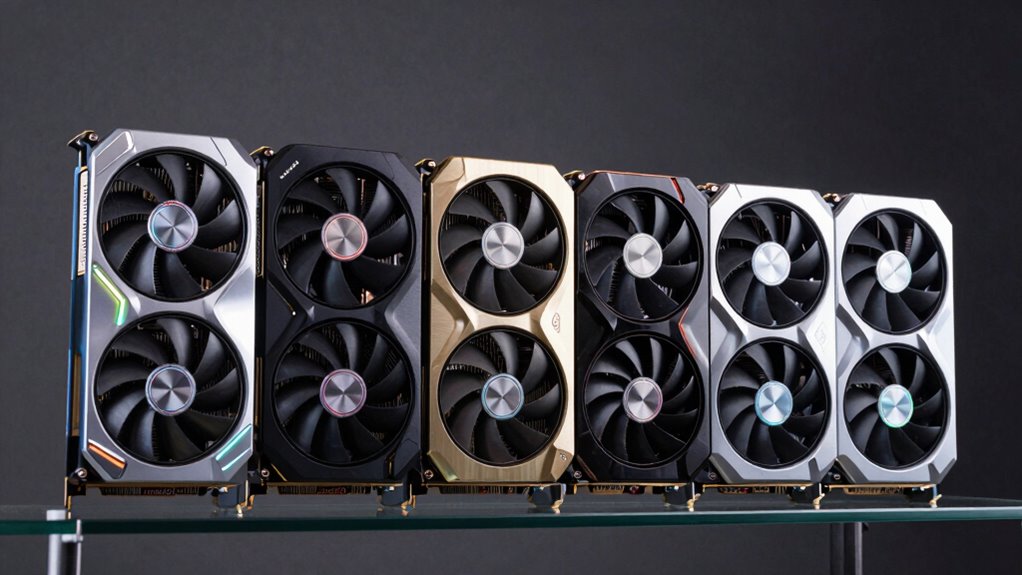

Choosing a GPU for VR that packs 16GB of VRAM in 2026 means balancing performance, compatibility, and future-proofing. Top contenders like the ASRock Radeon RX 9070 Challenger and ASRock Radeon RX 9060 XT Steel Legend deliver robust 4K gaming and VR capabilities, but they demand powerful systems and spacious cases. Meanwhile, the ASUS Dual GeForce RTX 5060 Ti offers cutting-edge GDDR7 memory for those prioritizing speed, albeit with potentially higher power needs. Lastly, options like the GIGABYTE Radeon RX 9070 XT and ASUS Prime Radeon RX 9060 XT cater to enthusiasts seeking aesthetic features and overclocking headroom. Each choice involves tradeoffs in size, power, and features, so understanding these nuances helps tailor the perfect match for your VR ambitions.

Play games on Amazon Luna for your next adventure, included with Prime
- A rotating selection of games, no download needed
- Play on TV, laptop or phone
- Fast, free delivery for your gear, too
Key Takeaways
- High VRAM alone isn’t enough; GPU architecture and cooling impact VR performance.
- Compatibility with your system’s power supply and case size is critical for larger cards.
- Future-proofing favors PCIe 5.0 support and high boost clocks, but at a cost.
- Quiet operation and aesthetic features vary, with some cards prioritizing cooling and design.
- Price and availability can shift rapidly; balancing budget with performance remains essential.
| ASRock Radeon RX 9070 Challenger 16GB OC Graphics Card, RDNA 4, 2520MHz Boost, PCIe 5.0, Triple Fans, 0dB Silent, LED Indicator |  | Best Overall for High Performance and Future-Proofing | Graphics Coprocessor: AMD Radeon RX 9070 | RAM: 16 GB | GPU Clock Speed: 2520 MHz | VIEW ON AMAZON | See Our Full Breakdown |
| ASRock Radeon RX 9060 XT Steel Legend 16GB GDDR6 OC Graphics Card |  | Best for 4K Gaming and Content Creation | Boost Clock: 3275 MHz | VRAM: 16GB GDDR6 | Architecture: AMD RDNA 4 | VIEW ON AMAZON | See Our Full Breakdown |
| ASUS Dual GeForce RTX 5060 Ti 16GB GDDR7 OC Edition Gaming Graphics Card |  | Best for Speed and Compact Builds | Memory: 16GB GDDR7 | Architecture: NVIDIA Blackwell | Clock Speed: 2632 MHz (OC) | VIEW ON AMAZON | See Our Full Breakdown |
| GIGABYTE Radeon RX 9070 XT Gaming OC 16G Graphics Card |  | Best for Aesthetics and High Performance | Memory: 16GB GDDR6 | Interface: PCIe 5.0 | Cooling System: WINDFORCE | VIEW ON AMAZON | See Our Full Breakdown |
| ASUS Prime Radeon RX 9060 XT 16GB GDDR6 OC Edition Gaming Graphics Card |  | Best for Overclocking and Durability | Memory: 16GB GDDR6 | Boost Clock: up to 3330 MHz | Design: 2.5-slot | VIEW ON AMAZON | See Our Full Breakdown |
| gpu for vr with 16gb vram | Memory |
|---|---|
| ASRock Radeon RX 9070 Challeng | — |
| ASRock Radeon RX 9060 XT Steel | — |
| ASUS Dual GeForce RTX 5060 Ti | 16GB GDDR7 |
| GIGABYTE Radeon RX 9070 XT Gam | 16GB GDDR6 |
| ASUS Prime Radeon RX 9060 XT 1 | 16GB GDDR6 |
More Details on Our Top Picks
ASRock Radeon RX 9070 Challenger 16GB OC Graphics Card, RDNA 4, 2520MHz Boost, PCIe 5.0, Triple Fans, 0dB Silent, LED Indicator
The ASRock Radeon RX 9070 Challenger stands out for its high 16GB GDDR6 memory and impressive boost clock of 2520 MHz, making it an excellent choice for demanding VR applications. It supports PCIe 5.0, ensuring compatibility with the latest motherboards and future upgrades. The triple fan cooling system keeps thermal throttling at bay, though its large size and high power draw (requiring a 700W PSU) limit compatibility with smaller cases. Compared with other options, it offers a balanced mix of power and quiet operation, thanks to its 0dB technology. However, those with compact builds or limited power supplies should consider lighter options.
Pros:- High 16GB GDDR6 memory for demanding VR workloads
- Factory overclocked for enhanced gaming performance
- Triple fan cooling system ensures efficient heat dissipation
- Supports PCIe 5.0 for future-proof compatibility
Cons:- Requires a 700W power supply and two 8-pin connectors
- Large size may limit compatibility with smaller cases
- No bundled accessories or software
Best for: High-end VR setups requiring maximum performance and future readiness
Not ideal for: Small cases or systems with limited power capacity
- Graphics Coprocessor:AMD Radeon RX 9070
- RAM:16 GB
- GPU Clock Speed:2520 MHz
- Video Output Interface:DisplayPort, HDMI
- Graphics RAM Type:GDDR6
- Maximum Resolution:8192×4320
Our verdict“Best overall for users seeking a high-performance, future-proof VR card, provided their system can handle its size and power needs.”
ASRock Radeon RX 9060 XT Steel Legend 16GB GDDR6 OC Graphics Card
The ASRock Radeon RX 9060 XT Steel Legend excels with its 3275 MHz boost clock and robust cooling system, making it highly suitable for 4K VR gaming and content creation. Its triple fan setup and metal backplate add durability and effective heat management. Supporting next-gen connectivity—HDMI 2.1b and DisplayPort 2.1a—it stands out for future compatibility. While its high performance is undeniable, it demands a powerful system, including ample power supply and enough space, limiting its use in smaller or older builds. Compared to the RX 9070 Challenger, it offers higher clock speeds but at a similar size and power requirement.
Pros:- High-performance 16GB GDDR6 VRAM for VR and 4K workloads
- Advanced cooling with silent operation under low loads
- Support for next-gen HDMI 2.1b and DisplayPort 2.1a
- Durable metal backplate and military-grade components
Cons:- Requires a high-capacity power supply
- Compatibility issues with older systems or smaller cases
- Potentially higher cost due to premium features
Best for: Power users focused on 4K VR and multimedia production
Not ideal for: Systems with limited space or lower wattage power supplies
- Boost Clock:3275 MHz
- VRAM:16GB GDDR6
- Architecture:AMD RDNA 4
- Compute Units:32
- Connectivity:PCIe 5.0, HDMI 2.1b, DisplayPort 2.1a
Our verdict“Ideal for enthusiasts prioritizing future-proof features and high-performance VR, assuming system compatibility.”
ASUS Dual GeForce RTX 5060 Ti 16GB GDDR7 OC Edition Gaming Graphics Card
The ASUS Dual GeForce RTX 5060 Ti OC delivers cutting-edge performance with its 16GB GDDR7 memory and high clock speeds of up to 2632 MHz. Its dual BIOS and axial-tech fans make it adaptable and quiet, especially for smaller cases where space is at a premium. While it offers impressive speed, the high clock speeds and newer GDDR7 tech can lead to increased power consumption, demanding a robust power supply. Compared with AMD options, it emphasizes raw speed, making it suitable for gamers who want the latest tech in a smaller form factor, but it might come at a higher price and power cost.
Pros:- High-performance 16GB GDDR7 memory
- Quiet operation with 0dB technology
- Dual BIOS for customization
- Compact 2.5-slot design fits smaller cases
Cons:- Limited detailed specs in description
- Potentially high power consumption
- Higher price point due to latest tech
Best for: Gamers with small chassis seeking top speed and quiet operation
Not ideal for: Users seeking maximum VRAM capacity at the expense of memory speed
- Memory:16GB GDDR7
- Architecture:NVIDIA Blackwell
- Clock Speed:2632 MHz (OC)
- Design:2.5-slot, dual BIOS
- Cooling:Axial-tech fan, 0dB
Our verdict“Best for speed-focused users wanting cutting-edge GDDR7 in a compact and quiet form factor, suitable for small builds.”
GIGABYTE Radeon RX 9070 XT Gaming OC 16G Graphics Card
The GIGABYTE Radeon RX 9070 XT Gaming OC combines high-performance 16GB GDDR6 with a sleek RGB lighting setup and WINDFORCE cooling technology. Its PCIe 5.0 support and thermal conductive gel offer solid thermal management, making it suitable for vibrant gaming setups and VR. However, its detailed specifications are sparse, and it shares the same size and power requirements as other large cards. The RGB lighting adds aesthetic appeal but may not appeal to minimalists. It’s a compelling choice for those who want performance with style, provided their system supports PCIe 5.0 and ample cooling.
Pros:- High-performance 16GB GDDR6 VRAM
- RGB lighting for customization
- Advanced cooling with WINDFORCE technology
- Supports PCIe 5.0 for future upgrades
Cons:- Limited detailed specs available
- Potentially high power consumption
- Requires compatible PCIe 5.0 slot
Best for: Aesthetic-conscious gamers seeking performance and style
Not ideal for: Budget builds or systems without PCIe 5.0 support
- Memory:16GB GDDR6
- Interface:PCIe 5.0
- Cooling System:WINDFORCE
- Lighting:RGB
- Maximum Resolution:7680×4320
Our verdict“Great for gamers who want a stylish, high-performance VR card with RGB flair, assuming system compatibility with PCIe 5.0.”
ASUS Prime Radeon RX 9060 XT 16GB GDDR6 OC Edition Gaming Graphics Card
The ASUS Prime Radeon RX 9060 XT OC offers boost clocks up to 3330 MHz, making it highly appealing for gamers seeking maximum performance. Its dual-ball fan bearings and 2.5-slot design promote longevity and efficient cooling. The dual BIOS switch adds versatility, allowing users to switch between quiet and performance modes. While it excels in overclocking potential, it might be loud under heavy load despite its 0dB tech, and it requires sufficient space for its larger cooling design. This card is ideal for overclockers and durability-focused users, though it might be overkill for casual VR users or those with limited case space.
Pros:- Extremely high boost clock speeds
- Dual-ball fan bearings for longevity
- Dual BIOS provides customization
- Efficient cooling with 2.5-slot design
Cons:- Potentially loud under load
- Requires ample case space
- No specific price info provided
Best for: Overclocking enthusiasts and durability-focused gamers
Not ideal for: Budget-conscious buyers or minimalists
- Memory:16GB GDDR6
- Boost Clock:up to 3330 MHz
- Design:2.5-slot
- Cooling:Dual-ball fan bearings
- Features:Dual BIOS
Our verdict“Ideal for overclockers and users who prioritize durability and maximum clock speeds, provided their system can accommodate its size.”

How We Picked
Our selection process focused on GPUs with at least 16GB of VRAM, targeting VR and high-end gaming in 2026. We prioritized models with recent architectures like RDNA 4 and NVIDIA Blackwell, emphasizing performance benchmarks, cooling solutions, connectivity options, and user feedback. Compatibility considerations, such as power requirements and size constraints, played a key role. Each card was evaluated for its ability to handle demanding VR workloads, future-proof features like PCIe 5.0, and overall value for different user profiles.
Factors to Consider When Choosing Gpu For Vr With 16gb Vram
Choosing the right GPU for VR with 16GB VRAM goes beyond just the memory size. It involves understanding the architecture, cooling solutions, power requirements, and compatibility with your existing system. Future-proof features like PCIe 5.0 support and high boost clocks can extend the lifespan of your investment, but they often come with higher costs and system demands. This guide will walk you through key considerations and help you identify which features matter most based on your VR setup and usage priorities.
Performance and Architecture
For VR, the underlying architecture—RDNA 4 for AMD or Blackwell for NVIDIA—determines how well the GPU handles real-time rendering and demanding workloads. High boost clocks and core counts boost frame rates, which are critical for smooth VR experiences. Consider your intended use: high-end gaming or professional content creation can justify more powerful, feature-rich cards, while casual VR might do fine with slightly lower specs.
Cooling and Size
Effective cooling systems, like triple-fan setups, prevent thermal throttling and maintain performance during extended VR sessions. Larger cards with 2.5-slot or 3-slot designs require spacious cases and robust airflow. If your case is compact, a smaller or dual-slot model might be necessary, but this could limit thermal performance, especially during intense VR sessions.
Power and Compatibility
High VRAM cards often need substantial power supplies—700W or more—and multiple connectors. Check your system’s PSU and case size before purchasing. PCIe 5.0 support is advantageous for future upgrades but is only compatible with recent motherboards. Balance your current system capabilities with your VR ambitions to avoid bottlenecks or installation issues.
Aesthetics and Features
Features like RGB lighting and dual BIOS switches appeal to enthusiasts who want style and customization. Quiet operation tech like 0dB fans benefits those sensitive to noise, especially in shared spaces. Decide which features align with your priorities—performance, aesthetics, or quiet operation—and weigh their importance against cost.
Frequently Asked Questions
Is 16GB VRAM necessary for VR gaming?
While not always essential, 16GB VRAM provides ample headroom for the most demanding VR titles and future titles that require more memory. It helps reduce stuttering and allows for higher resolution textures, but overall performance also depends on GPU architecture, clock speeds, and cooling. If you’re planning to run high-fidelity VR or use your GPU for content creation, 16GB VRAM becomes a worthwhile investment.
Do I need PCIe 5.0 support for VR in 2026?
PCIe 5.0 support offers increased bandwidth that can benefit data transfer speeds, especially with large VRAM and high-resolution textures. However, most current VR workloads are not bottlenecked by PCIe 4.0, so PCIe 5.0 is more about future-proofing. If you’re building a new system now, opting for PCIe 5.0 ensures compatibility with upcoming hardware, but for immediate VR performance, PCIe 4.0 cards still perform excellently.
Are larger, triple-fan cards worth it for VR?
Yes, especially if you prioritize thermal management and quieter operation during extended VR sessions. Triple-fan cards tend to run cooler, maintaining higher clocks and reducing thermal throttling, which can translate into smoother VR experiences. The tradeoff is size—these cards require more case space and power. Consider your case dimensions and PSU capacity before choosing a larger card.
Is GDDR7 significantly better than GDDR6 for VR?
GDDR7 offers faster data rates and improved efficiency over GDDR6, which can translate to higher frame rates and lower latency in VR. However, the real-world impact depends on how well the rest of the GPU’s architecture handles workloads. For VR, especially at high resolutions, GDDR7 can provide a performance edge, but it also comes at a higher cost and power consumption. For most users, high-quality GDDR6 cards remain excellent choices.
How important is cooling for VR GPU performance?
Cooling is vital because VR workloads can push GPUs to their thermal limits, especially during long sessions. Effective cooling solutions prevent thermal throttling, maintain high clock speeds, and prolong the lifespan of your hardware. Quiet cooling options are beneficial for noise-sensitive environments, while advanced cooling technologies, like triple fans or liquid cooling, are better suited for overclocked or high-performance cards.
Conclusion
For gamers who prioritize raw power and future-proofing, the ASRock Radeon RX 9070 Challenger offers a compelling balance of high VRAM, clock speed, and PCIe 5.0 support. Content creators or 4K enthusiasts should consider the RX 9060 XT Steel Legend for its high clock speeds and robust build. Budget-conscious users or those building compact setups might prefer the ASUS Dual GeForce RTX 5060 Ti for its speed and size advantages. Enthusiasts wanting customization and aesthetics will find the GIGABYTE RX 9070 XT appealing, provided their system supports its features. Ultimately, your choice depends on your system compatibility, performance needs, and whether VR is your primary focus or a part of a broader high-end gaming or content creation ecosystem.
Fall Picks
fall essentials
As an affiliate, we earn on qualifying purchases.